
css零散笔记——修改input样式input:-internal-autofill-selected背景色
闲聊:
小颖项目中的登录页需将 input 背景色设为透明,小颖将 input 的背景色设置后,发现表单自动填充后还是会有背景色,然后发现 浏览器 自带了背景色:
效果图:
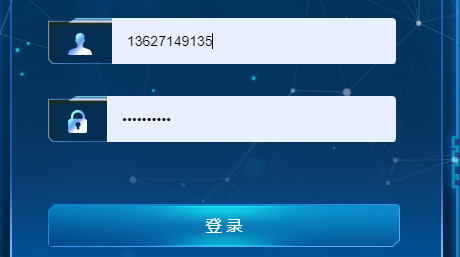

虽然小颖也设置了其背景色为透明,但表单自动填充后还是有背景色,问度娘后解决了。
解决方案:
  .el-input {

    height: 46px;

    background: url(("../assets/largeS/login_input.png"));

    background-size: 100% 100%;

    .el-input-group__prepend,

    .el-input__inner,

    .el-input__inner:hover,

    .el-input__inner:focus {

      background-color: transparent !important;

      border-width: 0;

    }

    // 解决回填后带背景色问题

    .el-input__inner:-webkit-autofill,

    .el-input__inner:-webkit-autofill:hover,

    .el-input__inner:-webkit-autofill:focus,

    .el-input__inner:-webkit-autofill:active {

      -webkit-transition-delay: 99999s;

      -webkit-transition: color 99999s ease-out,

        background-color 99999s ease-out;

    }

    input {

      height: 46px;

      box-shadow: inset 0 0 0 1000px transparent !important;

    }

    .user_icon {

      width: 24px;

      height: 22px;

      display: inline-block;

      margin-top: 8px;

      background: url(("../assets/largeS/login_user.png"));

    }

    .password_icon {

      width: 19px;

      height: 23px;

      display: inline-block;

      margin-top: 8px;

      background: url(("../assets/largeS/login_pwd.png"));

    }

  }
参考:
chrome浏览器中自带input样式input:-internal-autofill-selected(修改input背景色)
表单信息:
    <div class="form_box">

      <el-form

        ref="loginForm"

        :model="loginForm"

        :rules="loginRules"

        class="login-form"

      >

        <h3 class="title">欢迎登录</h3>

        <el-form-item prop="username">

          <el-input

            v-model="loginForm.username"

            type="text"

            auto-complete="off"

            placeholder="账号"

          >

            <span slot="prepend" class="user_icon"></span>

          </el-input>

        </el-form-item>

        <el-form-item prop="password">

          <el-input

            v-model="loginForm.password"

            type="password"

            auto-complete="off"

            placeholder="密码"

            @keyup.enter.native="handleLogin"

          >

            <span slot="prepend" class="password_icon"></span>

          </el-input>

        </el-form-item>

        <el-form-item style="width: 100%">

          <el-button

            :loading="loading"

            size="medium"

            type="primary"

            class="login_btn"

            @click.native.prevent="handleLogin"

          >

            <span v-if="!loading" style="font-size: 16px">登 录</span>

            <span v-else>登 录 中...</span>

          </el-button>

          <div style="float: right" v-if="register">

            <router-link class="link-type" :to="'/register'"

              >立即注册</router-link

            >

          </div>

        </el-form-item>

      </el-form>

    </div>
css零散笔记——修改input样式input:-internal-autofill-selected背景色的更多相关文章
- CSS 小结笔记之三种样式表
CSS 引入共有三种方式:内部样式表,内联样式(行内样式)表,外部样式表,当然也可以使用多重样式 内联样式 <div style="color:red;font-size:20px&q ...
- CSS如何修改placeholder样式
项目用经常遇到修改input的placeholder的颜色的需求,这里来看一下placeholder如何用css设置: 原文发布与我的个人博客>> 首先来看一下chrome默认的input ...
- [CSS] input样式定制
input样式 定制一个泥团input,想怎么捏就怎么捏 appearance: none 所有主流浏览器都不支持 appearance 属性. Firefox 支持替代的 -moz-appearan ...
- React 项目中修改 Ant Design 的默认样式(Input Checkbox 等等
修改样式更符合项目的需求特别是在 Input 和 Checkbox 等等一系列 试过很的方式都有问题, 比如直接在行内添加样式会无法传递到特定的层级 最好的办法是添加 id 可行 渲染部分代码 < ...
- HTML+CSS学习笔记 (7) - CSS样式基本知识
HTML+CSS学习笔记 (7) - CSS样式基本知识 内联式css样式,直接写在现有的HTML标签中 CSS样式可以写在哪些地方呢?从CSS 样式代码插入的形式来看基本可以分为以下3种:内联式.嵌 ...
- css实现 当鼠标移到input的时候,input框出现阴影,当移动到button的时候,input框的阴影消失,button框出现阴影
<meta charset="utf-8" /> <style type="text/css"> div{overflow: hidde ...
- 使用jquery修改css中带有!important的样式属性
当CSS中含有!important的样式属性时,普通的修改方式是会出现失败的.如下: <div class="test">使用jquery修改css中带有!import ...
- html中如何修改选中 用input做的搜索框 的边框颜色
html中如何修改选中 用input做的搜索框 的边框颜色 如图,当我鼠标选中输入框时,内边框会变成蓝色 我的问题是: 1.如何把蓝色去掉? 2.如何改成别的颜色? 首先感谢 UI设计师提出的需求,解 ...
- 如何利用 jQuery 修改 css 中带有 !important 的样式属性?
使用 jQuery 修改 css 中带有 !important 的样式属性 外部样式为: div.test { width:auto !important; overflow:auto !import ...
- 自定义带图标input样式
<!DOCTYPE html> <html> <head> <meta charset="UTF-8"> <title> ...
随机推荐
- 文件上传的multipart/form-data属性,你理解了吗
form表单经常用于前端发送请求,比如:用户填写信息.选择数据.上传文件,对于不同的场景,上传数据的格式也会有些区别. action action 表示该请求的 url 地址,定义在form上,请求的 ...
- 后缀数组C++详解
后缀定义 "后缀i"代表以第i个字符开头的后缀,存储是用i代表字符串s的后缀s[i...n] 后缀数组是什么? 后缀数组(Suffix Array)主要关系到两个数组:sa 和 r ...
- 【pandas小技巧】--日期相关处理
日期处理相关内容之前pandas基础系列中有一篇专门介绍过,本篇补充两个常用的技巧. 1. 多列合并为日期 当收集来的数据中,年月日等信息分散在多个列时,往往需要先合并成日期类型,然后才能做分析处理. ...
- Maven安装与配置教程
一.安装前检查 检查电脑上是否安装JDK,如果没有安装,请查看JDK安装教程:点我查看 如果电脑上已经安装JDK,按Win 和R键,输入cmd,然后点击确定 输入java -version,点击回车, ...
- 后浪搞的在线版 Windows 12「GitHub 热点速览」
本周比较火的莫过于 3 位初中生开源的 Windows 12 网页版,虽然项目完成度不如在线版的 Windows 11,但是不妨一看.除了后生可畏的 win12 之外,开源不到一周的 open-int ...
- [HUBUCTF 2022 新生赛]ezPython
附件链接:https://wwvc.lanzouj.com/iIqq218z5x0d 给了一个pyc文件 利用命令将pyc转换为py文件 uncompyle6 ezPython.pyc > ez ...
- 用Rust手把手编写一个Proxy(代理), 动工
用Rust手把手编写一个Proxy(代理), 动工 项目 ++wmproxy++ gitee 传送门 github 传送门 设计流程图 flowchart LR A[客户端] -->|Http| ...
- 从零开始FastDFS整合Nginx(转)
转自 https://www.cnblogs.com/chiangchou/p/fastdfs.html#_labelTop Linux环境:Centos7.0 安装过程 原博客有几处纰漏,下文已 ...
- Python并发编程——threading、开启线程 、线程进程对比、线程方法、守护线程、GIL、同步锁、死锁和递归锁、信号量、Event、condition、定时器、queue、concurrent
文章目录 内容回顾 一 threading模块介绍 二 开启线程的两种方式 三 在一个进程下开启多个线程与在一个进程下开启多个子进程的区别 四 练习 五 线程相关的其他方法 六 守护线程 七 Pyth ...
- Go 项目代码布局
Go 项目代码布局 目录 Go 项目代码布局 一.Go 语言"创世项目"结构 1.1 src 目录结构三个特点 二.Go 项目布局演进 2.1 演进一:Go 1.4 版本删除 pk ...