
[Project] Simulate HTTP Post Request to obtain data from Web Page by using Python Scrapy Framework
1. Background
Though it's always difficult to give child a perfect name, parent never give up trying. One of my friends met a problem. his baby girl just came to the world, he want to make a perfect name for her. he found a web page, in which he can input a baby name, baby birthday and birth time, then the web page will return 2 scores to indicate whether the name is a good or bad for the baby according to China's old philosophy --- "The Book of Changes (易经)". The 2 scores are ranged from 0 to 100. My friend asked me that could it possible to make a script that input thousands of popular names in batches, he then can select baby name among top score names, such as names with both scores over 95.
The website
https://www.threetong.com/ceming/
2. Analysis and Plan
Chinese given name is usually consist of one or two Chinese characters. Recently, given name with two Chinese characters is more popular. My friend want to make a given name with 2 characters as weill. As the baby girl's family name is known, be same with her father, I just need to make thousands of given names that are suitable for girl and automatically input at the website, finally obtain the displayed scores
3. Step
A, Obtain Chinese characters that suitable for naming a girl
Traditionally, there are some characters for naming a girl. I just find these characters from a website, http://xh.5156edu.com, there are totally 800 characters and the possible combination of two chracters among these characters is 800 x 800 = 640,000, which means the number of input given name are 640,000. The scrapy code is below
#spider code
# -*- coding: utf-8 -*-

import scrapy

from getName.items import GetnameItem

class DownnameSpider(scrapy.Spider):

    name = 'downName'

    start_urls = ['http://xh.5156edu.com/xm/nu.html'] #default http request


    # default handler function for http response, which is a callback function

    def parse(self, response):

        item = GetnameItem()

        item['ming'] = response.xpath('//a[@class="fontbox"]/text()').extract()

        yield item
#define a item to score chracters
import scrapy

class GetnameItem(scrapy.Item):

    # define the fields for your item here like:

    # name = scrapy.Field()

    ming = scrapy.Field()
B, Write a script to automatically input all names with baby birth time in website, obtain the corresponding scores, filter all names with top scores and show to kid's parent.
4. Key Point
A, How to quickly write xpath path of objects that want to be captured.
If you are not quite familiar with xpath grammar, Chrome or Firefox provides developer tools to help you out.
Make a example of Chrome
Open the web page with Chrome, right click the object that you want to capture, select "inspect"
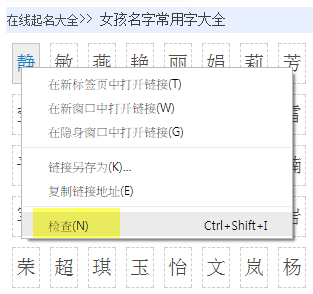
Then Chrome will open Developer Tools, show you the object in HTML source code. Right click the object again in source code, select Copy, select Copy Xpath
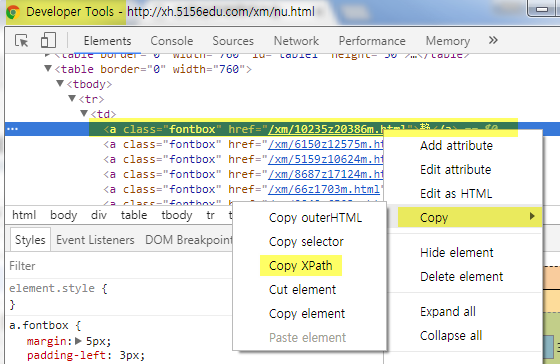
In this way, you can get xpath of object "静" in this example. If you want to get all objects similar with object "静", you should know basic xpath grammar, like below:
item['ming'] = response.xpath('//a[@class="fontbox"]/text()').extract()
The code is to find all "a" tags with class name "fontbox", and extract its text, finally assign to item.
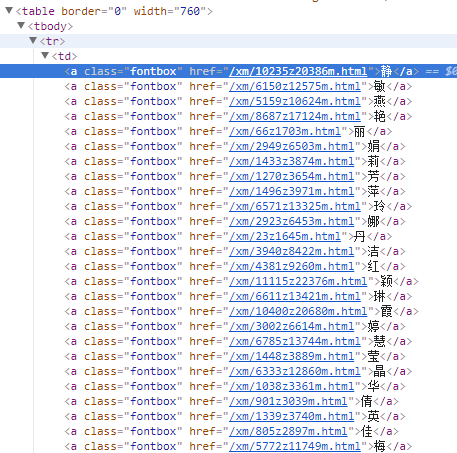
These objects are as below. Therefore I can obtain the 800 characters.
B, How to input data at web page automatically
auto-input is not to simulate human operation, is not to find input box and click submit. Instead auto-input is to directly send a HTTP Request with data to target web page. There are two common way to send data thru HTTP Request, one is HTTP GET, one is HTTP POST. Let's first check web page “https://www.threetong.com/ceming/“, to see which method does it use to send data.Thanks to Developer Tools on Chrome, we can do it easily.
First, try to input data in web page ”https://www.threetong.com/ceming/”
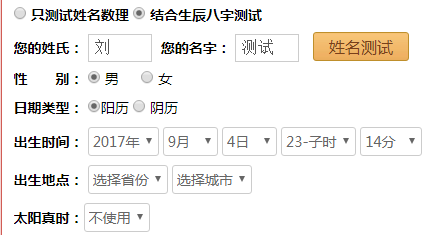
Then open Chrome Developer Tools, check source code (Elements tab)
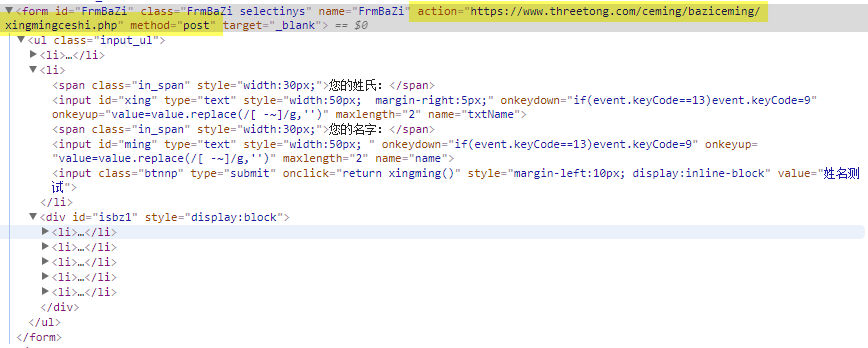
We can see that the form is send thru HTTP POST, and the target web page is followed by action key word.
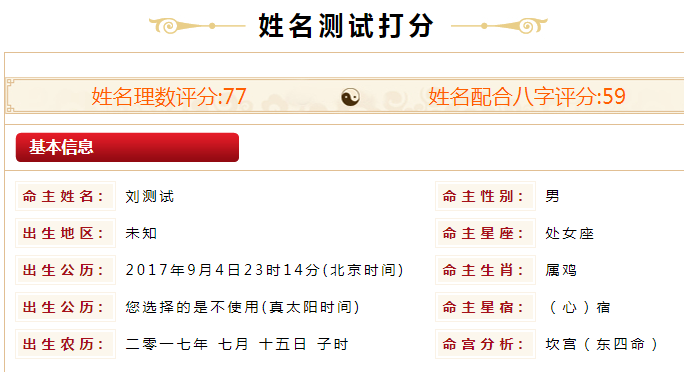
to continue, we click "姓名测试", which is the submission button, the page will redirect to targe web page, in which the scores will be displayed.
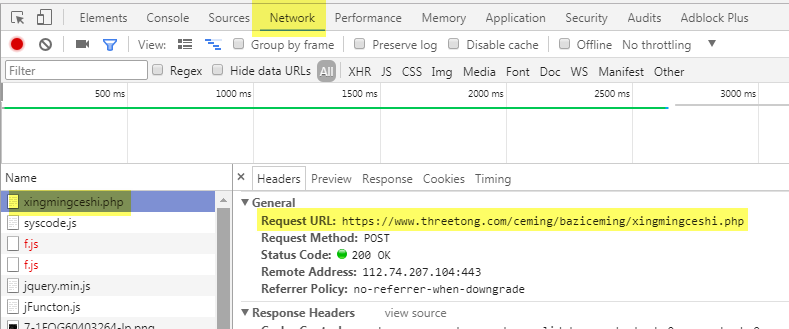
Go to Developer Tools again, go to Network, select xingmingceshi.php page, select Headers, the detailed information abou the page is shown.
The exact form data is shown as below
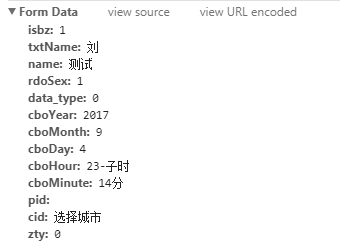
So, we just need to send a HTTP POST request to target web page with above form data.
C, Code
# -*- coding: utf-8 -*-

# Define here the models for your scraped items

#

# See documentation in:

# http://doc.scrapy.org/en/latest/topics/items.html
# Define a item to save data

import scrapy

class DaxiangnameItem(scrapy.Item):

    # define the fields for your item here like:

    # name = scrapy.Field()

    score1 = scrapy.Field()

    score2 = scrapy.Field()

    name = scrapy.Field()
# -*- coding: utf-8 -*-

import scrapy

import csv
# import item that define above

from daxiangName.items import DaxiangnameItem

class CemingSpider(scrapy.Spider):

    name = 'ceming'

    # This is Scrapy default entry function, program will start from the funtion.

    def start_requests(self):
        # Making a 2 characters combination by using two for-loop, it will read 1 character from a file each time. The UTF-8 is used to avoid Chinese chracter display issue.

        with open(getattr(self,'file','./ming1.csv'),encoding='UTF-8') as f:

            reader = csv.DictReader(f)

            for line in reader:

                #print(line['\ufeffmingzi'])

                with open(getattr(self,'file2','./ming2.csv'),encoding='UTF-8') as f2:

                    reader2 = csv.DictReader(f2)

                    for line2 in reader2:

                        #print(line)

                        #print(line2)#I use print function to find that there is a \ufeff character ahead of real data

                        mingzi = line['\ufeffming1']+line2['\ufeffming2']

                        #print(mingzi)#Below is the core function, Scrapy provide s function that could send a http post request with parameters

                        FormRequest = scrapy.http.FormRequest(

                            url='https://www.threetong.com/ceming/baziceming/xingmingceshi.php',

                            formdata={'isbz':'1',

                            'txtName':u'刘',

                            'name':mingzi,

                            'rdoSex':'0',

                            'data_type':'0',

                            'cboYear':'2017',

                            'cboMonth':'7',

                            'cboDay':'30',

                            'cboHour':u'20-戌时',

                            'cboMinute':u'39分',

                           },

                            callback=self.after_login  #Here is to specify callback function, which means to specify which function to handle the http response.

                        )

                        yield FormRequest  #Here is important, Scrapy has a pool that stores all the http request to be sand. We use yield key word to make a iterator generator, to save the current http request into pool

    def after_login(self, response):

        '''#save response body into a file

        filename = 'source.html'

        with open(filename, 'wb') as f:

           f.write(response.body)

        self.log('Saved file %s' % filename)

        '''
     # extract scores from http response using xpath, and only return integer and decimal by using regular expression

        score1 = response.xpath('/html/body/div[6]/div/div[2]/div[3]/div[1]/span[1]/text()').re('[\d.]+')

        score2 = response.xpath('/html/body/div[6]/div/div[2]/div[3]/div[1]/span[2]/text()').re('[\d.]+')

        name = response.xpath('/html/body/div[6]/div/div[2]/div[3]/ul[1]/li[1]/text()').extract()

        #print(score1)

        #print(score2)

        print(name)
     # filter name with good score

        if float(score1[0]) >= 95 and float(score2[0]) >= 95:

            item = DaxiangnameItem()

            item['score1'] = score1

            item['score2'] = score2

            item['name'] = name

            yield item  # There is also a output pool, we use yield to make a iterator generator as well, to put the output item into pool. We can get these data by using -o parameter when run the scrapy code.
5. Epilogue
unexpectedly, I get 4000 names that has a good score, which bring a really big trouble for my friend to select manually. So I decided to delete some input characters, to filter characters that only my friend likes. Finally, I get dozens of names that to be selected.
[Project] Simulate HTTP Post Request to obtain data from Web Page by using Python Scrapy Framework的更多相关文章
- python scrapy,beautifulsoup,regex,sgmparser,request,connection
In [2]: import requests In [3]: s = requests.Session() In [4]: s.headers 如果你是爬虫相关的业务?抓取的网站还各种各样, ...
- JMeter Ant Task 生成的*.jtl打开之后request和response data是空的,怎样让其不是空的呢?
JMeter Ant Task 生成的*.jtl打开之后request和response data是空的,怎样让其不是空的呢?修改JMeter.properties,将jmeter.save.save ...
- The multi-part request contained parameter data (excluding uploaded files) that exceeded the limit for maxPostSize set on the associated connector.
springboot 表单体积过大时报错: The multi-part request contained parameter data (excluding uploaded files) tha ...
- Springboot 上传报错: Failed to parse multipart servlet request; nested exception is java.lang.IllegalStateException: The multi-part request contained parameter data (excluding uploaded files) that exceede
Failed to parse multipart servlet request; nested exception is java.lang.IllegalStateException: The ...
- Home | eMine: Web Page Transcoding Based on Eye Tracking Project Page
Home | eMine: Web Page Transcoding Based on Eye Tracking Project Page The World Wide Web (web) has m ...
- Tutorial: Importing and analyzing data from a Web Page using Power BI Desktop
In this tutorial, you will learn how to import a table of data from a Web page and create a report t ...
- Data manipulation primitives in R and Python
Data manipulation primitives in R and Python Both R and Python are incredibly good tools to manipula ...
- The requested page cannot be accessed because the related configuration data for the page is invalid
当在VS2013下开发web site时,调试时都是在IIS Express中进行的,没有问题.当部署到IIS中,出现:The requested page cannot be accessed be ...
- [asp.net core]The requested page cannot be accessed because the related configuration data for the page is invalid.
bug HTTP Error 500.19 - Internal Server Error The requested page cannot be accessed because the rela ...
随机推荐
- vue-router 组件实例被复用问题
最近在开发过程中遇到如下问题: 当前路由是这样的 http://127.0.0.1:3010/order?keywords=22 只改变keywords的值,路由不跳转 http://127.0.0. ...
- C# if判断语句执行顺序
DataTable dt = null; )//不报错,因为先执行dt != null 成立时才执行dt.Rows.Count > 0 { } && dt != null)//报 ...
- php框架中的phalcon框架的安装,及初步认识,从表单提交简单的数据到数据库中
php框架中的phalcon框架的安装,及初步认识,从表单提交简单的数据到数据库中 1.phalcon框架的安装: phalcon框架在windows本地安装可以利用wamp软件,安装之后可以查看对应 ...
- Highcharts tooltip显示多条线的信息
直接上代码吧,简单粗暴点: tooltip: { shared: true, valueSuffix: '分', formatter: function () { let s = "&quo ...
- SpringCloud的DataRest(四)restful特性展示
一.get - list - http://10.110.20.16:8391/BusiSys/company?page=0&size=5&sort=comp_id,asc 二.pos ...
- Spring Security入门(1-12)Spring Security 的过滤器机制
Servlet过滤器被用来拦截用户请求来进行请求之前或之后的处理,或者干脆重定向这个请求,这取决于servlet过滤器的功能. Servlet过滤器处理之后的目标servlet是 MVC 分发web ...
- Oracle处理XML字段时遇到的ORA-31013: XPATH 表达式无效问题
select extractValue(ed.info_id, '/Root/ExpandProfile/PhoneNumber') as phone, extractValue(ed.info_id ...
- 微信小程序配置WSS协议
配置的是nginx转发,前提是你已经安装了nginx的软件并已经正常打开网页,安装好SSL协议,能打开https网页 下面是配置: 需要的话可以根据需求修改 server { listen 80; s ...
- python/socket编程之粘包
python/socket编程之粘包 粘包 只有TCP有粘包现象,UDP永远不会粘包. 首先需要掌握一个socket收发消息的原理 发送端可以是1k,1k的发送数据而接受端的应用程序可以2k,2k的提 ...
- 前端学习之jquery
前端学习之jquery 1. 什么是jQuery对象? jQuery对象就是通过jQuery包装DOM对象后产生的对象.jQuery对象是jQuery独有的.如果一个对象是jQuery对象,那么它 ...