
IO (四)
1 深度遍历文件夹
- 示例:
package java20;

import java.io.File;
import java.io.FilenameFilter;
import java.text.SimpleDateFormat;
import java.util.Date;

/**
 * 2017/10/14
 * 说明:
 */
public class FileDemo {
    public static void main(String[] args) {
       File dir = new File("D:\\code");
       listAll(dir);

    }

    /**
     * 深度遍历文件夹
     * @param dir
     */
    private static void listAll(File dir) {
        System.out.println("文件夹:"+dir.getAbsolutePath());
        File[] files = dir.listFiles();
        for(File file : files){
            if(file.isDirectory()){
                listAll(file);
            }else{
                System.out.println("文件:"+file.getAbsolutePath());
            }

        }
    }

}
2 Properties
2.1 Properties的特点
- 该集合中的键和值都是字符串类型的。
- 集合中的数据可以保存在流中,或者从流中获取。
2.2 构造方法
- 创建一个没有默认值的空属性列表
public Properties()
2.3 常用方法
- 设置属性值
public Object setProperty(String key,String value)
- 根据指定的键获取值
public String getProperty(String key)
- 返回属性列表的所有键的枚举
public Enumeration<?> propertyNames()
- 返回此属性列表中的键的set集合
public Set<String> stringPropertyNames()
- 示例:
package java20;

import java.util.Enumeration;
import java.util.Properties;
import java.util.Set;

/**
 * 2017/10/15
 * 说明:
 */
public class PropertiesDemo {
    public static void main(String[] args) {
        Properties pros = new Properties();

        pros.setProperty("zhangsan","20");
        pros.setProperty("lisi","26");
        pros.setProperty("wangwu","27");

        //第一种方式获取所有的键值
        Enumeration<?> enumeration = pros.propertyNames();
        while(enumeration.hasMoreElements()){
            String name = (String) enumeration.nextElement();
            String value = pros.getProperty(name);
            System.out.println(name+":"+value);

        }

        System.out.println("------------------------------");

        //第二种方式获取所有的键值
        Set<String> names = pros.stringPropertyNames();
        for(String name:names){
            String value = pros.getProperty(name);
            System.out.println(name+":"+value);
        }

    }
}
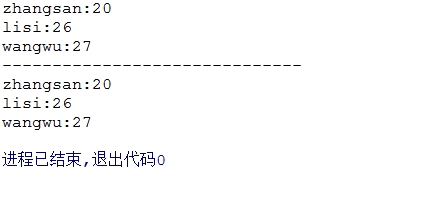
- 将属性列表写入输出流
public void store(OutputStream out,String comments) throws IOException
- 将属性列表写入输出流
public void store(Writer writer,String comments) throws IOException
- 示例:
package java20;

import java.io.FileWriter;
import java.io.IOException;
import java.util.Enumeration;
import java.util.Properties;
import java.util.Set;

/**
 * 2017/10/15
 * 说明:
 */
public class PropertiesDemo {
    public static void main(String[] args) throws IOException {
        Properties pros = new Properties();

        pros.setProperty("zhangsan","20");
        pros.setProperty("lisi","26");
        pros.setProperty("wangwu","27");

        FileWriter fs = new FileWriter("pros.properties");

        pros.store(fs,"properties文件");

        fs.close();

    }
}
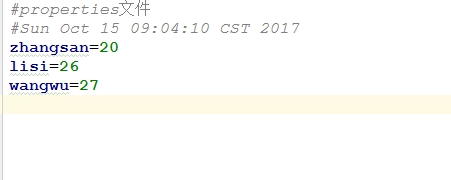
- 从输入流中读取属性列表
public void load(InputStream inStream) throws IOException
- 从输入流中读取属性列表
public void load(Reader reader) throws IOException
- 示例:
package java20;

import java.io.FileReader;
import java.io.FileWriter;
import java.io.IOException;
import java.util.Enumeration;
import java.util.Properties;
import java.util.Set;

/**
 * 2017/10/15
 * 说明:
 */
public class PropertiesDemo {
    public static void main(String[] args) throws IOException {
        Properties pros = new Properties();

        FileReader fr = new FileReader("pros.properties");

        pros.load(fr);

        Set<String> names = pros.stringPropertyNames();
        for(String name:names){
            String value = pros.getProperty(name);
            System.out.println(name+":"+value);
        }

    }
}
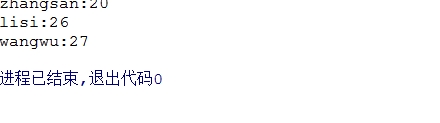
- 修改属性文件中的值
package java20;

import java.io.FileReader;
import java.io.FileWriter;
import java.io.IOException;
import java.util.Enumeration;
import java.util.Properties;
import java.util.Set;

/**
 * 2017/10/15
 * 说明:
 */
public class PropertiesDemo {
    public static void main(String[] args) throws IOException {
        Properties pros = new Properties();

        FileReader fr = new FileReader("pros.properties");

        pros.load(fr);

        pros.setProperty("zhangsan","60");

        FileWriter fw = new FileWriter("pros.properties");

        pros.store(fw,"修改属性文件");

        fw.close();
        fr.close();

    }
}
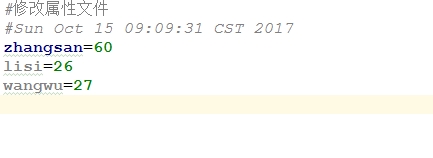
- 示例:获取一个应用程序运行的次数,如果超过5次,给出使用次数并体术请注册的信息,并不要运行程序。
package java20;

import java.io.*;
import java.util.Enumeration;
import java.util.Properties;
import java.util.Set;

/**
 * 2017/10/15
 * 说明:
 */
public class PropertiesDemo {
    public static void main(String[] args) throws IOException {
        //将所需要的配置文件封装成File对象
        File config = new File("count.properties");
        if(!config.exists()){
            config.createNewFile();
        }
        FileInputStream fis = new FileInputStream(config);
        Properties pros = new Properties();
        pros.load(fis);

        //从集合中通过键获取次数
        String times = pros.getProperty("times");
        int count = 0;
        if(times != null){
            count = Integer.parseInt(times);
            if(count >= 5){
                System.out.println("使用次数已到,请注册");
                return;
            }
        }

        count ++;

        //将改变的后的次数重新存储到集合中
        pros.setProperty("times",String.valueOf(count));

        FileOutputStream fos = new FileOutputStream(config);

        pros.store(fos,"");

        fos.close();
        fis.close();

    }
}
3 打印流
3.1 PrintStream
3.1.1 PrintStream简介
- PrintStream为其它输出流添加了功能,使得它们能够方便的打印各种数据值的表现形式。它还提供了其它两项功能。与其它输出流不同,PrintStream永远不会抛出IOException。
- 异常情况仅设置可通过checkError方法测试的内部标志。
- 为了自动刷新,可以创建一个PrintStream,这意味着可在写入byte数组之后调用flush方法,可调用其中一个println方法,或写入一个换行符或字节('\n')。
3.1.2 构造方法
- 创建一个具有指定文件且不带自动刷新的打印流
public PrintStream(File file) throws FileNotFoundException
- 创建具有指定文件名称和字符集且不带自动刷新的打印流
public PrintStream(File file,String csn) throws FileNotFoundException UnsupportedEncodingException
- 创建打印流
public PrintStream(OutputStream out)
- 创建打印流
public PrintStream(OutputStream out, boolean autoFlush)
- 创建打印流
public PrintStream(OutputStream out,boolean autoFlush,String encoding) throws UnsupportedEncodingException
- 创建具有指定文件名且不带自定刷新的打印流
public PrintStream(String fileName) throws FileNotFoundException
- 创建指定文件名称和字符集且不带自动刷新的打印流
public PrintStream(String fileName,String csn) throws FileNotFoundException, UnsupportedEncodingException
3.1.3 方法
- 将指定字符添加到此输出流
public PrintStream append(char c)
- 将指定字符序列添加到此输出流
public PrintStream append(CharSequence csq)
- 将指定字符序列的子序列添加到此输出流
public PrintStream append(CharSequence csq, int start, int end)
- 刷新流并检查其错误状态
public boolean checkError()
- 清除此流的内部标志
protected void clearError()
- 关闭流
public void close()
- 刷新该流的缓冲
public void flush()
- 使用指定格式字符串和参数将格式化字符串写入到此输出流中
public PrintStream format(Locale l,String format, Object... args)
- 使用指定格式字符串和参数将格式化字符串写入到此输出流中
public PrintStream format(String format, Object... args)
- 打印boolean值
public void print(boolean b)
- 打印字符
public void print(char c)
- 打印字符数组
public void print(char[] s)
- 打印double精度浮点数
public void print(double d)
- 打印float精度浮点数
public void print(double d)
- 打印整数
public void print(int i)
- 打印long整数
public void print(long l)
- 打印对象
public void print(Object obj)
- 打印字符串
public void print(String s)
- 使用指定格式字符串和参数将格式化的字符串写入此wirter的便捷方法
public PrintWriter printf(Locale l,String format,Object... args)
- 使用指定格式字符串和参数将格式的字符串写入此writer的便捷方法
public PrintWriter printf(String format,Object... args)
- 通过写入分隔符字符串终止当前行
public void println()
- 打印boolean值,然后终止该行
public void println(boolean x)
- 打印字符,然后终止该行
public void println(char x)
- 打印字符数组,然后终止该行
public void println(char[] x)
- 打印double精度浮点数,然后终止该行
public void println(double x)
- 打印float精度浮点数,然后终止该行
public void println(float x)
- 打印int整数,然后终止该行
public void println(int x)
- 打印long类型整数,然后终止该行
public void println(long x)
- 打印Object,然后终止该行
public void println(Object x)
- 打印String,然后终止该行
public void println(String x)
- 指示已发生错误
protected void setError()
- 写入字符数组
public void write(char[] buf)
- 写入字符数组的某一部分
public void write(char[] buf, int off,int len)
- 写入单个字符
public void write(int c)
- 写入字符串
public void write(String s)
- 写入字符串的某一部分
public void write(String s,int off,int len)
3.1.4 示例:
- 示例:
package java20;

import java.io.FileNotFoundException;
import java.io.FileOutputStream;
import java.io.PrintStream;

/**
 * 2017/10/15
 * 说明:
 */
public class PrintStreamDemo {
    public static void main(String[] args) throws FileNotFoundException {
        PrintStream ps = new PrintStream(new FileOutputStream("aaa.txt"),true);

        ps.print(1);
        ps.print('a');
        ps.println("你好啊");
        ps.println("你好啊");

        ps.flush();
        ps.close();

    }
}
3.2 PrintWriter
3.2.1 PrintWriter简介
- 向文本输出流打印对象的格式化表示形式,此类实现了在PrintStream的所有print方法,它不包含用于写入原始字节的方法,对于这些字节,程序应该使用未编码的字节流进行写入。
- 如果启用了自动刷新,则只有调用println、printf或format的其中一个方法时才可能完成此操作,而不是每当正好输出换行符的时候才完成。这些方法使用平台自有的行分隔符概念,而不是换行符。
- 此类中的方法不会抛出IO异常,尽管其某些构造方法可能会抛出异常。
3.2.2 构造方法
- 使用指定文件创建不具有自动刷新的PrintWriter
public PrintWriter(File file) throws FileNotFoundException
- 创建具有指定文件和字符集且不带有自动刷新的PrintWriter
public PrintWriter(File file,String csn) throws FileNotFoundException, UnsupportedEncodingException
- 根据现有的OutputStream创建不带有自动刷新的PrintWriter
public PrintWriter(OutputStream out)
- 根据现有的OutputStream创建PrintWriter
public PrintWriter(OutputStream out,boolean autoFlush)
- 创建具有指定文件名且不带有自动刷新的PrintWriter
public PrintWriter(String fileName) throws FileNotFoundException
- 创建具有制定文件名称和字符集且不带有自动刷新的PrintWriter
public PrintWriter(String fileName,String csn) throws FileNotFoundException, UnsupportedEncodingException
- 创建不带有自动刷新的PrintWriter
public PrintWriter(Writer out)
- 创建带自动刷新的PrintWriter
public PrintWriter(Writer out, boolean autoFlush)
3.2.3 方法
- 将指定字符添加到此writer
public PrintWriter append(char c)
- 将指定的字符序列添加到此writer
public PrintWriter append(CharSequence csq)
- 将指定字符序列的子序列添加到此writer
public PrintWriter append(CharSequence csq, int start, int end)
- 如果流没有关闭,则刷新流且检查其错误状态
public boolean checkError()
- 清除此流的错误状态
protected void clearError()
- 关闭该流并释放与之关联的所有系统资源
public void close()
- 刷新该流的缓冲
public void flush()
- 使用指定格式的字符串和参数将一个格式化字符串写入此writer中
public PrintWriter format(Locale l,String format,Object... args)
- 使用指定格式的字符串和参数将一个格式化字符串写入此writer中
public PrintWriter format(String format,Object... args)
- 打印boolean值
public void print(boolean b)
- 打印字符
public void print(char c)
- 打印字符数组
public void print(char[] s)
- 打印double类型的值
public void print(double d)
- 打印float类型的值
public void print(float f)
- 打印int类型的值
public void print(int i)
- 打印long类型的值
public void print(long l)
- 打印对象
public void print(Object obj)
- 打印字符串
public void print(String s)
- 使用指定格式字符串和参数将格式化的字符串写入此writer的便捷方法
public PrintWriter printf(Locale l,String format, Object... args)
- 使用指定格式字符串和参数将格式化的字符串写入此writer的便捷方法
public PrintWriter printf(String format,Object... args)
- 通过写入行分隔符字符串终止当前行
public void println()
- 打印boolean类型的值,然后终止该行
public void println(boolean x)
- 打印字符,然后终止该行
public void println(char x)
- 打印字符数组,然后终止该行
public void println(char[] x)
- 打印double类型的值,然后终止改行
public void println(double x)
- 打印浮点数,然后终止该行
public void println(float x)
- 打印整数,然后终止该行
public void println(int x)
- 打印long类型整数,然后终止该行
public void println(long x)
- 打印Object类型的值,然后终止该行
public void println(Object x)
- 打印String类型的值,然后终止该行
public void println(String x)
- 指示已发生错误
protected void setError()
- 写入字符数组
public void write(char[] buf)
- 写入字符数组的一部分
public void write(char[] buf,int off, int len)
- 写入单个字符
public void write(int c)
- 写入字符串
public void write(String s)
- 写入字符串的某一部分
public void write(String s, int off, int len)
4 SequenceInputStream 序列流
4.1 SequenceInputStream简介
- SequenceInputStream表示其他输入流的逻辑串联,它从输入流的有序集合开始,并从第一个输入流开始读取,直到达文件末尾,接着从第二个输入流读取,依次类推,直到达到包含的最后一个输入流的文件末尾处为止。
4.2 构造方法
- 通过参数来初始化新建SequenceInputStream,该参数必须是生成运行时类型为InputStream对象的Enumeration类型参数
public SequenceInputStream(Enumeration<? extends InputStream> e)
- 通过参数来初始化新建SequenceInputStream(将按顺序读取这两个参数,先读取s1,然后读取s2),以提供此SequenceInputStream读取的字节
public SequenceInputStream(InputStream s1, InputStream s2)
4.3 方法
- 关闭此输入流病释放与此流相关联的所有系统资源
public void close() throws IOException
- 从此输入流中读取下一个数据字节
public int read() throws IOException
- 将最多len个数据字节从此输入流读入byte数组
public int read(byte[] b, int off, int len) throws IOException
4.4 示例
- 示例:
package java20;

import java.io.*;
import java.util.Vector;

/**
 * 2017/10/15
 * 说明:
 */
public class SequenceInputStreamDemo {
    public static void main(String[] args) throws IOException {
        Vector<InputStream> vector = new Vector<>();
        vector.add(new FileInputStream("test1.txt"));
        vector.add(new FileInputStream("test2.txt"));
        vector.add(new FileInputStream("test3.txt"));

        SequenceInputStream si = new SequenceInputStream(vector.elements());

        byte[] buffer = new byte[1024];

        int len = 0;

        while((len = si.read(buffer)) != -1){
            System.out.println(new String(buffer,0,len));
        }

    }
}
- 示例:
package java20;

import java.io.*;
import java.util.*;

/**
 * 2017/10/15
 * 说明:
 */
public class SequenceInputStreamDemo {
    public static void main(String[] args) throws IOException {
        List<InputStream> list = new ArrayList<>();
        list.add(new FileInputStream("test1.txt"));
        list.add(new FileInputStream("test2.txt"));
        list.add(new FileInputStream("test3.txt"));

        Iterator<InputStream> iterator = list.iterator();

        Enumeration<InputStream> enumerations = new Enumeration<InputStream>() {
            @Override
            public boolean hasMoreElements() {
                return iterator.hasNext();
            }

            @Override
            public InputStream nextElement() {
                return iterator.next();
            }
        };

        SequenceInputStream si = new SequenceInputStream(enumerations);

        byte[] buffer = new byte[1024];

        int len = 0;

        while((len = si.read(buffer)) != -1){
            System.out.println(new String(buffer,0,len));
        }

    }
}
- 示例:
package java20;

import java.io.*;
import java.util.*;

/**
 * 2017/10/15
 * 说明:
 */
public class SequenceInputStreamDemo {
    public static void main(String[] args) throws IOException {
        List<InputStream> list = new ArrayList<>();
        list.add(new FileInputStream("test1.txt"));
        list.add(new FileInputStream("test2.txt"));
        list.add(new FileInputStream("test3.txt"));

        Enumeration<InputStream> enumerations = Collections.enumeration(list);

        SequenceInputStream si = new SequenceInputStream(enumerations);

        byte[] buffer = new byte[1024];

        int len = 0;

        while((len = si.read(buffer)) != -1){
            System.out.println(new String(buffer,0,len));
        }

    }
}
IO (四)的更多相关文章
- Java IO(四)
对象序列化 对象序列化又叫对象的持久化,对象的串行化(或反串行化) 当使用Serializable接口实现序列化操作时,如果一个对象中的某个属性不希望被序列化,则可以使用transient关键字进行声 ...
- java IO(四):键盘录入
*/ .hljs { display: block; overflow-x: auto; padding: 0.5em; color: #333; background: #f8f8f8; } .hl ...
- Java之IO(四)DataInputStream和DataOutputStream
转载请注明源出处:http://www.cnblogs.com/lighten/p/6986155.html 1.前言 DataInputStream和DataOutputStream分别继承了Fil ...
- 系统学习 Java IO (四)----文件的读写和随机访问 FileInputStream/FileOutputStream & RandomAccessFile
目录:系统学习 Java IO---- 目录,概览 文件输入流 FileInputStream 这是一个简单的FileInputStream示例: InputStream input = new Fi ...
- linux系统编程之文件与io(四)
今天继续学习文件与io,主要是学习文件共享及文件.复制文件描述符,有点抽象,主要是概念上的理解,但是很重要,下面一一来分解: 文件共享: 回顾一下,在linux系统调用中,是通过文件描述符来访问文件的 ...
- Java IO(四--字符流基本使用
在上一节,介绍了字节流的基本使用,本节介绍一下字符流的使用 Reader: public abstract class Reader implements Readable, Closeable { ...
- java I/O框架 (四)文件流
文件读取 FileInputStream FileReader 文件写入 FileOutputStream FileWriter 随机文件读写 RandomAccessFile 一.文件读取 File ...
- {python之IO多路复用} IO模型介绍 阻塞IO(blocking IO) 非阻塞IO(non-blocking IO) 多路复用IO(IO multiplexing) 异步IO(Asynchronous I/O) IO模型比较分析 selectors模块
python之IO多路复用 阅读目录 一 IO模型介绍 二 阻塞IO(blocking IO) 三 非阻塞IO(non-blocking IO) 四 多路复用IO(IO multiplexing) 五 ...
- 并发编程(IO多路复用)
阅读目录 一 IO模型介绍 二 阻塞IO(blocking IO) 三 非阻塞IO(non-blocking IO) 四 多路复用IO(IO multiplexing) 五 异步IO(Asynchro ...
- Java之IO(零)总结
转载请注明原出处:http://www.cnblogs.com/lighten/p/7274378.html 1.前言 本章是对之前所讲述的整个Java的IO包的一个总结,抽出个人认为比较重要的知识点 ...
随机推荐
- Mycat 配置
前言 Mycat 是一个数据库分库分表中间件 MyCAT 是作为通用代理设计的,后端是以 Mysql协议 和 JDBC 的方式连接数据库,可以支持 Oracle.DB2.SQL Server . mo ...
- 跟我一起读postgresql源码(十)——Executor(查询执行模块之——Scan节点(下))
接前文跟我一起读postgresql源码(九)--Executor(查询执行模块之--Scan节点(上)) ,本篇把剩下的七个Scan节点结束掉. T_SubqueryScanState, T_Fun ...
- C#学习笔记-装饰模式
题目:给顾客打扮,但是需要满足正常的穿衣风格,例如先穿了衬衣再打领带,最后在穿鞋子,这种基本要求. 分析: 现在将具体的衣服裤子和鞋子都分别写在不同的类里面,这样方便以后添加新的衣服,这些全部都属于服 ...
- uImage和zImage的区别
1.各种文件的意义 vmlinux 编译出来的最原始的内核文件,未压缩. zImage 是vmlinux经过gzip压缩后的文件. bzImage bz表示“big zImage”,不是用bzi ...
- spring官方学习地址
1.http://projects.spring.io/spring-framework/ 2.https://github.com/spring-projects/spring-mvc-showca ...
- windows NLB+ARR实现Web负载均衡高可用/可伸缩
基于IIS的ARR负载均衡 基于NLB负载均衡 这两篇分别分ARR 和 NLB基本配置,下面我们讲讲,如何组合使用,搭配成高可用/可伸缩集群. 什么是高可用,可伸缩 ? 高可用:是指系统经过专门设计减 ...
- MATLAB命令大全+注释小结
一.常用对象操作:除了一般windows窗口的常用功能键外.1.!dir 可以查看当前工作目录的文件. !dir& 可以在dos状态下查看.2.who 可以查看当前工作空间变量名, ...
- [51nod1197]字符串的数量 V2
用N个不同的字符(编号1 - N),组成一个字符串,有如下要求: (1) 对于编号为i的字符,如果2 * i > n,则该字符可以作为结尾字符.如果不作为结尾字符而是中间的字符,则该字符后面可以 ...
- BZOJ 3105: [cqoi2013]新Nim游戏
题目:http://www.lydsy.com/JudgeOnline/problem.php?id=3105 题意是要取一些数使得剩余的数xor和的子集不为0 拟阵.求解极大线性无关组.贪心从大到小 ...
- [国嵌笔记][013][Mini2440开发板介绍]
系统资源 处理器:三星 S3C2440A ARM9 内存:64M SDRAM Nor Flash:2MB Nand Flash:256MB LCD:3.5寸 分辨率320*240 启动模式 从nan ...