
(二)异步方法BeginInvoke和EndInvoke
.Net framework可以让你异步调用任何方法,你可以定义一个与你要调用的方法的签名相同的委托。公共语言运行时将自动为该委托定义与签名相同的BeginInvok和EndInvoke方法。
BeginInvoke方法触发你的异步方法,它和你想要执行的异步方法有相同的参数。另外还有两个可选参数,第一个是AsyncCallback委托是异步完成的回调方法。第二个是用户自定义对象,该对象将传递到回调方法中。BeginInvoke立即返回并且不等待完成异步的调用(继续执行该下面的代码,不需要等待)。BeginInvoke返回IAsyncResult接口,可用于检测异步调用的过程。
通过EndInvoke方法检测异步调用的结果。如果异步调用尚未完成,EndInvoke将阻塞调用线程,直到它完成
下面代码演示使用BeginInvoke和EndInvoke进行异步调用的四种常见方式。在调用BeginInvoke可以做以下工作:
- 做一些其他操作,然后调用EndInvoke方法阻塞线程直到该方法完成。
- 使用IAsyncResult.AsyncWaitHandle属性,使用它的WaitOne方法阻塞线程直到收到WaitHandle信号,然后调用EndInvoke。
- 检查BeginInvoke返回值IAsyncResult的状态来决定方法是否完成,然后调用EndInvoke方法。
 public delegate string AsyncMethodCaller(int callDuration, out int threadId);

    class Program

    {

        static void Main(string[] args)

        {

        }

        static string TestMethod(int callDuration, out int threadId)

        {

            Console.WriteLine("Test method begins:");

            //睡一会 模拟耗时操作

            Thread.Sleep(callDuration);

            threadId = Thread.CurrentThread.ManagedThreadId;

            return string.Format("My call time was {0}.", callDuration.ToString());

        }

    }
情况一:通过EndInovke阻塞线程,直到异步调用结束。
 static void Main(string[] args)

        {

            int threadId;

            AsyncMethodCaller caller = new AsyncMethodCaller(TestMethod);

            IAsyncResult result = caller.BeginInvoke(, out threadId, null, null);

            //调用EndInvoke方法,等待异步嗲用完成,并得到结果。

            string returnValue = caller.EndInvoke(out threadId, result);

            Console.WriteLine("The call executed on thread {0},with return value {1}.", threadId, returnValue);

            Console.Read();

        }
情况二:通过WaitHandle属性阻塞线程。
static void Main(string[] args)

        {

            int threadId;

            AsyncMethodCaller caller = new AsyncMethodCaller(TestMethod);

            IAsyncResult result = caller.BeginInvoke(, out threadId, null, null);

            Thread.Sleep();

            Console.WriteLine("Main thread {0} does some work.", Thread.CurrentThread.ManagedThreadId);

            //等待WaitHandle信号

            result.AsyncWaitHandle.WaitOne();

            //调用EndInvoke方法,等待异步嗲用完成,并得到结果。

            string returnValue = caller.EndInvoke(out threadId, result);

            //关闭等待句柄

            result.AsyncWaitHandle.Close();

            Console.WriteLine("The call executed on thread {0},with return value {1}.", threadId, returnValue);

            Console.Read();

        }
情况三:检查BeginInvoke返回结果的状态。
可以通过BeginInvoke的返回结果的IsCompleted属性检查异步是否完成。你可以在异步没有完成的时候做其他的操作。
static void Main(string[] args)

        {

            int threadId;

            AsyncMethodCaller caller = new AsyncMethodCaller(TestMethod);

            IAsyncResult result = caller.BeginInvoke(, out threadId, null, null);

            Thread.Sleep();

            Console.WriteLine("Main thread {0} does some work.", Thread.CurrentThread.ManagedThreadId);

            while (result.IsCompleted == false)

            {

                Thread.Sleep();

                Console.WriteLine("*");

            }

            //调用EndInvoke方法,等待异步嗲用完成,并得到结果。

            string returnValue = caller.EndInvoke(out threadId, result);

            //关闭等待句柄

            result.AsyncWaitHandle.Close();

            Console.WriteLine("The call executed on thread {0},with return value {1}.", threadId, returnValue);

            Console.Read();

        }
情况4、可以使用回调函数。
private delegate string RunOnThreadPool(out int threadId);

        private static void Callback(IAsyncResult ar)

        {

            Console.WriteLine("开始回调方法");

            Console.WriteLine("回调方法的参数: {0}", ar.AsyncState);

            Console.WriteLine("是否线程池: {0}", Thread.CurrentThread.IsThreadPoolThread);

            Console.WriteLine("线程池线程 id: {0}", Thread.CurrentThread.ManagedThreadId);

        }

        private static string Test(out int threadId)

        {

            Console.WriteLine("Starting...");

            Console.WriteLine("是否线程池: {0}", Thread.CurrentThread.IsThreadPoolThread);

            Thread.Sleep(TimeSpan.FromSeconds());

            threadId = Thread.CurrentThread.ManagedThreadId;

            return string.Format("线程池线程 id 是: {0}", threadId);

        }
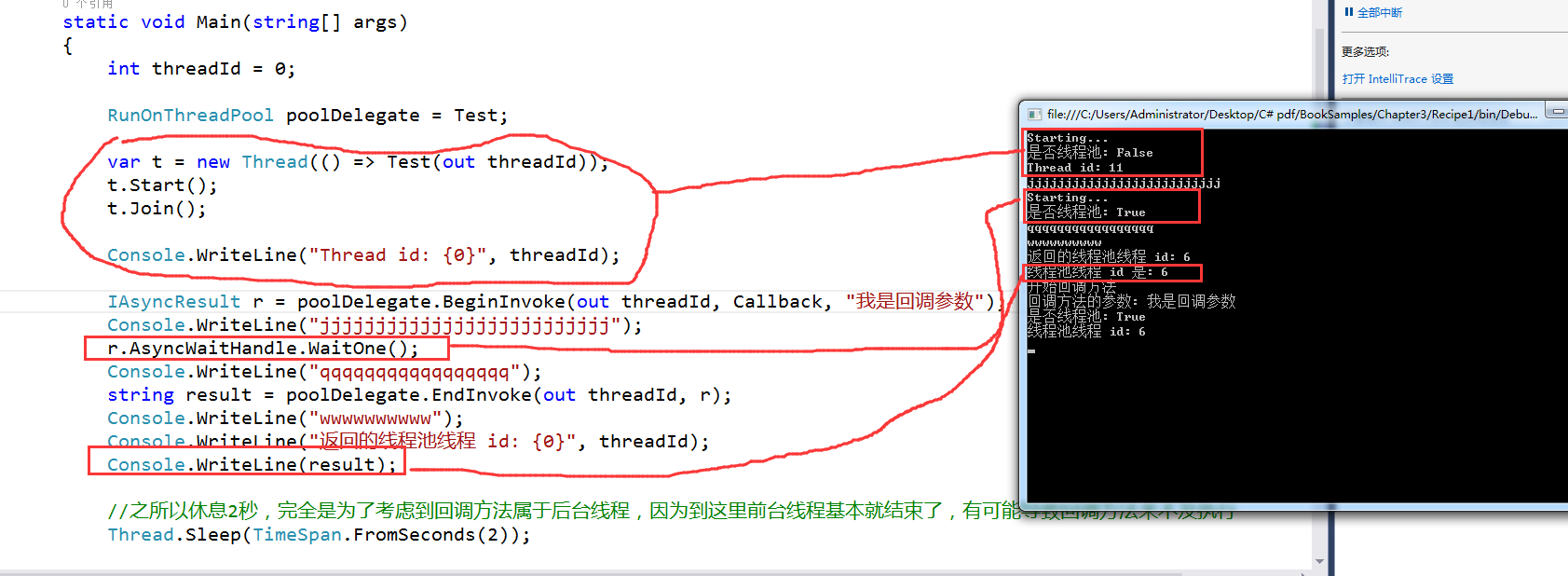
回调函数的执行,是在EndInvoke之后执行的。
(二)异步方法BeginInvoke和EndInvoke的更多相关文章
- c#委托中的同步和异步方法即BeginInvoke和EndInvoke
学习多线程之前我们先了解一下电脑的一些概念,比如进程,线程,这个参考https://www.cnblogs.com/loverwangshan/p/10409755.html 这篇文章.今天我们接着来 ...
- C#线程系列讲座(1):BeginInvoke和EndInvoke方法
一.C#线程概述 在操作系统中一个进程至少要包含一个线程,然后,在某些时候需要在同一个进程中同时执行多项任务,或是为了提供程序的性能,将要执行的任务分解成多个子任务执行.这就需要在同一个进程中开启多个 ...
- [转]BeginInvoke和EndInvoke方法浅析
开发语言:C#3.0 IDE:Visual Studio 2008 一.C#线程概述 在操作系统中一个进程至少要包含一个线程,然后,在某些时候需要在同一个进程中同时执行多项任务,或是为了提 ...
- delegate 中的BeginInvoke和EndInvoke方法
开发语言:C#3.0 IDE:Visual Studio 2008 一.C#线程概述 在操作系统中一个进程至少要包含一个线程,然后,在某些时候需要在同一个进程中同时执行多项任务,或是为了提供程序的性能 ...
- 转:C#线程系列讲座(1) BeginInvoke和EndInvoke方法
转载自:http://www.cnblogs.com/levin9/articles/2319248.html 开发语言:C#3.0IDE:Visual Studio 2008本系列教程主要包括如下内 ...
- 黄聪:C#多线程教程(1):BeginInvoke和EndInvoke方法,解决主线程延时Thread.sleep柱塞问题(转)
开发语言:C#3.0 IDE:Visual Studio 2008 本系列教程主要包括如下内容: 1. BeginInvoke和EndInvoke方法 2. Thread类 3. 线程池 4. 线 ...
- C# BeginInvoke和EndInvoke方法
转载自:BeginInvoke和EndInvoke方法 IDE:Visual Studio 2008 本系列教程主要包括如下内容:1. BeginInvoke和EndInvoke方法 2. Threa ...
- C#线程 BeginInvoke和EndInvoke使用方法
一.C#线程概述 在操作系统中一个进程至少要包含一个线程,然后,在某些时候需要在同一个进程中同时执行多项任务,或是为了提供程序的性能,将要执行的任务分解成多个子任务执行.这就需要在同一个进程中开启多个 ...
- C#线程应用实例(part1) 之 BeginInvoke和EndInvoke
最近这个公司是做 winfrom 开发的 , 这段时间就好好的学学WCF , 公司框架什么的自己去琢磨! 这里主要写一些 winfrom 中 用到的一些陌生 技术 1.BeginInvoke 以前B ...
随机推荐
- Oracle:对用户的CREATE、ALTER、GRANT、REVOKE操作练习
--创建一个用户yong2,yong2的表空间为users,临时表空间为temp,users的表空间大小为10M,密码立刻过期,用户锁定. CREATE USER yong2IDENTIFIED BY ...
- 在form里面,放了四个UEditor,怎么在后台分别获取它们值
1) 默认情况下提交到后台的表单名称是 "editorValue",在editor_config.js中可以配置,参数名为textarea. 2) 可以在容器标签(即script标 ...
- base64是啥原理
Base64是一种基于64个可打印字符来表示二进制数据的表示方法.由于2的6次方等于64,所以每6个比特为一个单元,对应某个可打印字符.三个字节有24个比特,对应于4个Base64单元,即3个字节可表 ...
- fsockopen — 打开一个网络连接或者一个Unix套接字连接
fsockopen (PHP 4, PHP 5, PHP 7) 说明 resource fsockopen ( string $hostname [, int $port = -1 [, int &a ...
- drawpoly()函数的用法
画多边形的函数drawpoly() 用当前绘图色.线型及线宽,画一个给定若干点所定义的多边形.第一个参数,是多边形的顶点数第二个参数,是该数组中是多边形所有顶点(x,y)坐标值,即一系列整数对
- IOS开发之UIView总结1
太长了,请看 http://blog.csdn.net/xdrt81y/article/details/9128695 performSelector: performSelector:withObj ...
- 【编程技巧】addSubview和insertSubview的区别
addSubview 是将view加到所有层的最顶层 相当于将insertSubview的atIndex参数设置成view.subviews count 即 [view addSubview:onev ...
- CCF系列之出现次数最多的数(201312-1)
试题名称: 出现次数最多的数 时间限制: 1.0s 内存限制: 256.0MB 问题描述: 问题描述 给定n个正整数,找出它们中出现次数最多的数.如果这样的数有多个,请输出其中最小的一个. 输入格 ...
- 关于RegExp对象实例的lastIndex属性的一些整理
今天在做正则循环匹配,碰到一个怪问题,第一次可以匹配上,但循环第一次之后,就无法匹配上了.猛然想起,RegExp中lastIndex属性,于是上网搜索了一下,将一些资料整理归纳,以备今后自己查阅(记性 ...
- Centos7-两台Centos机器间复制文件
我又两台Centos机器,一台192.168.1.1:另一台192.168.1.2 现在在将192.168.1.1上的一个文件复制到192.168.1.2.登陆到192.168.1.1然后运行命令 命 ...