
ABP框架源码学习之授权逻辑
asp.net core的默认的几种授权方法参考“雨夜朦胧”的系列博客,这里要强调的是asp.net core mvc中的授权和asp.net mvc中的授权不一样,建议先看前面“雨夜朦胧”的博客。
Abp中Controller里面用到的权限验证类为:AbpMvcAuthorizeAttribute,ApplicationService里面用到的权限验证类为:AbpAuthorizeAttribute(见下图)。
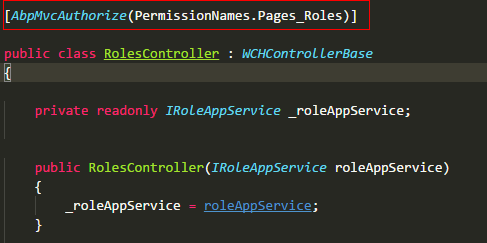
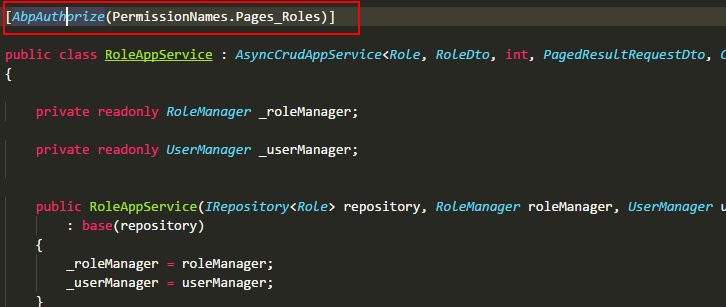
AbpMvcAuthorizeAttribute和AbpAuthorizeAttribute这两个类全部继承自IAbpAuthorizeAttribute(重要!!!),下面是这两个类的源码。
 namespace Abp.Authorization

 {

     /// <summary>

     /// This attribute is used on a method of an Application Service (A class that implements <see cref="IApplicationService"/>)

     /// to make that method usable only by authorized users.

     /// </summary>

     [AttributeUsage(AttributeTargets.Class | AttributeTargets.Method, AllowMultiple = true)]

     public class AbpAuthorizeAttribute : Attribute, IAbpAuthorizeAttribute

     {

         /// <summary>

         /// A list of permissions to authorize.

         /// </summary>

         public string[] Permissions { get; }

         /// <summary>

         /// If this property is set to true, all of the <see cref="Permissions"/> must be granted.

         /// If it's false, at least one of the <see cref="Permissions"/> must be granted.

         /// Default: false.

         /// </summary>

         public bool RequireAllPermissions { get; set; }

         /// <summary>

         /// Creates a new instance of <see cref="AbpAuthorizeAttribute"/> class.

         /// </summary>

         /// <param name="permissions">A list of permissions to authorize</param>

         public AbpAuthorizeAttribute(params string[] permissions)

         {

             Permissions = permissions;

         }

     }

 }
 namespace Abp.AspNetCore.Mvc.Authorization

 {

     /// <summary>

     /// This attribute is used on an action of an MVC <see cref="Controller"/>

     /// to make that action usable only by authorized users.

     /// </summary>

     [AttributeUsage(AttributeTargets.Class | AttributeTargets.Method, AllowMultiple = true)]

     public class AbpMvcAuthorizeAttribute : AuthorizeAttribute, IAbpAuthorizeAttribute

     {

         /// <inheritdoc/>

         public string[] Permissions { get; set; }

         /// <inheritdoc/>

         public bool RequireAllPermissions { get; set; }

         /// <summary>

         /// Creates a new instance of <see cref="AbpMvcAuthorizeAttribute"/> class.

         /// </summary>

         /// <param name="permissions">A list of permissions to authorize</param>

         public AbpMvcAuthorizeAttribute(params string[] permissions)

         {

             Permissions = permissions;

         }

     }

 }
重点来啦!!!
 namespace Abp.AspNetCore.Mvc.Authorization

 {

     public class AbpAuthorizationFilter : IAsyncAuthorizationFilter, ITransientDependency

     {

         public ILogger Logger { get; set; }

         private readonly IAuthorizationHelper _authorizationHelper;

         private readonly IErrorInfoBuilder _errorInfoBuilder;

         private readonly IEventBus _eventBus;

         public AbpAuthorizationFilter(

             IAuthorizationHelper authorizationHelper,

             IErrorInfoBuilder errorInfoBuilder,

             IEventBus eventBus)

         {

             _authorizationHelper = authorizationHelper;

             _errorInfoBuilder = errorInfoBuilder;

             _eventBus = eventBus;

             Logger = NullLogger.Instance;

         }

         public async Task OnAuthorizationAsync(AuthorizationFilterContext context)

         {

             // 判断context中是否有继承IAllowAnoymousFilter,有则跳出方法即验证成功

             if (context.Filters.Any(item => item is IAllowAnonymousFilter))

             {

                 return;

             }

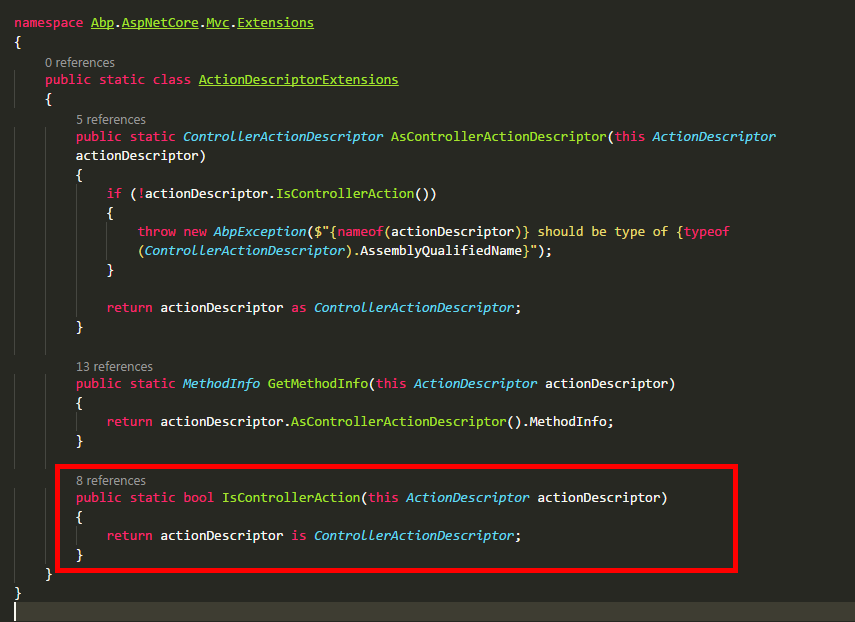
        //判断是否是Controller,具体方法见下面第一张截图

             if (!context.ActionDescriptor.IsControllerAction())

             {

                 return;

             }

             //TODO: Avoid using try/catch, use conditional checking

             try

             {

                 await _authorizationHelper.AuthorizeAsync(

                     context.ActionDescriptor.GetMethodInfo(),

                     context.ActionDescriptor.GetMethodInfo().DeclaringType

                 );

             }

             catch (AbpAuthorizationException ex)

             {

                 Logger.Warn(ex.ToString(), ex);

                 _eventBus.Trigger(this, new AbpHandledExceptionData(ex));

                 if (ActionResultHelper.IsObjectResult(context.ActionDescriptor.GetMethodInfo().ReturnType))

                 {

                     context.Result = new ObjectResult(new AjaxResponse(_errorInfoBuilder.BuildForException(ex), true))

                     {

                         StatusCode = context.HttpContext.User.Identity.IsAuthenticated

                             ? (int) System.Net.HttpStatusCode.Forbidden

                             : (int) System.Net.HttpStatusCode.Unauthorized

                     };

                 }

                 else

                 {

                     context.Result = new ChallengeResult();

                 }

             }

             catch (Exception ex)

             {

                 Logger.Error(ex.ToString(), ex);

                 _eventBus.Trigger(this, new AbpHandledExceptionData(ex));

                 if (ActionResultHelper.IsObjectResult(context.ActionDescriptor.GetMethodInfo().ReturnType))

                 {

                     context.Result = new ObjectResult(new AjaxResponse(_errorInfoBuilder.BuildForException(ex)))

                     {

                         StatusCode = (int) System.Net.HttpStatusCode.InternalServerError

                     };

                 }

                 else

                 {

                     //TODO: How to return Error page?

                     context.Result = new StatusCodeResult((int)System.Net.HttpStatusCode.InternalServerError);

                 }

             }

         }

     }

 }
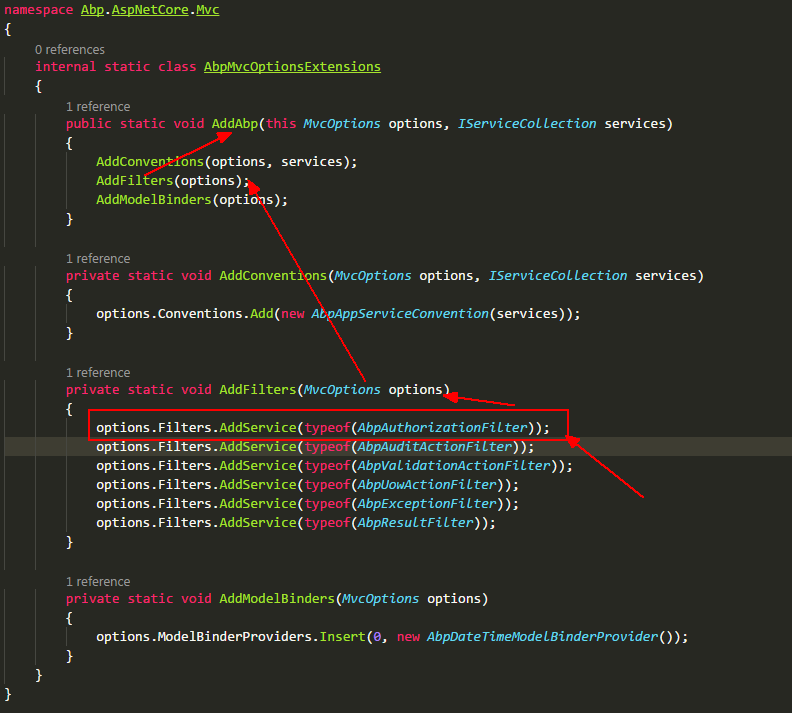
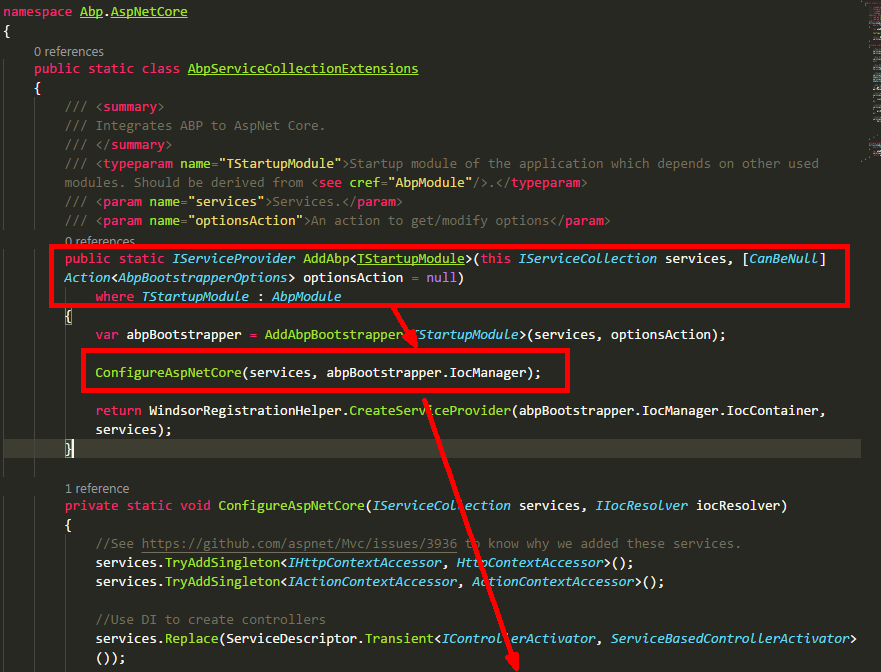
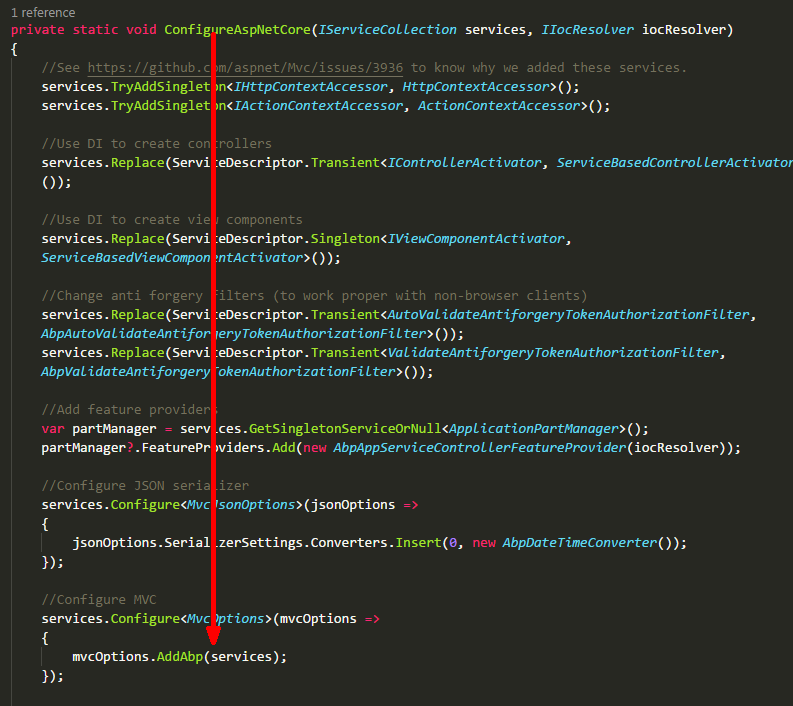
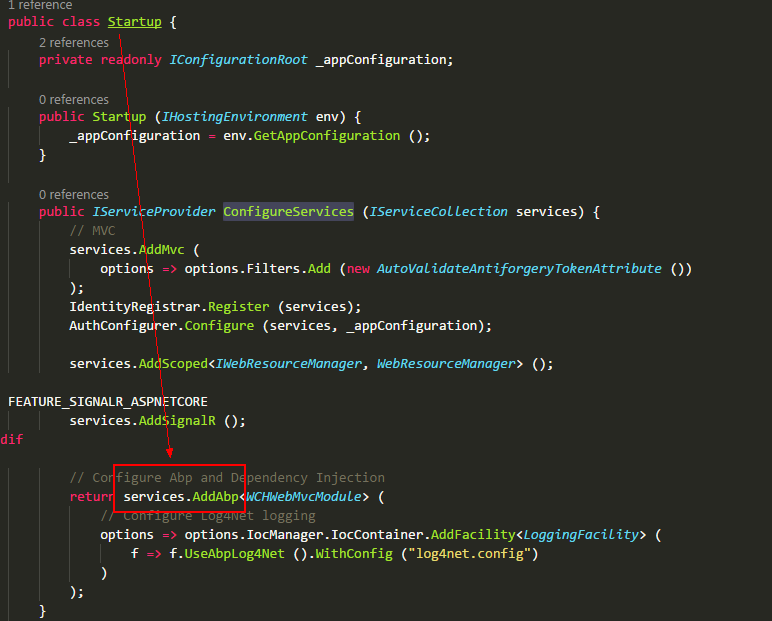
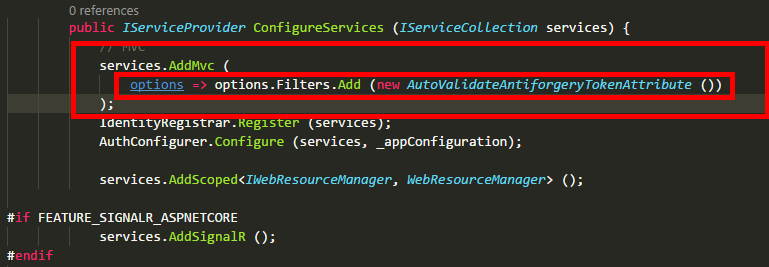
拓展:当我们有某个业务需要用到AOP时,但又不想使用一些第三方框架,我们就可以借鉴上面的方法,定义一个特性,然后定义一个Filter,在Filter里面判断Controller等是否使用这些特性,并且特性的属性是否符合我们的需求,最后在Startup里面AddMvc时将这个Filter添加到FilterCollection里面。例如下图,自动验证AntiforgeryToken
ABP框架源码学习之授权逻辑的更多相关文章
- ABP框架源码学习之修改默认数据库表前缀或表名称
ABP框架源码学习之修改默认数据库表前缀或表名称 1,源码 namespace Abp.Zero.EntityFramework { /// <summary> /// Extension ...
- Golang源码学习:调度逻辑(二)main goroutine的创建
接上一篇继续分析一下runtime.newproc方法. 函数签名 newproc函数的签名为 newproc(siz int32, fn *funcval) siz是传入的参数大小(不是个数):fn ...
- 集合框架源码学习之ArrayList
目录: 0-0-1. 前言 0-0-2. 集合框架知识回顾 0-0-3. ArrayList简介 0-0-4. ArrayList核心源码 0-0-5. ArrayList源码剖析 0-0-6. Ar ...
- CI框架源码学习笔记1——index.php
做php开发一年多了,陆陆续续用过tp/ci/yii框架,一直停留在只会使用的层面上,关于框架内部的结构实际上是不甚了解的.为了深入的学习,决定把CI框架的源码从头到尾的学习一下, 主要因为CI框架工 ...
- axel源码学习(0)——程序逻辑
axel简介 axel是一个命令行下的轻量级http/ftp 下载加速工具,支持多线程下载和断点续传,支持从多个镜像下载同一文件. axel的用法如下: 图 0.1 axel usage axel 粗 ...
- 集合框架源码学习之HashMap(JDK1.8)
目录: 0-1. 简介 0-2. 内部结构分析 0-2-1. JDK18之前 0-2-2. JDK18之后 0-3. LinkedList源码分析 0-3-1. 构造方法 0-3-2. put方法 0 ...
- 集合框架源码学习之LinkedList
0-1. 简介 0-2. 内部结构分析 0-3. LinkedList源码分析 0-3-1. 构造方法 0-3-2. 添加add方法 0-3-3. 根据位置取数据的方法 0-3-4. 根据对象得到索引 ...
- CI框架源码学习笔记7——Utf8.php
愉快的清明节假期结束了,继续回到CI框架学习.这一节我们来看看Utf8.php文件,它主要是用来做utf8编码,废话不多说,上代码. class CI_Utf8 { /** * Class const ...
- CI框架源码学习笔记2——Common.php
上一节我们最后说到了CodeIgniter.php,可是这一节的标题是Common.php,有的朋友可能会觉得很奇怪.事实上,CodeIgniter.php其实包含了ci框架启动的整个流程. 里面引入 ...
随机推荐
- [ios 开发笔记]:一句话笔记
1.NSString转int int a=[@"123" intValue]; 同样适用于NSDictionary将NSNumber转为int 2.switch(stateme ...
- Java 运动模糊
Java 运动模糊代码 想用Java 写个运动模糊的效果,无奈本人水平有限,国内也没找到资源,于是Google到了一个文档,特地分享出来! 本代码源自 http://www.jhlabs.com/ip ...
- win7 使用anaconda安装tensorflow并且在jupyter notebook上启动
记录一下学习深度学习的小事情: 1.tensorflow 现在只支持windows 64位系统: 2.因为实验室的电脑比较老旧,Gpu配置低,所以选择安装的是tensorflow Cpu版本,对于学习 ...
- 2017-07-08( bzip2 bunzip mount)
.bz2 压缩格式 不能压缩目录 bzip2 源文件 (不保留源文件) bzip2 -k 源文件 (保留源文件) bzip2 -d 压缩文件名 (-k保留压缩文件) bunzip 压缩文 ...
- dBm与Vpp相互转换公式
dBm = 10 + 20lg(0.5Vpp) Vpp = 2x10 以上公式均为阻抗为50欧的情况下计算得出的
- 爬取知名社区技术文章_pipelines_4
获取字段的存储处理和获取普通的路径 #!/usr/bin/python3 # -*- coding: utf-8 -*- import pymysql import gevent import pym ...
- 修改mysqlcharacter_set_database与character_set_server的默认编码(windows环境)
@参考文章 修改前是这个样子的 mysql> show variables like "%char%";+--------------------------+------- ...
- TDD最佳实践
这里就先目前阶段,整理一份TDD的最佳实践,在之后的Xunit测试整理中,这份实践会越来越长,对于这份核心在写测试的时候应该时刻注意. 1,在软件开发领域中,从来没有这样的事情:少数的几行代码对大量的 ...
- junit设计模式--组合模式
Composite,英语翻译下,复合,组合. 组合模式有时候又叫做部分-整体模式,它使我们在树形结构的问题中,模糊了简单元素和复杂元素的概念,客户程序可以像处理简单元素一样来处理复杂元素,从而使得客户 ...
- 输入和输出--RandomAccessFile类
RandomAccessFile 类 RandomAccessFile 类既可以读取文件内容,也可以向文件输出数据. RandomAccessFile 类支持 "随机访问" 的方式 ...