
java上传excel到后台解析入库
背景:最近需要做一个excel模板导入的功能,以便用户可以自己增删改查数据,当然,只有特别的用户才能有此权限,捋了捋思路,还是从前端写起
实现:
页面最后的效果如下,可以自己修改,删除,导入导出数据,为了统一规范,防止数据不规范解析不了,模板由我们提供下载,用户填充数据统一导入,
涉及到机密,打码请见谅。
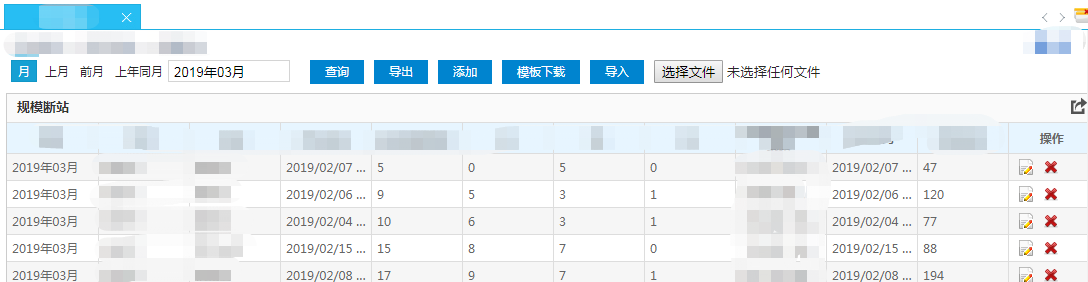
页面主要我分为三大块功能,
一是分权分域,只有特定的用户才能导入修改,删除,添加数据,这个看你怎么保存当前用户,验证下用户权限等,这里不做过多阐述:
二是数据的查询,导出,因为之前做的几乎都有这两个功能,所以集成过来,需要看导出代码的可以看我之前的博客参考;
三是数据导入,修改,删除,添加和模板的下载,这里主要说模板下载和导入数据的解析
模板下载这块,前端用的按钮点击事件,window.location.href指定到后台路径,后台模板下载方法代码如下:
public static void getTemplate(HttpServletRequest request, HttpServletResponse response,String filename) throws IOException {

        String path = TEMPLATE_PATH + filename;

        File file = new File(path);

        if(!file.exists()){

            return;

        }

        response.setContentType("application/octet-stream");

        response.setHeader("Content-Disposition", "attachment; filename="+ new String(filename.getBytes("utf-8"), "ISO-8859-1"));

        BufferedInputStream bi = new BufferedInputStream(new FileInputStream(file));

        OutputStream os = response.getOutputStream();

        byte[] bytes = new byte[1024];

        int i = bi.read(bytes);

        while (i != -1){

            os.write(bytes, 0, i);

            i = bi.read(bytes);

        }

        if (bi != null) {

            try {

                bi.close();

            } catch (IOException e) {

                e.printStackTrace();

            }

        }

    }
这里path我指定了一个位置来放模板下载的文件,因为模块较多,所以按照名称下载,
导入模板,前端代码如下:
<li class='item'>

                    <input type="button" class="button" id="uploading" value="导入">

                </li>

                <li class='item'>

                    <input type="file" id="file1">

                </li>
两个按钮,导入的按钮绑定click事件,里面只验证了文档的格式是不是excel,使用FormData对象作为data上传,FormData对象用以将数据编译成键值对,以便用XMLHttpRequest来发送数据,后台使用MultipartFile对象接收:
click事件如下:
ExportIn: function () {

                if($("#file1").val().length <=0){

                    alert("请选择文件");

                    return false;

                }else{

                    var filepath = $("#file1").val();

                    var extStart = filepath.lastIndexOf(".");

                    var ext = filepath.substring(extStart,filepath.length).toUpperCase();

                    if (ext != ".XLSX" && ext != ".XLS" && ext != ".XLSM") {

                        alert("请上传excel格式文档");

                        return false;

                    }

                }

                //获取到上传的文件信息

                var data =document.getElementById("file1").files[0];

                var fromData = new FormData();

                if(data != null){

                    fromData.append("file",data);

                    $.ajax({

                        type: "post",

                        url: dss.rootPath + "plugin/labourCompetition/NpsCompetitionScore_mobile_uploading",

                        data: fromData,

                        dataType: "json",

                        contentType: false,

                        processData: false,

                        beforeSend: function () {

                            dss.load(true);

                        },

                        complete: function () {

                            dss.load(false);

                        },

                        success: function (data) {

                            if (data.status != "OK") {

                                alert(data.status);

                            }

                            else if (data.status == "OK") {

                                alert("导入成功!");

                            }

                            window.location.reload();

                        }

                    });

                }

                },
后台使用MultipartFile 接收,绑定了前端的file参数,验证文件是否为空,然后判断文件格式,是xls还是xlsx格式,创建对应的对象解析,然后把数据存到list<String[]>中,
一行为一个string数组,因为解析模板要复用,还有验证不为空,日期格式等所以有些地方写的很麻烦,可以用简单的办法解决,但是又不能影响复用的模块,所以我的处理可
能麻烦了点,各位可以按照自己的需求来。
后台接收的方法如下:
@RequestMapping("plugin/labourCompetition/NpsCompetitionScore_mobile_uploading")

    @ResponseBody

    public JsonData importTemplate(@RequestParam(value = "file")MultipartFile file) throws Exception {

        JsonData jsonData = new JsonData();

        Boolean bool = ImportExcel.checkFile(file);

        if(!bool){

           jsonData.setStatus("文件类型不正确或为空");

           return jsonData;

        }

      //工具类在下面

        HashMap<String, ArrayList<String[]>> hashMap = ImportExcel.analysisFile(file);

        ArrayList<String[]> arrayList = hashMap.get("OK");

        if(arrayList == null){

            Set<String> strings = hashMap.keySet();

            String next = strings.iterator().next();

            jsonData.setStatus(next);

            return jsonData;

        }

        //数据都在arrayList中,循环入库,记得最后一个字段加上loadTime

        ConnectSettings dwConnect = commUtil.getDwConnect();

        String sql = " INSERT INTO 表名  values ";

        String nowDate = ImportExcel.getNowDate();

        for(int n = 0;n < arrayList.size();n++){

            String[] str = arrayList.get(n);

            sql += " ( ";

            for(int num =0;num<str.length;num++){

                sql += "'" +str[num]+"',";

                if(num == str.length-1){

                    sql += "to_date('"+nowDate+"','yyyy-mm-dd hh24:mi:ss')";

                }

            }

            if( n != arrayList.size()-1 ){

                sql += " ),";

            }else{

                sql += " )";

            }

        }

        System.err.println(sql);

        int i = DbHelper.executeNonQuery(sql, dwConnect);

        System.err.println("成功执行行数"+i);

        if(i < 1){

            jsonData.setStatus("导入失败");

            return jsonData;

        }

        jsonData.setStatus("导入成功");

        return jsonData;

    }
@Component

public class ImportExcel {

    private static Calendar calendar = Calendar.getInstance();

    private static SimpleDateFormat simpleDateFormat = new SimpleDateFormat("yyyy年MM月");

    private static SimpleDateFormat simpleDateFormat2 = new SimpleDateFormat("yyyy/MM/dd HH:mm:ss");

    private static SimpleDateFormat simpleDateFormat3 = new SimpleDateFormat("yyyy/MM/dd");

    //解析excel文件

    public static HashMap<String, ArrayList<String[]>> analysisFile(MultipartFile file) throws IOException {

        HashMap<String, ArrayList<String[]>> hashMap = new HashMap<>();

        //获取workbook对象

        Workbook workbook = null;

        String filename = file.getOriginalFilename();

        InputStream inputStream = file.getInputStream();

        //根据后缀名是否excel文件

        if(filename.endsWith("xls")){

            //

            workbook = new HSSFWorkbook(inputStream);

        }else if(filename.endsWith("xlsx")){

            //

            workbook = new XSSFWorkbook(inputStream);

        }

        //创建对象,把每一行作为一个String数组,所以数组存到集合中

        ArrayList<String[]> arrayList = new ArrayList<>();

        if(workbook != null){

            //循环sheet,现在是单sheet

            for(int sheetNum = 0;sheetNum < workbook.getNumberOfSheets();sheetNum++){

                //获取第一个sheet

                Sheet sheet = workbook.getSheetAt(sheetNum);

                if(sheet == null){

                    hashMap.put("文件sheet为空!",arrayList);

                    return hashMap;

                }

                //获取当前sheet开始行和结束行

                int firstRowNum = sheet.getFirstRowNum();

                int lastRowNum = sheet.getLastRowNum();

                //循环开始,除了前两行

                for(int rowNum = firstRowNum + 2;rowNum <= lastRowNum;rowNum++){

                    //获取当前行

                    Row row = sheet.getRow(rowNum);

                    //获取当前行的开始列和结束列

                    short firstCellNum = row.getFirstCellNum();

                    short lastCellNum = row.getLastCellNum();

                    //获取总行数

                    int lastCellNum2 = row.getPhysicalNumberOfCells();

                    String[] strings = new String[lastCellNum2];

                    //循环当前行

                    for(int cellNum = firstCellNum;cellNum < lastCellNum;cellNum++){

                        Cell cell = row.getCell(cellNum);

                        if( cell == null || "".equals(cell) || cell.getCellType()== Cell.CELL_TYPE_BLANK ){

                            hashMap.put("第"+(rowNum+1)+"行,第"+(cellNum+1)+"列为空",arrayList);

                            return hashMap;

                        }

                        String  cellValue = "";

                        cellValue = getCellValue(cell);

                        strings[cellNum] = cellValue;

                    }

                    arrayList.add(strings);

                }

            }

        }

        inputStream.close();

        hashMap.put("OK",arrayList);

        return hashMap;

    }

    //把每一个cell转换为string

    public static String getCellValue(Cell cell){

        String cellValue = "";

        if(cell == null){

            return cellValue;

        }

        //把数字转换成string,防止12.0这种情况

        if(cell.getCellType() == cell.CELL_TYPE_NUMERIC){

            cell.setCellType(cell.CELL_TYPE_STRING);

        }

        //判断数据的类型

        switch (cell.getCellType()) {

            case Cell.CELL_TYPE_NUMERIC: //数字0

                cellValue = String.valueOf(cell.getNumericCellValue());

                break;

            case Cell.CELL_TYPE_STRING: //字符串1

                cellValue = String.valueOf(cell.getStringCellValue());

                break;

            case Cell.CELL_TYPE_BOOLEAN: //Boolean

                cellValue = String.valueOf(cell.getBooleanCellValue());

                break;

            case Cell.CELL_TYPE_FORMULA: //公式

                //cellValue = String.valueOf(cell.getCellFormula());

                try {

                    cellValue = String.valueOf(cell.getNumericCellValue());

                } catch (IllegalStateException e) {

                    cellValue = String.valueOf(cell.getRichStringCellValue());

                }

                break;

            case Cell.CELL_TYPE_BLANK: //空值

                cellValue = "";

                break;

            case Cell.CELL_TYPE_ERROR: //故障

                cellValue = "非法字符";

                break;

            default:

                cellValue = "未知类型";

                break;

        }

        return cellValue;

    }

    //判断row是否为空

    public static boolean isRowEmpty(Row row) {

        for (int c = row.getFirstCellNum(); c < row.getLastCellNum(); c++) {

            Cell cell = row.getCell(c);

            if (cell != null && cell.getCellType() != Cell.CELL_TYPE_BLANK) {

                return false;

            }

        }

        return true;

    }

    //检查文件类型

    public static Boolean checkFile(MultipartFile file){

        //检查文件是否为空

        boolean empty = file.isEmpty();

        if(empty || file == null){

            return  false;

        }

        //检查文件是否是excel类型文件

        String filename = file.getOriginalFilename();

        if(!filename.endsWith("xls") && !filename.endsWith("xlsx")){

            return false;

        }

        return true;

    }

    //转换excel导入之后时间变为数字,月时间

    public static String getCorrectMonth(int i){

        calendar.set(1900,0,1);

        calendar.add(calendar.DATE,i);

        Date time = calendar.getTime();

        String s = simpleDateFormat.format(time);

        return s;

    }

    //转换excel导入之后时间变为数字,年月日时间

    public static String getCorrectDay(int i){

        calendar.set(1900,0,-1,0,0,0);

        calendar.add(calendar.DATE,i);

        Date time = calendar.getTime();

        String s = simpleDateFormat3.format(time);

        return s;

    }

    //获取当前时间的字符串

    public static String getNowDate(){

        Date date = new Date();

        SimpleDateFormat simpleDateFormat = new SimpleDateFormat("yyyy-MM-dd HH:mm:ss");

        String format = simpleDateFormat.format(date);

        return format;

    }

    //文件读取到指定的位置

    public String saveFile(MultipartFile file) throws IOException {

        MultipartFile update = file;

        //文件中参数名字

        String name = update.getName();

        //文件名字

        String originalFilename = update.getOriginalFilename();

        //是否为空

        boolean empty = update.isEmpty();

        //传输文件到指定路径中

        String path = "F://LDJS/boco/uploading/"+originalFilename;

        update.transferTo(new File(path));

        //文件类型

        String contentType = update.getContentType();

        InputStream inputStream = update.getInputStream();

        inputStream.close();

        //是否存在此路径

        boolean path1 = new File(path).exists();

        if(path1){

            return "OK";

        }else{

            return "导入文件失败";

        }

    }

    //显示时间,把数字转换成时间类型的

    public static String getExcelDate(Cell cell){

        Date dateCellValue = cell.getDateCellValue();

        SimpleDateFormat simpleDateFormat = new SimpleDateFormat("yyyy-MM-dd");

        String format = simpleDateFormat.format(dateCellValue);

        return format;

    }

    public static String getDetailDate(String date){

        int dayNum = (int)Double.parseDouble(date);

        String s1 = "0."+ date.split("\\.")[1];

        String hour = Double.parseDouble(s1)*24 +"";

        int hourNum = Integer.parseInt(hour.split("\\.")[0]);

        String s2 = "0."+ hour.split("\\.")[1];

        String minte = Double.parseDouble(s2)*60 +"";

        int minteNum = Integer.parseInt(minte.split("\\.")[0]);

        String s3 = "0."+ minte.split("\\.")[1];

        String second = Double.parseDouble(s3)*60 +"";

        int secondNum = Integer.parseInt(second.split("\\.")[0]);

        calendar.set(1900,0,-1,0,0,0);

        calendar.add(calendar.DATE,dayNum);

        calendar.add(calendar.HOUR,hourNum);

        calendar.add(calendar.MINUTE,minteNum);

        calendar.add(calendar.SECOND,secondNum);

        Date time = calendar.getTime();

        String s = simpleDateFormat2.format(time);

        return s;

    }

    //检查是否是数字

    public static Boolean checkWhetherNumber(String str){

        try {

            BigDecimal bigDecimal = new BigDecimal(str);

        }catch (Exception e){

            return false;

        }

        return true;

    }

    //检查是不是时间类型

    public static Boolean checkWhetherDate(String str){

        try {

            SimpleDateFormat simpleDateFormat = new SimpleDateFormat("yyyy/MM/dd HH:mm:ss");

            // 设置lenient为false. 否则SimpleDateFormat会比较宽松地验证日期,比如2007/02/29会被接受,并转换成2007/03/01

            simpleDateFormat.setLenient(false);

            simpleDateFormat.parse(str);

        }catch (Exception e){

            return false;

        }

        return true;

    }

    //检查是不是时间类型

    public static Boolean checkWhetherDate2(String str){

        try {

            SimpleDateFormat simpleDateFormat = new SimpleDateFormat("yyyy/MM/dd");

            simpleDateFormat.setLenient(false);

            simpleDateFormat.parse(str);

        }catch (Exception e){

            return false;

        }

        return true;

    }

    //检查是不是月的时间类型

    public static Boolean checkWhetherMonth(String str){

        try {

            SimpleDateFormat simpleDateFormat = new SimpleDateFormat("yyyy年MM月");

            simpleDateFormat.setLenient(false);

            simpleDateFormat.parse(str);

        }catch (Exception e){

            return false;

        }

        return true;

    }

}
java上传excel到后台解析入库的更多相关文章
- java上传excel文件及解析
java上传excel文件及解析 CreateTime--2018年3月5日16:25:14 Author:Marydon 一.准备工作 1.1 文件上传插件:swfupload: 1.2 文件上 ...
- Java上传Excel并解析
1.上传: public String uploadFile(CommonsMultipartFile file,String uploadPath,String realUploadPath){ I ...
- koa上传excel文件并解析
1.中间键使用 koa-body npm install koa-body --save const koaBody = require('koa-body'); app.use(koaBody({ ...
- C# 上传excel文档解析出里面数据
if (fileExt.ToUpper() == ".XLS" || fileExt.ToUpper() == ".XLSX" || fileExt.ToUpp ...
- Java上传下载excel、解析Excel、生成Excel
在软件开发过程中难免需要批量上传与下载,生成报表保存也是常有之事,最近集团门户开发用到了Excel模版下载,Excel生成,圆满完成,对这一知识点进行整理,资源共享,有不足之处还望批评指正,文章结尾提 ...
- postman上传excel,java后台读取excel生成到指定位置进行备份,并且把excel中的数据添加到数据库
最近要做个前端网页上传excel,数据直接添加到数据库的功能..在此写个读取excel的demo. 首先新建springboot的web项目 导包,读取excel可以用poi也可以用jxl,这里本文用 ...
- java的poi技术下载Excel模板上传Excel读取Excel中内容(SSM框架)
使用到的jar包 JSP: client.jsp <%@ page language="java" contentType="text/html; charset= ...
- 使用ocupload和POI一键上传Excel并解析导入数据库
使用的工具如下: JQuery ocupload jquery.ocupload-1.1.2.js Apache POI poi-3.9.jar 如果是Maven项目添加依赖如下: <depe ...
- ASP.NET Core 2.2 : 十六.扒一扒新的Endpoint路由方案 try.dot.net 的正确使用姿势 .Net NPOI 根据excel模板导出excel、直接生成excel .Net NPOI 上传excel文件、提交后台获取excel里的数据
ASP.NET Core 2.2 : 十六.扒一扒新的Endpoint路由方案 ASP.NET Core 从2.2版本开始,采用了一个新的名为Endpoint的路由方案,与原来的方案在使用上差别不 ...
随机推荐
- linux 安装 PHP fileinfo 扩展
将windows解压Linux服务器 1.错误: PHP Fileinfo extension must be installed/enabled to use Intervention Image. ...
- Dubbo中Directory解析
Directory代表多个Invoker,可以把它看成List Directory接口 Directory接口继承了Node接口: 1234567 public interface Directory ...
- diskqueue.go
}
- Django中用户权限模块
Django中用户权限模块 1 auth模块 auth模块是Django提供的标准权限管理系统,可以提供用户身份认证, 用户组和权限管理. auth可以和admin模块配合使用, 快速建立网站的管理系 ...
- webpack下css/js/html引用图片的正确方式
在webpack的处理下,为了使引用的图片被打包编译(以把src的图片文件编译到dist中或者对src的文件进行base64编码),应使用如下引用方式: 1. 在html/ejs等中引用图片: 借助r ...
- iPhone6 AirDrop找不到我的mac解决方法!注销mac和iPhone的icloud账号
注销mac和iPhone的icloud账号,icloud 会自动同步个人热点,个人热点开启状态,mac 和 iPhone 无法看到对方!
- The following untracked working tree files would be overwritten by merge
git pull的时候遇到这样的问题: The following untracked working tree files would be overwritten by merge balabal ...
- HashMap 实现及原理
1.为什么用HashMap? HashMap是一个散列桶(数组和链表),它存储的内容是键值对(key-value)映射HashMap采用了数组和链表的数据结构,能在查询和修改方便继承了数组的线性查找和 ...
- 读书笔记:深入理解java虚拟机(二)创建对象的时候需要访问哪几块内存
@TOC 对象在内存中如何储存 对象访问在java语言中无处不在,是最普通的程序行为,但即使是最简单的访问,也会涉及到java栈,java堆,方法去三个最重要的内存区域的关联关系,比如下面这段代码: ...
- 从壹开始前后端分离[.NetCore ] 38 ║自动初始化数据库(不定期更新)
缘起 哈喽大家好呀,我们又见面啦,这里先祝大家圣诞节快乐哟,昨天的红包不知道有没有小伙伴抢到呢.今天的这篇内容灰常简单,只是对我们的系统的数据库进行CodeFirst,然后就是数据处理,因为这几个月来 ...