
iOS监听模式系列之通知中心
补充--通知中心
对于很多初学者往往会把iOS中的本地通知、推送通知和iOS通知中心的概念弄混。其实二者之间并没有任何关系,事实上它们都不属于一个框架,前者属于UIKit框架,后者属于Foundation框架。
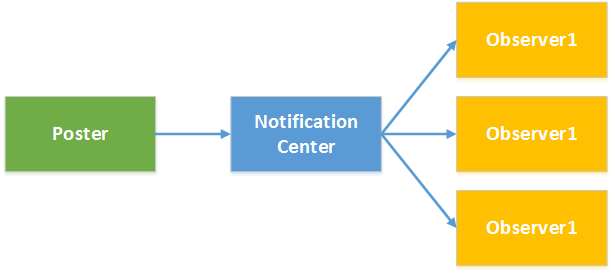
通知中心实际上是iOS程序内部之间的一种消息广播机制,主要为了解决应用程序内部不同对象之间解耦而设计。它是基于观察者模式设计的,不能跨应用程序进程通信,当通知中心接收到消息之后会根据内部的消息转发表,将消息发送给订阅者。下面是一个简单的流程示意图:
了解通知中心需要熟悉NSNotificationCenter和NSNotification两个类:
NSNotificationCenter:是通知系统的中心,用于注册和发送通知,下表列出常用的方法。
| 方法 | 说明 |
| - (void)addObserver:(id)observer selector:(SEL)aSelector name:(NSString *)aName object:(id)anObject | 添加监听,参数: observer:监听者 selector:监听方法(监听者监听到通知后执行的方法) name:监听的通知名称 object:通知的发送者(如果指定nil则监听任何对象发送的通知) |
| - (id <NSObject>)addObserverForName:(NSString *)name object:(id)obj queue:(NSOperationQueue *)queue usingBlock:(void (^)(NSNotification *note))block | 添加监听,参数: name:监听的通知名称 object:通知的发送者(如果指定nil则监听任何对象发送的通知) queue:操作队列,如果制定非主队线程队列则可以异步执行block block:监听到通知后执行的操作 |
| - (void)postNotification:(NSNotification *)notification | 发送通知,参数: notification:通知对象 |
| - (void)postNotificationName:(NSString *)aName object:(id)anObject | 发送通知,参数: aName:通知名称 anObject:通知发送者 |
| - (void)postNotificationName:(NSString *)aName object:(id)anObject userInfo:(NSDictionary *)aUserInfo | 发送通知,参数: aName:通知名称 anObject:通知发送者 aUserInfo:通知参数 |
| - (void)removeObserver:(id)observer | 移除监听,参数: observer:监听对象 |
| - (void)removeObserver:(id)observer name:(NSString *)aName object:(id)anObject | 移除监听,参数: observer:监听对象 aName:通知名称 anObject:通知发送者 |
NSNotification:代表通知内容的载体,主要有三个属性:name代表通知名称,object代表通知的发送者,userInfo代表通知的附加信息。
虽然前面的文章中从未提到过通知中心,但是其实通知中心我们并不陌生,前面文章中很多内容都是通过通知中心来进行应用中各个组件通信的,只是没有单独拿出来说而已。例如前面的文章中讨论的应用程序生命周期问题,当应用程序启动后、进入后台、进入前台、获得焦点、失去焦点,窗口大小改变、隐藏等都会发送通知。这个通知可以通过前面NSNotificationCenter进行订阅即可接收对应的消息,下面的示例演示了如何添加监听获得UIApplication的进入后台和获得焦点的通知:
#import "KCMainViewController.h"

@interface KCMainViewController ()

@end

@implementation KCMainViewController

- (void)viewDidLoad {
    [super viewDidLoad];

    [self addObserverToNotificationCenter];

}

#pragma mark 添加监听
-(void)addObserverToNotificationCenter{
    /*添加应用程序进入后台监听
     * observer:监听者
     * selector:监听方法(监听者监听到通知后执行的方法)
     * name:监听的通知名称(下面的UIApplicationDidEnterBackgroundNotification是一个常量)
     * object:通知的发送者(如果指定nil则监听任何对象发送的通知)
     */
    [[NSNotificationCenter defaultCenter] addObserver:self selector:@selector(applicationEnterBackground)
name:UIApplicationDidEnterBackgroundNotification object:[UIApplication sharedApplication]];

    /* 添加应用程序获得焦点的通知监听
     * name:监听的通知名称
     * object:通知的发送者(如果指定nil则监听任何对象发送的通知)
     * queue:操作队列,如果制定非主队线程队列则可以异步执行block
     * block:监听到通知后执行的操作
     */
    NSOperationQueue *operationQueue=[[NSOperationQueue alloc]init];
    [[NSNotificationCenter defaultCenter] addObserverForName:UIApplicationDidBecomeActiveNotification
object:[UIApplication sharedApplication] queue:operationQueue usingBlock:^(NSNotification *note) {
        NSLog(@"Application become active.");
    }];
}

#pragma mark 应用程序启动监听方法
-(void)applicationEnterBackground{
    NSLog(@"Application enter background.");
}
@end
当然很多时候使用通知中心是为了添加自定义通知,并获得自定义通知消息。在前面的文章“iOS开发系列--视图切换”中提到过如何进行多视图之间参数传递,其实利用自定义通知也可以进行参数传递。通常一个应用登录后会显示用户信息,而登录信息可以通过登录界面获取。下面就以这样一种场景为例,在主界面中添加监听,在登录界面发送通知,一旦登录成功将向通知中心发送成功登录的通知,此时主界面中由于已经添加通知监听所以会收到通知并更新UI界面。
主界面KCMainViewController.m:
#import "KCMainViewController.h"
#import "KCLoginViewController.h"
#define UPDATE_LGOGIN_INFO_NOTIFICATION @"updateLoginInfo"

@interface KCMainViewController (){
    UILabel *_lbLoginInfo;
    UIButton *_btnLogin;
}

@end

@implementation KCMainViewController

- (void)viewDidLoad {
    [super viewDidLoad];

    [self setupUI];
}

-(void)setupUI{
    UILabel *label =[[UILabel alloc]initWithFrame:CGRectMake(0, 100,320 ,30)];
    label.textAlignment=NSTextAlignmentCenter;
    label.textColor=[UIColor colorWithRed:23/255.0 green:180/255.0 blue:237/255.0 alpha:1];
    _lbLoginInfo=label;
    [self.view addSubview:label];

    UIButton *button=[UIButton buttonWithType:UIButtonTypeSystem];
    button.frame=CGRectMake(60, 200, 200, 25);
    [button setTitle:@"登录" forState:UIControlStateNormal];
    [button addTarget:self action:@selector(loginOut) forControlEvents:UIControlEventTouchUpInside];
    _btnLogin=button;

    [self.view addSubview:button];
}

-(void)loginOut{
    //添加监听
    [self addObserverToNotification];

    KCLoginViewController *loginController=[[KCLoginViewController alloc]init];

    [self presentViewController:loginController animated:YES completion:nil];
}

/**
 *  添加监听
 */
-(void)addObserverToNotification{
    [[NSNotificationCenter defaultCenter] addObserver:self selector:@selector(updateLoginInfo:)
 name:UPDATE_LGOGIN_INFO_NOTIFICATION object:nil];
}

/**
 *  更新登录信息,注意在这里可以获得通知对象并且读取附加信息
 */
-(void)updateLoginInfo:(NSNotification *)notification{
    NSDictionary *userInfo=notification.userInfo;
    _lbLoginInfo.text=userInfo[@"loginInfo"];
    _btnLogin.titleLabel.text=@"注销";
}

-(void)dealloc{
    //移除监听
    [[NSNotificationCenter defaultCenter] removeObserver:self];
}
@end
登录界面KCLoginViewController.m:
#import "KCLoginViewController.h"
#define UPDATE_LGOGIN_INFO_NOTIFICATION @"updateLoginInfo"

@interface KCLoginViewController (){
    UITextField *_txtUserName;
    UITextField *_txtPassword;
}

@end

@implementation KCLoginViewController

- (void)viewDidLoad {
    [super viewDidLoad];

    [self setupUI];
}

/**
 *  UI布局
 */
-(void)setupUI{
    //用户名
    UILabel *lbUserName=[[UILabel alloc]initWithFrame:CGRectMake(50, 150, 100, 30)];
    lbUserName.text=@"用户名:";
    [self.view addSubview:lbUserName];

    _txtUserName=[[UITextField alloc]initWithFrame:CGRectMake(120, 150, 150, 30)];
    _txtUserName.borderStyle=UITextBorderStyleRoundedRect;
    [self.view addSubview:_txtUserName];

    //密码
    UILabel *lbPassword=[[UILabel alloc]initWithFrame:CGRectMake(50, 200, 100, 30)];
    lbPassword.text=@"密码:";
    [self.view addSubview:lbPassword];

    _txtPassword=[[UITextField alloc]initWithFrame:CGRectMake(120, 200, 150, 30)];
    _txtPassword.secureTextEntry=YES;
    _txtPassword.borderStyle=UITextBorderStyleRoundedRect;
    [self.view addSubview:_txtPassword];

    //登录按钮
    UIButton *btnLogin=[UIButton buttonWithType:UIButtonTypeSystem];
    btnLogin.frame=CGRectMake(70, 270, 80, 30);
    [btnLogin setTitle:@"登录" forState:UIControlStateNormal];
    [self.view addSubview:btnLogin];
    [btnLogin addTarget:self action:@selector(login) forControlEvents:UIControlEventTouchUpInside];

    //取消登录按钮
    UIButton *btnCancel=[UIButton buttonWithType:UIButtonTypeSystem];
    btnCancel.frame=CGRectMake(170, 270, 80, 30);
    [btnCancel setTitle:@"取消" forState:UIControlStateNormal];
    [self.view addSubview:btnCancel];
    [btnCancel addTarget:self action:@selector(cancel) forControlEvents:UIControlEventTouchUpInside];
}

#pragma mark 登录操作
-(void)login{
    if ([_txtUserName.text isEqualToString:@"kenshincui"] && [_txtPassword.text isEqualToString:@"123"] ) {
        //发送通知
        [self postNotification];
        [self dismissViewControllerAnimated:YES completion:nil];
    }else{
        //登录失败弹出提示信息
        UIAlertView *alertView=[[UIAlertView alloc]initWithTitle:@"系统信息"
message:@"用户名或密码错误,请重新输入!" delegate:nil cancelButtonTitle:@"取消" otherButtonTitles:nil];
        [alertView show];
    }

}

#pragma mark 点击取消
-(void)cancel{
    [self dismissViewControllerAnimated:YES completion:nil];
}

/**
 *  添加通知,注意这里设置了附加信息
 */
-(void)postNotification{
    NSDictionary *userInfo=@{@"loginInfo":[NSString stringWithFormat:@"Hello,%@!",_txtUserName.text]};
    NSLog(@"%@",userInfo);
    NSNotification *notification=[NSNotification notificationWithName:UPDATE_LGOGIN_INFO_NOTIFICATION
object:self userInfo:userInfo];
    [[NSNotificationCenter defaultCenter] postNotification:notification];
//也可直接采用下面的方法
//    [[NSNotificationCenter defaultCenter] postNotificationName:UPDATE_LGOGIN_INFO_NOTIFICATION object:self userInfo:userInfo];

}
@end
iOS监听模式系列之通知中心的更多相关文章
- iOS监听模式系列之关于delegate(代理,委托)的学习
首先,大家应该都明白的是委托是协议的一种,顾名思义,就是委托他人帮自己去做什么事.也就是当自己做什么事情不方便的时候,就可以建立一个委托,这样就可以委托他人帮自己去实现什么方法. 其次,我简单的总结了 ...
- iOS监听模式系列之键值编码KVC、键值监听KVO的简单介绍和应用
键值编码KVC 我们知道在C#中可以通过反射读写一个对象的属性,有时候这种方式特别方便,因为你可以利用字符串的方式去动态控制一个对象.其实由于ObjC的语言特性,你根部不必进行任何操作就可以进行属性的 ...
- iOS监听模式系列之IOS中的几中观察监听模式
本文介绍Objective C中实现观察者模式(也被称为广播者/监听者.发布/注册或者通知)的五种方法以及每种方法的价值所在. 该文章将包括: 1 手动广播者和监听者(Broadcaster and ...
- iOS监听模式系列之NSNotificationCenter的简单使用
NSNotificationCenter 对于这个没必要多说,就是一个消息通知机制,类似广播.观察者只需要向消息中心注册感兴趣的东西,当有地方发出这个消息的时候,通知中心会发送给注册这个消息的对象.这 ...
- iOS监听模式系列之推送消息通知
推送通知 和本地通知不同,推送通知是由应用服务提供商发起的,通过苹果的APNs(Apple Push Notification Server)发送到应用客户端.下面是苹果官方关于推送通知的过程示意图: ...
- iOS监听模式系列之本地通知Notification
本地通知 本地通知是由本地应用触发的,它是基于时间行为的一种通知形式,例如闹钟定时.待办事项提醒,又或者一个应用在一段时候后不使用通常会提示用户使用此应用等都是本地通知.创建一个本地通知通常分为以下几 ...
- iOS监听模式系列之对APNs的认知与理解
前言: APNs 协议在近两年的 WWDC 上改过两次, 15 年 12 月 17 日更是推出了革命性的新特性.但在国内传播的博客.面试题里关于 APNs 的答案全都是旧的.错的. 导航: 对 APN ...
- iOS监听模式系列之iOS开发证书、秘钥
补充--iOS开发证书.秘钥 iOS开发过程中如果需要进行真机调试.发布需要注册申请很多证书,对于初学者往往迷惑不解,再加上今天的文章中会牵扯到一些特殊配置,这里就简单的对iOS开发的常用证书和秘钥等 ...
- iOS监听模式之KVO、KVC的高阶应用
KVC, KVO作为一种魔法贯穿日常Cocoa开发,笔者原先是准备写一篇对其的全面总结,可网络上对其的表面介绍已经够多了,除去基本层面的使用,笔者跟大家谈下平常在网络上没有提及的KVC, KVO进阶知 ...
随机推荐
- Erlang简单并行服务器
Erlang简单并行服务器(金庆的专栏)Erlang并行服务器为每个Tcp连接创建对应的连接进程,处理客户端数据.参考 Erlang程序设计(第2版)17.1.3 顺序和并行服务器并行服务器的诀窍是: ...
- JAVA面向对象-----extends关键字
继承使用extends关键字实现 1:发现学生是人,工人是人.显然属于is a 的关系,is a就是继承. 2:谁继承谁? 学生继承人,发现学生里的成员变量,姓名和年龄,人里边也都进行了定义.有重 复 ...
- javascript之内置函数
1.常规函数 (1)alert函数:显示一个警告对话框,包括一个OK按钮. (2)confirm函数:显示一个确认对话框,包括OK.Cancel按钮. (3)escape函数:将字符转换成Unicod ...
- Effective C++ ——构造/析构/赋值运算符
条款五:了解C++默认编写并调用那些函数 是否存在空的类? 假设定义类为class Empty{}:当C++编译器处理过后会变成如下的形式: class Empty{ Empty(){} ~Empty ...
- Linux Debugging (九) 一次生产环境下的“内存泄露”
一个偶然的机会,发现一个进程使用了超过14G的内存.这个进程是一个RPC server,只是作为中转,绝对不应该使用这么多内存的.即使并发量太多,存在内存中的数据太多,那么在并发减少的情况下,这个内存 ...
- ENVI自带的非监督分类测试情况
最近写了两个关于遥感图像的简单的非监督分类算法KMEAN和ISODATA,发现结果和ENVI的一直有差异,而且还蛮大的,找了好久也没有找到原因.于是用PS自己绘制了一个简单的图像用于测试.如图1所示, ...
- Android开发学习之路--Service之初体验
android最后一个组件便是service了,终于学习到最后一个组件了,从年前的开发环境的搭建,到现在学到最后一个组件花了三周的时间,期间记录的点点滴滴,照着书本学习编写的代码都受益匪浅,这里要感谢 ...
- java实现异步调用实例
在JAVA平台,实现异步调用的角色有如下三个角色: 调用者 取货凭证 真实数据 一个调用者在调用耗时操作,不能立即返回数据时,先返回一个取货凭证.然后在过一断时间后凭取货凭证来获取真正的数据. ...
- CCM和GCM
分组密码链接-消息认证码--CCM Counter with CBC-MAC 组成CCM的关键算法是AES加密算法.CTR工作模式和CMAC认证算法,在加密和MAC算法中共用一个密钥K. CCM ...
- J2EE学习从菜鸟变大鸟之八 企业级项目开发的思考
什么是企业级项目开发 "企业级项目".企业级项目开发,Java也是企业级项目开发,这个我们到处说.听,每天被我们挂在嘴边,可是到底什么项目才算是"企业级"?自己 ...