
iOS监听模式系列之通知中心
补充--通知中心
对于很多初学者往往会把iOS中的本地通知、推送通知和iOS通知中心的概念弄混。其实二者之间并没有任何关系,事实上它们都不属于一个框架,前者属于UIKit框架,后者属于Foundation框架。
通知中心实际上是iOS程序内部之间的一种消息广播机制,主要为了解决应用程序内部不同对象之间解耦而设计。它是基于观察者模式设计的,不能跨应用程序进程通信,当通知中心接收到消息之后会根据内部的消息转发表,将消息发送给订阅者。下面是一个简单的流程示意图:
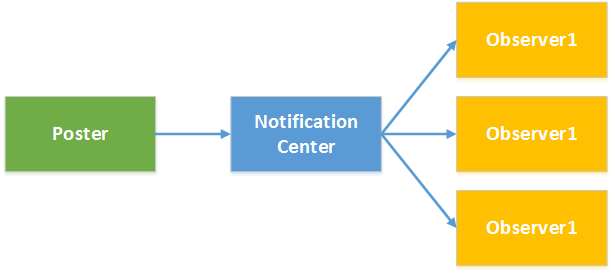
了解通知中心需要熟悉NSNotificationCenter和NSNotification两个类:
NSNotificationCenter:是通知系统的中心,用于注册和发送通知,下表列出常用的方法。
| 方法 | 说明 |
| - (void)addObserver:(id)observer selector:(SEL)aSelector name:(NSString *)aName object:(id)anObject | 添加监听,参数: observer:监听者 selector:监听方法(监听者监听到通知后执行的方法) name:监听的通知名称 object:通知的发送者(如果指定nil则监听任何对象发送的通知) |
| - (id <NSObject>)addObserverForName:(NSString *)name object:(id)obj queue:(NSOperationQueue *)queue usingBlock:(void (^)(NSNotification *note))block | 添加监听,参数: name:监听的通知名称 object:通知的发送者(如果指定nil则监听任何对象发送的通知) queue:操作队列,如果制定非主队线程队列则可以异步执行block block:监听到通知后执行的操作 |
| - (void)postNotification:(NSNotification *)notification | 发送通知,参数: notification:通知对象 |
| - (void)postNotificationName:(NSString *)aName object:(id)anObject | 发送通知,参数: aName:通知名称 anObject:通知发送者 |
| - (void)postNotificationName:(NSString *)aName object:(id)anObject userInfo:(NSDictionary *)aUserInfo | 发送通知,参数: aName:通知名称 anObject:通知发送者 aUserInfo:通知参数 |
| - (void)removeObserver:(id)observer | 移除监听,参数: observer:监听对象 |
| - (void)removeObserver:(id)observer name:(NSString *)aName object:(id)anObject | 移除监听,参数: observer:监听对象 aName:通知名称 anObject:通知发送者 |
NSNotification:代表通知内容的载体,主要有三个属性:name代表通知名称,object代表通知的发送者,userInfo代表通知的附加信息。
虽然前面的文章中从未提到过通知中心,但是其实通知中心我们并不陌生,前面文章中很多内容都是通过通知中心来进行应用中各个组件通信的,只是没有单独拿出来说而已。例如前面的文章中讨论的应用程序生命周期问题,当应用程序启动后、进入后台、进入前台、获得焦点、失去焦点,窗口大小改变、隐藏等都会发送通知。这个通知可以通过前面NSNotificationCenter进行订阅即可接收对应的消息,下面的示例演示了如何添加监听获得UIApplication的进入后台和获得焦点的通知:
#import "KCMainViewController.h"

@interface KCMainViewController ()

@end

@implementation KCMainViewController

- (void)viewDidLoad {
    [super viewDidLoad];

    [self addObserverToNotificationCenter];

}

#pragma mark 添加监听
-(void)addObserverToNotificationCenter{
    /*添加应用程序进入后台监听
     * observer:监听者
     * selector:监听方法(监听者监听到通知后执行的方法)
     * name:监听的通知名称(下面的UIApplicationDidEnterBackgroundNotification是一个常量)
     * object:通知的发送者(如果指定nil则监听任何对象发送的通知)
     */
    [[NSNotificationCenter defaultCenter] addObserver:self selector:@selector(applicationEnterBackground)
name:UIApplicationDidEnterBackgroundNotification object:[UIApplication sharedApplication]];

    /* 添加应用程序获得焦点的通知监听
     * name:监听的通知名称
     * object:通知的发送者(如果指定nil则监听任何对象发送的通知)
     * queue:操作队列,如果制定非主队线程队列则可以异步执行block
     * block:监听到通知后执行的操作
     */
    NSOperationQueue *operationQueue=[[NSOperationQueue alloc]init];
    [[NSNotificationCenter defaultCenter] addObserverForName:UIApplicationDidBecomeActiveNotification
object:[UIApplication sharedApplication] queue:operationQueue usingBlock:^(NSNotification *note) {
        NSLog(@"Application become active.");
    }];
}

#pragma mark 应用程序启动监听方法
-(void)applicationEnterBackground{
    NSLog(@"Application enter background.");
}
@end
当然很多时候使用通知中心是为了添加自定义通知,并获得自定义通知消息。在前面的文章“iOS开发系列--视图切换”中提到过如何进行多视图之间参数传递,其实利用自定义通知也可以进行参数传递。通常一个应用登录后会显示用户信息,而登录信息可以通过登录界面获取。下面就以这样一种场景为例,在主界面中添加监听,在登录界面发送通知,一旦登录成功将向通知中心发送成功登录的通知,此时主界面中由于已经添加通知监听所以会收到通知并更新UI界面。
主界面KCMainViewController.m:
#import "KCMainViewController.h"
#import "KCLoginViewController.h"
#define UPDATE_LGOGIN_INFO_NOTIFICATION @"updateLoginInfo"

@interface KCMainViewController (){
    UILabel *_lbLoginInfo;
    UIButton *_btnLogin;
}

@end

@implementation KCMainViewController

- (void)viewDidLoad {
    [super viewDidLoad];

    [self setupUI];
}

-(void)setupUI{
    UILabel *label =[[UILabel alloc]initWithFrame:CGRectMake(0, 100,320 ,30)];
    label.textAlignment=NSTextAlignmentCenter;
    label.textColor=[UIColor colorWithRed:23/255.0 green:180/255.0 blue:237/255.0 alpha:1];
    _lbLoginInfo=label;
    [self.view addSubview:label];

    UIButton *button=[UIButton buttonWithType:UIButtonTypeSystem];
    button.frame=CGRectMake(60, 200, 200, 25);
    [button setTitle:@"登录" forState:UIControlStateNormal];
    [button addTarget:self action:@selector(loginOut) forControlEvents:UIControlEventTouchUpInside];
    _btnLogin=button;

    [self.view addSubview:button];
}

-(void)loginOut{
    //添加监听
    [self addObserverToNotification];

    KCLoginViewController *loginController=[[KCLoginViewController alloc]init];

    [self presentViewController:loginController animated:YES completion:nil];
}

/**
 *  添加监听
 */
-(void)addObserverToNotification{
    [[NSNotificationCenter defaultCenter] addObserver:self selector:@selector(updateLoginInfo:)
 name:UPDATE_LGOGIN_INFO_NOTIFICATION object:nil];
}

/**
 *  更新登录信息,注意在这里可以获得通知对象并且读取附加信息
 */
-(void)updateLoginInfo:(NSNotification *)notification{
    NSDictionary *userInfo=notification.userInfo;
    _lbLoginInfo.text=userInfo[@"loginInfo"];
    _btnLogin.titleLabel.text=@"注销";
}

-(void)dealloc{
    //移除监听
    [[NSNotificationCenter defaultCenter] removeObserver:self];
}
@end
登录界面KCLoginViewController.m:
#import "KCLoginViewController.h"
#define UPDATE_LGOGIN_INFO_NOTIFICATION @"updateLoginInfo"

@interface KCLoginViewController (){
    UITextField *_txtUserName;
    UITextField *_txtPassword;
}

@end

@implementation KCLoginViewController

- (void)viewDidLoad {
    [super viewDidLoad];

    [self setupUI];
}

/**
 *  UI布局
 */
-(void)setupUI{
    //用户名
    UILabel *lbUserName=[[UILabel alloc]initWithFrame:CGRectMake(50, 150, 100, 30)];
    lbUserName.text=@"用户名:";
    [self.view addSubview:lbUserName];

    _txtUserName=[[UITextField alloc]initWithFrame:CGRectMake(120, 150, 150, 30)];
    _txtUserName.borderStyle=UITextBorderStyleRoundedRect;
    [self.view addSubview:_txtUserName];

    //密码
    UILabel *lbPassword=[[UILabel alloc]initWithFrame:CGRectMake(50, 200, 100, 30)];
    lbPassword.text=@"密码:";
    [self.view addSubview:lbPassword];

    _txtPassword=[[UITextField alloc]initWithFrame:CGRectMake(120, 200, 150, 30)];
    _txtPassword.secureTextEntry=YES;
    _txtPassword.borderStyle=UITextBorderStyleRoundedRect;
    [self.view addSubview:_txtPassword];

    //登录按钮
    UIButton *btnLogin=[UIButton buttonWithType:UIButtonTypeSystem];
    btnLogin.frame=CGRectMake(70, 270, 80, 30);
    [btnLogin setTitle:@"登录" forState:UIControlStateNormal];
    [self.view addSubview:btnLogin];
    [btnLogin addTarget:self action:@selector(login) forControlEvents:UIControlEventTouchUpInside];

    //取消登录按钮
    UIButton *btnCancel=[UIButton buttonWithType:UIButtonTypeSystem];
    btnCancel.frame=CGRectMake(170, 270, 80, 30);
    [btnCancel setTitle:@"取消" forState:UIControlStateNormal];
    [self.view addSubview:btnCancel];
    [btnCancel addTarget:self action:@selector(cancel) forControlEvents:UIControlEventTouchUpInside];
}

#pragma mark 登录操作
-(void)login{
    if ([_txtUserName.text isEqualToString:@"kenshincui"] && [_txtPassword.text isEqualToString:@"123"] ) {
        //发送通知
        [self postNotification];
        [self dismissViewControllerAnimated:YES completion:nil];
    }else{
        //登录失败弹出提示信息
        UIAlertView *alertView=[[UIAlertView alloc]initWithTitle:@"系统信息"
message:@"用户名或密码错误,请重新输入!" delegate:nil cancelButtonTitle:@"取消" otherButtonTitles:nil];
        [alertView show];
    }

}

#pragma mark 点击取消
-(void)cancel{
    [self dismissViewControllerAnimated:YES completion:nil];
}

/**
 *  添加通知,注意这里设置了附加信息
 */
-(void)postNotification{
    NSDictionary *userInfo=@{@"loginInfo":[NSString stringWithFormat:@"Hello,%@!",_txtUserName.text]};
    NSLog(@"%@",userInfo);
    NSNotification *notification=[NSNotification notificationWithName:UPDATE_LGOGIN_INFO_NOTIFICATION
object:self userInfo:userInfo];
    [[NSNotificationCenter defaultCenter] postNotification:notification];
//也可直接采用下面的方法
//    [[NSNotificationCenter defaultCenter] postNotificationName:UPDATE_LGOGIN_INFO_NOTIFICATION object:self userInfo:userInfo];

}
@end
iOS监听模式系列之通知中心的更多相关文章
- iOS监听模式系列之关于delegate(代理,委托)的学习
首先,大家应该都明白的是委托是协议的一种,顾名思义,就是委托他人帮自己去做什么事.也就是当自己做什么事情不方便的时候,就可以建立一个委托,这样就可以委托他人帮自己去实现什么方法. 其次,我简单的总结了 ...
- iOS监听模式系列之键值编码KVC、键值监听KVO的简单介绍和应用
键值编码KVC 我们知道在C#中可以通过反射读写一个对象的属性,有时候这种方式特别方便,因为你可以利用字符串的方式去动态控制一个对象.其实由于ObjC的语言特性,你根部不必进行任何操作就可以进行属性的 ...
- iOS监听模式系列之IOS中的几中观察监听模式
本文介绍Objective C中实现观察者模式(也被称为广播者/监听者.发布/注册或者通知)的五种方法以及每种方法的价值所在. 该文章将包括: 1 手动广播者和监听者(Broadcaster and ...
- iOS监听模式系列之NSNotificationCenter的简单使用
NSNotificationCenter 对于这个没必要多说,就是一个消息通知机制,类似广播.观察者只需要向消息中心注册感兴趣的东西,当有地方发出这个消息的时候,通知中心会发送给注册这个消息的对象.这 ...
- iOS监听模式系列之推送消息通知
推送通知 和本地通知不同,推送通知是由应用服务提供商发起的,通过苹果的APNs(Apple Push Notification Server)发送到应用客户端.下面是苹果官方关于推送通知的过程示意图: ...
- iOS监听模式系列之本地通知Notification
本地通知 本地通知是由本地应用触发的,它是基于时间行为的一种通知形式,例如闹钟定时.待办事项提醒,又或者一个应用在一段时候后不使用通常会提示用户使用此应用等都是本地通知.创建一个本地通知通常分为以下几 ...
- iOS监听模式系列之对APNs的认知与理解
前言: APNs 协议在近两年的 WWDC 上改过两次, 15 年 12 月 17 日更是推出了革命性的新特性.但在国内传播的博客.面试题里关于 APNs 的答案全都是旧的.错的. 导航: 对 APN ...
- iOS监听模式系列之iOS开发证书、秘钥
补充--iOS开发证书.秘钥 iOS开发过程中如果需要进行真机调试.发布需要注册申请很多证书,对于初学者往往迷惑不解,再加上今天的文章中会牵扯到一些特殊配置,这里就简单的对iOS开发的常用证书和秘钥等 ...
- iOS监听模式之KVO、KVC的高阶应用
KVC, KVO作为一种魔法贯穿日常Cocoa开发,笔者原先是准备写一篇对其的全面总结,可网络上对其的表面介绍已经够多了,除去基本层面的使用,笔者跟大家谈下平常在网络上没有提及的KVC, KVO进阶知 ...
随机推荐
- RabbitMQ消息队列入门篇(环境配置+Java实例+基础概念)
一.消息队列使用场景或者其好处 消息队列一般是在项目中,将一些无需即时返回且耗时的操作提取出来,进行了异步处理,而这种异步处理的方式大大的节省了服务器的请求响应时间,从而提高了系统的吞吐量. 在项目启 ...
- iOS下JS与OC互相调用(七)--Cordova 基础
Cordova 简介 在介绍Cordova之前,必须先提一下PhoneGap.PhoneGap 是Nitobi软件公司2008年推出的一个框架,旨在弥补web 和iOS 之间的不足,使得web 和 i ...
- git中status指令总是提示内容被修改的解决
大熊猫猪·侯佩原创或翻译作品.欢迎转载,转载请注明出处. 如果觉得写的不好请多提意见,如果觉得不错请多多支持点赞.谢谢! hopy ;) 最近在用git提交项目修改时发现一个问题,就是多次 git a ...
- paypal的IPN机制
paypal对接时发现有这么一个机制,看起来还不错,起到了防止篡改欺诈行为,保证了通信的安全性,但会增加几次通信.
- Android数据库Sqlite-android学习之旅(九)
简介 sqilte是一个轻量级的数据库,满足数据库的基本操作,由于移动端的内存有限,所以sqilte刚好能满足移动端开发的基本要求. 废话不多说,上代码 1.首先介绍一下,sqlite的管理类SQLi ...
- Xdoclet + Ant自动生成Hibernate配置文件
在使用Hibernate的时候,过多的Hibernate配置文件是一个让人头疼的问题.最近接触了Xdoclet这个工具.它实际上就是一个自动代码生成的工具,Xdoclet不能单独运行,必须搭配其他工具 ...
- Mybatis源码之Statement处理器RoutingStatementHandler(三)
RoutingStatementHandler类似路由器,在其构造函数中会根据Mapper文件中设置的StatementType来选择使用SimpleStatementHandler.Prepared ...
- PA 项目创建任务
---- 创建任务 DECLARE p_project_id NUMBER := 155233; p_task_number VARCHAR2(240) := 'CXYTEST0001'; p_tas ...
- (NO.00003)iOS游戏简单的机器人投射游戏成形记(六)
为什么要将手臂移动的代码单独放在一个方法中? 其实这里是多次重构之后的版本.原来的移动代码是放在touchMoved方法里的.后来发现除了触摸手臂移动方式外,还要实现触摸屏幕移动手臂这第二种方式. 所 ...
- (NO.00002)iOS游戏精灵战争雏形(十一)
为了在子弹触碰到目标时做一些事情,我们必须要设置碰撞回调. 首先在MainScene.h的类接口中添加碰撞协议: @interface MainScene : CCNode <CCPhysics ...