
实例 centos自动挂载、备份windows共享文件夹,并删除第7日前当天的备份
此为用户twk的备份执行方案(192.168.42.246虚拟机数据库,备份到192.168.42.147的第二硬盘)
此为用户twk的备份执行方案(192.168.42.5虚拟机数据库,备份到192.168.42.147的第二硬盘)
思路:
共享192.168.42.5的AppServ,关闭windows防火墙
建立mount文件夹,挂载AppServer,
在sdb1建立airfreightdb文件夹,建立sh(设定自动删除7日前的备份),
sh添加到排程crontab
ticketingdb步骤:
#mkdir /mnt/ticketingdb
#mount -t cifs -o username=administrator,password=xxxxx //192.168.42.246/AppServ /mnt/ticketingdb
#ll /mnt/ticketingdb
#mkdir /mnt/sdb1/ticketingdb
airfreightdb步骤:
#mkdir /mnt/airfreightdb
#mount -t cifs -o username=admin,password=XXXXXXXX //192.168.42.5/AppServ /mnt/airfreightdb
#ll /mnt/airfreightdb
#mkdir /mnt/sdb1/airfreightdb
备份路径:可备份到同一文件夹,也可以备份到不同的文件夹,以管理员习惯为准。
#vi ai+ti.sh
*****************************************************************************************
mount -t cifs -o username=administrator,password=xxxxxxxxxx //192.168.42.246/AppServ /mnt/ticketingdb
mount -t cifs -o username=admin,password=xxxxxxxxx //192.168.42.5/AppServ /mnt/airfreightdb
DATE=`date +%Y-%m-%d`
tar -cvzf /mnt/sdb1/airfreightdb/airfreightdb.$DATE.tar.gz /mnt/airfreightdb
find /mnt/sdb1/airfreightdb -type f -mtime +7 -exec rm -f {} \;
tar -cvzf /mnt/sdb1/ticketingdb/ticketingdb.$DATE.tar.gz /mnt/ticketingdb
find /mnt/sdb1/ticketingdb -type f -mtime +7 -exec rm -f {} \;
#
#backup airfreight database and ticketing database to 192.168.42.147 second HD /mnt/sdb1
******************************************************************************************
#crontab -e
#05 20 * * * /root/ai+ti.sh
~~~~~~~~~~~~~~~~~~~~~~~~~~~~~~~~~~~~~~~~~~~~~~~~~~~~~~~~
~~~~~~~~~~~~~~~~~~~~~~~~~~~~~~~~~~~~~~~~~~~~~~~~~~~~~~~~
补充说明:
例如:
今天是1-11号,查找第五天前当日( -mtime x )
-mtime 0 就是1-11号
-mtime 5 就是1-6号
......
留意一点mtime是以24小时计算的,不足24小时会被计算为当天。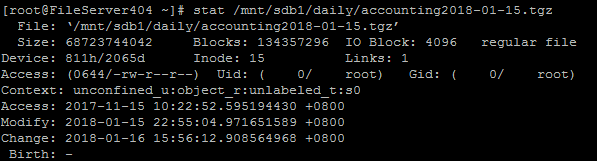
最近访问时间 access time (-atime)
最近更改时间 modify time (-mtime)
最近状态改动时间 change time(-ctime)
实例 centos自动挂载、备份windows共享文件夹,并删除第7日前当天的备份的更多相关文章
- centos 配置 samba 与windows共享文件夹
yum install samba /etc/samba/smb.conf directory mask = 0777 ← 指定新建目录的属性(以下4行) force directory mode = ...
- CentOS访问Windows共享文件夹的方法
CentOS访问Windows共享文件夹的方法 1 在地址栏中输入下面内容: smb://Windows IP/Share folder name,smb为Server Message Block协议 ...
- 烂泥:CentOS6.5挂载windows共享文件夹
本文由秀依林枫提供友情赞助,首发于烂泥行天下. 由于工作需要,需要把本机的文件夹共享出去,然后让CentOS服务器临时使用下. 服务器使用的是CentOS系统,而本机使用的win7系统.考虑到是临时使 ...
- windows共享文件夹如何让CentOS 6.5读取
http://www.111cn.net/sys/CentOS/74104.htm 工作需要,需要把本地win7共享的文件夹让CenotOS 6.5服务器临时使用一下,以下是CentOS 6.5系统挂 ...
- samba 挂载windows共享文件夹
先转载一片文章 centOS下yum安装配置samba 地址 http://blog.csdn.net/linglongwunv/article/details/5212875 遇到问题1 # ...
- centos7挂载Windows共享文件夹(学习笔记)
centos7挂载windows共享文件夹 练习环境:centos7是安装在台式机的虚拟机,Windows共享文件夹是公司服务器的共享文件夹(已设置好的共享) 步骤 1. 设置挂载点:mkdir /m ...
- windows共享文件夹给centOS
服务器使用的是CentOS系统,而本机使用的win7系统.考虑到是临时使用,所以就不打算搭建FTP和Samba服务器,直接通过CentOS挂载windows共享文件夹的方式来达到此目的. 既然是使用w ...
- Linux 挂载windows共享文件夹
Linux 挂载windows共享文件夹 准备工具: 1.windows 共享出来文件夹. 2.Linux 安装cifs文件挂载属性 3.其他 windows ip: 192.168.27.99 Li ...
- Linux 挂载Windows共享文件夹和NAS存储
summary: [Linux 挂载共享存储] 概述 将Windows共享文件夹和NAS存储挂载至Linux. Linux系统环境:CentOS 挂载共享存储 查看外部主机共享了哪些目录 smbcli ...
随机推荐
- Linux终端下 dstat 监控工具
dstat 是一个可以取代vmstat,iostat,netstat和ifstat这些命令的多功能产品.dstat克服了这些命令的局限并增加了一些另外的功能,增加了监控项,也变得更灵活了.dstat可 ...
- 撸一撸Spring Cloud Ribbon的原理-负载均衡器
在上一篇<撸一撸Spring Cloud Ribbon的原理>中整理发现,RestTemplate内部调用负载均衡拦截器,拦截器内最终是调用了负载均衡器来选择服务实例. 接下来撸一撸负载均 ...
- python进阶学习笔记(二)
1.模块和包的概念 python的解决方案是把同名的模块放到不同的包中 1.1,导入模块 要使用一个模块,我们必须首先导入该模块.Python使用import语句导入一个模块.例如,导入系统自带的模块 ...
- [原创]Oracle 12c的备份和恢复策略
Oracle 12c的备份和恢复策略(RMAN备份[开启归档/控制文件/数据文件/归档日志]): 备份策略: * 每半年做一个数据库的全备份(包括所有的数据和只读表空间) * 每周做一次零级备份 * ...
- bzoj 2176 最小表示
2176: Strange string Time Limit: 10 Sec Memory Limit: 259 MBSubmit: 419 Solved: 174[Submit][Status ...
- css渲染(一) 字体和文本
一.字体属性 1.默认字体系列 chrome/opera:"宋体" firefox:"微软雅黑" safari/IE:Times,"宋体" ...
- jdk 1.8 开发环境配置
计算机->右键->属性->高级系统设置->环境变量->系统变量 新建系统变量:JAVA_HOME,变量值为:C:\Program Files (x86)\Java\jdk ...
- POJ - 1426 暴力枚举+同余模定理 [kuangbin带你飞]专题一
完全想不到啊,同余模定理没学过啊,想起上学期期末考试我问好多同学'≡'这个符号什么意思,都说不知道,你们不是上了离散可的吗?不过看了别人的解法我现在会了,同余模定理介绍及运用点这里点击打开链接 简单说 ...
- mysql varchar vs oracle varchar2
1.错误提示: mysql的Data truncation: Data too long for column 'path' at row 1 错误原因: 1.字段过长而导致出错的, 2. 可能是因为 ...
- c# try-finally有什么用
finally 代码块中的代码是 try-catch 结构执行完后无论有无异常发生都会执行的.finally 代码块中的代码是 try-catch 结构执行完后无论有无异常发生都会执行的.final ...