
PHPStorm中对nodejs项目进行单元测试
安装必要的包
nodejs的单元测试最常用的是使用mocha包。首先确保你本地安装nodejs,之后安装mocha包。
npm install mocha -g
然后还需要安装相关的断言工具,Node.js中常用的断言库有:
- assert: TDD风格
- should: BDD风格
- expect: BDD风格
- chai: BDD/TDD风格
使用npm install安装这些断言库其中之一即可。
PHPStorm配置nodejs单元测试环境
在PHPStorm中选择菜单:Run -> Edit Configurations,点击右上角添加mocha。
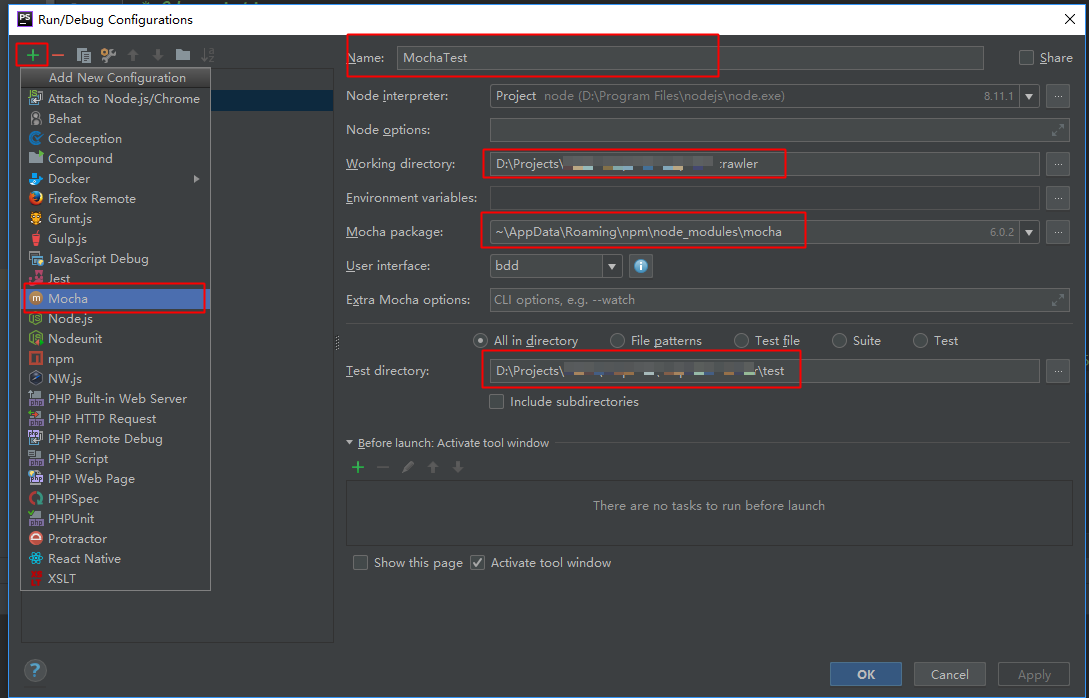
分别填写下面几项,关于mocha单元测试可以参考官网:https://mochajs.org/
- Name: 随便一个运行配置的名称,如MochaTest
- Working directory: 当前项目目录
- Mocha package: Mocha安装包的目录,node_modules\mocha
- User interface: 测试类型,这里选择TDD(对应
assert库) - Test directory: 这一项可以选择测试目录或文件
- All in directory: 整个目录都进行测试
- File patterns: 某种模式的文件,可以填正则表达式
- Test file: 某个特定的测试文件
填写完成并且没有报错后点击OK。
Nodejs进行单元测试
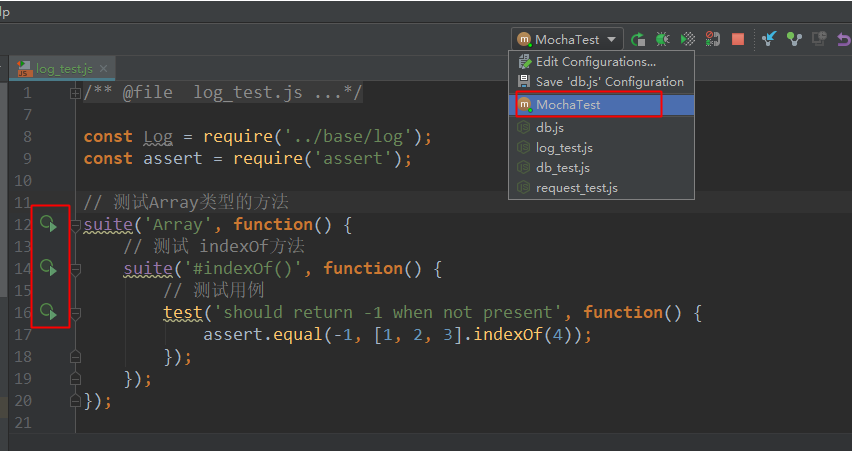
这里我们选择assert库,TDD模式进行单元测试。在上面选定的Test directory目录下新建一个测试文件test.js.
const assert = require('assert');

// 测试Array类型的方法

suite('Array', function() {

    // 测试 indexOf方法

    suite('#indexOf()', function() {

        // 测试用例

        test('should return -1 when not present', function() {

            assert.equal(-1, [1, 2, 3].indexOf(4));

        });

    });

});
点击选择Mocha运行,在PHPStorm下面的输出框中有测试的结果,绿色表示通过,红色表示失败。
断言库的使用
mocha进行单元测试的时候,除了能够使用assert断言库,只要断言代码中抛出Error,mocha就可以正常工作。
assert库:TDD风格
下面列举assert库中常用的断言函数,详情可参考官网:https://www.npmjs.com/package/assert
- assert.fail(actual, expected, message, operator)
- assert(value, message), assert.ok(value, [message])
- assert.equal(actual, expected, [message])
- assert.notEqual(actual, expected, [message])
- assert.deepEqual(actual, expected, [message])
- assert.notDeepEqual(actual, expected, [message])
- assert.strictEqual(actual, expected, [message])
- assert.notStrictEqual(actual, expected, [message])
- assert.throws(block, [error], [message])
- assert.doesNotThrow(block, [message])
- assert.ifError(value)
其中的参数说明如下:
- value: 实际值
- actual: 实际值
- expected: 期望值
- block: 语句块
- message: 附加信息
BDD风格should.js断言库
安装方法:npm install should --save-dev,官网地址:https://github.com/shouldjs/should.js
const should = require('should');

const user = {

    name: 'tj'

  , pets: ['tobi', 'loki', 'jane', 'bandit']

};

user.should.have.property('name', 'tj');

user.should.have.property('pets').with.lengthOf(4);

// If the object was created with Object.create(null)

// then it doesn't inherit `Object.prototype`, so it will not have `.should` getter

// so you can do:

should(user).have.property('name', 'tj');

// also you can test in that way for null's

should(null).not.be.ok();

someAsyncTask(foo, function(err, result){

  should.not.exist(err);

  should.exist(result);

  result.bar.should.equal(foo);

});
should库可以使用链式调用,功能非常强大。相关文档参考:http://shouldjs.github.io/
user.should.be.an.instanceOf(Object).and.have.property('name', 'tj');

user.pets.should.be.instanceof(Array).and.have.lengthOf(4);
常用的should断言方法:
无意义谓词,没作用增加可读性:
.an,.of,.a,.and,.be,.have,.with,.is,.whichshould.equal(actual, expected, [message]): 判断是否相等
should.notEqual(actual, expected, [message]): 判断是否不相等
should.strictEqual(actual, expected, [message]): 判断是否严格相等
should.notStrictEqual(actual, expected, [message]): 判断是否严格不相等
should.deepEqual(actual, expected, [message]): 判断是否递归相等
should.notDeepEqual(actual, expected, [message]): 判断是否递归不想等
should.throws(block, [error], [message]): 判断是否抛出异常
should.doesNotThrow(block, [message]): 判断是否不抛出异常
should.fail(actual, expected, message, operator): 判断是否不等
should.ifError(err): 判断是否为错误
should.exist(actual, [message]): 判断对象是否存在
should.not.exist(actual, [message]): 判断对象是否不存在
另外should还提供了一系列类型判断断言方法:
// bool类型判断

(true).should.be.true();

false.should.not.be.true();

// 数组是否包含

[ 1, 2, 3].should.containDeep([2, 1]);

[ 1, 2, [ 1, 2, 3 ]].should.containDeep([ 1, [ 3, 1 ]]);

// 数字比较

(10).should.not.be.NaN();

NaN.should.be.NaN();

(0).should.be.belowOrEqual(10);

(0).should.be.belowOrEqual(0);

(10).should.be.aboveOrEqual(0);

(10).should.be.aboveOrEqual(10);

// Promise状态判断

// don't forget to handle async nature

(new Promise(function(resolve, reject) { resolve(10); })).should.be.fulfilled();

// test example with mocha it is possible to return promise

it('is async', () => {

   return new Promise(resolve => resolve(10))

     .should.be.fulfilled();

});

// 对象的属性判断

({ a: 10 }).should.have.property('a');

({ a: 10, b: 20 }).should.have.properties({ b: 20 });

[1, 2].should.have.length(2);

({}).should.be.empty();

// 类型检查

[1, 2, 3].should.is.Array();

({}).should.is.Object();
几种常见的测试风格代码举例
BDD
BDD提供的接口有:describe(), context(), it(), specify(), before(), after(), beforeEach(), and afterEach().
describe('Array', function() {

  before(function() {

    // ...

  });

  describe('#indexOf()', function() {

    context('when not present', function() {

      it('should not throw an error', function() {

        (function() {

          [1, 2, 3].indexOf(4);

        }.should.not.throw());

      });

      it('should return -1', function() {

        [1, 2, 3].indexOf(4).should.equal(-1);

      });

    });

    context('when present', function() {

      it('should return the index where the element first appears in the array', function() {

        [1, 2, 3].indexOf(3).should.equal(2);

      });

    });

  });

});
TDD
提供的接口有: suite(), test(), suiteSetup(), suiteTeardown(), setup(), and teardown():
suite('Array', function() {

  setup(function() {

    // ...

  });

  suite('#indexOf()', function() {

    test('should return -1 when not present', function() {

      assert.equal(-1, [1, 2, 3].indexOf(4));

    });

  });

});
QUNIT
和TDD类似,使用suite()和test()标记测试永烈,包含的接口有:before(), after(), beforeEach(), and afterEach()。
function ok(expr, msg) {

  if (!expr) throw new Error(msg);

}

suite('Array');

test('#length', function() {

  var arr = [1, 2, 3];

  ok(arr.length == 3);

});

test('#indexOf()', function() {

  var arr = [1, 2, 3];

  ok(arr.indexOf(1) == 0);

  ok(arr.indexOf(2) == 1);

  ok(arr.indexOf(3) == 2);

});

suite('String');

test('#length', function() {

  ok('foo'.length == 3);

});
PHPStorm中对nodejs项目进行单元测试的更多相关文章
- 在Linux系统中部署NodeJS项目
在Linux系统中部署NodeJS项目 安装NodeJS 首先进入 Node 官网,下载对应的 Node包 下载下来后是一个后缀为 xz 的压缩包,我们把这个包上传到 Linux 系统中的 /usr/ ...
- 在WebStorm环境中给nodejs项目中添加packages
照前文 http://www.cnblogs.com/wtang/articles/4133820.html 给电脑设置了WebStorm的IDE的nodejs开发环境.新建了个express的网站 ...
- Phpstorm配置phpunit对php进行单元测试
在 phpstorm 中配置 php 项目的单元测试,项目使用 Composer 进行管理,为了避免在项目中直接引入 phpunit 相关代码包,使项目的 vendor 目录变得臃肿,这里采用全局安装 ...
- 如何在NodeJS项目中优雅的使用ES6
如何在NodeJS项目中优雅的使用ES6 NodeJs最近的版本都开始支持ES6(ES2015)的新特性了,设置已经支持了async/await这样的更高级的特性.只是在使用的时候需要在node后面加 ...
- SVN checkout 出的项目在PHPstorm中打开没有subversion(SVN)选项按钮怎么办?
对于svn add 命令的批量操作,为了操作简便还是习惯在IDE中完成,有时候新checkout出的项目,在PHPstorm中右键菜单中没有 Subversion 按钮,操作如下: 点击VCS按钮,然 ...
- VS中怎样对C#项目进行单元测试
场景 SpringBoot+Junit在IDEA中实现查询数据库的单元测试: https://blog.csdn.net/BADAO_LIUMANG_QIZHI/article/details/927 ...
- phalcon: Windows 下 Phalcon dev-tools 配置 和 Phpstorm中配置Phalcon 代码提示, phalcon tools的使用
准备: phalcon-devtools包 下载地址: https://github.com/phalcon/phalcon-devtools 解压到wampserver的www目录 (xampp 用 ...
- 为WPF项目创建单元测试
原文作者: 周银辉 来源: 博客园 原文地址:http://www.cnblogs.com/zhouyinhui/archive/2007/09/30/911522.html 可能你已发现一个问题, ...
- PhpStorm创建Drupal模块项目开发教程(4)
编码器是一个检查和操纵代码的Drupal-specific工具. 探测器则是发现异常代码,通常被用于开发中的编码错误预警. 接下来将介绍编码器与探测器在PhpStorm中整合工作的各个步骤,实现PHP ...
随机推荐
- BZOJ_4002_[JLOI2015]有意义的字符串_矩阵乘法
BZOJ_4002_[JLOI2015]有意义的字符串_矩阵乘法 Description B 君有两个好朋友,他们叫宁宁和冉冉.有一天,冉冉遇到了一个有趣的题目:输入 b;d;n,求 Input 一行 ...
- CentOS7.3上部署简单的网站(Tomcat)
本文转载自:沙师弟专栏 https://blog.csdn.net/u014597198/article/details/79649219 [ 感谢郭大大 ] 服务器版本:CentOS 7.3 64 ...
- csc.exe的环境变量设置
csc.exe使用来编译*.cs文件的,但必须要在安装目录下使用.所以需要设置一下环境变量. C#的环境变量设置 1.“win+R” 打开运行窗口,并输入 “cmd”: 2.运行“set path=% ...
- 移动通信最先进的音频编解码器EVS及用好要做的工作
语音通信从最初的只有有线通信变成后来的有线通信与无线通信(移动通信)的竞争,当移动语音通信价格下来后有线语音通信明显处于逆势.如今移动语音通信的竞争对手是OTT(On The Top)语音,OTT语音 ...
- vue2.0 axios封装、vuex介绍
一.前言 博主也是vue道路上的行者,道行不深,希望自己的东西能对大家有所帮助.这篇博客针对 了解过vue基础,但是没有做过vue项目的童鞋.如果想看基础指令,可以看我之前的一篇博客,请点击 跳转, ...
- 危险 AI 花名册
简评:臭不要脸 AI 名单,another side of AI. 这是一个可怕的 AI 清单,上面的各种商用 AI 项目都用于一些很恶劣的目的.请大家保持警惕. 区别对待类 · HireVue - ...
- 你真的知道final关键字吗?
概述 final在英文中是最终的,不可更改的.在Java中final修饰变量,函数和类,就像这个单词的意思,一旦使用赋值之后不可更改. final修饰的变量不可以被改变 finalTest类 publ ...
- asp.net core系列 45 Web应用 模型绑定和验证
一. 模型绑定 ASP.NET Core MVC 中的模型绑定,是将 HTTP 请求中的数据映射到action方法参数. 这些参数可能是简单类型的参数,如字符串.整数或浮点数,也可能是复杂类型的参数. ...
- 闲聊js中的apply、call和arguments
JavaScript提供了apply和call两种调用方式来确定函数中的this的指向,在现实编码中,我确实 很少接触到这两个方法.但很无奈,很多面试题都要考这两种方法,我又没怎么用到,所以我们先来 ...
- Vue源码解析(二):数据驱动
一.数据驱动: 数据驱动是vue.js最大的特点.在vue.js中,数据驱动就是当数据发生变化的时候,用户界面发生相应的变化,开发者不需要手动的去修改dom.数据驱动还有一部分是数据更新驱动视图变化. ...