
springboot获取applicationcontext
使用springboot之前,我们通过ClassPathXmlApplicationContext加载spring xml配置文件来获取applicationcontext,使用springboot后,由于不存在xml文件,故该种方式已经不能使用
在官方文档中介绍,可通过实现ApplicationRunner或者CommandLineRunner在springaplication启动后,立即执行其中的一些代码,做初始化操作,如果存在多个实现类,可使用@Order注解设置其启动顺序,也可使用实现ApplicationListener来做初始化操作,并且实现ApplicationListener可获取到applicationcontext
获取applicationcontext的方式有多种,以下列举出两种方式
一、实现ApplicationListener<ContextRefreshedEvent>
1、启动类
package com.demo.bootdemo;

import org.springframework.boot.SpringApplication;

import org.springframework.boot.autoconfigure.SpringBootApplication;

import com.demo.bootdemo.listeners.MainBusiListeners;

import com.demo.bootdemo.test.TestBean;

import com.demo.bootdemo.uitils.ApplicationContextUtils;

@SpringBootApplication

public class MydemoApplication {

    public static void main(String[] args) {

        SpringApplication sa = new SpringApplication(MydemoApplication.class);

        sa.addListeners(new MainBusiListeners());

        sa.run(args);

        // 测试

        TestBean bean = ApplicationContextUtils.getBean(TestBean.class);

        bean.print("yes it is test.");

    }

}
2、启动监听
package com.demo.bootdemo.listeners;

import org.springframework.context.ApplicationListener;

import org.springframework.context.event.ContextRefreshedEvent;

import com.demo.bootdemo.uitils.ApplicationContextUtils;

/**

 * 启动监听

 */

public class MainBusiListeners implements ApplicationListener<ContextRefreshedEvent> {

    @Override

    public void onApplicationEvent(ContextRefreshedEvent event) {

        ApplicationContextUtils.setContext(event.getApplicationContext());

    }

}
3、ApplicationContext工具类
package com.demo.bootdemo.uitils;

import org.springframework.context.ApplicationContext;

/**

 * ApplicaitonContext工具类

 *

 */

public class ApplicationContextUtils {

    private static ApplicationContext context;

    public static void setContext(ApplicationContext applicationContext) {

        context = applicationContext;

    }

    public static Object getBean(String beanName) {

        return context.getBean(beanName);

    }

    public static <T> T getBean(Class<T> t) {

        return context.getBean(t);

    }

}
4、测试Bean
package com.demo.bootdemo.test;

import org.springframework.stereotype.Component;

/**

 * 测试Bean

 */

@Component

public class TestBean {

    public void print(String str) {

        System.out.println("input: " + str);

    }

}
5、启动启动类MydemoApplication.java
  .   ____          _            __ _ _

 /\\ / ___'_ __ _ _(_)_ __  __ _ \ \ \ \

( ( )\___ | '_ | '_| | '_ \/ _` | \ \ \ \

 \\/  ___)| |_)| | | | | || (_| |  ) ) ) )

  '  |____| .__|_| |_|_| |_\__, | / / / /

 =========|_|==============|___/=/_/_/_/

 :: Spring Boot ::        (v2.1.3.RELEASE)

2019-04-04 09:51:28.722  INFO 93344 --- [           main] com.demo.bootdemo.MydemoApplication      : Starting MydemoApplication on admin-PC with PID 93344 (D:\Programs\eclipseworkplace\springboot\mydemo\target\classes started by admin in D:\Programs\eclipseworkplace\springboot\mydemo)

2019-04-04 09:51:28.725  INFO 93344 --- [           main] com.demo.bootdemo.MydemoApplication      : No active profile set, falling back to default profiles: default

2019-04-04 09:51:29.247  INFO 93344 --- [           main] com.demo.bootdemo.MydemoApplication      : Started MydemoApplication in 0.838 seconds (JVM running for 1.204)

input: yes it is test.
通过上述输出结果可知,applicationcontext正常获取,如果需要在run方法执行之前,使用applicationcontext做一些事情,可在MainBusiListeners的onApplicationEvent方法中进行。另外,使用@Component或者具有类似功能注解,启动类中去掉sa.addListeners(new MainBusiListeners());,一样可以正常获取applicationcontext,ApplicationListener中的Event有多种,父接口为ApplicationEvent,具体可参考源码查看
二、启动类run方法返回值即为applicationcontext
查看main方法中启动类代码
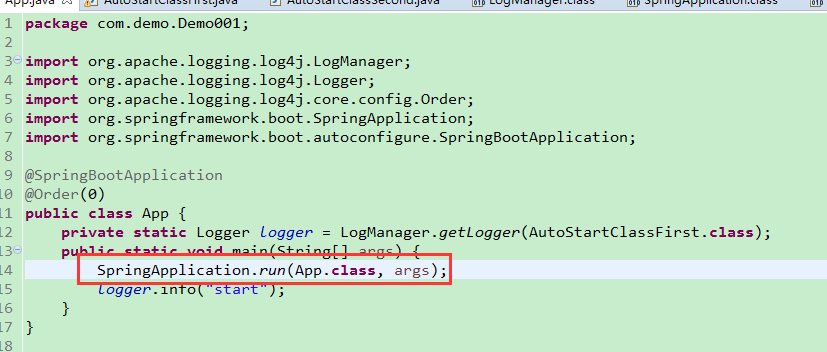
查看run方法,发现该方法返回ConfigurableApplicationContext
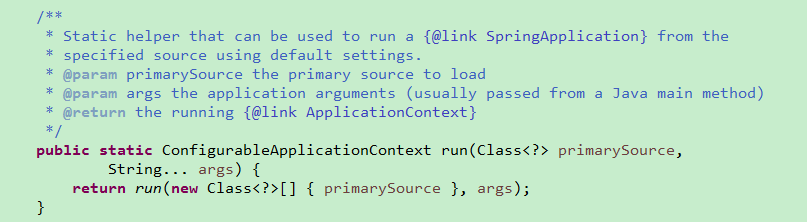
查看ConfigurableApplicationContext

接口实现了ApplicaitonContext接口,所以run方法返回的值就是我们需要的context了
启动类
package com.demo.Demo001;

import org.springframework.boot.SpringApplication;

import org.springframework.boot.autoconfigure.SpringBootApplication;

import org.springframework.context.ConfigurableApplicationContext;

@SpringBootApplication

public class App {

    public static void main(String[] args) {

        ConfigurableApplicationContext context = SpringApplication.run(App.class, args);

        ContextUtils.setApplicationContext(context);

        MainBusiEntry.execute();

    }

}
context工具类
package com.demo.Demo001;

import org.springframework.context.ApplicationContext;

public class ContextUtils {

    public static ApplicationContext context;

    private ContextUtils() {

    }

    public static void setApplicationContext(ApplicationContext applicationContext) {

        context = applicationContext;

    }

    public static Object getBean(String beanName) {

        return context.getBean(beanName);

    }

    public static <T> T getBean(Class<T> t) {

        return context.getBean(t);

    }

}
测试bean
package com.demo.Demo001;

import org.springframework.stereotype.Component;

@Component

public class TestBean {

    public String getName() {

        return this.getClass().getCanonicalName();

    }

}
业务处理入口
package com.demo.Demo001;

import org.apache.logging.log4j.LogManager;

import org.apache.logging.log4j.Logger;

public class MainBusiEntry {

    private static Logger logger = LogManager.getLogger(MainBusiEntry.class);

    public static void execute() {

        TestBean bean = ContextUtils.getBean(TestBean.class);

        logger.info(bean.getName());

    }

}
启动springboot,输出结果如下
  .   ____          _            __ _ _

 /\\ / ___'_ __ _ _(_)_ __  __ _ \ \ \ \

( ( )\___ | '_ | '_| | '_ \/ _` | \ \ \ \

 \\/  ___)| |_)| | | | | || (_| |  ) ) ) )

  '  |____| .__|_| |_|_| |_\__, | / / / /

 =========|_|==============|___/=/_/_/_/

 :: Spring Boot ::        (v2.1.0.RELEASE)

11:53:25.302 INFO  org.springframework.boot.StartupInfoLogger.logStarting()/50 - Starting App on admin-PC with PID 195640 (D:\Programs\eclipseworkplace\springboot\Demo001\target\classes started by admin in D:\Programs\eclipseworkplace\springboot\Demo001)

11:53:25.338 INFO  org.springframework.boot.SpringApplication.logStartupProfileInfo()/675 - No active profile set, falling back to default profiles: default

11:53:26.375 INFO  com.mongodb.diagnostics.logging.SLF4JLogger.info()/71 - Cluster created with settings {hosts=[localhost:27017], mode=SINGLE, requiredClusterType=UNKNOWN, serverSelectionTimeout='30000 ms', maxWaitQueueSize=500}

11:53:26.456 INFO  org.springframework.boot.StartupInfoLogger.logStarted()/59 - Started App in 1.393 seconds (JVM running for 2.078)

11:53:26.459 INFO  com.demo.Demo001.MainBusiEntry.execute()/11 - com.demo.Demo001.TestBean
输出了测试类的路径。
我们在开发中,使用的为第一种获取applicationcontext的方式
springboot获取applicationcontext的更多相关文章
- SpringBoot项目中获取applicationContext对象
ApplicationContext 对象是Spring开源框架的上下文对象实例,也就是我们常说的Spring容器,一般情况下我们是不用手动来管理它,而是由Spring框架自己来维护bean之间的关系 ...
- springboot获取getBean方法以及ApplicationContext空指针问题解决
创建获取ApplicationContext工具类: package com.performancetest.common.utils; import org.springframework.bean ...
- @PostConstruct +getapplicationcontext.getbean springboot获取getBean
Componentpublic class SpringContextUtils implements ApplicationContextAware { public static Applicat ...
- Spring获取ApplicationContext
在Spring+Struts+Hibernate中,有时需要使用到Spring上下文.项目启动时,会自动根据applicationContext配置文件初始化上下文,可以使用ApplicationCo ...
- 【转】SpringTest框架JUnit单元测试用例获取ApplicationContext实例的方法
转自:http://www.coderli.com/junit-spring-test-applicationcontext JUnit单元测试用例中使用Spring框架,直接方式如下. @RunWi ...
- spring获取ApplicationContext对象的方法——ApplicationContextAware
一. 引言 工作之余,在看一下当年学的spring时,感觉我们以前都是通过get~ set~方法去取spring的Ioc取bean,今天就想能不能换种模型呢?因为我们在整合s2sh时,也许有那么一天就 ...
- Spring获取ApplicationContext方式,和读取配置文件获取bean的几种方式
转自:http://chinazhaokeke.blog.163.com/blog/static/109409055201092811354236 Spring获取ApplicationContex ...
- Spring Boot 获取ApplicationContext
package com.demo; import org.springframework.beans.BeansException; import org.springframework.contex ...
- spring mvc在Controller中获取ApplicationContext
spring mvc在Controller中获取ApplicationContext web.xml中进行正常的beans.xml和spring-mvc.xml的配置: 需要在beans.xml中进行 ...
随机推荐
- box-sizing 的作用
box-sizing:content-box | border-box content-box: padding和border不被包含在定义的width和height之内.对象的实际宽度等于设置的wi ...
- 洛谷P2000 拯救世界(生成函数)
题面 题目链接 Sol 生成函数入门题 至多为\(k\)就是\(\frac{1-x^{k+1}}{1-x}\) \(k\)的倍数就是\(\frac{1}{1-x^k}\) 化简完了就只剩下一个\(\f ...
- SD Consultant Year End Activities
SD Consultant Year End Activities What are the year ending activities to be done for SAP SD? S.No ...
- css3 @media支持ie8用respond.js 解决IE6~8的响应式布局问题
respond.js插件实现原理 接下来,需要理解respond.js的实现思路: 第一步,将head中所有外部引入的CSS文件路径取出来存储到一个数组当中: 第二步,遍历数组,并一个个发送AJAX请 ...
- Android IPC机制(三)使用AIDL实现跨进程方法调用
上一篇文章中我们介绍了使用Messenger来进行进程间通信的方法,但是我们能发现Messenger是以串行的方式来处理客户端发来的信息,如果有大量的消息发到服务端,服务端仍然一个一个的处理再响应客户 ...
- Git:二、本地文件操作
文件必须放在本地Git仓库的文件夹下,子文件夹也可以. 1.添加/修改 git add <文件名> 2.提交 git commit -m "本次提交说明" 可以add很 ...
- Python sax模块(SAX解析XML)
XML样例: <?xml version="1.0"?> <collection shelf="New Arrivals"> <m ...
- mysql初始化提示安装perl
all_db --user=mysql --datadir=/data/mysql", "delta": "0:00:00.222500", &quo ...
- Integert 与 int例子详解
public final class Integerextends Numberimplements Comparable<Integer> Integer 类在对象中包装了一个基本类型 ...
- 区块链会与io域名有什么关系
为什么区块链会与io域名有这么大的联系? 近几年,区块链成为各国央行到国内外各大商业银行.联合国.国际货币基金组织到许多国家政府研究机构讨论的热点,"区块链+"应用创新正在成为引领 ...