
手动写Entity Framework 数据库上下文和Model实体
1、引用EF对应的程序集
使用命令安装EntityFramework包
Install-Package EntityFramework

Entity Framework简单目录:
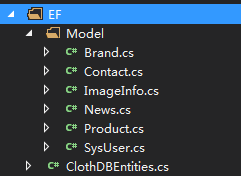
1.context数据库上下文class:
using System;

using System.Collections.Generic;

using System.Data.Entity;

using System.Data.Entity.Infrastructure;

using System.Linq;

using System.Web;

namespace ClothMvcApp.EF

{

    public class ClothDBContext: DbContext, IDisposable

    {

        public ClothDBContext()

            : base("name=ClothDBContext")

        {

        }

        protected override void OnModelCreating(DbModelBuilder modelBuilder)

        {

            base.OnModelCreating(modelBuilder);

        }

        public DbSet<News> News { get; set; }

        public DbSet<Product> Product { get; set; }

        public DbSet<SysUser> SysUser { get; set; }

        public DbSet<Brand> Brand { get; set; }

        public DbSet<ImageInfo> ImageInfo { get; set; }

        public DbSet<Contact> Contact { get; set; }

    }

}
2.Model实体类:
添加所需程序集:
Install-Package System.ComponentModel.Annotations
如下图:

using System;

using System.Collections.Generic;

using System.ComponentModel.DataAnnotations.Schema;

using System.Linq;

using System.Web;

namespace ClothMvcApp.EF

{

    [Table("Brand")]

    public class Brand

    {

        [Column("Id")]

        public Guid Id { get; set; }

        [Column("Content")]

        public string Content { get; set; }

        [Column("Picture")]

        public string Picture { get; set; }

        [Column("CreateTime")]

        public DateTime CreateTime { get; set; }

    }

}
有外键字段Model:
using System;

using System.ComponentModel.DataAnnotations;

using System.ComponentModel.DataAnnotations.Schema;

namespace Lemon.Media.Entities

{

    /// <summary>

    /// 渠道应用

    /// </summary>

     [Table("Channel_Apps")]

   public  class ChannelApp

    {

         [Key, Column("Id")]

        public Guid Id { get; set; }

         /// <summary>

         /// 渠道ID(主要指物业)

         /// </summary>

         [Column("ChannelId")]

        public int ChannelId { get; set; }

         /// <summary>

         /// 是否由H5承载实现

         /// </summary>

         [Column("IsH5")]

         public bool IsH5 { get; set; }

         /// <summary>

         /// App应用唯一标识

         /// </summary>

         [Column("AppKey")]

        public string AppKey { get; set; }

         /// <summary>

         /// 添加时间

         /// </summary>

         [Column("AddTime")]

        public DateTime AddTime { get; set; }

         /// <summary>

         /// 是否删除

         /// </summary>

         [Column("IsDel")]

        public bool IsDel { get; set; }

         /// <summary>

         /// 是否需要PPTV

         /// </summary>

         [Column("HasPPTV")]

         public bool HasPPTV { get; set; }

         /// <summary>

         /// 渠道

         /// </summary>

         [ForeignKey("ChannelId")]

         public virtual Channel Channel { get; set; }

    }

}
3.web.config 数据库连接字符串:
<connectionStrings>

    <add name="ClothDBContext" connectionString="Data Source=.;Initial Catalog=ClothDB;User ID=sa;Password=123456;Pooling=true;" providerName="System.Data.SqlClient" />

  </connectionStrings>
4.简单的调用方式:
using (var context = new ClothDBEntities())

            {

                context.ImageInfo.Where(c => c.Cate == "banner").OrderByDescending(c => c.CreateTime).Take().ToList();

            }
ps:卸载nuget包:
Uninstall-Package System.ComponentModel.Annotations
手动写Entity Framework 数据库上下文和Model实体的更多相关文章
- Entity Framework 数据库初始化四种策略
策略一:数据库不存在时重新创建数据库 Database.SetInitializer<testContext>(new CreateDatabaseIfNotExists<testC ...
- Entity Framework数据库初始化四种策略
策略一:数据库不存在时重新创建数据库 程序代码 Database.SetInitializer<testContext>(new CreateDatabaseIfNotExists< ...
- [Programming Entity Framework] 第3章 查询实体数据模型(EDM)(一)
http://www.cnblogs.com/sansi/archive/2012/10/18/2729337.html Programming Entity Framework 第二版翻译索引 你可 ...
- Entity Framework 数据库先行、模型先行、代码先行
数据库先行(Database First):基于已存在的数据库,利用某些工具(如Vs提供的EF设计器)创建实体类,数据库对象与实体类的匹配关系等,你也可以手动修改这些自动生成的代码及匹配文件. 模型先 ...
- Entity Framework入门教程:创建实体数据模型
下图为一个已经创建好的数据库表关系 实体数据模型的创建过程 在Visual Studio项目中,右键程序集菜单,选择[添加]->[新建项],在[添加新项窗口]中选择[ADO.NET实体数据模型] ...
- Visual Studio2017中如何让Entity Framework工具【ADO.NET实体数据模型】支持MYSQL数据源
熟悉Entity Framework应该对以下图片不陌生,他就是ADO.NET实体数据模型向导:可以将数据库的表自动生成模型类,或者创建Code First的模型文件. 但是这个模型向导默认只显示微软 ...
- Entity framework 加载多层相关实体数据
Entity framework有3种加载数据的方式:懒汉式(Lazy loading),饿汉式(Eager loading),显示加载(Explicit loading).3种加载方式有各自的优缺点 ...
- Mysql 该如何 Entity Framework 数据库迁移 和 如何更好的支持EntityFramework.Extended
问题 1.在使用EntityFramework访问Mysql的时候,使用迁移来生成数据库或者更新数据库时候会遇到一些问题 2.EntityFramework.Extended对Mysql的支持不是很完 ...
- Entity FrameWork Code First 之Model分离
之前一直用DB First新建类库进行使用,最近开始研究Code First.Code First也可以将Model新建在类库里面,然后通过数据迁移等操作生成数据库. 现在说下主要步骤: 1.新建类库 ...
随机推荐
- Android 架构 -- Room
gradle依赖: // add for room implementation "android.arch.persistence.room:runtime:1.1.1" // ...
- java 子类强转父类 父类强转子类
Java 继承 继承就是子类继承父类的特征和行为,使得子类对象(实例)具有父类的实例域和方法,或子类从父类继承方法,使得子类具有父类相同的行为. Java 子类强转父类 父类引用指向子类对象: jav ...
- pytest 5. fixture之yield实现teardown
前言: 1.前面讲的是在用例前加前置条件,相当于setup,既然有setup那就有teardown,fixture里面的teardown用yield来唤醒teardown的执行 看以下的代码: #!/ ...
- The CLI moved into a separate package: webpack-cli.解决办法
The CLI moved into a separate package: webpack-cli.Please install ‘webpack-cli‘ in addition to webpa ...
- 原生JS正则实现trim()
Jquery中封装有trim() 原生需要自己实现,我们可以用原型的方式自己封装trim()方法,实现去掉前后空格.前空格.后空格...所以不必抱怨,简单又灵活,这才是强大的JS的特色 String. ...
- POJ 2976 Dropping tests(01分数规划)
Dropping tests Time Limit: 1000MS Memory Limit: 65536K Total Submissions:17069 Accepted: 5925 De ...
- 【清北学堂2018-刷题冲刺】Contest 3
比较数学的一场,难度稍大. Task 1:数数 [问题描述] fadbec 很善于数数,⽐如他会数将a 个红球,b 个黄球,c 个蓝球,d个绿球排成⼀列,求出任意相邻不同⾊的方案数⽬. 现在R ...
- node.js(小案例)_实现学生信息增删改
一.前言 本节内容主要对小案例做一个总结: 1.如何开始搭建小项目 2.路由设计 3.模块应用 4.项目源码以及实现过程github地址: 项目演示如下: 二.主要内容 1.项目的关键性js源码: 项 ...
- 定时任务调度-Celery
确保任务不重叠解决方法: from celery import task from celery.five import monotonic from celery.utils.log import ...
- Kafka技术内幕 读书笔记之(五) 协调者——消费组状态机
协调者保存的消费组元数据中记录了消费组的状态机 , 消费组状态机的转换主要发生在“加入组请求”和“同步组请求”的处理过程中 .协调者处理“离开消费组请求”“迁移消费组请求”“心跳请求” “提交偏移量请 ...