
LifecycleProcessor not initialized - call 'refresh' before invoking lifecycle methods via the context: Root WebApplicationContext: startup date [Sun Jan 13 17:59:19 CST 2019]; root of context hierarch
在运行项目时出现了:LifecycleProcessor not initialized - call 'refresh' before invoking lifecycle methods via the context: Root WebApplicationContext: startup date [Sun Jan 13 17:59:19 CST 2019]; root of context hierarchy
我在百度搜索了半天,都试了一下,却都不是我要的结果, 后来才发现这不是我运行异常真正的引发点。
后来我往上翻了一下:看到了: java.lang.ClassNotFoundException: com.sun.tools.internal.xjc.model.Model
原来是我Model导入的包不对。
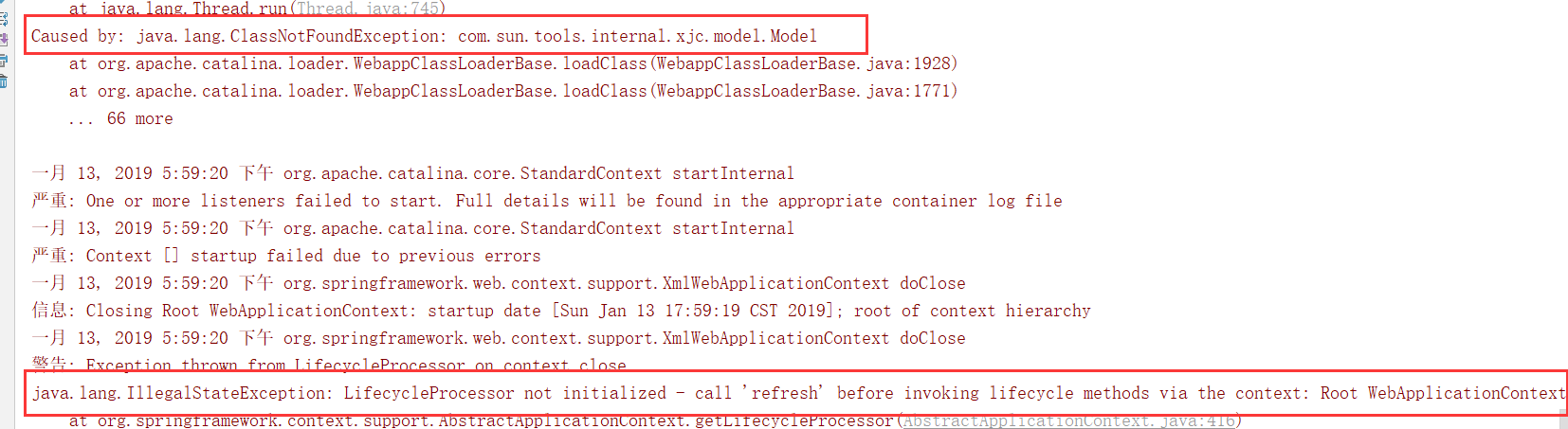
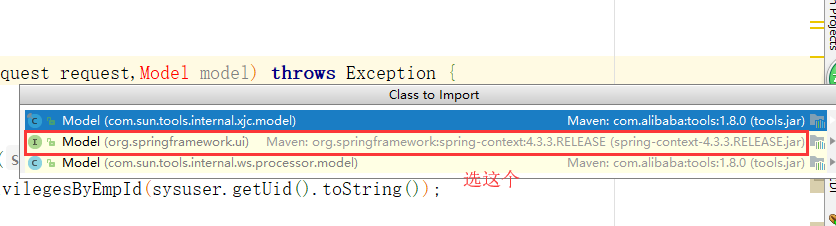
可能你出现LifecycleProcessor not initialized - call 'refresh' before invoking lifecycle methods via the context: Root WebApplicationContext: startup date [Sun Jan 13 17:59:19 CST 2019]; root of context hierarch并不是这个引发的问题,
也有可能就是单纯因为这个引发的问题: 可以参考 https://blog.csdn.net/u011418173/article/details/79066323
LifecycleProcessor not initialized - call 'refresh' before invoking lifecycle methods via the context: Root WebApplicationContext: startup date [Sun Jan 13 17:59:19 CST 2019]; root of context hierarch的更多相关文章
- LifecycleProcessor not initialized - call 'refresh' before invoking lifecycle methods via the context: --异常记录
升级了JDK之后,启动应用,直接抛出此异常.网上搜罗半天,没有正确的解决方案. 然后想到了是“升级了JDK”,重新检查所有JDK相关的配置的地方,在Debug Configurations里找到启动时 ...
- LifecycleProcessor not initialized - call 'refresh' before invoking lifecycle methods via the contex异常的原因
eclipse里面启动tomcat报这个错误的原因是由于jar包冲突了,在我的项目里面引入了jar包,但是我的工程里面有这个jar包的两个工程,都被导入到同一个项目里面了,导致不知道该去用哪一个类,所 ...
- java.lang.IllegalStateException: LifecycleProcessor not initialized - call 'refresh' before invoking lifecycle methods via the context: Root WebApplicationContext: startup date [Mon Oct 01 16:32:37 CS
使用idea工具更改项目包名时报 :java.lang.ClassNotFoundException 解决方案: 1.删除项目的target目录,这个目录存放的是编译后的文件 2.清除缓存 3.重新编 ...
- eclipse启动报错java.lang.IllegalStateException: LifecycleProcessor not initialized - call 'refresh' befo
报错: java.lang.IllegalStateException: LifecycleProcessor not initialized - call 'refresh' before invo ...
- java.lang.IllegalStateException: ApplicationEventMulticaster not initialized - call 'refresh' before multicasting events via the context 错误
spring boot 项目启动报错:原因一般是注入了相同名字的service -- :: com.gxcards.mes.MainWwwWeb: logStartupProfileInfo INFO ...
- ApplicationEventMulticaster not initialized - call 'refresh' before
https://stackoverflow.com/questions/45318618/applicationeventmulticaster-not-initialized-call-refres ...
- vue & lifecycle methods & this bug & ES6 Arrow function & this bind bug
vue & lifecycle methods & this bug ES6 Arrow function & this bind bug bad fetchTableData ...
- React LifeCycle Methods & re-learning 2019
React LifeCycle Methods & re-learning 2019 v16.9.0 https://reactjs.org/docs/react-component.html ...
- [MST] Use Volatile State and Lifecycle Methods to Manage Private State
MST has a pretty unique feature: It allows you to capture private state on models, and manage this s ...
随机推荐
- File初识和练习
目录 File类 File对象的构建 File文件名.路径的获取 文件的状态 文件的其他操作 创建文件夹 列出下一级 实战练习1:列出子孙级目录及名称 实战练习2:列出文件及其子孙文件的总大小 实战练 ...
- 校赛F
问题描述 例如对于数列[1 2 3 4 5 6],排序后变为[6 1 5 2 4 3].换句话说,对于一个有序递增的序列a1, a2, a3, ……, an,排序后为an, a1, an-1, a2, ...
- Redis数据类型-Strings
Redis 简介 REmote DIctionary Server(Redis) 是一个由Salvatore Sanfilippo写的key-value存储系统. Redis是一个开源的使用ANSI ...
- insmod 签名问题
问题现象: 通过 insmod 加载 XXX.ko 时候提示: hello: module verification failed: signature and/or required key mis ...
- HTTP之状态码
状态代码有三位数字组成,第一个数字定义了响应的类别,共分五种类别: 1xx:指示信息--表示请求已接收,继续处理 2xx:成功--表示请求已被成功接收.理解.接受 3xx:重定向--要完成请求必须进行 ...
- 20175229张智敏 Arrays和String单元测试
Arrays和String单元测试 1.具体要求: 在IDEA中以TDD的方式对String类和Arrays类进行学习 测试相关方法的正常,错误和边界情况 String类 charAt split A ...
- 关于管理,你可能一直有 3 个误解zz
很多管理者认为,下属绩效低是由于其能力不行.其实,下属的绩效是由管理者决定的.一个好的管理者,必须对管理有正确的认知,才能形成有效的管理行为,让下属拥有绩效,并获得成长.来源丨春暖花开(ID:CCH_ ...
- linux下PythonQt混编记录
看了很多博主经验,然后自己实验总结出来的,就不一一写出处了,非常感谢各位博主的分享经验. 一.安装Python3.6 安装依赖环境 # yum -y install zlib-devel bzip2- ...
- java日志系统中的 NDC
NDC https://www.cnblogs.com/smile361/p/3853404.html
- kubernetes1.7.6 ha高可用部署
写在前面: 1. 该文章部署方式为二进制部署. 2. 版本信息 k8s 1.7.6,etcd 3.2.9 3. 高可用部分 etcd做高可用集群.kube-apiserver 为无状态服务使用hap ...