
Spring Boot入门(12)实现页面访问量统计功能
在日常的网站使用中,经常会碰到页面的访问量(或者访问者人数)统计。那么,在Spring Boot中该如何实现这个功能呢?
我们的想法是比较简单的,那就是将访问量储存在某个地方,要用的时候取出来即可,储存的位置可选择数据库或者其他文件。本例所使用的例子为txt文件,我们将访问量数据记录在D盘的count.txt文件中。
下面直接开始本次的项目。整个项目的完整结构如下:
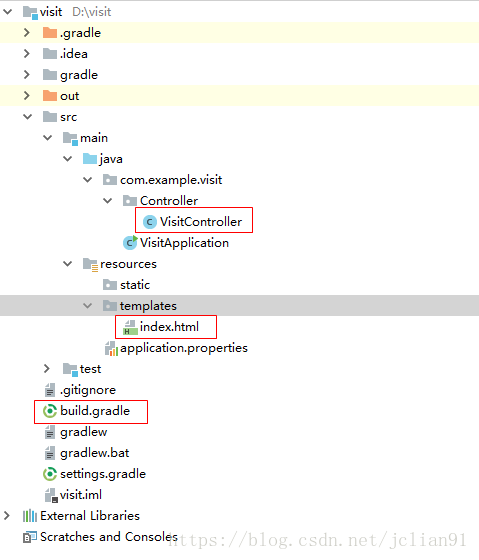
我们只需要修改划红线的三个文件,其中build.gradle的代码如下:
buildscript {

	ext {

		springBootVersion = '2.0.3.RELEASE'

	}

	repositories {

		mavenCentral()

	}

	dependencies {

		classpath("org.springframework.boot:spring-boot-gradle-plugin:${springBootVersion}")

	}

}

apply plugin: 'java'

apply plugin: 'eclipse'

apply plugin: 'org.springframework.boot'

apply plugin: 'io.spring.dependency-management'

group = 'com.example'

version = '0.0.1-SNAPSHOT'

sourceCompatibility = 1.8

repositories {

	mavenCentral()

}

dependencies {

	compile('org.springframework.boot:spring-boot-starter-web')

	// https://mvnrepository.com/artifact/org.springframework.boot/spring-boot-starter-thymeleaf

	compile group: 'org.springframework.boot', name: 'spring-boot-starter-thymeleaf', version: '2.0.1.RELEASE'

}
视图文件(模板)index.HTML的代码如下:
<!DOCTYPE html>
<html xmlns:th="http://www.thymeleaf.org">
<head>
<meta http-equiv="Content-Type" content="text/html; charset=UTF-8" />
<title>访问统计</title>
<script th:inline="javascript">
function load(){
var count = [[${count}]];
document.getElementById("visit").innerHTML = count.toString();
}
</script>
</head>
<body onload="load()">
<h1>Hello, world!</h1>
<p>  本页面已被访问<span id="visit"></span>次。</p>
</body>
</html>
控制器文件VisitController.java文件的代码如下:
package com.example.visit.Controller;

import java.io.*;

import java.util.Map;

import org.springframework.stereotype.Controller;

import org.springframework.web.bind.annotation.GetMapping;

@Controller

public class VisitController {

    @GetMapping("/index")

    public String Index(Map <String, Object> map){

        // 获取访问量信息

        String txtFilePath = "D://count.txt";

        Long count = Get_Visit_Count(txtFilePath);

        System.out.println(count);

        map.put("count", count); // 后台参数传递给前端

        return "index";

    }

    /*

     * 获取txt文件中的数字,即之前的访问量

     * 传入参数为: 字符串: txtFilePath,文件的绝对路径

     */

    public static Long Get_Visit_Count(String txtFilePath) {

        try {

            //读取文件(字符流)

            BufferedReader in = new BufferedReader(new InputStreamReader(new FileInputStream(txtFilePath),"UTF-8"));

            //循环读取数据

            String str = null;

            StringBuffer content = new StringBuffer();

            while ((str = in.readLine()) != null) {

                content.append(str);

            }

            //关闭流

            in.close();

            //System.out.println(content);

            // 解析获取的数据

            Long count = Long.valueOf(content.toString());

            count ++; // 访问量加1

            //写入相应的文件

            BufferedWriter out = new BufferedWriter(new OutputStreamWriter(new FileOutputStream(txtFilePath),"UTF-8"));

            out.write(String.valueOf(count));

            //清楚缓存

            out.flush();

            //关闭流

            out.close();

            return count;

        }

        catch (Exception e){

            e.printStackTrace();

            return 0L;

        }

    }

}
这样我们就完成了整个项目的配置,最后,我们在D盘中的count.txt中写入数字0,作为初始访问量。
运行Spring Boot项目,在浏览器中输入localhost:8080/index , 显示的页面如下:
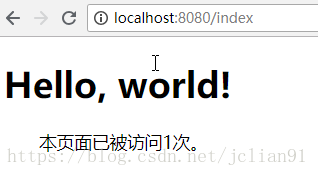
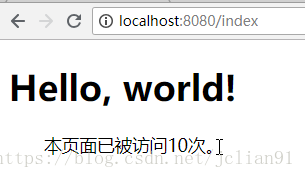
刚载入页面时,显示页面被访问1次。当我们将这个这也载入10次后,显示如下:
这样我们就用Spring Boot实现了页面访问量的统计功能。
本次分享到此结束,欢迎大家交流~~
注意:本人现已开通两个微信公众号: 因为Python(微信号为:python_math)以及轻松学会Python爬虫(微信号为:easy_web_scrape), 欢迎大家关注哦~~
Spring Boot入门(12)实现页面访问量统计功能的更多相关文章
- Spring Boot入门(11)实现文件下载功能
在这篇博客中,我们将展示如何在Spring Boot中实现文件的下载功能. 还是遵循笔者写博客的一贯风格,简单又不失详细,实用又能让你学会. 本次建立的Spring Boot项目的主要功能 ...
- Spring boot入门(三):SpringBoot集成结合AdminLTE(Freemarker),利用generate自动生成代码,利用DataTable和PageHelper进行分页显示
关于SpringBoot和PageHelper,前篇博客已经介绍过Spring boot入门(二):Spring boot集成MySql,Mybatis和PageHelper插件,前篇博客大致讲述了S ...
- Spring Boot 入门(十二):报表导出,对比poi、jxl和esayExcel的效率
本片博客是紧接着Spring Boot 入门(十一):集成 WebSocket, 实时显示系统日志写的 关于poi.jxl和esayExcel的介绍自行百度. jxl最多支持03版excel,所以单个 ...
- spring boot入门教程——Spring Boot快速入门指南
Spring Boot已成为当今最流行的微服务开发框架,本文是如何使用Spring Boot快速开始Web微服务开发的指南,我们将使创建一个可运行的包含内嵌Web容器(默认使用的是Tomcat)的可运 ...
- Spring Boot 入门之持久层篇(三)
原文地址:Spring Boot 入门之持久层篇(三) 博客地址:http://www.extlight.com 一.前言 上一篇<Spring Boot 入门之 Web 篇(二)>介绍了 ...
- Spring Boot 入门之 Web 篇(二)
原文地址:Spring Boot 入门之 Web 篇(二) 博客地址:http://www.extlight.com 一.前言 上一篇<Spring Boot 入门之基础篇(一)>介绍了 ...
- Spring Boot 入门 - 目录
pring Boot 入门 - 进阶篇(3)- 定时任务(@Scheduled) 主要用于定时发送邮件.夜间自动维护等. (1)开启定时任务功能 @Configuration @EnableSched ...
- 161103、Spring Boot 入门
Spring Boot 入门 spring Boot是Spring社区较新的一个项目.该项目的目的是帮助开发者更容易的创建基于Spring的应用程序和服务,让更多人的人更快的对Spring进行入门体验 ...
- Spring Boot 入门(六):集成 treetable 和 zTree 实现树形图
本篇文章是接着Spring Boot 入门(五):集成 AOP 进行日志管理写的,主要集成了树形图,在部门列表或者权限列表中,树形图经常被用上.主要是根据相应的 API 凭借 html 字符串 1.t ...
随机推荐
- python_flask 基础巩固(自定义URL转换器)
自定义URL转换器(在BaseConverter类外定义)from werkzeug.routing import BaseConverter定义类继承BaseConverter 实现类app.url ...
- Monkey测试结果分析
Monkey测试结果分析 什么是monkey Monkey 测试是 Android 自动化测试的手段之一,它通过模拟用户的按键输入.触摸屏输入等,测试设备多长时间出现异常.Monkey 是一个命令行工 ...
- Excel VBA(宏):添加宏
写在前面: .编写宏,打开VBA,双击ThisWorkbook对当前工作薄进行编写宏:双击Sheet1,对整个sheet编写宏: 或者创建模块,在模块里,编写.调试代码. 打开VBA的方法见第一讲,结 ...
- 211806385 黄存慧 https://www.cnblogs.com/huangch/ https://github.com/HuangCh327
211806385 黄存慧 https://www.cnblogs.com/huangch/ https://github.com/HuangCh327
- 下载、安装JDK并配置JDK的环境变量
概念简介: JDK:(Java Development Kit)Java语言的软件开发工具包,它包含了Java程序的开发工具和Java程序的运行环境JRE: JRE:(Java Runtime Env ...
- kubernets基础
1.定义和功能. 1.1定义:kubernets解释为舵手或者飞行员,以Borg为主衍生出. 1.2功能:自动装箱,自我修复,水平扩展,服务发现和负载均衡,自动发布和回滚. 密钥和配置管理,存储编排, ...
- Shader_ShaderForge_NGUI_序列帧/
序列帧 Shader篇 Shader Forge序列帧算法! 附上Shader代码部分: // Shader created with Shader Forge v1.26 // Shader For ...
- 传统对象池&AB对象池
前序: Q:为啥需要对象池? A: 游戏中大量出现或销毁对象时会反复的开堆和放堆,程序与内存之间交互过于频繁导致资源的大量浪费 Q: 对象池实现原理? A: 当子对象池没有物体的时候,它会和普通没加对 ...
- 利用Socket 实现多客户端的请求与响应
import java.io.IOException; import java.net.ServerSocket; import java.net.Socket; public class Serve ...
- datepart in ssis
"\\\\"+_"+ (DT_STR,4,1252)DATEPART( "yyyy" , @[System::StartTime] ) + RIGHT ...