
201772020113 李清华《面向对象程序设计(java)》第16周学习总结
1、实验目的与要求
(1) 掌握线程概念;
(2) 掌握线程创建的两种技术;
(3) 理解和掌握线程的优先级属性及调度方法;
(4) 掌握线程同步的概念及实现技术;
2、实验内容和步骤
实验1:测试程序并进行代码注释。
测试程序1:
l 在elipse IDE中调试运行ThreadTest,结合程序运行结果理解程序;
l 掌握线程概念;
l 掌握用Thread的扩展类实现线程的方法;
利用Runnable接口改造程序,掌握用Runnable接口创建线程的方法。
|
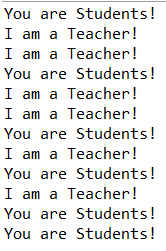
class Lefthand extends Thread { public void run() { for(int i=0;i<=5;i++) { System.out.println("You are Students!"); try{ sleep(500); } catch(InterruptedException e) { System.out.println("Lefthand error.");} } } } class Righthand extends Thread { public void run() { for(int i=0;i<=5;i++) { System.out.println("I am a Teacher!"); try{ sleep(300); } catch(InterruptedException e) { System.out.println("Righthand error.");} } } } public class ThreadTest { static Lefthand left; static Righthand right; public static void main(String[] args) { left=new Lefthand(); right=new Righthand(); left.start(); right.start(); } } |
运行结果:
测试程序2:
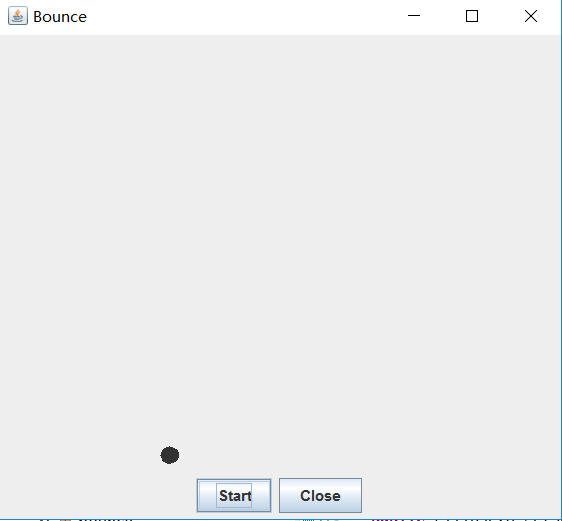
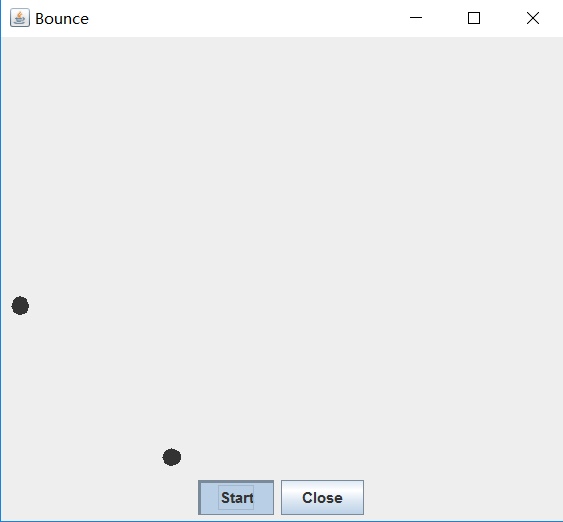
l 在Elipse环境下调试教材625页程序14-1、14-2 、14-3,结合程序运行结果理解程序;
 package bounce;

 import java.awt.*;

 import java.awt.event.*;

 import javax.swing.*;

 /**

  * 显示动画弹跳球

  * @version 1.34 2015-06-21

  * @author Cay Horstmann

  */

 public class Bounce

 {

    public static void main(String[] args)

    {

       EventQueue.invokeLater(() -> {

          JFrame frame = new BounceFrame();

          frame.setDefaultCloseOperation(JFrame.EXIT_ON_CLOSE);

          frame.setVisible(true);

       });

    }

 }

 /**

  * 框架与球组件和按钮

  */

 class BounceFrame extends JFrame

 {

    private BallComponent comp;

    public static final int STEPS = 1000;

    public static final int DELAY = 3;

    /**

     * 使用组件构造框架以显示弹跳球和“开始”和“关闭”按钮

     */

    public BounceFrame()

    {

       setTitle("Bounce");

       comp = new BallComponent();

       add(comp, BorderLayout.CENTER);

       JPanel buttonPanel = new JPanel();

       addButton(buttonPanel, "Start", event -> addBall());

       addButton(buttonPanel, "Close", event -> System.exit(0));

       add(buttonPanel, BorderLayout.SOUTH);

       pack();

    }

    /**

     * 向容器添加按钮

     * @param c the container

     * @param title the button title

     * @param listener the action listener for the button

     */

    public void addButton(Container c, String title, ActionListener listener)

    {

       JButton button = new JButton(title);

       c.add(button);

       button.addActionListener(listener);

    }

    /**

     * 在面板上添加一个弹跳球,使其反弹1,000次

     */

    public void addBall()

    {

       try

       {

          Ball ball = new Ball();

          comp.add(ball);

          for (int i = 1; i <= STEPS; i++)

          {

             ball.move(comp.getBounds());

             comp.paint(comp.getGraphics());

             Thread.sleep(DELAY);

          }

       }

       catch (InterruptedException e)

       {

       }

    }

 }
Bounce
 package bounce;

 import java.awt.*;

 import java.util.*;

 import javax.swing.*;

 /**

  * 绘制球的组件

  * @version 1.34 2012-01-26

  * @author Cay Horstmann

  */

 public class BallComponent extends JPanel

 {

    private static final int DEFAULT_WIDTH = 450;

    private static final int DEFAULT_HEIGHT = 350;

    private java.util.List<Ball> balls = new ArrayList<>();

    /**

     * 向组件添加球

     * @param b the ball to add

     */

    public void add(Ball b)

    {

       balls.add(b);

    }

    public void paintComponent(Graphics g)

    {

       super.paintComponent(g); // 擦除背景

       Graphics2D g2 = (Graphics2D) g;

       for (Ball b : balls)

       {

          g2.fill(b.getShape());

       }

    }

    public Dimension getPreferredSize() { return new Dimension(DEFAULT_WIDTH, DEFAULT_HEIGHT); }

 }
BallComponent
 package bounce;

 import java.awt.geom.*;

 /**

  * 从矩形边缘移动并弹回的球

  * @version 1.33 2007-05-17

  * @author Cay Horstmann

  */

 public class Ball

 {

    private static final int XSIZE = 15;

    private static final int YSIZE = 15;

    private double x = 0;

    private double y = 0;

    private double dx = 1;

    private double dy = 1;

    /**

     * 将球移动到下一个位置,如果碰到其中一个边缘则反转方向

     */

    public void move(Rectangle2D bounds)

    {

       x += dx;

       y += dy;

       if (x < bounds.getMinX())

       {

          x = bounds.getMinX();

          dx = -dx;

       }

       if (x + XSIZE >= bounds.getMaxX())

       {

          x = bounds.getMaxX() - XSIZE;

          dx = -dx;

       }

       if (y < bounds.getMinY())

       {

          y = bounds.getMinY();

          dy = -dy;

       }

       if (y + YSIZE >= bounds.getMaxY())

       {

          y = bounds.getMaxY() - YSIZE;

          dy = -dy;

       }

    }

    /**

     * 获取球在其当前位置的形状。

     */

    public Ellipse2D getShape()

    {

       return new Ellipse2D.Double(x, y, XSIZE, YSIZE);

    }

 }
Ball
l 在Elipse环境下调试教材631页程序14-4,结合程序运行结果理解程序;
 package bounceThread;

 import java.awt.*;

 import java.awt.event.*;

 import javax.swing.*;

 /**

  * 显示动画弹跳球

  * @version 1.34 2015-06-21

  * @author Cay Horstmann

  */

 public class BounceThread

 {

    public static void main(String[] args)

    {

       EventQueue.invokeLater(() -> {

          JFrame frame = new BounceFrame();

          frame.setTitle("BounceThread");

          frame.setDefaultCloseOperation(JFrame.EXIT_ON_CLOSE);

          frame.setVisible(true);

       });

    }

 }

 /**

  * 框架与球组件和按钮

  */

 class BounceFrame extends JFrame

 {

    private BallComponent comp;

    public static final int STEPS = 1000;

    public static final int DELAY = 5;

    /**

     * 用显示弹跳球以及开始和关闭按钮的组件构建框架

     */

    public BounceFrame()

    {

       comp = new BallComponent();

       add(comp, BorderLayout.CENTER);

       JPanel buttonPanel = new JPanel();

       addButton(buttonPanel, "Start", event -> addBall());

       addButton(buttonPanel, "Close", event -> System.exit(0));

       add(buttonPanel, BorderLayout.SOUTH);

       pack();

    }

    /**

     * 向容器添加按钮

     * @param c the container

     * @param title the button title

     * @param listener the action listener for the button

     */

    public void addButton(Container c, String title, ActionListener listener)

    {

       JButton button = new JButton(title);

       c.add(button);

       button.addActionListener(listener);

    }

    /**

     * 在画布上添加一个弹跳球,并启动一个线程使其弹跳

     */

    public void addBall()

    {

       Ball ball = new Ball();

       comp.add(ball);

       Runnable r = () -> {

          try

          {

             for (int i = 1; i <= STEPS; i++)

             {

                ball.move(comp.getBounds());

                comp.repaint();

                Thread.sleep(DELAY);

             }

          }

          catch (InterruptedException e)

          {

          }

       };

       Thread t = new Thread(r);

       t.start();

    }

 }
BounceThread

l 对比两个程序,理解线程的概念和用途;
l 掌握线程创建的两种技术。
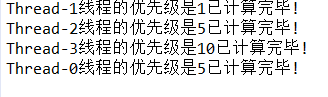
测试程序3:分析以下程序运行结果并理解程序。
|
class Race extends Thread { public static void main(String args[]) { Race[] runner=new Race[4]; for(int i=0;i<4;i++) runner[i]=new Race( ); for(int i=0;i<4;i++) runner[i].start( ); runner[1].setPriority(MIN_PRIORITY); runner[3].setPriority(MAX_PRIORITY);} public void run( ) { for(int i=0; i<1000000; i++); System.out.println(getName()+"线程的优先级是"+getPriority()+"已计算完毕!"); } } |
 class Race extends Thread {

     public static void main(String args[]) {

         Race[] runner = new Race[4];

         for (int i = 0; i < 4; i++)

             runner[i] = new Race();

         for (int i = 0; i < 4; i++)

             runner[i].start();

         runner[1].setPriority(MIN_PRIORITY);// 更改线程为最低优先级

         runner[3].setPriority(MAX_PRIORITY);// 更改线程为最高优先级

     }

     public void run() {

         for (int i = 0; i < 1000000; i++);// 起延时作用

         System.out.println(getName() + "线程的优先级是" + getPriority() + "已计算完毕!");

     }

 }
Race
测试程序4
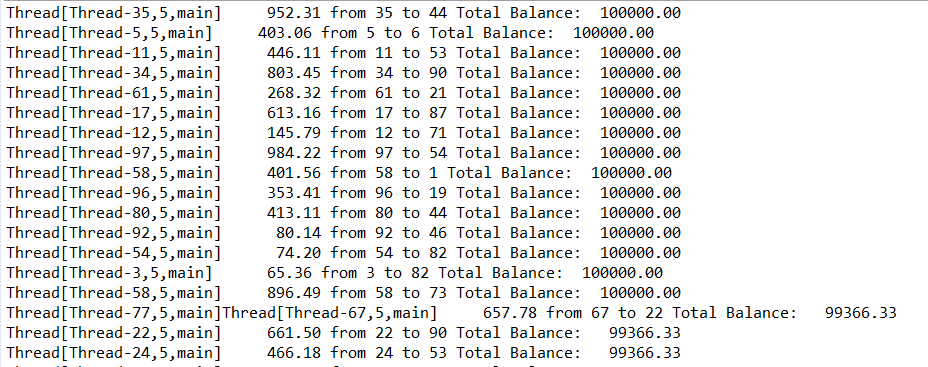
l 教材642页程序模拟一个有若干账户的银行,随机地生成在这些账户之间转移钱款的交易。每一个账户有一个线程。在每一笔交易中,会从线程所服务的账户中随机转移一定数目的钱款到另一个随机账户。
l 在Elipse环境下调试教材642页程序14-5、14-6,结合程序运行结果理解程序;
 package unsynch;

 import java.util.*;

 /**

  * 有许多银行账户的银行

  * @version 1.30 2004-08-01

  * @author Cay Horstmann

  */

 public class Bank

 {

    private final double[] accounts;

    /**

     * 建设银行 .

     * @param 账号的数目n

     * @param 每个账户的初始余额

     */

    public Bank(int n, double initialBalance)

    {

       accounts = new double[n];

       Arrays.fill(accounts, initialBalance);

    }

    /**

     * 把钱从一个账户转到另一个账户。

     * @param 从账户转账

     * @param 转到要转账的账户

     * @param 转账金额

     */

    public void transfer(int from, int to, double amount)

    {

       if (accounts[from] < amount) return;

       System.out.print(Thread.currentThread());

       accounts[from] -= amount;

       System.out.printf(" %10.2f from %d to %d", amount, from, to);

       accounts[to] += amount;

       System.out.printf(" Total Balance: %10.2f%n", getTotalBalance());

    }

    /**

     * 获取所有帐户余额的总和。

     * @return 总余额

     */

    public double getTotalBalance()

    {

       double sum = 0;

       for (double a : accounts)

          sum += a;

       return sum;

    }

    /**

     * 获取银行中的帐户数量。

     * @return 账户数量

     */

    public int size()

    {

       return accounts.length;

    }

 }
Bank
 package unsynch;

 /**

  * 当多个线程访问数据结构时,此程序显示数据损坏

  * @version 1.31 2015-06-21

  * @author Cay Horstmann

  */

 public class UnsynchBankTest

 {

    public static final int NACCOUNTS = 100;

    public static final double INITIAL_BALANCE = 1000;

    public static final double MAX_AMOUNT = 1000;

    public static final int DELAY = 10;

    public static void main(String[] args)

    {

       Bank bank = new Bank(NACCOUNTS, INITIAL_BALANCE);

       for (int i = 0; i < NACCOUNTS; i++)

       {

          int fromAccount = i;

          Runnable r = () -> {

             try

             {

                while (true)

                {

                   int toAccount = (int) (bank.size() * Math.random());

                   double amount = MAX_AMOUNT * Math.random();

                   bank.transfer(fromAccount, toAccount, amount);

                   Thread.sleep((int) (DELAY * Math.random()));

                }

             }

             catch (InterruptedException e)

             {

             }

          };

          Thread t = new Thread(r);

          t.start();

       }

    }

 }
UnsynchBankTest
综合编程练习
编程练习1
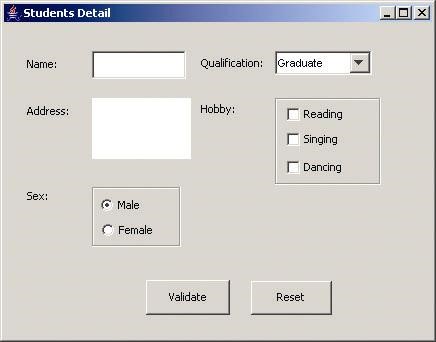
1. 设计一个用户信息采集程序,要求如下:
(1)用户信息输入界面如下图所示:
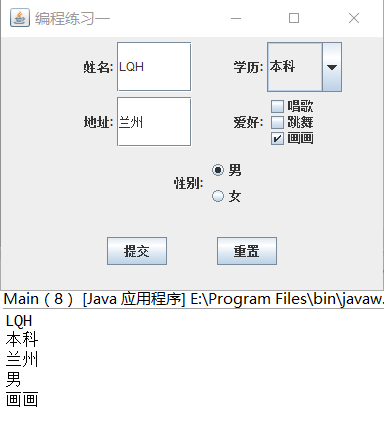
(2)用户点击提交按钮时,用户输入信息显示控制台界面
(3)用户点击重置按钮后,清空用户已输入信息
(4)点击窗口关闭,程序退出。
 package xxcj;

 import java.awt.EventQueue;

 import javax.swing.JFrame;

 public class Main {

     public static void main(String[] args) {

         EventQueue.invokeLater(() -> {

             DemoJFrame page = new DemoJFrame();

         });

     }

 }
 package xxcj;

 import java.awt.Dimension;

 import java.awt.Toolkit;

 import java.awt.Window;

 public class WinCenter {

     public static void center(Window win){

         Toolkit tkit = Toolkit.getDefaultToolkit();

         Dimension sSize = tkit.getScreenSize();

         Dimension wSize = win.getSize();

         if(wSize.height > sSize.height){

             wSize.height = sSize.height;

         }

         if(wSize.width > sSize.width){

             wSize.width = sSize.width;

         }

         win.setLocation((sSize.width - wSize.width)/ 2, (sSize.height - wSize.height)/ 2);

     }

 }
 package xxcj;

 import java.awt.Dimension;

 import java.awt.FlowLayout;

 import java.awt.GridLayout;

 import javax.swing.BorderFactory;

 import javax.swing.ButtonGroup;

 import javax.swing.JButton;

 import javax.swing.JCheckBox;

 import javax.swing.JComboBox;

 import javax.swing.JFrame;

 import javax.swing.JLabel;

 import javax.swing.JPanel;

 import javax.swing.JRadioButton;

 import javax.swing.JTextField;

 public class DemoJFrame extends JFrame {

     private JPanel jPanel1;

     private JPanel jPanel2;

     private JPanel jPanel3;

     private JPanel jPanel4;

     private JTextField fieldname;

     private JComboBox comboBox;

     private JTextField fieldadress;

     private ButtonGroup bg;

     private JRadioButton nan;

     private JRadioButton nv;

     private JCheckBox sing;

     private JCheckBox dance;

     private JCheckBox draw;

     public DemoJFrame() {

         this.setSize(400, 300);

         this.setVisible(true);

         this.setTitle("编程练习一");

         this.setDefaultCloseOperation(EXIT_ON_CLOSE);

         WinCenter.center(this);

         jPanel1 = new JPanel();

         setJPanel1(jPanel1);

         jPanel2 = new JPanel();

         setJPanel2(jPanel2);

         jPanel3 = new JPanel();

         setJPanel3(jPanel3);

         jPanel4 = new JPanel();

         setJPanel4(jPanel4);

         FlowLayout flowLayout = new FlowLayout();

         this.setLayout(flowLayout);

         this.add(jPanel1);

         this.add(jPanel2);

         this.add(jPanel3);

         this.add(jPanel4);

     }

     private void setJPanel1(JPanel jPanel) {

         jPanel.setPreferredSize(new Dimension(300, 50));

         jPanel.setLayout(new GridLayout(1, 4));

         JLabel name = new JLabel("              姓名:");

         fieldname = new JTextField("");

         JLabel study = new JLabel("              学历:");

         comboBox = new JComboBox();

         comboBox.addItem("初中");

         comboBox.addItem("高中");

         comboBox.addItem("本科");

         jPanel.add(name);

         jPanel.add(fieldname);

         jPanel.add(study);

         jPanel.add(comboBox);

     }

     private void setJPanel2(JPanel jPanel) {

         jPanel.setPreferredSize(new Dimension(300, 50));

         jPanel.setLayout(new GridLayout(1, 4));

         JLabel name = new JLabel("              地址:");

         fieldadress = new JTextField();

         JLabel study = new JLabel("              爱好:");

         JPanel selectBox = new JPanel();

         selectBox.setLayout(new GridLayout(3, 1));

         sing = new JCheckBox("唱歌");

         dance = new JCheckBox("跳舞");

         draw = new JCheckBox("画画");

         selectBox.add(sing);

         selectBox.add(dance);

         selectBox.add(draw);

         jPanel.add(name);

         jPanel.add(fieldadress);

         jPanel.add(study);

         jPanel.add(selectBox);

     }

     private void setJPanel3(JPanel jPanel) {

         jPanel.setPreferredSize(new Dimension(300,70));

         JLabel sex = new JLabel("            性别:");

         JPanel selectBox = new JPanel();

         selectBox.setLayout(new GridLayout(2,1));

         bg = new ButtonGroup();

         nan = new JRadioButton("男");

         nv = new JRadioButton("女");

         bg.add(nan);

         bg.add(nv);

         selectBox.add(nan);

         selectBox.add(nv);

         jPanel.add(sex);

         jPanel.add(selectBox);

     }

     private void setJPanel4(JPanel jPanel) {

         jPanel.setPreferredSize(new Dimension(300, 150));

         FlowLayout flowLayout = new FlowLayout(FlowLayout.CENTER, 50, 10);

         jPanel.setLayout(flowLayout);

         jPanel.setLayout(flowLayout);

         JButton sublite = new JButton("提交");

         JButton reset = new JButton("重置");

         sublite.addActionListener((e) -> valiData());

         reset.addActionListener((e) -> Reset());

         jPanel.add(sublite);

         jPanel.add(reset);

     }

     private void valiData() {

         String name = fieldname.getText().toString().trim();

         String xueli = comboBox.getSelectedItem().toString().trim();

         String address = fieldadress.getText().toString().trim();

         System.out.println(name);

         System.out.println(xueli);

         String hobbystring="";

         if (sing.isSelected()) {

             hobbystring+="唱歌";

         }

         if (dance.isSelected()) {

             hobbystring+="跳舞";

         }

         if (draw.isSelected()) {

             hobbystring+="画画";

         }

         System.out.println(address);

         if (nan.isSelected()) {

             System.out.println("男");

         }

         if (nv.isSelected()) {

             System.out.println("女");

         }

         System.out.println(hobbystring);

     }

     private void Reset() {

         fieldadress.setText(null);

         fieldname.setText(null);

         comboBox.setSelectedIndex(0);

         sing.setSelected(false);

         dance.setSelected(false);

         draw.setSelected(false);

         bg.clearSelection();

     }

 }
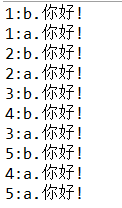
2.创建两个线程,每个线程按顺序输出5次“你好”,每个“你好”要标明来自哪个线程及其顺序号。
 package nihao;

 class Lefthand extends Thread {

     public void run() {

         for (int i = 0; i < 5; i++) {

             System.out.println(i + 1 + ":a.你好!");

             try {

                 Thread.sleep(500);

             } catch (InterruptedException e) {

                 System.out.println("Lefthand error.");

             }

         }

     }

 }

 class Righthand extends Thread {

     public void run() {

         for (int i = 0; i < 5; i++) {

             System.out.println(i + 1 + ":b.你好!");

             try {

                 Thread.sleep(300);

             } catch (InterruptedException e) {

                 System.out.println("Righthand error.");

             }

         }

     }

 }

 public class ThreadTest {

     static Lefthand left;

     static Righthand right;

     public static void main(String[] args) {

         left = new Lefthand();

         right = new Righthand();

         left.start();

         right.start();

     }

 }
3. 完善实验十五 GUI综合编程练习程序。
201772020113 李清华《面向对象程序设计(java)》第16周学习总结的更多相关文章
- 201771010134杨其菊《面向对象程序设计java》第九周学习总结
第九周学习总结 第一部分:理论知识 异常.断言和调试.日志 1.捕获 ...
- 扎西平措 201571030332《面向对象程序设计 Java 》第一周学习总结
<面向对象程序设计(java)>第一周学习总结 正文开头: 项目 内容 这个作业属于哪个课程 https://www.cnblogs.com/nwnu-daizh/ 这个作业的要求在哪里 ...
- 201871010132-张潇潇《面向对象程序设计(java)》第一周学习总结
面向对象程序设计(Java) 博文正文开头 项目 内容 这个作业属于哪个课程 https://www.cnblogs.com/nwnu-daizh/ 这个作业的要求在哪里 https://www.cn ...
- 杨其菊201771010134《面向对象程序设计Java》第二周学习总结
第三章 Java基本程序设计结构 第一部分:(理论知识部分) 本章主要学习:基本内容:数据类型:变量:运算符:类型转换,字符串,输入输出,控制流程,大数值以及数组. 1.基本概念: 1)标识符:由字母 ...
- 201871010124 王生涛《面向对象程序设计JAVA》第一周学习总结
项目 内容 这个作业属于哪个课程 https://www.cnblogs.com/nwnu-daizh/ 这个作业的要求在哪里 https://edu.cnblogs.com/campus/xbsf/ ...
- 201871010115——马北《面向对象程序设计JAVA》第二周学习总结
项目 内容 这个作业属于哪个课程 https://www.cnblogs.com/nwnu-daizh/ 这个作业的要求在哪里 https://www.cnblogs.com/nwnu-daizh/p ...
- 201871010132——张潇潇《面向对象程序设计JAVA》第二周学习总结
项目 内容 这个作业属于哪个课程 https://www.cnblogs.com/nwnu-daizh/ 这个作业的要求在哪里 https://www.cnblogs.com/nwnu-daizh/p ...
- 201777010217-金云馨《面向对象程序设计(Java)》第二周学习总结
项目 内容 这个作业属于哪个课程 https://www.cnblogs.com/nwnu-daizh/ 这个作业的要求在哪里 https://www.cnblogs.com/nwnu-daizh/p ...
- 201771010123汪慧和《面向对象程序设计Java》第二周学习总结
一.理论知识部分 1.标识符由字母.下划线.美元符号和数字组成, 且第一个符号不能为数字.标识符可用作: 类名.变量名.方法名.数组名.文件名等.第二部分:理论知识学习部分 2.关键字就是Java语言 ...
- 马凯军201771010116《面向对象与程序设计Java》第九周学习总结
一.理论知识部分 异常.日志.断言和调试 1.异常:在程序的执行过程中所发生的异常事件,它中断指令的正常执行. 2.Java的异常处理机制可以控制程序从错误产生的位置转移到能够进行错误处理的位置. 3 ...
随机推荐
- siimpleHttpServer 快速建立一个文件服务器
利用 SimpleHTTPServer 可以非常快速的建立一个http服务器,如果有同学在做共享文件时遇到了困难,只需要一行代码,即可建站完成. 在想要映射的文件夹目录内,执行命令行 python - ...
- C++ Object实体类
*暂未完成,因为无尽BUG滚滚来. 好长时间没写完,一是能力不够,二是我还得给老板写WEB的代码.可是我不会WEB!js和PHP简直就是世界上最好的语言,因为它们能够让人更快地进入极乐世界. 让我写一 ...
- 解决openstack实例主机名后缀问题
参考地址https://ask.openstack.org/en/question/26918/change-novalocal-suffix-in-hostname/ 问题现象 可以看到主机名的后缀 ...
- 盘点海口最好吃的西餐厅top10
Top 1:主厨的餐桌 餐厅地址:龙华区海秀路九号民航宾馆一楼大堂 主厨的餐桌Chef's Table是三位志同道合的大厨一起携手开办的西餐厅,正宗的西式料理.浓郁的浪漫气息,都是Chef's Tab ...
- SourceInsight宏插件3(非常好用,强力推荐)
openfolder.em源码:(链接:https://pan.baidu.com/s/1draaimWzCHZ3vLxL--lfiQ 提取码:zyq4) //使用资源管理器打开当前文件所在文件夹, ...
- siftflow-fcn32s训练及预测
一.说明 SIFT Flow 是一个标注的语义分割的数据集,有两个label,一个是语义分类(33类),另一个是场景标签(3类). Semantic and geometric segmentatio ...
- input框在浏览器上显示一个叉,去掉方法
/* 清除IE10及以上版本input的叉叉(X)和密码输入框的眼睛图标 */ input::-ms-clear { display: none; } input::-ms-reveal { disp ...
- oracle 查询所有约束
主键约束SELECT USER_CONS_COLUMNS.CONSTRAINT_NAME AS 约束名, USER_CONS_COLUMNS.TABLE_NAME AS 表名, USER_CON ...
- Notepad2用法说明
Notepad2用法说明:1.替换系统记事本.bat和恢复系统记事本.bat可以替换.回复系统记事本.2.查看→默认字体,编程可用Consolas,字号四号.3.查看→自定义方案,Identifier ...
- WIN10X64_LTSB2016极限精简版by双心
WIN10X64LTSB2016极限精简版by双心http://www.cnblogs.com/liuzhaoyzz/p/9162113.html 一.前言:关于极限精简版的说明 本系统为极限精简版, ...