
ggplot2绘制概率密度图
以下绘图以Weibull分布(韦伯分布、威布尔分布)为例
关于Weibull分布(韦伯分布、威布尔分布),请参考本人博客http://www.cnblogs.com/wwxbi/p/6141501.html
library(ggplot2)

# 这里的d和y都有大小顺序

d<- seq(0, 5, length.out=10000)

y<-dweibull(d, shape=5, scale=1, log = FALSE)

df<-data.frame(x=d,y)

ggplot(df,aes(x=d,y))+

  geom_line(colour="green")+

  ggtitle("Weibull distribution \n 概率密度图")

# 这里的h没有大小顺序

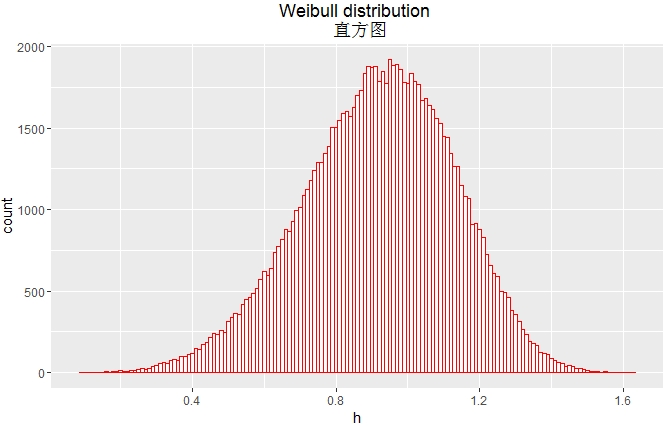
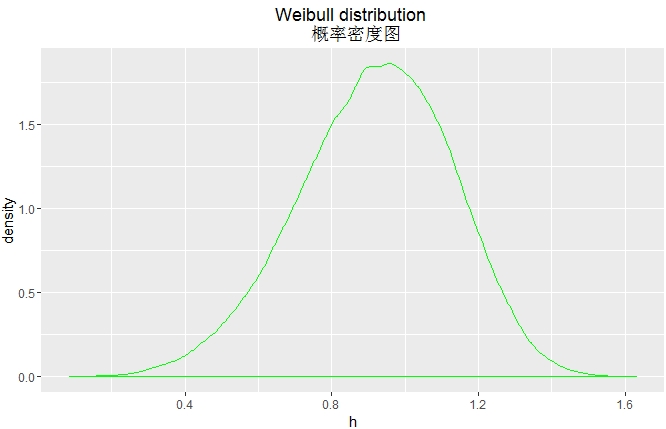
h <- rweibull(100000, shape=5, scale=1)

ggplot(NULL,aes(x=h))+

  geom_histogram(binwidth = 0.01,fill="white",colour="red")+

  ggtitle("Weibull distribution \n 直方图")
ggplot(NULL,aes(x=h))+

  geom_density(colour="green")+

  ggtitle("Weibull distribution \n 概率密度图")

ggplot(NULL,aes(x=h))+

  geom_line(stat="density",colour="green")+

  ggtitle("Weibull distribution \n 概率密度图")
library(sqldf)

library(ggplot2)

d<- seq(0, 5, length.out=10000)

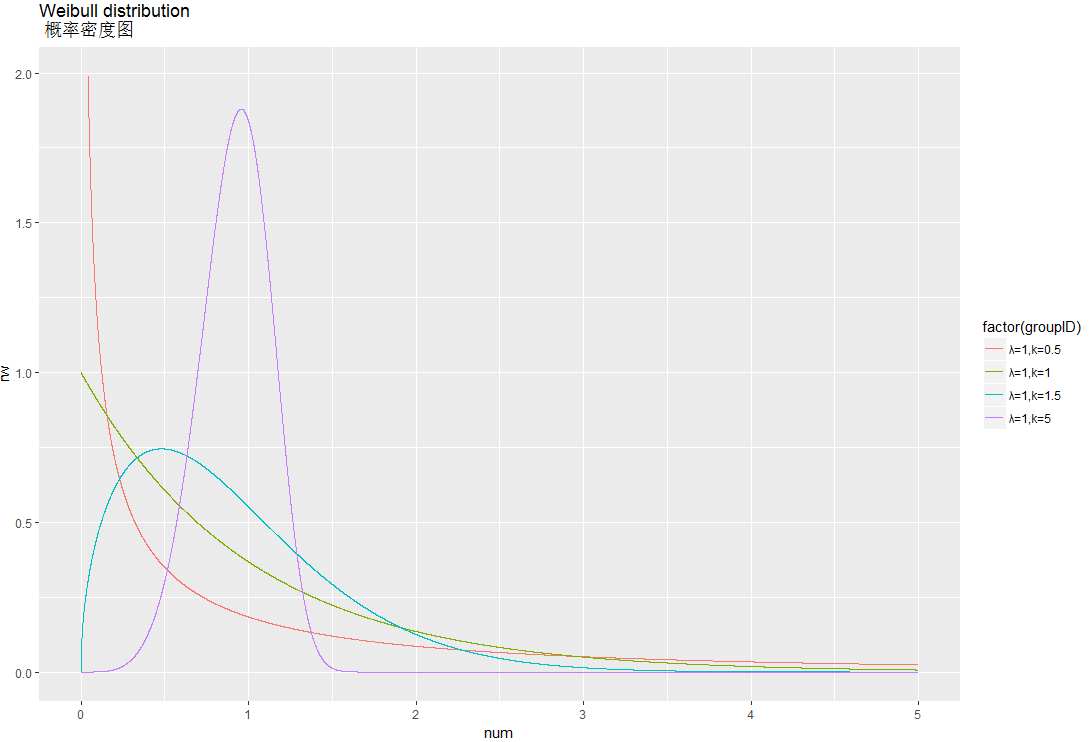
df1<-data.frame(num=seq(0,5,length=10000),groupID="λ=1,k=0.5",rw=dweibull(d, scale=1,shape=0.5 ))

df2<-data.frame(num=seq(0,5,length=10000),groupID="λ=1,k=1",rw=dweibull(d, scale=1,shape=1 ))

df3<-data.frame(num=seq(0,5,length=10000),groupID="λ=1,k=1.5",rw=dweibull(d, scale=1,shape=1.5 ))

df4<-data.frame(num=seq(0,5,length=10000),groupID="λ=1,k=5",rw=dweibull(d, scale=1,shape=5 ))

df5<-sqldf("

           select num,groupID,rw from df1

           union all

           select num,groupID,rw from df2

           union all

           select num,groupID,rw from df3

           union all

           select num,groupID,rw from df4 ")

df<-subset(df5, rw <2 )

ggplot(df,aes(x=num,y=rw,group=factor(groupID),colour=factor(groupID)))+

  geom_line()+

  ggtitle("Weibull distribution \n 概率密度图")
library(sqldf)

library(ggplot2)

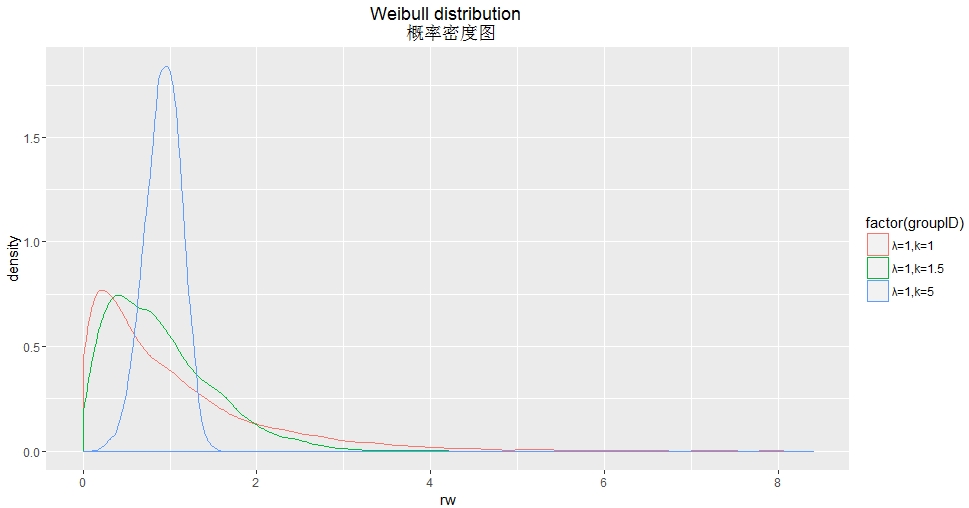
df2<-data.frame(num=seq(0,5,length=10000),groupID="λ=1,k=1",rw=rweibull(10000, scale=1,shape=1 ))

df3<-data.frame(num=seq(0,5,length=10000),groupID="λ=1,k=1.5",rw=rweibull(10000, scale=1,shape=1.5 ))

df4<-data.frame(num=seq(0,5,length=10000),groupID="λ=1,k=5",rw=rweibull(10000, scale=1,shape=5 ))

df<-sqldf("

          select num,groupID,rw from df2

          union all

          select num,groupID,rw from df3

          union all

          select num,groupID,rw from df4 ")

ggplot(df,aes(x=rw,group=factor(groupID),colour=factor(groupID)))+

  geom_density()+

  ggtitle("Weibull distribution \n 概率密度图")
library(sqldf)

library(ggplot2)

d<- seq(0, 5, length.out=10000)

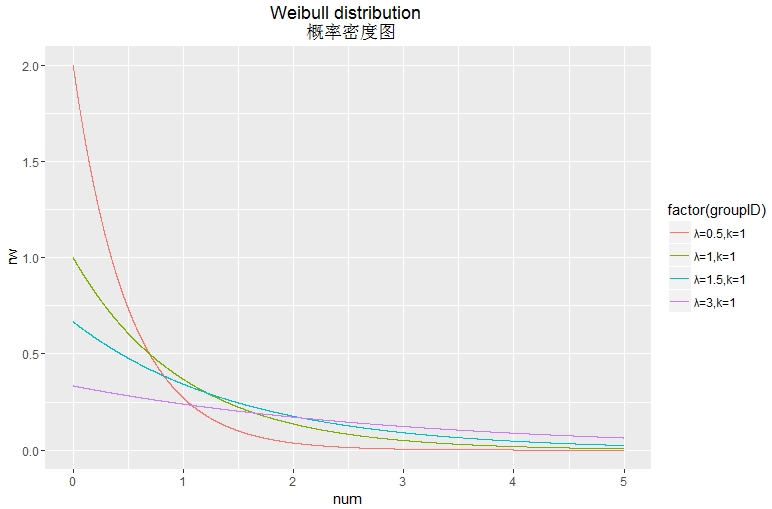
df1<-data.frame(num=seq(0,5,length=10000),groupID="λ=0.5,k=1",rw=dweibull(d, scale=0.5,shape=1 ))

df2<-data.frame(num=seq(0,5,length=10000),groupID="λ=1,k=1",rw=dweibull(d, scale=1,shape=1 ))

df3<-data.frame(num=seq(0,5,length=10000),groupID="λ=1.5,k=1",rw=dweibull(d, scale=1.5,shape=1 ))

df4<-data.frame(num=seq(0,5,length=10000),groupID="λ=3,k=1",rw=dweibull(d, scale=3,shape=1 ))

df5<-sqldf("

           select num,groupID,rw from df1

           union all

           select num,groupID,rw from df2

           union all

           select num,groupID,rw from df3

           union all

           select num,groupID,rw from df4 ")

df<-df5

ggplot(df,aes(x=num,y=rw,group=factor(groupID),colour=factor(groupID)))+

  geom_line()+

  ggtitle("Weibull distribution \n 概率密度图")
ggplot2绘制概率密度图的更多相关文章
- ggplot2绘制多图
参考链接:http://www.cnblogs.com/nxld/p/6065237.html ggplot2.multiplot是一个易于使用的功能,将多个图形在同一页面上使用R统计软件和GGPLO ...
- R绘图 第六篇:绘制线图(ggplot2)
线图是由折线构成的图形,线图是把散点从左向右用直线连接起来而构成的图形,在以时间序列为x轴的线图中,可以看到数据增长的趋势. geom_line(mapping = NULL, data = NULL ...
- R-forestplot包| HR结果绘制森林图
本文首发于“生信补给站”微信公众号,https://mp.weixin.qq.com/s/2W1W-8JKTM4S4nml3VF51w 更多关于R语言,ggplot2绘图,生信分析的内容,敬请关注小号 ...
- R绘制韦恩图 | Venn图
解决方案有好几种: 网页版,无脑绘图,就是麻烦,没有写代码方便 极简版,gplots::venn 文艺版,venneuler,不好安装rJava,参见Y叔 酷炫版,VennDiagram 特别注意: ...
- 用canvas绘制折线图
<!DOCTYPE html> <html lang="en"> <head> <meta charset="UTF-8&quo ...
- php中用GD绘制折线图
php中用GD绘制折线图,代码如下: Class Chart{ private $image; // 定义图像 private $title; // 定义标题 private $ydata; // 定 ...
- 使用Canvas绘制背景图
原文 http://www.imququ.com/post/use-canvas-as-background-image.html 最近iCloud Web的Beta版换了UI,整体风格变得和iOS ...
- Excel应该这么玩——7、我是预言家:绘制趋势图
让我们先看一个场景:你是公司销售部的员工,你手里有公司最近几年的销售额相关的数据,经理希望你预测下个月的销售额.盯着一堆数据,你或许会想到画一张XY坐标图,然后将每个月份的销售额标定为一个坐标.但是下 ...
- 使用Excel 2007绘制甘特图
本文将教大家如何使用Excel 2007制作甘特图.Excel并未提供甘特图类型,但还是可以绘制甘特图的,方法就是通过对堆积条形图类型进行自定义,使之显示任务.任务工期和层次结构. 下面的过程可帮助创 ...
随机推荐
- 查询SQL阻塞语句
SELECT SPID=p.spid, DBName = convert(CHAR(),d.name), ProgramName = program_name, LoginName = convert ...
- JSP转发和重定向的区别
重定向: response.sendRedirect("地址"); a. 页面地址显示最终页面 b. 不可向后传递参数 c. 跳到外 ...
- SQL Server 2008 清空删除日志文件 130G日志 10秒内变10M
SQL2005: Backup Log DNName with no_log '这里的DNName是你要收缩的数据库名,自己注意修改下面的数据库名,我就不再注释了. go dump transact ...
- Java求解汉诺塔问题
汉诺塔问题的描述如下:有3根柱子A.B和C,在A上从上往下按照从小到大的顺序放着一些圆盘,以B为中介,把盘子全部移动到C上.移动过程中,要求任意盘子的下面要么没有盘子,要么只能有比它大的盘子.编程实现 ...
- IOS指纹识别调用
最近正在开发的一个app需要加入指纹识别的功能,先搜索一下找到官方文档,简单易懂: https://developer.apple.com/library/ios/documentation/Loca ...
- Linux+Redis实战教程_day02_2、redis简述及安装与启动
2. redis简述及安装 关系型数据库(SQL): Mysql,oracle 特点:数据和数据之间,表和字段之间,表和表之间是存在关系的 例如:部门表 001部门, 员工表 001 用户表,用户 ...
- Lua协程-测试2
print("Lua 协程测试2") function testFun(n) print("into foo,n = "..n) * n) -- 挂起co协程 ...
- 如何编写一个SQL注入工具
0x01 前言 一直在思考如何编写一个自动化注入工具,这款工具不用太复杂,但是可以用最简单.最直接的方式来获取数据库信息,根据自定义构造的payload来绕过防护,这样子就可以. 0x02 SQL注 ...
- Linux 查看目录大小及文件数量命令
查看当前目录大小: [root@21andy.com]# du -sh 查看指定目录大小: [root@21andy.com]# du -sh /www/21andy.com 查看当前目录文件总数: ...
- 解决3 字节的 UTF-8 序列的字节 3 无效
maven项目编译正常,运行时候报以下错误: 3 字节的 UTF-8 序列的字节 3 无效 仔细看这个错误的详细信息,会发现是某个xml文件中字符识别的问题,解决办法如下: 在pom.xml中添加以下 ...