
使用maven生成可执行的jar包
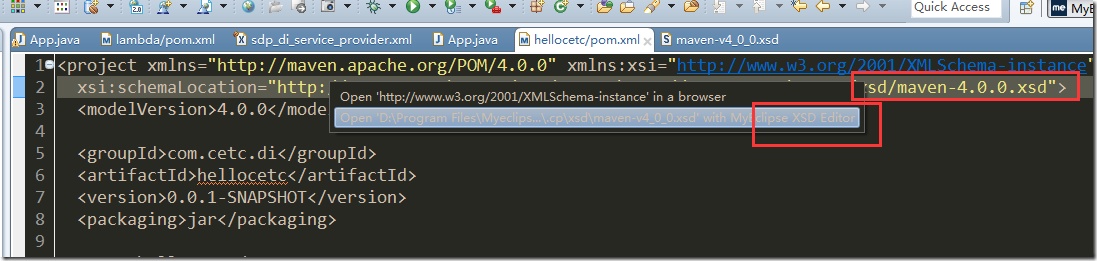
从pom的xsi中可以打开描述pom的schema:
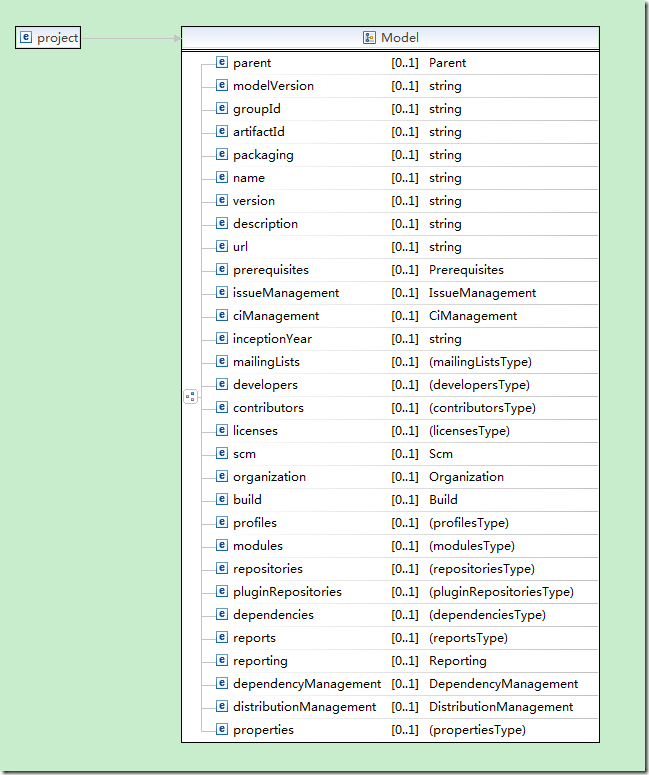
可以看到pom中,project的结构:
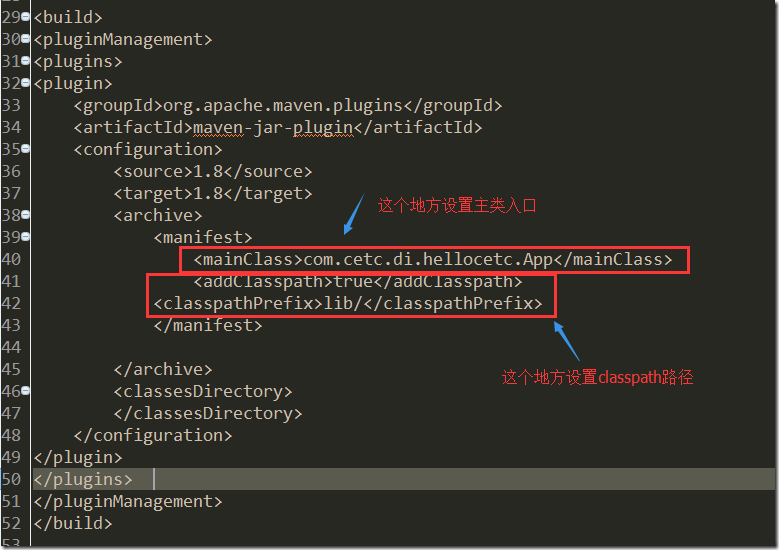
默认的mvn install生成的jar是不带主类入口的,需要在maven-compile-plugin中设置主类,
<project xmlns="http://maven.apache.org/POM/4.0.0" xmlns:xsi="http://www.w3.org/2001/XMLSchema-instance"

  xsi:schemaLocation="http://maven.apache.org/POM/4.0.0 http://maven.apache.org/xsd/maven-4.0.0.xsd">

  <modelVersion>4.0.0</modelVersion>

  <groupId>com.cetc.di</groupId>

  <artifactId>hellocetc</artifactId>

  <version>0.0.1-SNAPSHOT</version>

  <packaging>jar</packaging>

  <name>hellocetc</name>

  <url>http://maven.apache.org</url>

  <properties>

    <project.build.sourceEncoding>UTF-8</project.build.sourceEncoding>

  </properties>

  <dependencies>

    <dependency>

      <groupId>junit</groupId>

      <artifactId>junit</artifactId>

      <version>3.8.1</version>

      <scope>test</scope>

    </dependency>

  </dependencies>

<build>

<pluginManagement>

<plugins>

<plugin>

    <groupId>org.apache.maven.plugins</groupId>

    <artifactId>maven-jar-plugin</artifactId>

    <configuration>

        <source>1.8</source>

        <target>1.8</target>

        <archive>

            <manifest>

                <mainClass>com.cetc.di.hellocetc.App</mainClass>

                <addClasspath>true</addClasspath>

            <classpathPrefix>lib/</classpathPrefix>

            </manifest>

        </archive>

        <classesDirectory>

        </classesDirectory>

    </configuration>

</plugin>

</plugins>

</pluginManagement>

</build>

</project>
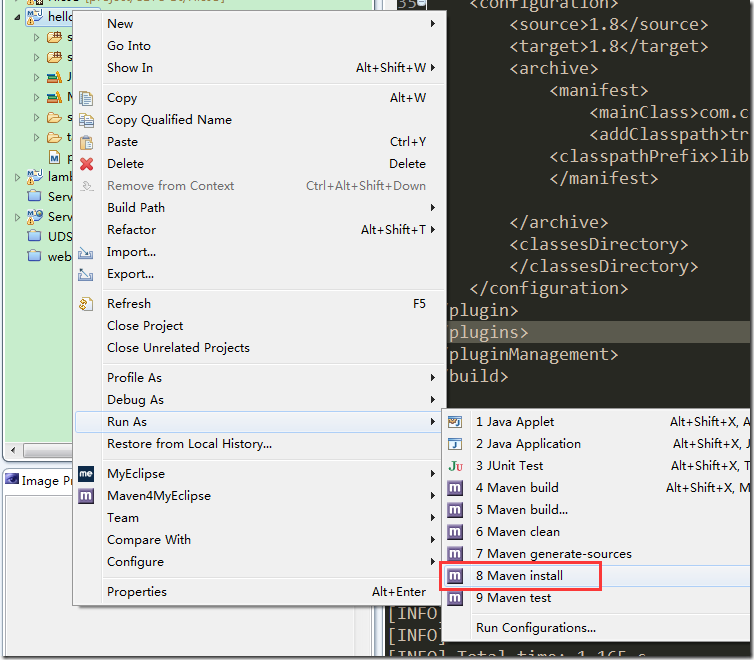
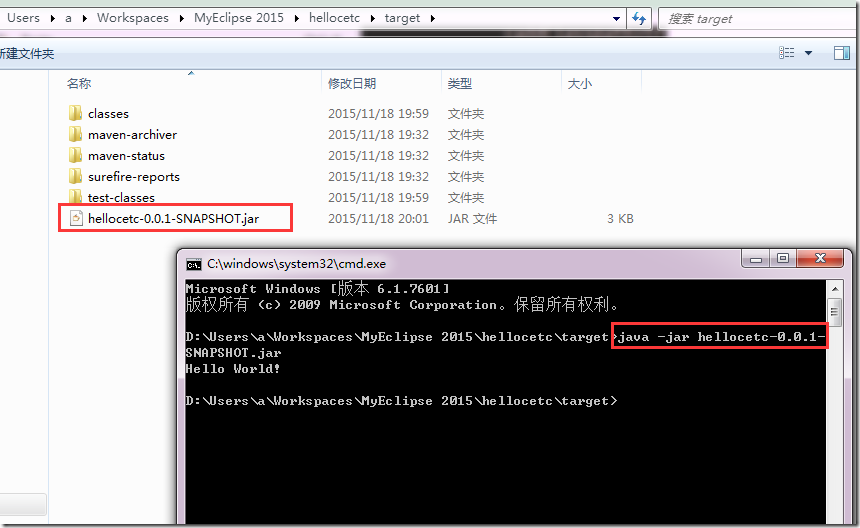
执行mvn install:
在target目录中,发现jar包已经生成:
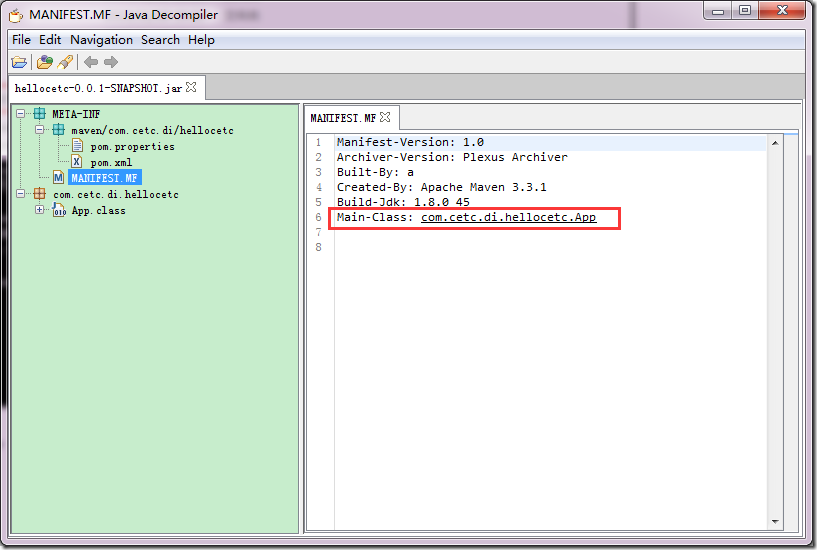
用java decompiler,可以看到manifest中已经加入了MainClass:
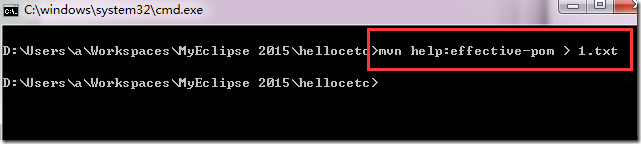
使用mvn help:effective-pom可以看到pom.xml的完整结构(包括继承而来的属性):
[INFO] Scanning for projects...

[INFO]

[INFO] ------------------------------------------------------------------------

[INFO] Building hellocetc 0.0.1-SNAPSHOT

[INFO] ------------------------------------------------------------------------

[INFO]

[INFO] --- maven-help-plugin:2.2:effective-pom (default-cli) @ hellocetc ---

[INFO]

Effective POMs, after inheritance, interpolation, and profiles are applied:

<!-- ====================================================================== -->

<!--                                                                        -->

<!-- Generated by Maven Help Plugin on 2015-11-18T08:05:12                  -->

<!-- See: http://maven.apache.org/plugins/maven-help-plugin/                -->

<!--                                                                        -->

<!-- ====================================================================== -->

<!-- ====================================================================== -->

<!--                                                                        -->

<!-- Effective POM for project 'com.cetc.di:hellocetc:jar:0.0.1-SNAPSHOT'   -->

<!--                                                                        -->

<!-- ====================================================================== -->

<project xmlns="http://maven.apache.org/POM/4.0.0" xmlns:xsi="http://www.w3.org/2001/XMLSchema-instance" xsi:schemaLocation="http://maven.apache.org/POM/4.0.0 http://maven.apache.org/xsd/maven-4.0.0.xsd">

  <modelVersion>4.0.0</modelVersion>

  <groupId>com.cetc.di</groupId>

  <artifactId>hellocetc</artifactId>

  <version>0.0.1-SNAPSHOT</version>

  <name>hellocetc</name>

  <url>http://maven.apache.org</url>

  <properties>

    <project.build.sourceEncoding>UTF-8</project.build.sourceEncoding>

  </properties>

  <dependencies>

    <dependency>

      <groupId>junit</groupId>

      <artifactId>junit</artifactId>

      <version>3.8.1</version>

      <scope>test</scope>

    </dependency>

  </dependencies>

  <repositories>

    <repository>

      <snapshots>

        <enabled>false</enabled>

      </snapshots>

      <id>central</id>

      <name>Central Repository</name>

      <url>https://repo.maven.apache.org/maven2</url>

    </repository>

  </repositories>

  <pluginRepositories>

    <pluginRepository>

      <releases>

        <updatePolicy>never</updatePolicy>

      </releases>

      <snapshots>

        <enabled>false</enabled>

      </snapshots>

      <id>central</id>

      <name>Central Repository</name>

      <url>https://repo.maven.apache.org/maven2</url>

    </pluginRepository>

  </pluginRepositories>

  <build>

    <sourceDirectory>D:\Users\a\Workspaces\MyEclipse 2015\hellocetc\src\main\java</sourceDirectory>

    <scriptSourceDirectory>D:\Users\a\Workspaces\MyEclipse 2015\hellocetc\src\main\scripts</scriptSourceDirectory>

    <testSourceDirectory>D:\Users\a\Workspaces\MyEclipse 2015\hellocetc\src\test\java</testSourceDirectory>

    <outputDirectory>D:\Users\a\Workspaces\MyEclipse 2015\hellocetc\target\classes</outputDirectory>

    <testOutputDirectory>D:\Users\a\Workspaces\MyEclipse 2015\hellocetc\target\test-classes</testOutputDirectory>

    <resources>

      <resource>

        <directory>D:\Users\a\Workspaces\MyEclipse 2015\hellocetc\src\main\resources</directory>

      </resource>

    </resources>

    <testResources>

      <testResource>

        <directory>D:\Users\a\Workspaces\MyEclipse 2015\hellocetc\src\test\resources</directory>

      </testResource>

    </testResources>

    <directory>D:\Users\a\Workspaces\MyEclipse 2015\hellocetc\target</directory>

    <finalName>hellocetc-0.0.1-SNAPSHOT</finalName>

    <pluginManagement>

      <plugins>

        <plugin>

          <artifactId>maven-antrun-plugin</artifactId>

          <version>1.3</version>

        </plugin>

        <plugin>

          <artifactId>maven-assembly-plugin</artifactId>

          <version>2.2-beta-5</version>

        </plugin>

        <plugin>

          <artifactId>maven-dependency-plugin</artifactId>

          <version>2.8</version>

        </plugin>

        <plugin>

          <artifactId>maven-release-plugin</artifactId>

          <version>2.3.2</version>

        </plugin>

        <plugin>

          <artifactId>maven-jar-plugin</artifactId>

          <version>2.4</version>

          <configuration>

            <source>1.8</source>

            <target>1.8</target>

            <archive>

              <manifest>

                <mainClass>com.cetc.di.hellocetc.App</mainClass>

                <addClasspath>true</addClasspath>

                <classpathPrefix>lib/</classpathPrefix>

              </manifest>

            </archive>

            <classesDirectory />

          </configuration>

        </plugin>

      </plugins>

    </pluginManagement>

    <plugins>

      <plugin>

        <artifactId>maven-clean-plugin</artifactId>

        <version>2.5</version>

        <executions>

          <execution>

            <id>default-clean</id>

            <phase>clean</phase>

            <goals>

              <goal>clean</goal>

            </goals>

          </execution>

        </executions>

      </plugin>

      <plugin>

        <artifactId>maven-resources-plugin</artifactId>

        <version>2.6</version>

        <executions>

          <execution>

            <id>default-testResources</id>

            <phase>process-test-resources</phase>

            <goals>

              <goal>testResources</goal>

            </goals>

          </execution>

          <execution>

            <id>default-resources</id>

            <phase>process-resources</phase>

            <goals>

              <goal>resources</goal>

            </goals>

          </execution>

        </executions>

      </plugin>

      <plugin>

        <artifactId>maven-jar-plugin</artifactId>

        <version>2.4</version>

        <executions>

          <execution>

            <id>default-jar</id>

            <phase>package</phase>

            <goals>

              <goal>jar</goal>

            </goals>

            <configuration>

              <source>1.8</source>

              <target>1.8</target>

              <archive>

                <manifest>

                  <mainClass>com.cetc.di.hellocetc.App</mainClass>

                  <addClasspath>true</addClasspath>

                  <classpathPrefix>lib/</classpathPrefix>

                </manifest>

              </archive>

              <classesDirectory />

            </configuration>

          </execution>

        </executions>

        <configuration>

          <source>1.8</source>

          <target>1.8</target>

          <archive>

            <manifest>

              <mainClass>com.cetc.di.hellocetc.App</mainClass>

              <addClasspath>true</addClasspath>

              <classpathPrefix>lib/</classpathPrefix>

            </manifest>

          </archive>

          <classesDirectory />

        </configuration>

      </plugin>

      <plugin>

        <artifactId>maven-compiler-plugin</artifactId>

        <version>3.1</version>

        <executions>

          <execution>

            <id>default-compile</id>

            <phase>compile</phase>

            <goals>

              <goal>compile</goal>

            </goals>

          </execution>

          <execution>

            <id>default-testCompile</id>

            <phase>test-compile</phase>

            <goals>

              <goal>testCompile</goal>

            </goals>

          </execution>

        </executions>

      </plugin>

      <plugin>

        <artifactId>maven-surefire-plugin</artifactId>

        <version>2.12.4</version>

        <executions>

          <execution>

            <id>default-test</id>

            <phase>test</phase>

            <goals>

              <goal>test</goal>

            </goals>

          </execution>

        </executions>

      </plugin>

      <plugin>

        <artifactId>maven-install-plugin</artifactId>

        <version>2.4</version>

        <executions>

          <execution>

            <id>default-install</id>

            <phase>install</phase>

            <goals>

              <goal>install</goal>

            </goals>

          </execution>

        </executions>

      </plugin>

      <plugin>

        <artifactId>maven-deploy-plugin</artifactId>

        <version>2.7</version>

        <executions>

          <execution>

            <id>default-deploy</id>

            <phase>deploy</phase>

            <goals>

              <goal>deploy</goal>

            </goals>

          </execution>

        </executions>

      </plugin>

      <plugin>

        <artifactId>maven-site-plugin</artifactId>

        <version>3.3</version>

        <executions>

          <execution>

            <id>default-site</id>

            <phase>site</phase>

            <goals>

              <goal>site</goal>

            </goals>

            <configuration>

              <outputDirectory>D:\Users\a\Workspaces\MyEclipse 2015\hellocetc\target\site</outputDirectory>

              <reportPlugins>

                <reportPlugin>

                  <groupId>org.apache.maven.plugins</groupId>

                  <artifactId>maven-project-info-reports-plugin</artifactId>

                </reportPlugin>

              </reportPlugins>

            </configuration>

          </execution>

          <execution>

            <id>default-deploy</id>

            <phase>site-deploy</phase>

            <goals>

              <goal>deploy</goal>

            </goals>

            <configuration>

              <outputDirectory>D:\Users\a\Workspaces\MyEclipse 2015\hellocetc\target\site</outputDirectory>

              <reportPlugins>

                <reportPlugin>

                  <groupId>org.apache.maven.plugins</groupId>

                  <artifactId>maven-project-info-reports-plugin</artifactId>

                </reportPlugin>

              </reportPlugins>

            </configuration>

          </execution>

        </executions>

        <configuration>

          <outputDirectory>D:\Users\a\Workspaces\MyEclipse 2015\hellocetc\target\site</outputDirectory>

          <reportPlugins>

            <reportPlugin>

              <groupId>org.apache.maven.plugins</groupId>

              <artifactId>maven-project-info-reports-plugin</artifactId>

            </reportPlugin>

          </reportPlugins>

        </configuration>

      </plugin>

    </plugins>

  </build>

  <reporting>

    <outputDirectory>D:\Users\a\Workspaces\MyEclipse 2015\hellocetc\target\site</outputDirectory>

  </reporting>

</project>

[INFO] ------------------------------------------------------------------------

[INFO] BUILD SUCCESS

[INFO] ------------------------------------------------------------------------

[INFO] Total time: 0.526 s

[INFO] Finished at: 2015-11-18T20:05:12+08:00

[INFO] Final Memory: 10M/245M

[INFO] ------------------------------------------------------------------------
使用maven生成可执行的jar包的更多相关文章
- Maven 生成可执行的jar包
maven 默认打包生成的 jar 包是不能够直接运行的,因为带有 main 方法的类信息不会添加到 manifest 中,即打开 jar 文件中的 META-INF/MANIFEST.MF 文件,将 ...
- maven-jar-plugin 使用maven生成可执行的jar包install a test-jar in maven
<build> <plugins> <plugin> <groupId>org.apache.maven.plugins</groupId> ...
- [Maven]Maven构建可执行的jar包(包含依赖jar包)
----------------------------------------------------------------- 原创博文,如需转载请注明出处! 博主:疲惫的豆豆 链接:http:/ ...
- 用命令行编译java并生成可执行的jar包
用命令行编译java并生成可执行的jar包 1.编写源代码. 编写源文件:CardLayoutDemo.java并保存,例如:I:\myApp\CardLayoutDemo.java.程序结构如下: ...
- maven 生成可执行的jar文件
微服务的热潮,慢慢讲jar引入了码农的视线之中,从传统web开发中过来的人面对这个东西也算是个新鲜事了,接下来聊一聊在maven下生成可运行jar的那些事. Maven可以使用mvn package指 ...
- eclipse使用MAVEN打包可执行的jar包
1.新建maven工程 注意勾选 随便填一下 建好之后工程目录如下 新建测试类与工具类,主类很简单 工具类也很简单,就是初始化了日志 maven依赖包也只有一个log4j的jar <depend ...
- 转: maven打可执行的jar包以及classpath设置
from: http://drizzlewalk.blog.51cto.com/2203401/416508
- maven打一个可执行的jar包
<plugin> <groupId>org.apache.maven.plugins</groupId> <artifactId>maven-depen ...
- 使用Mavne生成可以执行的jar文件
到目前为之,还没有运行HelloWorld的项目,不要忘了HelloWorld类可是有一个main方法的.使用mvn clean install命令默认生成的jar 包是不能直接运行的.因为带有mai ...
随机推荐
- 基于Android的百度地图实现输入地址返回经纬度信息
1 解决方案一 此处解决办法参照自网友文章,对于输入的地址信息要求:城市名+具体地址名. 如果输入的地址信息只有具体地址名,而没有城市名,可能解析不出经纬度信息.还有就是解析出的经纬度再反向解析显示再 ...
- Android 使用DDMS查看内存使用情况
- python 模块之platform模块(基本了解)
# -*- coding: cp936 -*-#python 27#xiaodeng#python 模块之platform模块(基本了解)#获取底层平台的识别数据 #知道该模块用途即可,需要使用时直接 ...
- 共享内存:mmap函数实现
内存映射的应用: 以页面为单位,将一个普通文件映射到内存中,通常在须要对文件进行频繁读写时使用,这样用内存读写代替I/O读写,以获得较高的性能; 将特殊文件进行匿名内存映射,能够为关联进程提供共享内存 ...
- ios中base64编码
参考文章:其中文章的:http://blog.csdn.net/ztp800201/article/details/9470065 下载包 其中 包括GTMBase包下载地址 http://pan.b ...
- CE lua脚本
CE递归遍历主界面控件 local fnGetSpace = function(n) local ret = "" ,n do ret = (ret .. "-" ...
- ctrl+shift+i eclipse快捷键,debug时显示全黑屏
ctrl+shift+i eclipse快捷键,debug时显示全黑屏,这样方便进行查看内容.
- 自动化运维之Cobbler自动化部署安装操作系统
Cobbler概述: Cobbler可以用来快速建立 Linux 网络安装环境,它已将 Linux 网络安装的技术门槛,从大专以上文化水平,成功降低到初中以下,连补鞋匠都能学会. 在生产环境中,经常批 ...
- 说说JSON和JSONP,也许你会豁然开朗,含jQuery使用jsonp用例
[原创]说说JSON和JSONP,也许你会豁然开朗,含jQuery用例 前言: 由于Sencha Touch 2这种开发模式的特性,基本决定了它原生的数据交互行为几乎只能通过AJAX来实现. 当然了 ...
- 【代码导读】Github 开源项目——wysihtml5 富编辑器(Bootstrap 风格)【一】
如果你经常留迹于各大论坛.博客,肯定对它们的富编辑器稍有印象.纯 Javascript 富编辑器可以说是前台 JS 脚本的巅峰作品.一款完整的编辑器,其复杂的功能,会让你遇到各种头痛的浏览器兼容问题, ...