
spring_cxf_basic_sender
jar
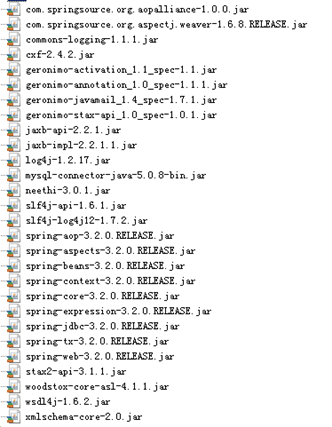
applicationContent.xml
<?xml version="1.0" encoding="UTF-8"?>

<beans xmlns="http://www.springframework.org/schema/beans"

xmlns:xsi="http://www.w3.org/2001/XMLSchema-instance"

xmlns:jaxws="http://cxf.apache.org/jaxws"

xmlns:soap="http://cxf.apache.org/bindings/soap"

    xmlns:context="http://www.springframework.org/schema/context"

    xmlns:aop="http://www.springframework.org/schema/aop"

    xmlns:tx="http://www.springframework.org/schema/tx"

xsi:schemaLocation="http://www.springframework.org/schema/beans

                    http://www.springframework.org/schema/beans/spring-beans.xsd

                    http://cxf.apache.org/bindings/soap

                    http://cxf.apache.org/schemas/configuration/soap.xsd

                    http://cxf.apache.org/jaxws

                    http://cxf.apache.org/schemas/jaxws.xsd

                    http://www.springframework.org/schema/context

                        http://www.springframework.org/schema/context/spring-context.xsd

                        http://www.springframework.org/schema/aop

                        http://www.springframework.org/schema/aop/spring-aop.xsd

                        http://www.springframework.org/schema/tx

                        http://www.springframework.org/schema/tx/spring-tx.xsd">

    <!-- 引入CXF Bean定义如下,早期的版本中使用 -->

    <import resource="classpath:META-INF/cxf/cxf.xml" />

    <import resource="classpath:META-INF/cxf/cxf-extension-soap.xml" />

    <import resource="classpath:META-INF/cxf/cxf-servlet.xml" />

    <!-- 配置数据源 -->

    <bean id="dataSource" class="org.springframework.jdbc.datasource.DriverManagerDataSource">

        <property name="driverClassName" value="com.mysql.jdbc.Driver"/>

        <property name="url" value="jdbc:mysql:///crmwebservice"/>

        <property name="username" value="root"/>

        <property name="password" value="manager123"/>

    </bean>

    <!-- 事务管理器 -->

    <bean id="txManager" class="org.springframework.jdbc.datasource.DataSourceTransactionManager">

        <property name="dataSource" ref="dataSource"/>

    </bean>

    <!-- 支持事务注解 -->

    <tx:annotation-driven transaction-manager="txManager"/>

    <bean id="jdbcTemplate" class="org.springframework.jdbc.core.JdbcTemplate">

        <property name="dataSource" ref="dataSource"/>

    </bean>

    <bean id="customerService" class="com.shan.crm.service.CustomerServiceImpl">

        <property name="jdbcTemplate" ref="jdbcTemplate"/>

    </bean>

    <!-- 注册服务 -->

    <jaxws:server id="myService" address="/customer">

        <jaxws:serviceBean>

            <ref bean="customerService"/>

        </jaxws:serviceBean>

    </jaxws:server>

</beans>
web.xml
<?xml version="1.0" encoding="UTF-8"?>

<web-app xmlns:xsi="http://www.w3.org/2001/XMLSchema-instance" xmlns="http://java.sun.com/xml/ns/javaee" xsi:schemaLocation="http://java.sun.com/xml/ns/javaee http://java.sun.com/xml/ns/javaee/web-app_2_5.xsd" id="WebApp_ID" version="2.5">

  <display-name>crm_webservice</display-name>

  <welcome-file-list>

    <welcome-file>index.html</welcome-file>

    <welcome-file>index.htm</welcome-file>

    <welcome-file>index.jsp</welcome-file>

    <welcome-file>default.html</welcome-file>

    <welcome-file>default.htm</welcome-file>

    <welcome-file>default.jsp</welcome-file>

  </welcome-file-list>

  <!-- 配置spring配置文件位置 -->

  <context-param>

  <param-name>contextConfigLocation</param-name>

  <param-value>classpath:cxf.xml</param-value>

  </context-param>

  <!-- 配置spring监听器 -->

  <listener>

     <listener-class>org.springframework.web.context.ContextLoaderListener</listener-class>

  </listener>

  <!-- 配置CXF框架提供的servlet -->

  <servlet>

  <servlet-name>cxf</servlet-name>

  <servlet-class> org.apache.cxf.transport.servlet.CXFServlet</servlet-class>

  <!-- 通过初始化参数指定cxf框架的配置文件位置 -->

      <init-param>

      <param-name>config-location</param-name>

      <param-value>classpath:cxf.xml</param-value>

      </init-param>

  </servlet>

  <servlet-mapping>

  <servlet-name>cxf</servlet-name>

  <url-pattern>/service/*</url-pattern>

  </servlet-mapping>

</web-app>
在要发布的接口上

《浏览器》访问
http:ocalhost:8080/项目名 / web.xml中url-pattern名/ 发布服务的路径
http://localhost:8080/CxfwebService/service/cxfService
《接收端applicationContent.xml》
<?xml version="1.0" encoding="UTF-8"?>

<beans xmlns="http://www.springframework.org/schema/beans"

    xmlns:xsi="http://www.w3.org/2001/XMLSchema-instance"

    xmlns:context="http://www.springframework.org/schema/context"

    xmlns:aop="http://www.springframework.org/schema/aop"

    xmlns:tx="http://www.springframework.org/schema/tx"

         xmlns:jaxws="http://cxf.apache.org/jaxws"

         xmlns:soap="http://cxf.apache.org/bindings/soap"

    xsi:schemaLocation="http://www.springframework.org/schema/beans

                        http://www.springframework.org/schema/beans/spring-beans.xsd

                        http://www.springframework.org/schema/context

                        http://www.springframework.org/schema/context/spring-context.xsd

                        http://www.springframework.org/schema/aop

                        http://www.springframework.org/schema/aop/spring-aop.xsd

                        http://www.springframework.org/schema/tx

                        http://www.springframework.org/schema/tx/spring-tx.xsd

                            http://cxf.apache.org/bindings/soap

                            http://cxf.apache.org/schemas/configuration/soap.xsd

                               http://cxf.apache.org/jaxws

                            http://cxf.apache.org/schemas/jaxws.xsd">

    <!-- 加载属性文件 -->

    <context:property-placeholder location="classpath:jdbc.properties"/>

    <!-- 配置数据源 -->

    <bean id="dataSource" class="com.mchange.v2.c3p0.ComboPooledDataSource">

        <property name="driverClass" value="${jdbc.driverClass}"/>

        <property name="jdbcUrl" value="${jdbc.jdbcUrl}"/>

        <property name="user" value="${jdbc.user}"/>

        <property name="password" value="${jdbc.password}"/>

    </bean>

    <!-- 配置LocalSessionFactoryBean,spring提供的用于整合hibernate的工厂bean -->

    <bean id="sessionFactory" class="org.springframework.orm.hibernate5.LocalSessionFactoryBean">

        <property name="dataSource" ref="dataSource"/>

        <!-- 注入hibernate相关的属性配置 -->

        <property name="hibernateProperties">

            <props>

                <prop key="hibernate.dialect">org.hibernate.dialect.MySQL5Dialect</prop>

                <prop key="hibernate.hbm2ddl.auto">update</prop>

                <prop key="hibernate.show_sql">true</prop>

                <prop key="hibernate.format_sql">true</prop>

            </props>

        </property>

        <!-- 注入hibernate的映射文件 -->

        <property name="mappingLocations">

            <list>

                <value>classpath:com/shan/bos/domain/*.xml</value>

            </list>

        </property>

    </bean>

    <!-- 配置事务管理器 -->

    <bean id="transactionManager" class="org.springframework.orm.hibernate5.HibernateTransactionManager">

        <property name="sessionFactory" ref="sessionFactory"/>

    </bean>

    <!-- 组件扫描 -->

    <context:component-scan base-package="com.shan.bos"/>

    <!-- 支持spring注解 -->

    <context:annotation-config/>

    <tx:annotation-driven/>

 <!-- 注册crm客户端代理对象 -->

    <jaxws:client id="myClient" serviceClass="com.shan.crm.service.CustomerService" address="http://localhost:8080/crm_webservice/service/customer" ></jaxws:client>

<!-- /*********************shiro框架与spring整合的部分配置***********************/ -->

<!-- 配置shiro框架的工厂bean -->

    <bean id="shiroFilter" class="org.apache.shiro.spring.web.ShiroFilterFactoryBean">

        <property name="securityManager" ref="securityManager"></property>

        <property name="loginUrl" value="/login.jsp"></property>

        <property name="successUrl" value="/index.jsp"></property>

        <property name="unauthorizedUrl" value="/unauthorized.jsp"></property>

        <!-- 指定    url级别拦截策略 -->

        <property name="filterChainDefinitions">

            <value>

                /css/**=anon

                /js/**=anon

                /images/**=anon

                /login.jsp*=anon

                /validatecode.jsp*=anon

                /userAction_login=anon

               /page_base_staff.action=perms["staff"]

                /*=authc

            </value>

        </property>

    </bean>

<!-- 安全管理器 -->

<bean id="securityManager" class="org.apache.shiro.web.mgt.DefaultWebSecurityManager" >

   <!-- 注入realm -->

   <property name="realm" ref="bosRealm"></property>

   <!-- 将缓存管理器注入 -->

   <property name="cacheManager" ref="cacheManager"></property>

</bean>

<!-- ****配置encached缓存管理器,然后将缓存管理器并注入给安全管理器对象***** -->

<!-- 配置缓存管理器 -->

<bean id="cacheManager" class="org.apache.shiro.cache.ehcache.EhCacheManager">

   <!-- 注入ehcache的配置文件 -->

   <property name="cacheManagerConfigFile" value="classpath:ehcache.xml"></property>

</bean>

<!-- 注册自定义的realm -->

<bean id="bosRealm" class="com.shan.bos.service.realm.BosRealm"> </bean>

<!-- ***************使用shiro的方法注解方式权限控制*********************** -->

  <!-- 开启shiro框架注解支持(由spring提供的) -->

       <bean id="DefaultAdvisorAutoProxyCreator" class="org.springframework.aop.framework.autoproxy.DefaultAdvisorAutoProxyCreator">

        <!-- 必须使用cglb方式为Action对象创建代理 -->

        <property name="proxyTargetClass" value="true"></property>

       </bean>

  <!-- 配置shiro框架提供的切面类,用于创建代理对象 -->

 <bean class="org.apache.shiro.spring.security.interceptor.AuthorizationAttributeSourceAdvisor"></bean>

<!-- ******************定时任务quartz配置********************* -->

<!-- 注册自定义作业类 -->

    <bean id="myJob" class="com.shan.bos.service.jobs.MailJob">

        <property name="username" value="lshan523@163.com"/>

        <property name="password" value="liushan511094523"/>

        <property name="smtpServer" value="smtp.163.com"/>

    </bean>

    <!-- 配置JobDetail -->

    <bean id="jobDetail" class="org.springframework.scheduling.quartz.MethodInvokingJobDetailFactoryBean">

        <!-- 注入目标对象 -->

        <property name="targetObject" ref="myJob"/>

        <!-- 注入目标方法 -->

        <property name="targetMethod" value="execute"/>

    </bean>

    <!-- 配置触发器 -->

    <bean id="myTrigger" class="org.springframework.scheduling.quartz.CronTriggerFactoryBean">

        <!-- 注入任务详情对象 -->

        <property name="jobDetail" ref="jobDetail"/>

        <!-- 注入cron表达式,通过这个表达式指定触发的时间点 -->

        <property name="cronExpression">

            <value>0/10 * * * * ? 2019</value>

        </property>

    </bean>

    <!-- 配置调度工厂 -->

    <bean id="schedulerFactoryBean" class="org.springframework.scheduling.quartz.SchedulerFactoryBean">

        <!-- 注入触发器 -->

        <property name="triggers">

            <list>

                <ref bean="myTrigger"/>

            </list>

        </property>

    </bean>

</beans>
调用: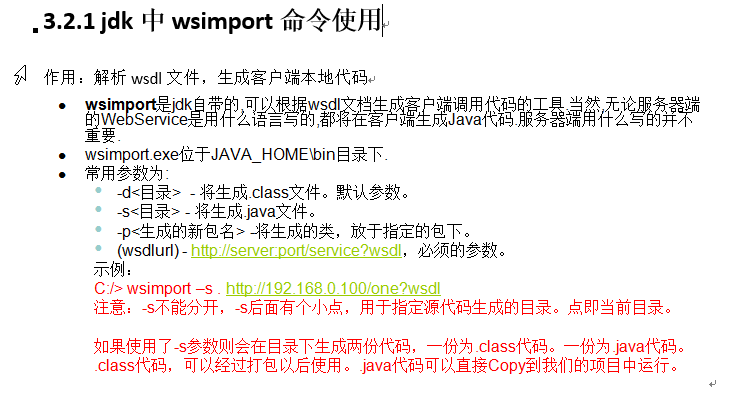
spring_cxf_basic_sender的更多相关文章
随机推荐
- Maps.newHashMapWithExpectedSize(2)
☆ Map<String, Object> diffQuota = Maps.newHashMapWithExpectedSize(2); Maps.newHashMapWithExpec ...
- java设计模式--创建型模式(一)
2016-04-24 10:10:34 创建型模式:工厂方法模式.抽象工厂模式.单例模式.建造者模式.原型模式 注意:工厂模式可以分为三类: 1)简单工厂模式(Simple Factory) 2)工厂 ...
- binlog cache size设置是否合理判断
二进制日志是写操作是,首先写入二进制日志缓冲(binlog_cache)然后commit,再从binlog_cache写入到binlog文件,默认大小为32K,而binlog_cache是sessio ...
- seleniumWebdriver浏览器驱动信息汇总
selenium是thoughtworks公司开发的一款开源的测试工具,主要用来做web端的自动化测试. Python安装selenium,直接使用执行pip install selenium(pyt ...
- MQ中间件选型
如果Java项目,数据量不大,用ActiveMQ,相对简单.支持JMS. 如果对性能.可靠性有一定要求,用RabbitMQ. 如果对性能有很高要求,甚至可牺牲一些可靠性,选kakfa. 在当前大数据时 ...
- 【转】Ubuntu添加PATH环境变量
原文网址:http://www.cnblogs.com/pang123hui/archive/2011/05/28/2309889.html 添加分两种: 一.临时性添加 ~$ echo $PATH ...
- Oracle误删除表空间的恢复
对于误删除表空间的恢复,本文通过基于数据库的时间点恢复和基于表空间的时间点恢复分别加以讨论 一 通过基于数据库的时间点恢复被误删除的表空间 1 需要注意的事项 a 基于数据库的时间点恢复将会回退整个数 ...
- asp.net如何使用cookie(创建、保存、读取)
Cookie的用法也和ASP中差不多.比如我们建立一个名为aspcn,值为大众的cookie HttpCookie cookie = new HttpCookie("aspcn") ...
- ASP.NET 实现验证码以及刷新验证码
实现代码 /// <summary> /// 生成验证码图片,保存session名称VerificationCode /// </summary> public static ...
- pfsense的nat配置
需要把内网192.168.1.100的80端口映射到外面,外网卡地址为192.168.1.200 firewall, firewall,nat,选择port forward标签,添加一个 在desti ...