
ZH奶酪:HTML元素文本溢出显示省略号(...)
一 单行文本
overflow: hidden;

text-overflow: ellipsis;

white-space: nowrap;
overflow 属性规定当内容溢出元素框时发生的事情。
| visible | 默认值。内容不会被修剪,会呈现在元素框之外。 |
| hidden | 内容会被修剪,并且其余内容是不可见的。 |
| scroll | 内容会被修剪,但是浏览器会显示滚动条以便查看其余的内容。 |
| auto | 如果内容被修剪,则浏览器会显示滚动条以便查看其余的内容。 |
| inherit | 规定应该从父元素继承 overflow 属性的值。 |
text-overflow 属性规定当文本溢出包含元素时发生的事情。
clip:修剪文本;
ellipsis:显示省略号来代表被修剪的文本;
string:使用给定的字符串来代表被修剪的文本;
white-space 属性设置如何处理元素内的空白。
| normal | 默认。空白会被浏览器忽略。 |
| pre | 空白会被浏览器保留。其行为方式类似 HTML 中的 <pre> 标签。 |
| nowrap | 文本不会换行,文本会在在同一行上继续,直到遇到 <br> 标签为止。 |
| pre-wrap | 保留空白符序列,但是正常地进行换行。 |
| pre-line | 合并空白符序列,但是保留换行符。 |
| inherit | 规定应该从父元素继承 white-space 属性的值。 |
二 多行文本,提供了几种方法,效果图中的每一段文字对应一个方法:
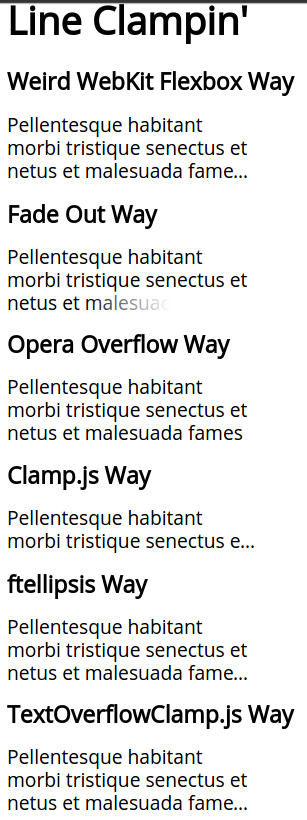
HTML代码
<h1>Line Clampin'</h1>

<h2>Weird WebKit Flexbox Way</h2>

<div class="module line-clamp">

  <p>Pellentesque habitant morbi tristique senectus et netus et malesuada fames ac turpis egestas. Vestibulum tortor quam, feugiat vitae, ultricies eget, tempor sit amet, ante. Donec eu libero sit amet quam egestas semper. Aenean ultricies mi vitae est. Mauris placerat eleifend leo.</p>

</div>

<h2>Fade Out Way</h2>

<div class="module fade">

  <p>Pellentesque habitant morbi tristique senectus et netus et malesuada fames ac turpis egestas. Vestibulum tortor quam, feugiat vitae, ultricies eget, tempor sit amet, ante. Donec eu libero sit amet quam egestas semper. Aenean ultricies mi vitae est. Mauris placerat eleifend leo.</p>

</div>

<h2>Opera Overflow Way</h2>

<div class="module last-line">

  <p>Pellentesque habitant morbi tristique senectus et netus et malesuada fames ac turpis egestas. Vestibulum tortor quam, feugiat vitae, ultricies eget, tempor sit amet, ante. Donec eu libero sit amet quam egestas semper. Aenean ultricies mi vitae est. Mauris placerat eleifend leo.</p>

</div>

<h2>Clamp.js Way</h2>

<div class="module js">

  <p id="clampjs">Pellentesque habitant morbi tristique senectus et netus et malesuada fames ac turpis egestas. Vestibulum tortor quam, feugiat vitae, ultricies eget, tempor sit amet, ante. Donec eu libero sit amet quam egestas semper. Aenean ultricies mi vitae est. Mauris placerat eleifend leo.</p>

</div>

<h2>ftellipsis Way</h2>

<div class="module js ftellipsis" id="ftellipsis">

  <p>Pellentesque habitant morbi tristique senectus et netus et malesuada fames ac turpis egestas. Vestibulum tortor quam, feugiat vitae, ultricies eget, tempor sit amet, ante. Donec eu libero sit amet quam egestas semper. Aenean ultricies mi vitae est. Mauris placerat eleifend leo.</p>

</div>

<h2>TextOverflowClamp.js Way</h2>

<div class="module js textoverflowclamp" id="textoverflowclamp">

  <p>Pellentesque habitant morbi tristique senectus et netus et malesuada fames ac turpis egestas. Vestibulum tortor quam, feugiat vitae, ultricies eget, tempor sit amet, ante. Donec eu libero sit amet quam egestas semper. Aenean ultricies mi vitae est. Mauris placerat eleifend leo.</p>

</div>
CSS代码
@import url(http://fonts.googleapis.com/css?family=Open+Sans);

body {

  padding: 20px;

  font: 1.2em/1.2em 'Open Sans', sans-serif;

}

.module {

  width: 250px;

  margin: 0 0 1em 0;

  overflow: hidden;

}

.module p {

  margin:;

}

.line-clamp {

  display: -webkit-box;

  -webkit-line-clamp:;

  -webkit-box-orient: vertical;

}

.fade {

  position: relative;

  height: 3.6em; /* exactly three lines */

}

.fade:after {

  content: "";

  text-align: right;

  position: absolute;

  bottom:;

  right:;

  width: 70%;

  height: 1.2em;

  background: linear-gradient(to right, rgba(255, 255, 255, 0), rgba(255, 255, 255, 1) 50%);

}

.last-line {

  height: 3.6em; /* exactly three lines */

  text-overflow: -o-ellipsis-lastline;

}

.ftellipsis {

  height: 3.6em;

}

h1 {

  margin: 0 0 1em 0;

}

h2 {

  font-size: 1.2em;

}
JS代码
// https://github.com/josephschmitt/Clamp.js

var module = document.getElementById("clampjs");

$clamp(module, {clamp: 2});

// https://github.com/ftlabs/ftellipsis

var element = document.getElementById('ftellipsis');

var ellipsis = new Ellipsis(element);

ellipsis.calc();

ellipsis.set();

// http://codepen.io/Merri/pen/Dsuim

/**

  * TextOverflowClamp.js

  *

  * Updated 2013-05-09 to remove jQuery dependancy.

  * But be careful with webfonts!

  */

// bind function support for older browsers without it

// https://developer.mozilla.org/en-US/docs/JavaScript/Reference/Global_Objects/Function/bind

if (!Function.prototype.bind) {

  Function.prototype.bind = function (oThis) {

    if (typeof this !== "function") {

      // closest thing possible to the ECMAScript 5 internal IsCallable function

      throw new TypeError("Function.prototype.bind - what is trying to be bound is not callable");

    }

    var aArgs = Array.prototype.slice.call(arguments, 1),

        fToBind = this,

        fNOP = function () {},

        fBound = function () {

          return fToBind.apply(this instanceof fNOP && oThis

                                 ? this

                                 : oThis,

                               aArgs.concat(Array.prototype.slice.call(arguments)));

        };

    fNOP.prototype = this.prototype;

    fBound.prototype = new fNOP();

    return fBound;

  };

}

// the actual meat is here

(function(w, d){

    var clamp, measure, text, lineWidth,

        lineStart, lineCount, wordStart,

        line, lineText, wasNewLine,

    ce = d.createElement.bind(d),

    ctn = d.createTextNode.bind(d);

    // measurement element is made a child of the clamped element to get it's style

    measure = ce('span');

    (function(s){

        s.position = 'absolute'; // prevent page reflow

        s.whiteSpace = 'pre'; // cross-browser width results

        s.visibility = 'hidden'; // prevent drawing

    })(measure.style);

    clamp = function (el, lineClamp) {

    // make sure the element belongs to the document

    if(!el.ownerDocument || !el.ownerDocument === d) return;

        // reset to safe starting values

        lineStart = wordStart = 0;

        lineCount = 1;

        wasNewLine = false;

        lineWidth = el.clientWidth;

        // get all the text, remove any line changes

        text = (el.textContent || el.innerText).replace(/\n/g, ' ');

        // remove all content

        while(el.firstChild !== null)

            el.removeChild(el.firstChild);

        // add measurement element within so it inherits styles

        el.appendChild(measure);

        // http://ejohn.org/blog/search-and-dont-replace/

        text.replace(/ /g, function(m, pos) {

            // ignore any further processing if we have total lines

      if(lineCount === lineClamp) return;

            // create a text node and place it in the measurement element

            measure.appendChild(ctn(text.substr(lineStart, pos - lineStart)));

            // have we exceeded allowed line width?

            if(lineWidth < measure.clientWidth) {

                if(wasNewLine) {

                    // we have a long word so it gets a line of it's own

                    lineText = text.substr(lineStart, pos + 1 - lineStart);

                    // next line start position

                    lineStart = pos + 1;

                } else {

                    // grab the text until this word

                    lineText = text.substr(lineStart, wordStart - lineStart);

                    // next line start position

                    lineStart = wordStart;

                }

                // create a line element

                line = ce('span');

                // add text to the line element

                line.appendChild(ctn(lineText));

                // add the line element to the container

                el.appendChild(line);

                // yes, we created a new line

                wasNewLine = true;

        lineCount++;

            } else {

                // did not create a new line

                wasNewLine = false;

            }

            // remember last word start position

            wordStart = pos + 1;

            // clear measurement element

            measure.removeChild(measure.firstChild);

        });

        // remove the measurement element from the container

        el.removeChild(measure);

        // create the last line element

        line = ce('span');

        // give styles required for text-overflow to kick in

        (function(s){

            s.display = 'inline-block';

            s.overflow = 'hidden';

            s.textOverflow = 'ellipsis';

            s.whiteSpace = 'nowrap';

            s.width = '100%';

        })(line.style);

        // add all remaining text to the line element

        line.appendChild(ctn(text.substr(lineStart)));

        // add the line element to the container

        el.appendChild(line);

    }

    w.clamp = clamp;

})(window, document);

// the only bit of jQuery

$(window).bind('load', function() {

  clamp(document.getElementById('textoverflowclamp'), 3);

});
其中
(1)-webkit-line-clamp 这种方法指支持部分浏览器,而且要与其他两个属性同时使用:
.line-clamp {
display: -webkit-box;
-webkit-line-clamp: 3;
-webkit-box-orient: vertical;
}

(2)clamp.js 下载地址及使用方法:https://github.com/josephschmitt/Clamp.js
(3)ftellipsis 下载地址及使用方法:https://github.com/ftlabs/ftellipsis
(4)jQuery.dotdotdot 下载地址及使用方法:https://github.com/BeSite/jQuery.dotdotdot
参考文章:
[1] https://css-tricks.com/line-clampin/
[2] http://www.css88.com/archives/5206
[3] http://codepen.io/Merri/pen/Dsuim
[4] http://codepen.io/feiwen8772/pen/AckqK
ZH奶酪:HTML元素文本溢出显示省略号(...)的更多相关文章
- CSS3文本溢出显示省略号
CCS3属性之text-overflow:ellipsis;的用法和注意之处 语法: text-overflow:clip | ellipsis 默认值:clip 适用于:所有元素 clip: 当对象 ...
- CSS换行文本溢出显示省略号
现代浏览器中使用css可以实现文本溢出,使用 text-overflow: ellipsis;在有些场景下没有效果,这个时候你需要检查应用的场景是是否是块元素,是否有确切的width. 如果是行内元素 ...
- CSS文本溢出显示省略号
项目中常常有这种需要我们对溢出文本进行"..."显示的操作,单行多行的情况都有(具体几行得看设计师心情了),这篇随笔是我个人对这种情况解决办法的归纳,欢迎各路英雄指教. 单行 语法 ...
- CSS单行文本溢出显示省略号
此为转载,原文地址 项目中常常有这种需要我们对溢出文本进行"..."显示的操作,单行多行的情况都有(具体几行得看设计师心情了),这篇随笔是我个人对这种情况解决办法的归纳,欢迎各路英 ...
- CSS和JS实现文本溢出显示省略号
本文记录实现文本溢出显示省略号的几种方式. 单行文本 三行CSS代码实现: overflow: hidden; // 文本溢出隐藏 text-overflow: ellipsis; // 显示省略号 ...
- css实现文本溢出显示省略号
看到很多网站上的文章列表只显示一部分,之后就是一个阅读全文链接,或者是以一个省略号结尾.今天就说说单行文本,多行文本溢出时怎么显示省略号? 单行 overflow: hidden; white-spa ...
- 文本溢出显示省略号,CSS未加载时a标签仍可用处理方法
一.文本溢出打点 (1)单行文本 overflow: hidden; text-overflow:ellipsis; white-space: nowrap; (2)多行文本 overflow : h ...
- WEB-CSS实现单行(多行)文本溢出显示省略号
//单行文本溢出部分隐藏显示省略号...overflow: hidden; text-overflow:ellipsis; white-space: nowrap; /** n 行文本溢出部分隐藏显示 ...
- 长文本溢出显示省略号(…) text-overflow: ellipsis
text-overflow 属性规定当文本溢出包含元素时发生的事情. 默认值: clip 继承性: no 版本: CSS3 JavaScript 语法: object .style.textOverf ...
随机推荐
- vs已停止工作
第一步: 开始-->所有程序-->Microsoft Visual Studio 2012-->VisualStudio Tools-->VS2012 开发人员命令提示(以管理 ...
- hibernate 注解 联合主键映射
联合主键用Hibernate注解映射方式主要有三种: 第一.将联合主键的字段单独放在一个类中,该类需要实现java.io.Serializable接口并重写equals和hascode,再将 该类注解 ...
- EntityFramework:状态变化与方法的关系(朋友的学习笔记)
一.约定OnModelCreating 有一些限制需要注意,例如: 1.表名不支持使用标签进行标注 2.最小长度在 OnModelCreating 中不支持 3.正则表达式在 OnModelCreat ...
- Linux学习13-CentOS安装ab做压力测试
前言 网站性能压力测试是服务器网站性能调优过程中必不可缺少的一,测试环境准备好了后,如何对网站做压力测试? 压力测试的工具很多,如:ab.http_load.webbench.siege.jmeter ...
- wdcp支持两种安装方式
v3.2版本已发布,支持多PHP版本共存共用,支持SSL证书,更多可看论坛 v3版讨论区 更多安装说明请看 http://www.wdlinux.cn/bbs/thread-57643-1-1.htm ...
- 推荐一款移动端的web UI控件 -- mobiscroll
用mobiscroll 可实现ios系统自带的选择器控件效果,支持几乎所有的移动平台(iOS, Android, BlackBerry, Windows Phone 8, Amazon Kindle) ...
- c# action<> func<> 这2个委托怎么用和理解
其实很好理解的呢!~首先你需要明白,他们是委托的简写形式. 一.[action<>]指定那些只有输入参数,没有返回值的委托 1.1定义一个委托: 比如,我们原来写委托: public de ...
- [Hook] 免root,自己进程内,binder hook (ClipboardManager)
cp from : http://weishu.me/2016/02/16/understand-plugin-framework-binder-hook/ Android系统通过Binder机制给应 ...
- VMware vSphere中的HA工作原理介绍
http://blog.51cto.com/linkinsds/416738 HA全称High Availability.它是VMware的企业应用环境中用来保障企业级应用的不间断运行需求所产生的一个 ...
- java.io包的总体框架图(转)
原文链接:java.io包的总体框架图, 便于记忆!