
matplotlib-plot-style
style
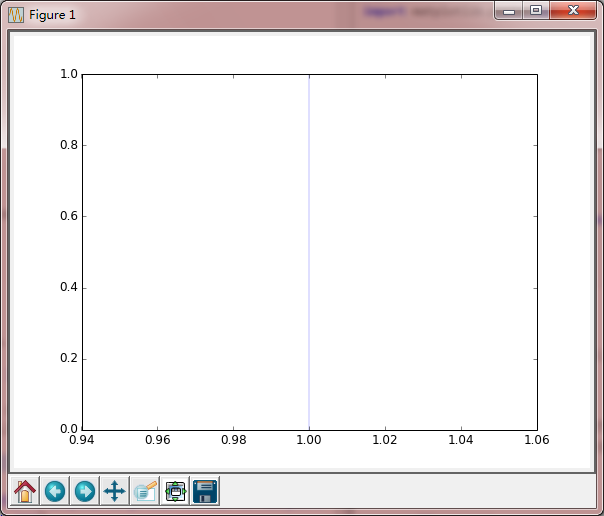
1.绘制x=1
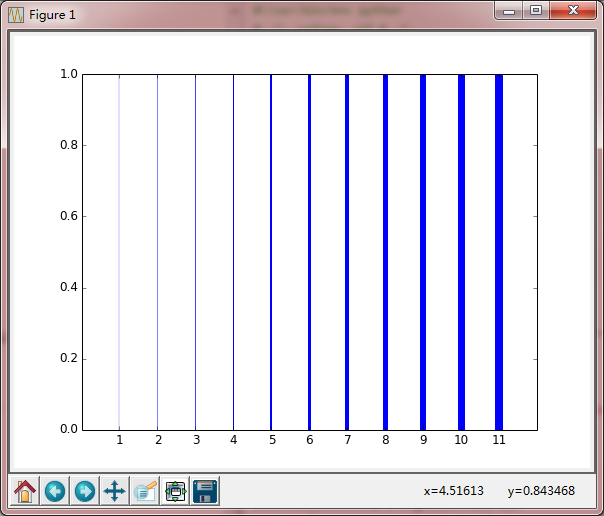
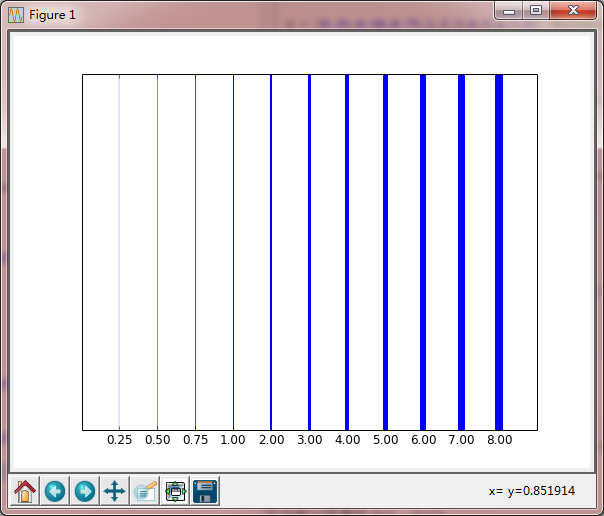
2.不同线宽
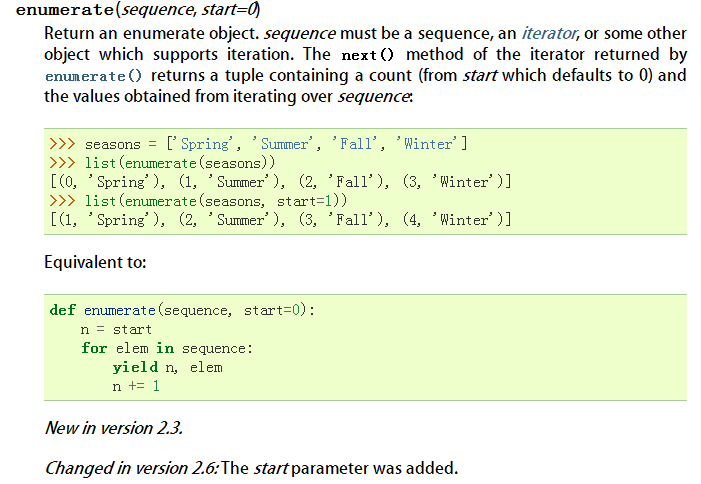
- enumerate(Widths)
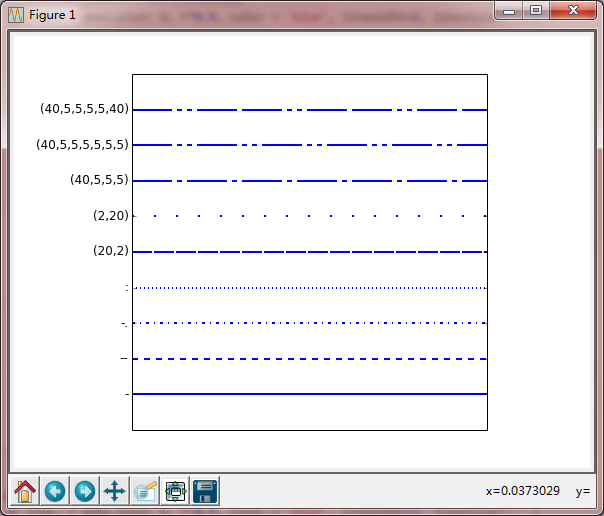
3.线型(实线,虚线,点划线) - linestyle
- set_dashes
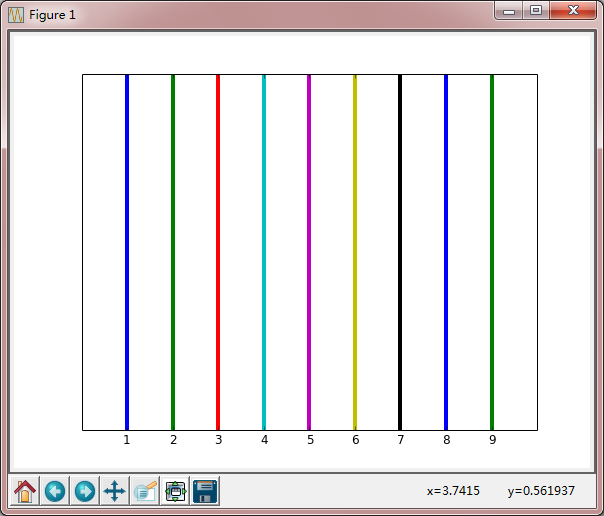
4.自动设置线颜色
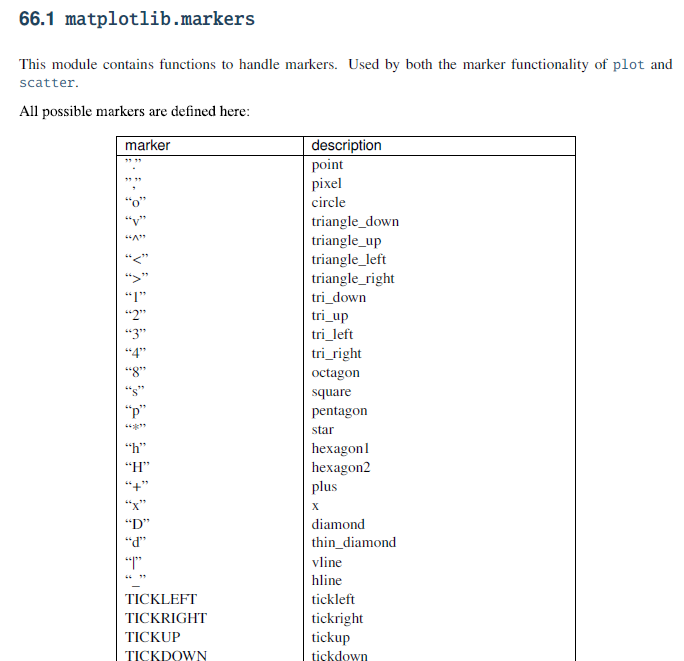
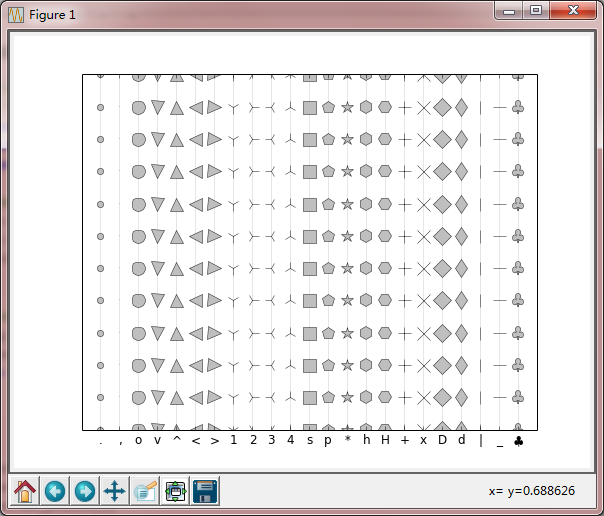
5.点的显示形式 - marker
- markersize
- markeredgecolor
- markerfacecolor
6.柱状图及其填充 - axes.bar
- axes.bar( .5+i, 1, hatch='/', color='white', edgecolor='blue',)
x=1
code
#!/usr/bin/env python

# -*- coding: utf-8 -*-

import numpy as np

import matplotlib

import matplotlib.pyplot as plt

#Data

Y=np.linspace(0,1,12)

X=np.ones(Y.size)

#figure

fig = plt.figure(figsize=(8,6), dpi=72, facecolor='white')

axes = plt.subplot(111)

#plot

axes.plot( (1+0)*X, Y, linewidth=0.25, color='blue')

plt.show()
Keypoints
axes.plot( (1+0)*X, Y, linewidth=0.25, color='blue')
X=[ 1. 1. 1. 1. 1. 1. 1. 1. 1. 1. 1. 1.]
Y=[ 0. 0.09090909 0.18181818 0.27272727 0.36363636 0.45454545
0.54545455 0.63636364 0.72727273 0.81818182 0.90909091 1. ]
Result
不同线宽
code
#!/usr/bin/env python

# -*- coding: utf-8 -*-

import numpy as np

import matplotlib

import matplotlib.pyplot as plt

# Data to be represented

Y = np.linspace(0,1,12)

print Y

X = np.ones(Y.size)

print X

W = [0.25,0.50,0.75,1,2,3,4,5,6,7,8]  #linewidth

print W

# Actual plotting

fig = plt.figure(figsize=(8,6), dpi=72, facecolor='white')

axes = plt.subplot(111)

for i,w in enumerate(W):

    axes.plot( (1+i)*X, Y, linewidth=w, color='blue')

# X,Y axes lable

axes.set_xlim(0,len(W)+1)

axes.set_yticks([])

axes.set_xticks(np.arange(1,len(W)+1))

axes.set_xticklabels(['%.2f' % w for w in W])

plt.show()
Keypoints
for i,w in enumerate(W):
axes.plot( (1+i)*X, Y, linewidth=w, color='blue')
绘制12条直线,X=1,...X=12
### Result
隐藏Y轴刻度,替换X轴标签后的图形
----
## 线型(实线,虚线,点划线)
### code
```python
#!/usr/bin/env python
# -*- coding: utf-8 -*-
import numpy as np
import matplotlib
import matplotlib.pyplot as plt
# Data to be represented
X = np.linspace(0,1,10)
Y = np.ones(X.size)
# Actual plotting
fig = plt.figure(figsize=(8,6), dpi=72, facecolor="white")
axes = plt.subplot(111,aspect=1)
axes.plot( X, Y*0.1, color = 'blue', linewidth=2, linestyle="-" )
axes.plot( X, Y*0.2, color = 'blue', linewidth=2, linestyle="--" )
axes.plot( X, Y*0.3, color = 'blue', linewidth=2, linestyle="-." )
axes.plot( X, Y*0.4, color = 'blue', linewidth=2, linestyle=":" )
line, = axes.plot( X, Y*0.5, color = 'blue', linewidth=2, linestyle="-" )
line.set_dashes([20,2])
line, = axes.plot( X, Y*0.6, color = 'blue', linewidth=2, linestyle="-" )
line.set_dashes([2,20])
line, = axes.plot( X, Y*0.7, color = 'blue', linewidth=2, linestyle="-" )
line.set_dashes((40,5,5,5))
line, = axes.plot( X, Y*0.8, color = 'blue', linewidth=2, linestyle="-" )
line.set_dashes((40,5,5,5,5,5))
line, = axes.plot( X, Y*0.9, color = 'blue', linewidth=2, linestyle="-" )

line.set_dashes((40,5,5,5,5,5,40,5))
axes.set_xlim(X.min(),X.max())
axes.set_ylim(0,1)
axes.set_xticks([])
axes.set_yticks(np.arange(1,10)/10.0)
axes.set_yticklabels(("-","--","-.",":",
"(20,2)", "(2,20)", "(40,5,5,5)",
"(40,5,5,5,5,5,5)", "(40,5,5,5,5,40)"))
plt.show()
Keypoints
axes.plot( X, Y*0.1, color = 'blue', linewidth=2, linestyle="-")
linestyle="-" 线型:
- --
- -.
- :
控制点划线的点,空格,划的长度:
line, = axes.plot( X, Y*0.9, color = 'blue', linewidth=2, linestyle="-" )
line.set_dashes((40,5,5,5,5,5,40,5))
40划5空格5点5空格5点5空格40划5空格

Result
自动设置线颜色
code
#!/usr/bin/env python

# -*- coding: utf-8 -*-

import numpy as np

import matplotlib

import matplotlib.pyplot as plt

# Data to be represented

Y = np.linspace(0,1,12)

X = np.ones(Y.size)

# Actual plotting

fig = plt.figure(figsize=(8,6), dpi=72, facecolor="white")

axes = plt.subplot(111)

lineNumbers=9

for i in range(lineNumbers):

    axes.plot( (1+i)*X, Y, linewidth=4)

axes.set_xlim(0,lineNumbers+1)

axes.set_yticks([])

axes.set_xticks(np.arange(1,lineNumbers+1))

plt.show()
Keypoints
这里用循环绘制了9条直线,但是这里是自动填充颜色的?
Result
5. 点的显示形式
code
#!/usr/bin/env python

# -*- coding: utf-8 -*-

import numpy as np

import matplotlib

import matplotlib.pyplot as plt

# Data to be represented

Y = np.linspace(0,1,12)

X = np.ones(Y.size)

markers = ['.',',','o','v','^','<','>','1','2','3','4',

           's','p','*','h','H','+','x','D','d','|','_', r'$\clubsuit$']

# Actual plotting

fig = plt.figure(figsize=(8,6), dpi=72, facecolor="white")

axes = plt.subplot(111)

for i,marker in enumerate(markers):

    axes.plot( (1+i)*X, Y, color = '0.9', linewidth=1,

               markersize = 13, marker=marker,

               markeredgecolor = '0.10', markerfacecolor = '0.75')

axes.set_xlim(0,len(markers)+1)

axes.set_ylim(Y.min(),Y.max())

axes.set_yticks([])

axes.set_xticks(np.arange(1,len(markers)+1))

axes.set_xticklabels(markers)

plt.show()
Keypoints
   axes.plot( (1+i)*X, Y, color = '0.9', linewidth=1,

               markersize = 13, marker='x',

               markeredgecolor = '0.10', markerfacecolor = '0.75')
标记的大小,类型,边缘颜色,前景色
Resutl
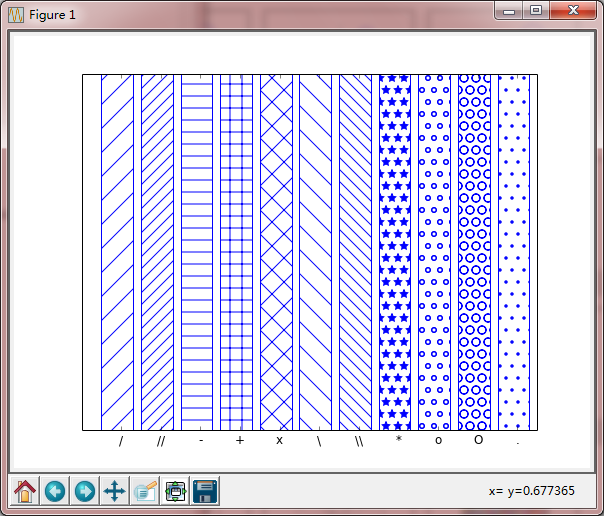
6. 柱状图及其填充
code
#!/usr/bin/env python

# -*- coding: utf-8 -*-

import numpy as np

import matplotlib

import matplotlib.pyplot as plt

# Data to be represented

X = np.linspace(0,1,10)

Y = np.ones(X.size)

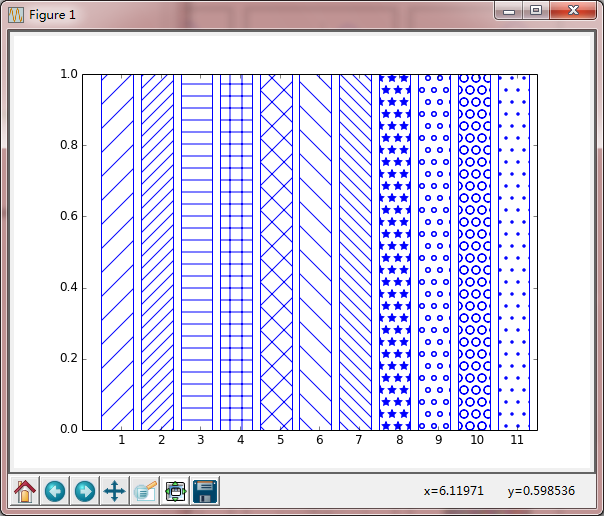
patterns = ('/','//','-', '+', 'x', '\\', '\\\\', '*', 'o', 'O', '.')

# Actual plotting

fig = plt.figure(figsize=(8,6), dpi=72, facecolor="white")

axes = plt.subplot(111)

for i,pattern in enumerate(patterns):

    axes.bar( .5+i, 1, hatch=pattern, color='white', edgecolor='blue',)

axes.set_xlim(0,len(patterns)+.5)

axes.set_ylim(0,1)

axes.set_yticks([])

axes.set_xticks(np.arange(1,len(patterns)+1))

axes.set_xticklabels(patterns)

plt.show()
Keypoints
axes.bar( .5+i, 1, hatch=pattern, color='white', edgecolor='blue',)
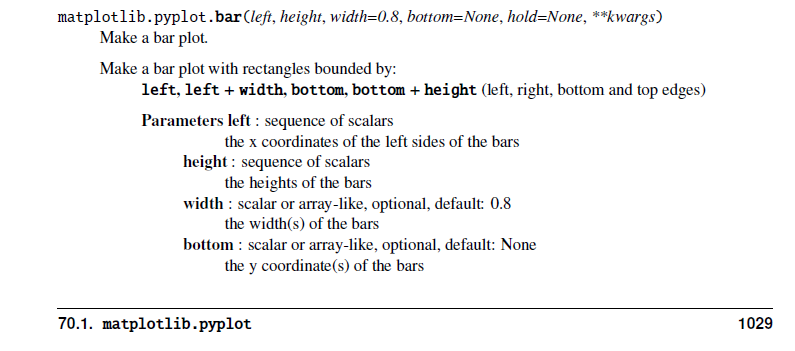
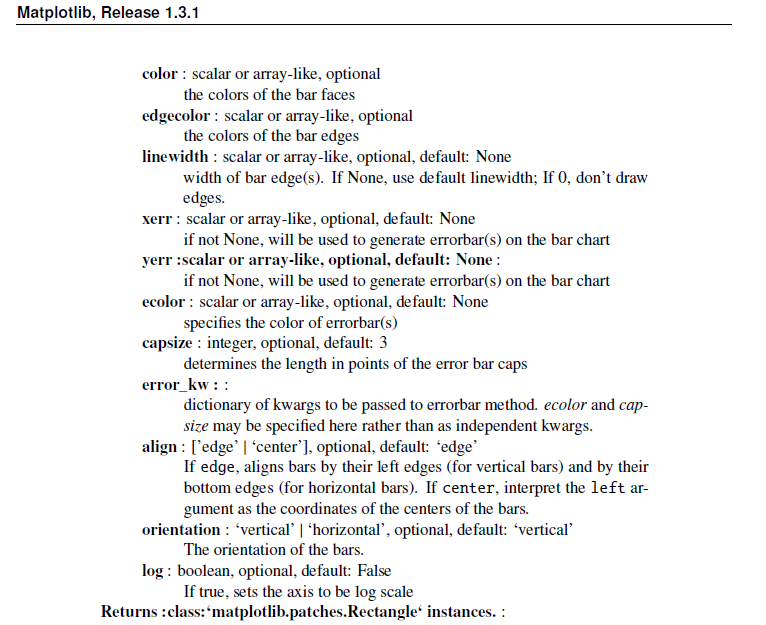
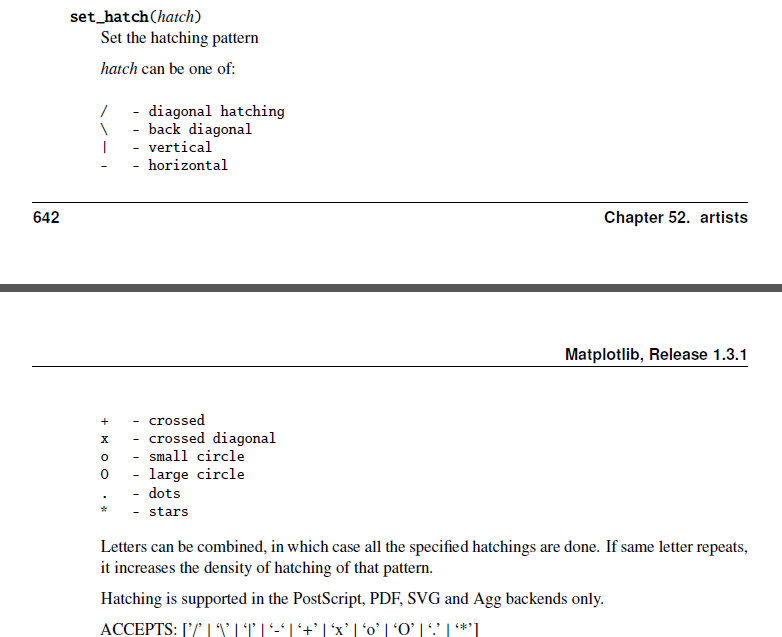
hatch,柱状图的填充:
Result
matplotlib-plot-style的更多相关文章
- python matplotlib plot 数据中的中文无法正常显示的解决办法
转发自:http://blog.csdn.net/laoyaotask/article/details/22117745?utm_source=tuicool python matplotlib pl ...
- python matplotlib.plot画图显示中文乱码的问题
在matplotlib.plot生成的统计图表中,中文总是无法正常显示.在网上也找了些资料,说是在程序中指定字体文件,不过那样的话需要对plot进行很多设置,而且都是说的设置坐标轴标题为中文,有时候图 ...
- 用Python设置matplotlib.plot的坐标轴刻度间隔以及刻度范围
一.用默认设置绘制折线图 import matplotlib.pyplot as plt x_values=list(range(11)) #x轴的数字是0到10这11个整数 y_values=[x* ...
- matplotlib 可视化 —— style sheets
Customizing plots with style sheets Matplotlib Style Gallery 1. 常见 style ggplot: bmh:Bayesian Method ...
- matplotlib plot 绘图函数发生阻塞(block)时的解决方法
Is there a way to detach matplotlib plots so that the computation can continue? 在一般编辑器中: from matplo ...
- Python Matplotlib.plot Update image Questions
1. 最近在测试一款设备,采集了一些设备后需要一帧一帧显示图像,经常使用Python,所以选用了Matplotlib进行图像操作 数据结构: timesatamp polar_distance hor ...
- 05. Matplotlib 1 |图表基本元素| 样式参数| 刻度 注释| 子图
1.Matplotlib简介及图表窗口 Matplotlib → 一个python版的matlab绘图接口,以2D为主,支持python.numpy.pandas基本数据结构,运营高效且有较丰富的图表 ...
- python时间序列画图plot总结
画图从直觉上来讲就是为了更加清晰的展示时序数据所呈现的规律(包括趋势,随时间变化的规律(一周.一个月.一年等等)和周期性规律),对于进一步选择时序分析模型至关重要.下面主要是基于pandas库总结一下 ...
- matplotlib 画图
matplotlib 画图 1. 画曲线图 Tompson = np.array([0, 0, 0, 0, 0.011, 0.051, 0.15, 0.251, 0.35, 0.44, 0 ...
- 学机器学习,不会数据分析怎么行——数据可视化分析(matplotlib)
前言 前面两篇文章介绍了 python 中两大模块 pandas 和 numpy 的一些基本使用方法,然而,仅仅会处理数据还是不够的,我们需要学会怎么分析,毫无疑问,利用图表对数据进行分析是最容易的, ...
随机推荐
- 豆瓣上9分以上的IT书籍-编程技术篇
在豆瓣上9分以上的IT书籍-编程语言篇中,收集了很多优秀的编程语言书籍,也得到了不少读者的喜欢.不过也有一些读者留言说某某书为什么没有,一种是因为某些书并不算讲某种编程语言的,一种是由于豆瓣9分以上这 ...
- app-framework学习--官网地址及demo下载地址
一起学习共同进步,加油..! 官网地址:http://app-framework-software.intel.com/ 下载地址:http://download.csdn.net/detail/ha ...
- iOS UILabel设置居上对齐,居中对齐,居下对齐
在iOS中默认的UILabel中的文字在竖直方向上仅仅能居中对齐,博主參考国外站点.从UILabel继承了一个新类,实现了居上对齐,居中对齐,居下对齐.详细例如以下: // // myUILabel ...
- 关于埃博拉病毒的基本知识(ABC)
科学研究表明.埃博拉病毒的存在历史很久远,可能有两千多万年的历史,在类人猿出现的时期就已存在. 埃博拉病毒呈现一种"蚕丝状",又细又长,无色透明.直径有80纳米,长短不等,在14微 ...
- python执行selenium报错
python + unittest + HTMLTestRunner 执行suite用例报错 Traceback (most recent call last): File "C:/ws/S ...
- redis PUB/SUB(发布/订阅)
PSUBSCRIBE订阅一个或多个符合给定模式的频道 PUBLISH将信息message 发送到指定的频道channel PUBSUB是一个查看订阅与发布系统状态的内省命令 PUBSUB CHANNE ...
- Centos 二进制安装node.js
一.登录node的官网查看最新的稳定版,以及需要下载的Linux版本,你可以有多种Linux安装方式(源码安装,二进制安装等). 二.Node安装及配置 1.创建安装目录:创建目录node.js [r ...
- C++头文件<bits/stdc++.h>
在刷题时,总发现有的只写一行头文件 #include <bits/stdc++.h> . 查阅资料后,才知道原来:#include<bits/stdc++.h>包含了目前c++ ...
- MySQL 自定义函数CREATE FUNCTION实例
分享一个MySQL 自定义函数CREATE FUNCTION的实例.mysql> delimiter $$mysql> CREATE FUNCTION myFunction-> (i ...
- IOS 程序员开发最常用宏定义
网上对IOS的宏定义比较多,我总结了一些最常用的宏,后续还会继续补上. 1.首次启动判断: #define First_Launched @"firstLaunch" 2.ios7 ...