
MySQL笔记(二)数据库对象的创建和管理
学校用 sqlserver ,记录数据移植到 mysql 过程中的一些问题(对应数据类型,主键外键等)。
索引:
- 查看数据的物理路径
- 查看表相关的信息(SHOW CREATE TABLE、DESC)
- 删库
- 创建表(要求在创建的过程中,分别为每张表合理建立主键、外键约束):VARCHAR VS. CHAR)
- 外键约束
- 表结构修改
- 索引操作(非聚集和聚集)
1、查看 MySql数据库物理文件存放路径
mysql> show global variables like "%datadir%";

+---------------+---------------------------------------------+

| Variable_name | Value                                       |

+---------------+---------------------------------------------+

| datadir       | C:\ProgramData\MySQL\MySQL Server 5.5\Data\ |

+---------------+---------------------------------------------+

1 row in set (0.00 sec)
所有数据库都放在这个默认目录下(可以自行修改),随便打开一个数据库,内容如下:

我发现 db.opt 是可以打开来编辑的,可以修改字符集什么的。
2、Getting Information About Tables
mysql> SHOW TABLES;

+-------------------+

| Tables_in_mangast |

+-------------------+

| manga             |

+-------------------+

1 row in set (0.00 sec)

mysql> SHOW CREATE TABLE manga;

+-------+-----------------------------------------------------------------------------------------------------------------------------------------+

| Table | Create Table                                                                                                                                                                                                                                                                                                                                                                                                    |

+-------+-----------------------------------------------------------------------------------------------------------------------------------------+

| manga | CREATE TABLE `manga` (

  `manga_id` bigint(20) NOT NULL AUTO_INCREMENT COMMENT '漫画id',

  `manga_name` varchar(40) NOT NULL COMMENT '漫画名字',

  `manga_discription` varchar(120) DEFAULT NULL COMMENT '漫画描述',

  `manga_status` tinyint(4) NOT NULL DEFAULT '' COMMENT '漫画描述',

  PRIMARY KEY (`manga_id`)

) ENGINE=InnoDB AUTO_INCREMENT=1004 DEFAULT CHARSET=utf8 COMMENT='漫画表'                  |

+-------+-----------------------------------------------------------------------------------------------------------------------------------------+

1 row in set (0.00 sec)
mysql> DESC manga;

+-------------------+--------------+------+-----+---------+----------------+

| Field             | Type         | Null | Key | Default | Extra          |

+-------------------+--------------+------+-----+---------+----------------+

| manga_id          | bigint(20)   | NO   | PRI | NULL    | auto_increment |

| manga_name        | varchar(40)  | NO   |     | NULL    |                |

| manga_discription | varchar(120) | YES  |     | NULL    |                |

| manga_status      | tinyint(4)   | NO   |     | 0       |                |

+-------------------+--------------+------+-----+---------+----------------+

4 rows in set (0.00 sec)

mysql> DESCRIBE manga;

+-------------------+--------------+------+-----+---------+----------------+

| Field             | Type         | Null | Key | Default | Extra          |

+-------------------+--------------+------+-----+---------+----------------+

| manga_id          | bigint(20)   | NO   | PRI | NULL    | auto_increment |

| manga_name        | varchar(40)  | NO   |     | NULL    |                |

| manga_discription | varchar(120) | YES  |     | NULL    |                |

| manga_status      | tinyint(4)   | NO   |     | 0       |                |

+-------------------+--------------+------+-----+---------+----------------+

4 rows in set (0.00 sec)
DESC 是 DESCRIBE 的简写形式
3、删库
DROP {DATABASE | SCHEMA} [IF EXISTS] db_name
DROP DATABASE returns the number of tables that were removed. This corresponds to the number of .frm files removed.
4、创建表(要求在创建的过程中,分别为每张表合理建立主键、外键约束)
相关资料
1.8.3.2 FOREIGN KEY Constraints
13.1.18.6 Using FOREIGN KEY Constraints
CHAR 与 VARCHAR 对比

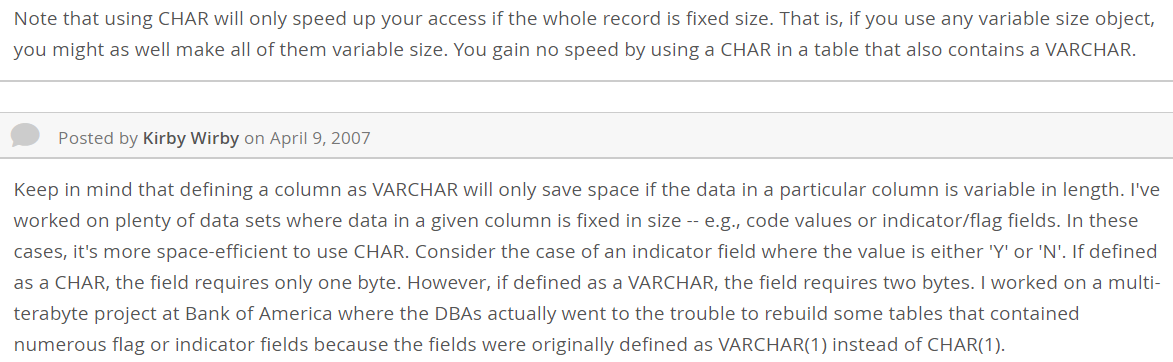
如果是定长的指示字段例如 Y 或者 N ,建议用 CHAR 比较节省空间, VARCAHR 要两个字节, CHAR 只要一个字节;非定长的用 VARCHAR。
Fixed-Point Types (Exact Value) - DECIMAL, NUMERIC ------- ps. 定点类型(准确值) decimal = 十进制
这个数据类型用于存储精确的数值,例如货币。
MySQL 中的 DECIMAL 和 SQLServer 中的 NUMERIC 是类似的。
例如说 salary DECIMAL(5,2) 的存储范围为 -999.99 到 999.99
5、外键约束
Corresponding columns in the foreign key and the referenced key must have similar data types. The size and sign of integer types must be the same. The length of string types need not be the same. For nonbinary (character) string columns, the character set and collation must be the same. (应用条件)
For storage engines supporting foreign keys, MySQL rejects any INSERT or UPDATE operation that attempts to create a foreign key value in a child table if there is no a matching candidate key value in the parent table. (对子表的影响)
When an UPDATE or DELETE operation affects a key value in the parent table that has matching rows in the child table, the result depends on the referential action specified using ON UPDATE and ON DELETEsubclauses of the FOREIGN KEY clause. (父表变动如何影响子表 ↓)
CASCADE: Delete or update the row from the parent table, and automatically delete or update the matching rows in the child table. Both ON DELETE CASCADE and ON UPDATE CASCADE are supported. Between two tables, do not define several ON UPDATE CASCADE clauses that act on the same column in the parent table or in the child table.
SET NULL: Delete or update the row from the parent table, and set the foreign key column or columns in the child table to NULL. Both ON DELETE SET NULL and ON UPDATE SET NULL clauses are supported.
If you specify a SET NULL action, make sure that you have not declared the columns in the child table as NOT NULL.
RESTRICT: Rejects the delete or update operation for the parent table. Specifying RESTRICT (or NO ACTION) is the same as omitting the ON DELETE or ON UPDATE clause.
NO ACTION: A keyword from standard SQL. In MySQL, equivalent to RESTRICT. The MySQL Server rejects the delete or update operation for the parent table if there is a related foreign key value in the referenced table. Some database systems have deferred checks, and NO ACTION is a deferred check. In MySQL, foreign key constraints are checked immediately, so NO ACTION is the same asRESTRICT. (和 RESTRICT 完全相同。)
SET DEFAULT: This action is recognized by the MySQL parser, but both InnoDB and NDB reject table definitions containing ON DELETE SET DEFAULT or ON UPDATE SET DEFAULT clauses.
For an ON DELETE or ON UPDATE that is not specified, the default action is always RESTRICT. (默认行为)
DROP DATABASE IF EXISTS orderdb;

CREATE DATABASE orderdb;

USE orderdb;

CREATE TABLE employee (

    employee_no VARCHAR(8),

    employee_name VARCHAR(10),

    sex CHAR(1),

    birthday DATE,

    address VARCHAR(50),

    telephone VARCHAR(20),

    hiredate DATE COMMENT '聘用日期',

    department VARCHAR(30),

    headship VARCHAR(10) COMMENT '职务',

    salary DECIMAL(8,2),

    PRIMARY KEY(employee_no)

)    ENGINE=INNODB;

CREATE TABLE customer (

    customer_no VARCHAR(9),

    customer_name VARCHAR(40),

    telephone VARCHAR(20),

    address VARCHAR(40),

    zip VARCHAR(6),

    PRIMARY KEY(customer_no)

)    ENGINE=INNODB;

CREATE TABLE product (

    product_no VARCHAR(9),

    product_name VARCHAR(40),

    product_class VARCHAR(20),

    product_price DECIMAL(7,2),

    PRIMARY KEY(product_no)

)    ENGINE=INNODB;

CREATE TABLE order_master (

    order_no VARCHAR(12),

    customer_no VARCHAR(9),

    saler_no VARCHAR(8),

    order_date DATE,

    order_sum DECIMAL(9,2),

    invoiceno CHAR(10) COMMENT '发票号码',

    PRIMARY KEY (order_no),

    FOREIGN KEY (customer_no)

        REFERENCES customer(customer_no)

)    ENGINE=INNODB;

CREATE TABLE order_detail (

    order_no VARCHAR(12),

    product_no VARCHAR(9),

    quantity INT,

    price DECIMAL(7,2),

    PRIMARY KEY (order_no, product_no),

    FOREIGN KEY (order_no)

        REFERENCES order_master(order_no),

    FOREIGN KEY (product_no)

        REFERENCES product(product_no)

)    ENGINE=INNODB;
6、表结构的修改
修改客户表结构,要求客户名称和客户电话属性为not null
修改员工表结构,要求员工姓名和电话属性为not null
修改订单表结构,要求发票号码属性为not null
一种方式是修改上面的 schema.sql 然后重新跑这个脚本(没有数据的情况下),另外一种方法是:
mysql> ALTER TABLE customer MODIFY customer_name VARCHAR(40) NOT NULL, MODIFY telephone VARCHAR(20) NOT NULL;

mysql> ALTER TABLE employee MODIFY employee_name VARCHAR(10) NOT NULL, MODIFY telephone VARCHAR(20) NOT NULL;

mysql> ALTER TABLE order_master MODIFY invoiceno CHAR(10) NOT NULL;
7、索引操作
在已创建的基本表的基础上,完成以下索引
(1)在员工表中按所得薪水建立一个非聚集索引salaryIdx
(2)在订单主表中,首先按订金金额的升序,然后按业务员编号的降序建立一个非聚集索引salenosumIdx。
参考资料:快速理解聚集索引和非聚集索引
MySQL笔记(二)数据库对象的创建和管理的更多相关文章
- Greenplum+Hadoop学习笔记-14-定义数据库对象之创建与管理模式
6.3.创建与管理模式 概述:DB内组织对象的一种逻辑结构.一个DB内能够有多个模式.在未指定模式时默认放置在public中.能够通过"\dn"方式查看数据库中现有模式: test ...
- Greenplum中定义数据库对象之创建与管理模式
创建与管理模式 概述:DB内组织对象的一种逻辑结构.一个DB内能够有多个模式.在未指定模式时默认放置在public中.能够通过"\dn"方式查看数据库中现有模式. testdw=# ...
- 实验十--- MySQL过程式数据库对象
实验十 MySQL过程式数据库对象 一. 实验内容: 1. 存储过程的创建和调用 2. 存储函数的创建和调用 3. 触发器的创建和触发 4. 事件的创建和修改 一. 实验项目:员工管理数据库 用于 ...
- Mysql 笔记二
Mysql 笔记二 Mysql 笔记二 Table of Contents 1. 前言 2. Master Thread 工作方式 2.1. 主循环(loop) 2.2. 后台循(backgroup ...
- MySql笔记(二)
目录 MySQL笔记(二) 一幅画,一次瞬间的回眸,就在那次画展上,那个眼神,温柔的流转,还是那干净的皮鞋,一尘不染,俊朗的眉宇性感的唇,悄悄走近,牵手一段浪漫 MySQL笔记(二) 13.条件查询 ...
- Hibernate数据库对象的创建与导出
Hibernate 与数据库的关系是ORM关系,对象映射数据库. 那么如何通过对象对数据库进行各种对象的ddl与dml操作呢? 数据库对象操作的〈database-object /〉+ SchemaE ...
- Oracle学习笔记九 数据库对象
Oracle 数据库对象又称模式对象,数据库对象是逻辑结构的集合,最基本的数据库对象是表. 其他数据库对象包括:
- MySql笔记二:命令简介
从笔记二开始讲解一些简单的命令,这些我在SQL Server里面都讲过了,什么主键,约束啥的数据库这些都是相通的,所以MySql这里,不讲,粗略过一遍. 使用命令框登录MySql mysql -u r ...
- MySQL中的数据库对象
1.数据库中一般包含下列对象 表.约束.索引.触发器.序列.视图: 可以使用图形用户界面或通过显式执行语句来创建这些数据库对象.用于创建这些数据库对象的语句称为“数据定义语言”(DDL),它们通常以关 ...
随机推荐
- ADOdb 支持的数据库包括哪些?
ADOdb 支持的数据库包括 MySQL, PostgreSQL,Interbase,Firebird,Informix,Oracle,MS SQL 7,Foxpro,Access,ADO,Sybas ...
- codeforces 782B - The Meeting Place Cannot Be Changed
time limit per test 5 seconds memory limit per test 256 megabytes input standard input output standa ...
- lamp docker apache2 supervisor monitor
sudo docker run -d -p 80:80 -p 3306:3306 -v /data/lampp/supervisormonitor:/app --name mylamp01 tutum ...
- XSS 防范XSS 攻击的措施
XssSniper--0KEE TEAM XssSniper--0KEE TEAM XssSniper 扩展介绍 一直以来,隐式输出的DomXSS漏洞难以被传统的扫描工具发 ...
- ls 列出文件目录(可以含子目录)及文件的完整路径
1.列出当前目录的文件.文件夹完整路径 ls -1 |awk '{print i$0}' i=`pwd`'/' 2.列出当前目录及子目录的文件.文件夹完整路径 ls -R |awk '{p ...
- http_build_query
http_build_query (PHP 5) http_build_query -- 生成 url-encoded 之后的请求字符串描述string http_build_query ( arra ...
- Jsoup爬虫解析
需要下载jsoup-1.8.1.jar包 jsoup 是一款Java 的HTML解析器,可直接解析某个URL地址.HTML文本内容.它提供了一套非常省力的API,可通过DOM,CSS以及类似于jQue ...
- 关于获取多个id的用法
一.子页面中的写法 <!DOCTYPE HTML><html><head><meta http-equiv="Content-Type" ...
- mysql 数据操作 多表查询 多表连接查询 全外连接
全外连接:显示左右两个表全部记录 全外连接 在内连接的基础上保留左右两表没有对应关系的记录 full join #注意:mysql不支持全外连接 full JOIN mysql> select ...
- PHPExcel使用-使用PHPExcel导出文件-导出MySQL数据
现在数据库里面有一组数据,我们将它按照不同的难度进行分sheet. 首先我们需要写一个mysql的配置文件- db.config.php(utf-8编码) : <?php $dbconfig= ...