
[Redis] - redis实战
Microsoft Windows [版本 10.0.17134.472]

(c)  Microsoft Corporation。保留所有权利。

C:\Users\SeeClanUkyo>f:

F:\>cd redis_

F:\redis_>redis-cli.exe

127.0.0.1:> set hero gareen

OK

127.0.0.1:> get hero

"gareen"

127.0.0.1:> set google http://www.google

OK

127.0.0.1:> append google .com

(integer)

127.0.0.1:> get google

"http://www.google.com"

127.0.0.1:> set visitors

OK

127.0.0.1:> incr visitors

(integer)

127.0.0.1:> incr visitors

(integer)

127.0.0.1:> get visitors

""

127.0.0.1:> incrby visitors

(integer)

127.0.0.1:> get visitors

""

127.0.0.1:> type google

string

127.0.0.1:> type visitors

string

127.0.0.1:> ttl google

(integer) -

127.0.0.1:> rename google google-site

OK

127.0.0.1:> get google

(nil)

127.0.0.1:> get google-site

"http://www.google.com"

127.0.0.1:> lpush list redis

(integer)

127.0.0.1:> lpush list1 hello

(integer)

127.0.0.1:> rpush list1 world

(integer)

127.0.0.1:> llen list1

(integer)

127.0.0.1:> lrange list1

) "hello"

) "world"

127.0.0.1:> lpop list1

"hello"

127.0.0.1:> rpop list1

"world"

127.0.0.1:> lrange list1

(empty list or set)

127.0.0.1:> hset person name jack

(integer)

127.0.0.1:> hset person age

(integer)

127.0.0.1:> hset person sex female

(integer)

127.0.0.1:> hgetall person

) "name"

) "jack"

) "age"

) ""

) "sex"

) "female"

127.0.0.1:> hkeys person

) "name"

) "age"

) "sex"

127.0.0.1:> hvals person

) "jack"

) ""

) "female"

127.0.0.1:> hdel person

(error) ERR wrong number of arguments for 'hdel' command

127.0.0.1:> hdel name

(error) ERR wrong number of arguments for 'hdel' command

127.0.0.1:> hdel name jack

(integer)

127.0.0.1:> hkey pserson

(error) ERR unknown command 'hkey'

127.0.0.1:> hkeys person

) "name"

) "age"

) "sex"

127.0.0.1:> hvals person

) "jack"

) ""

) "female"

127.0.0.1:> sadd myset "Hello"

(integer)

127.0.0.1:> sadd myset "World"

(integer)

127.0.0.1:> smembers myset

) "Hello"

) "World"

127.0.0.1:> sadd myset "one"

(integer)

127.0.0.1:> sismember myset "one"

(integer)

127.0.0.1:> sismember myset "two"

(integer)

127.0.0.1:> zadd dbs  redis

(integer)

127.0.0.1:> zadd dbs  memcached

(integer)

127.0.0.1:> zadd dbs  mongodb

(integer)

127.0.0.1:> zadd dbs  leveldb

(integer)

127.0.0.1:> zcard dbs

(integer)

127.0.0.1:> zcount dbs

(integer)

127.0.0.1:> zrank dbs leveldb

(integer)

127.0.0.1:> zrank dbs other

(nil)

127.0.0.1:> zrangebyscore dbs

) "memcached"

) "leveldb"

) "mongodb"

) "redis"

127.0.0.1:>
springboot的redis依赖
<dependency>

      <groupId>org.springframework.boot</groupId>

      <artifactId>spring-boot-starter-data-redis</artifactId>

</dependency>
不再概述windows上安装redis.
linux上安装后提示:

redis的使用小记:
https://deadzq.github.io/redis/Redis.html
写个测试:
package com.ykmimi.job;

import com.ykmimi.job.bean.MyUser;

import com.ykmimi.job.bean.MyUser1;

import com.ykmimi.job.mapper.MyUserMapper;

import org.junit.Test;

import org.junit.runner.RunWith;

import org.springframework.beans.factory.annotation.Autowired;

import org.springframework.boot.test.context.SpringBootTest;

import org.springframework.data.redis.core.RedisTemplate;

import org.springframework.data.redis.serializer.RedisSerializer;

import org.springframework.data.redis.serializer.StringRedisSerializer;

import org.springframework.test.context.junit4.SpringRunner;

import javax.annotation.Resource;

import java.util.List;

@RunWith(SpringRunner.class)

@SpringBootTest

public class DemoApplicationTests {

//    redis模板

    @Test

    public void contextLoads() {

        MyUser user = new MyUser(1l,111l,111l,"123",111l,"t");

        int insert = myUserMapper.insert(user);

        System.out.println(insert);

    }

    @Autowired

    private RedisTemplate<Object,Object> redisTemplate;

    @Resource

    private MyUserMapper myUserMapper;

    @Test

    public void getMyUser(){

        //字符串的序列化器 redis

        RedisSerializer redisSerializer = new StringRedisSerializer();

        redisTemplate.setKeySerializer(redisSerializer);

        //查询缓存

        MyUser myUser = (MyUser) redisTemplate.opsForValue().get("myUser");

        if(null == myUser){

            System.out.println("当缓存没有myUser时显示.");

            //缓存为空,查询数据库

            myUser = myUserMapper.selectByPrimaryKey(1l);

            //把数据库查询出来的数据放入redis

            redisTemplate.opsForValue().set("myUser",myUser);

        }

        System.out.println(myUser);

    }

}
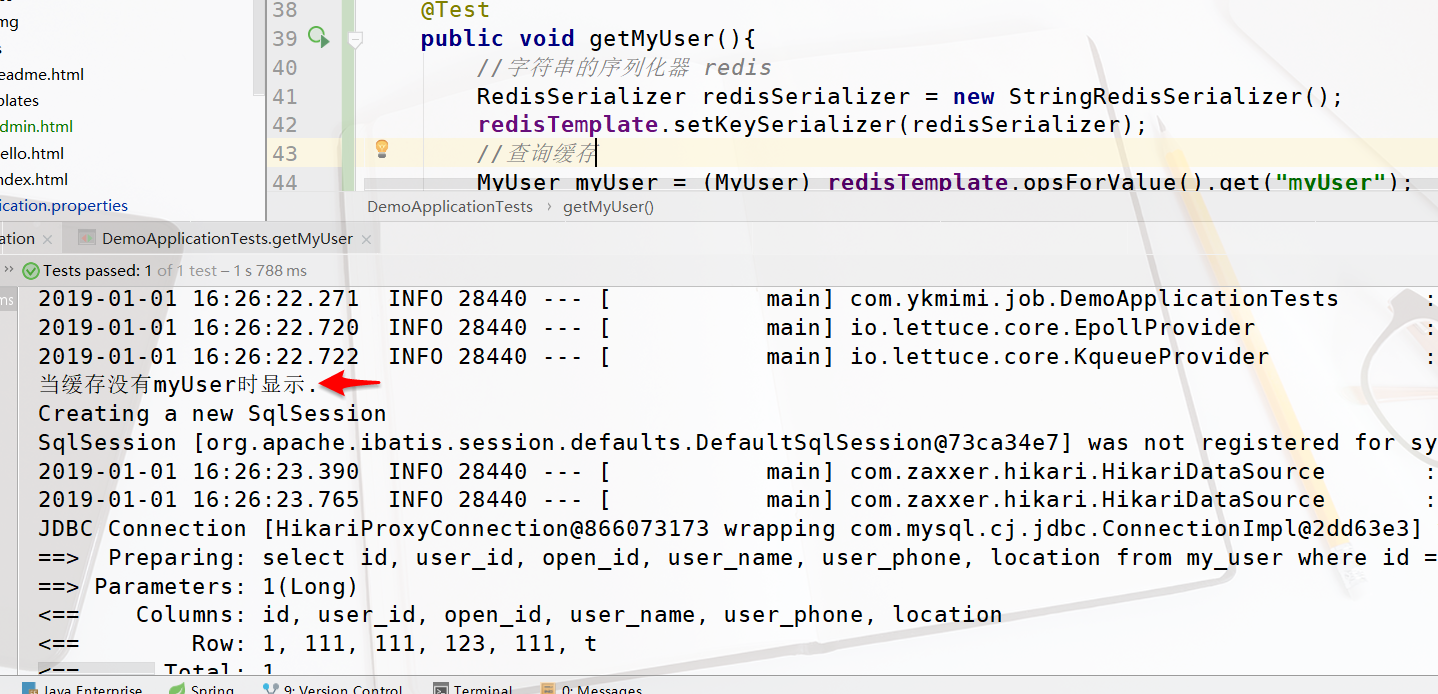
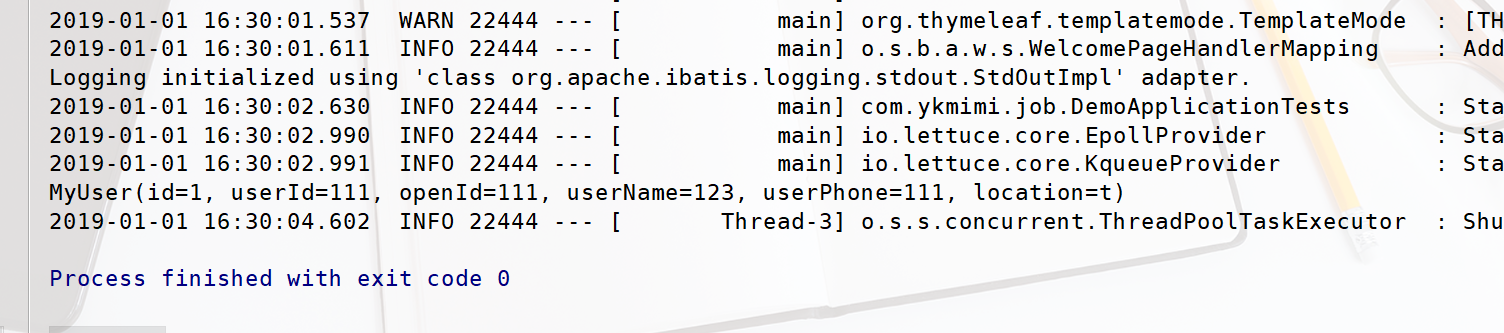
接着再次运行

因为此时redis中有myUser存储了,不再显示上面后箭头的输出.
需要在application.properties中:
# REDIS (RedisProperties)

# Redis数据库索引(默认为0)

spring.redis.database=0

# Redis服务器地址

spring.redis.host=127.0.0.1

# Redis服务器连接端口

spring.redis.port=6379

# 连接池最大连接数(使用负值表示没有限制)

#spring.redis.pool.max-active=8

# 连接池最大阻塞等待时间(使用负值表示没有限制)

spring.redis.jedis.pool.max-wait=-1

# 连接池中的最大空闲连接

spring.redis.jedis.pool.max-idle=8

# 连接池中的最小空闲连接

spring.redis.jedis.pool.min-idle=0

# 连接超时时间(毫秒)

spring.redis.timeout=5000
RedisConfig.java
package com.tansuo365.test1.config;

import com.fasterxml.jackson.annotation.JsonAutoDetect;

import com.fasterxml.jackson.annotation.PropertyAccessor;

import com.fasterxml.jackson.databind.ObjectMapper;

import org.springframework.cache.CacheManager;

import org.springframework.cache.annotation.CachingConfigurerSupport;

import org.springframework.cache.annotation.EnableCaching;

import org.springframework.cache.interceptor.KeyGenerator;

import org.springframework.context.annotation.Bean;

import org.springframework.context.annotation.Configuration;

import org.springframework.data.redis.cache.RedisCacheManager;

import org.springframework.data.redis.connection.RedisConnectionFactory;

import org.springframework.data.redis.core.RedisTemplate;

import org.springframework.data.redis.core.StringRedisTemplate;

import org.springframework.data.redis.serializer.Jackson2JsonRedisSerializer;

import java.lang.reflect.Method;

@Configuration

@EnableCaching

public class RedisConfig extends CachingConfigurerSupport {

    /**

     * 生成key的策略

     * @return

     */

    @Bean

    public KeyGenerator keyGenerator(){

        return new KeyGenerator() {

            @Override

            public Object generate(Object target, Method method, Object... params) {

                StringBuilder sb = new StringBuilder();

                sb.append(target.getClass().getName());

                sb.append(method.getName());

                for(Object obj : params){

                    sb.append(obj.toString());

                }

                return sb.toString();

            }

        };

    }

    /**

     * 管理缓存

     * @param factory

     * @return

     */

    @Bean

    public CacheManager cacheManager(RedisConnectionFactory factory){

        RedisCacheManager cacheManager = RedisCacheManager.create(factory);

        return cacheManager;

    }

    /**

     * RedisTemplate配置

     * @param factory

     * @return

     */

    @Bean

    public RedisTemplate<String,String> redisTemplate(RedisConnectionFactory factory){

        StringRedisTemplate template = new StringRedisTemplate(factory);

        Jackson2JsonRedisSerializer jackson2JsonRedisSerializer = new Jackson2JsonRedisSerializer(Object.class);

        ObjectMapper om = new ObjectMapper();

        om.setVisibility(PropertyAccessor.ALL, JsonAutoDetect.Visibility.ANY);

        om.enableDefaultTyping(ObjectMapper.DefaultTyping.NON_FINAL);

        jackson2JsonRedisSerializer.setObjectMapper(om);

        template.setValueSerializer(jackson2JsonRedisSerializer);

        template.afterPropertiesSet();

        return template;

    }

}
实体类必须实现序列化:
@Data

@Builder

@NoArgsConstructor

@AllArgsConstructor

public class PetroleumCoke implements Serializable {
在启动类上加入注解:
@EnableCaching

@SpringBootApplication
RedisService:
package com.tansuo365.test1.service;

import org.springframework.beans.factory.annotation.Autowired;

import org.springframework.data.redis.core.RedisTemplate;

import org.springframework.stereotype.Service;

import org.springframework.util.CollectionUtils;

import java.util.List;

import java.util.Map;

import java.util.Set;

import java.util.concurrent.TimeUnit;

@Service

public class RedisService {

    @Autowired

    private RedisTemplate redisTemplate;

    public void setRedisTemplate(RedisTemplate redisTemplate) {

        this.redisTemplate = redisTemplate;

    }

    //=============================common============================

    /**

     * 指定缓存失效时间

     * @param key 键

     * @param time 时间(秒)

     * @return

     */

    public boolean expire(String key,long time){

        try {

            if(time>0){

                redisTemplate.expire(key, time, TimeUnit.SECONDS);

            }

            return true;

        } catch (Exception e) {

            e.printStackTrace();

            return false;

        }

    }

    /**

     * 根据key 获取过期时间

     * @param key 键 不能为null

     * @return 时间(秒) 返回0代表为永久有效

     */

    public long getExpire(String key){

        return redisTemplate.getExpire(key,TimeUnit.SECONDS);

    }

    /**

     * 判断key是否存在

     * @param key 键

     * @return true 存在 false不存在

     */

    public boolean hasKey(String key){

        try {

            return redisTemplate.hasKey(key);

        } catch (Exception e) {

            e.printStackTrace();

            return false;

        }

    }

    /**

     * 删除缓存

     * @param key 可以传一个值 或多个

     */

    @SuppressWarnings("unchecked")

    public void del(String ... key){

        if(key!=null&&key.length>0){

            if(key.length==1){

                redisTemplate.delete(key[0]);

            }else{

                redisTemplate.delete(CollectionUtils.arrayToList(key));

            }

        }

    }

    //============================String=============================

    /**

     * 普通缓存获取

     * @param key 键

     * @return 值

     */

    public Object get(String key){

        return key==null?null:redisTemplate.opsForValue().get(key);

    }

    /**

     * 普通缓存放入

     * @param key 键

     * @param value 值

     * @return true成功 false失败

     */

    public boolean set(String key,Object value) {

        try {

            redisTemplate.opsForValue().set(key, value);

            return true;

        } catch (Exception e) {

            e.printStackTrace();

            return false;

        }

    }

    /**

     * 普通缓存放入并设置时间

     * @param key 键

     * @param value 值

     * @param time 时间(秒) time要大于0 如果time小于等于0 将设置无限期

     * @return true成功 false 失败

     */

    public boolean set(String key,Object value,long time){

        try {

            if(time>0){

                redisTemplate.opsForValue().set(key, value, time, TimeUnit.SECONDS);

            }else{

                set(key, value);

            }

            return true;

        } catch (Exception e) {

            e.printStackTrace();

            return false;

        }

    }

    /**

     * 递增

     * @param key 键

     * @param

     * @return

     */

    public long incr(String key, long delta){

        if(delta<0){

            throw new RuntimeException("递增因子必须大于0");

        }

        return redisTemplate.opsForValue().increment(key, delta);

    }

    /**

     * 递减

     * @param key 键

     * @param

     * @return

     */

    public long decr(String key, long delta){

        if(delta<0){

            throw new RuntimeException("递减因子必须大于0");

        }

        return redisTemplate.opsForValue().increment(key, -delta);

    }

    //================================Map=================================

    /**

     * HashGet

     * @param key 键 不能为null

     * @param item 项 不能为null

     * @return 值

     */

    public Object hget(String key,String item){

        return redisTemplate.opsForHash().get(key, item);

    }

    /**

     * 获取hashKey对应的所有键值

     * @param key 键

     * @return 对应的多个键值

     */

    public Map<Object,Object> hmget(String key){

        return redisTemplate.opsForHash().entries(key);

    }

    /**

     * HashSet

     * @param key 键

     * @param map 对应多个键值

     * @return true 成功 false 失败

     */

    public boolean hmset(String key, Map<String,Object> map){

        try {

            redisTemplate.opsForHash().putAll(key, map);

            return true;

        } catch (Exception e) {

            e.printStackTrace();

            return false;

        }

    }

    /**

     * HashSet 并设置时间

     * @param key 键

     * @param map 对应多个键值

     * @param time 时间(秒)

     * @return true成功 false失败

     */

    public boolean hmset(String key, Map<String,Object> map, long time){

        try {

            redisTemplate.opsForHash().putAll(key, map);

            if(time>0){

                expire(key, time);

            }

            return true;

        } catch (Exception e) {

            e.printStackTrace();

            return false;

        }

    }

    /**

     * 向一张hash表中放入数据,如果不存在将创建

     * @param key 键

     * @param item 项

     * @param value 值

     * @return true 成功 false失败

     */

    public boolean hset(String key,String item,Object value) {

        try {

            redisTemplate.opsForHash().put(key, item, value);

            return true;

        } catch (Exception e) {

            e.printStackTrace();

            return false;

        }

    }

    /**

     * 向一张hash表中放入数据,如果不存在将创建

     * @param key 键

     * @param item 项

     * @param value 值

     * @param time 时间(秒)  注意:如果已存在的hash表有时间,这里将会替换原有的时间

     * @return true 成功 false失败

     */

    public boolean hset(String key,String item,Object value,long time) {

        try {

            redisTemplate.opsForHash().put(key, item, value);

            if(time>0){

                expire(key, time);

            }

            return true;

        } catch (Exception e) {

            e.printStackTrace();

            return false;

        }

    }

    /**

     * 删除hash表中的值

     * @param key 键 不能为null

     * @param item 项 可以使多个 不能为null

     */

    public void hdel(String key, Object... item){

        redisTemplate.opsForHash().delete(key,item);

    }

    /**

     * 判断hash表中是否有该项的值

     * @param key 键 不能为null

     * @param item 项 不能为null

     * @return true 存在 false不存在

     */

    public boolean hHasKey(String key, String item){

        return redisTemplate.opsForHash().hasKey(key, item);

    }

    /**

     * hash递增 如果不存在,就会创建一个 并把新增后的值返回

     * @param key 键

     * @param item 项

     * @param by 要增加几(大于0)

     * @return

     */

    public double hincr(String key, String item,double by){

        return redisTemplate.opsForHash().increment(key, item, by);

    }

    /**

     * hash递减

     * @param key 键

     * @param item 项

     * @param by 要减少记(小于0)

     * @return

     */

    public double hdecr(String key, String item,double by){

        return redisTemplate.opsForHash().increment(key, item,-by);

    }

    //============================set=============================

    /**

     * 根据key获取Set中的所有值

     * @param key 键

     * @return

     */

    public Set<Object> sGet(String key){

        try {

            return redisTemplate.opsForSet().members(key);

        } catch (Exception e) {

            e.printStackTrace();

            return null;

        }

    }

    /**

     * 根据value从一个set中查询,是否存在

     * @param key 键

     * @param value 值

     * @return true 存在 false不存在

     */

    public boolean sHasKey(String key,Object value){

        try {

            return redisTemplate.opsForSet().isMember(key, value);

        } catch (Exception e) {

            e.printStackTrace();

            return false;

        }

    }

    /**

     * 将数据放入set缓存

     * @param key 键

     * @param values 值 可以是多个

     * @return 成功个数

     */

    public long sSet(String key, Object...values) {

        try {

            return redisTemplate.opsForSet().add(key, values);

        } catch (Exception e) {

            e.printStackTrace();

            return 0;

        }

    }

    /**

     * 将set数据放入缓存

     * @param key 键

     * @param time 时间(秒)

     * @param values 值 可以是多个

     * @return 成功个数

     */

    public long sSetAndTime(String key,long time,Object...values) {

        try {

            Long count = redisTemplate.opsForSet().add(key, values);

            if(time>0) expire(key, time);

            return count;

        } catch (Exception e) {

            e.printStackTrace();

            return 0;

        }

    }

    /**

     * 获取set缓存的长度

     * @param key 键

     * @return

     */

    public long sGetSetSize(String key){

        try {

            return redisTemplate.opsForSet().size(key);

        } catch (Exception e) {

            e.printStackTrace();

            return 0;

        }

    }

    /**

     * 移除值为value的

     * @param key 键

     * @param values 值 可以是多个

     * @return 移除的个数

     */

    public long setRemove(String key, Object ...values) {

        try {

            Long count = redisTemplate.opsForSet().remove(key, values);

            return count;

        } catch (Exception e) {

            e.printStackTrace();

            return 0;

        }

    }

    //===============================list=================================

    /**

     * 获取list缓存的内容

     * @param key 键

     * @param start 开始

     * @param end 结束  0 到 -1代表所有值

     * @return

     */

    public List<Object> lGet(String key,long start, long end){

        try {

            return redisTemplate.opsForList().range(key, start, end);

        } catch (Exception e) {

            e.printStackTrace();

            return null;

        }

    }

    /**

     * 获取list缓存的长度

     * @param key 键

     * @return

     */

    public long lGetListSize(String key){

        try {

            return redisTemplate.opsForList().size(key);

        } catch (Exception e) {

            e.printStackTrace();

            return 0;

        }

    }

    /**

     * 通过索引 获取list中的值

     * @param key 键

     * @param index 索引  index>=0时, 0 表头,1 第二个元素,依次类推;index<0时,-1,表尾,-2倒数第二个元素,依次类推

     * @return

     */

    public Object lGetIndex(String key,long index){

        try {

            return redisTemplate.opsForList().index(key, index);

        } catch (Exception e) {

            e.printStackTrace();

            return null;

        }

    }

    /**

     * 将list放入缓存

     * @param key 键

     * @param value 值

     * @param

     * @return

     */

    public boolean lSet(String key, Object value) {

        try {

            redisTemplate.opsForList().rightPush(key, value);

            return true;

        } catch (Exception e) {

            e.printStackTrace();

            return false;

        }

    }

    /**

     * 将list放入缓存

     * @param key 键

     * @param value 值

     * @param time 时间(秒)

     * @return

     */

    public boolean lSet(String key, Object value, long time) {

        try {

            redisTemplate.opsForList().rightPush(key, value);

            if (time > 0) expire(key, time);

            return true;

        } catch (Exception e) {

            e.printStackTrace();

            return false;

        }

    }

    /**

     * 将list放入缓存

     * @param key 键

     * @param value 值

     * @param

     * @return

     */

    public boolean lSet(String key, List<Object> value) {

        try {

            redisTemplate.opsForList().rightPushAll(key, value);

            return true;

        } catch (Exception e) {

            e.printStackTrace();

            return false;

        }

    }

    /**

     * 将list放入缓存

     * @param key 键

     * @param value 值

     * @param time 时间(秒)

     * @return

     */

    public boolean lSet(String key, List<Object> value, long time) {

        try {

            redisTemplate.opsForList().rightPushAll(key, value);

            if (time > 0) expire(key, time);

            return true;

        } catch (Exception e) {

            e.printStackTrace();

            return false;

        }

    }

    /**

     * 根据索引修改list中的某条数据

     * @param key 键

     * @param index 索引

     * @param value 值

     * @return

     */

    public boolean lUpdateIndex(String key, long index,Object value) {

        try {

            redisTemplate.opsForList().set(key, index, value);

            return true;

        } catch (Exception e) {

            e.printStackTrace();

            return false;

        }

    }

    /**

     * 移除N个值为value

     * @param key 键

     * @param count 移除多少个

     * @param value 值

     * @return 移除的个数

     */

    public long lRemove(String key,long count,Object value) {

        try {

            Long remove = redisTemplate.opsForList().remove(key, count, value);

            return remove;

        } catch (Exception e) {

            e.printStackTrace();

            return 0;

        }

    }

}
一个控制层
@RequestMapping("selectAll")

    public List selectAllPetroleumCoke(){

//        List<PetroleumCoke> petroleumCokes = petroleumCokeMapper.selectAllPetroleumCoke();

//        map.put("petroleumCokes",petroleumCokes);

//        return map;

        //字符串的序列化器 redis

        RedisSerializer redisSerializer = new StringRedisSerializer();

        redisTemplate.setKeySerializer(redisSerializer);

        List petroleumCokes = redisService.lGet("petroleumCokes", 0, -1);

        System.out.println("查询缓存数据为"+petroleumCokes);

        if (0 == petroleumCokes.size()) {

            synchronized(this){

                System.out.println("进入第一个if");

                petroleumCokes = redisService.lGet("petroleumCokes", 0, -1);

                if(0 == petroleumCokes.size()){

                    System.out.println("第二个if显示了,表示缓存没有查到petroleumCokes.");

                    //缓存为空,查询数据库

                    petroleumCokes = petroleumCokeMapper.selectAllPetroleumCoke();

                    //把数据库查询出来的数据放入redis

                    redisService.lSet("petroleumCokes",petroleumCokes);

                }

            }

        }

        return petroleumCokes;

    }
除了上面的缓存使用还可以直接使用注解:
//    @Cacheable(cacheNames = {"petroleumCokes"})

    @Cacheable(value = "petroleumCokes")

    @RequestMapping("selectAll")

    public List selectAllPetroleumCoke(){

        System.err.println("进入selectAll,表示要走数据库了~");

        List<PetroleumCoke> petroleumCokes = petroleumCokeMapper.selectAllPetroleumCoke();

        return petroleumCokes;

    }
[Redis] - redis实战的更多相关文章
- Redis企业实战的一些坑
附录:Redis企业实战的一些坑 一.前言 小伙伴们对Redis应该不陌生,Redis是系统必备的分布式缓存中间件,主要用来解决高并发下分担DB资源的负载,从而提升系统吞吐量. Redis支持多种数据 ...
- Redis主从实战
为了提升redis高可用性,除了备份redis dump数据之外,还需要创建redis主从架构,可以利用从将数据库持久化,(我们所说的数据持久化将是将数据保存到写磁盘上,保证不会因为断电等因素丢失数据 ...
- CentOS 6上的redis搭建实战记录(转)
redis 是一个基于内存的高性能key-value数据库,数据都保存在内存中定期刷新到磁盘,以极高的读写效率而备受关注.他的特点是支持各种数据结构,stirng,hashes, list,set,和 ...
- [redis] Redis 配置文件置参数详解
################################ 基础配置 ################################# #daemonize no 默认情况下, redis 不 ...
- ServiceStack.Redis——Redis于.net向上client解
ServiceStack.Redis--Redis于.net向上client解 源代码和使用: https://github.com/ServiceStack/ServiceStack.Redis 样 ...
- Redis --> Redis的接口介绍及使用
Redis的接口介绍及使用 Redis是一个远程内存数据库,它不仅性能强劲,而且还具有复制特性以及为解决问题而生的独一无二的数据模型.Redis提供了5种不同类型的数据结构,各式各样的问题都可以很自然 ...
- redis.Redis与redis.StrictRedis区别
redis-py提供两个类Redis和StrictRedis用于实现Redis的命令,StrictRedis用于实现大部分官方的命令,并使用官方的语法和命令(比如,SET命令对应与StrictRedi ...
- Windows下Redis缓存服务器的使用 .NET StackExchange.Redis Redis Desktop Manager 转发非原创
Windows下Redis缓存服务器的使用 .NET StackExchange.Redis Redis Desktop Manager Redis缓存服务器是一款key/value数据库,读11 ...
- linux上面是否有安装redis,redis启动
1.进入/usr/local/src目录,下载redis # cd /usr/local/src# wget http://download.redis.io/releases/redis-4.0.6 ...
随机推荐
- python platform模块
该模块用来访问平台相关属性. 常见属性和方法 系统名称 platform.system() 返回系统/操作系统名称,例如“Linux”,“Windows” >>> platform. ...
- iOS10网络权限数据
参考地址:1.http://www.cocoachina.com/ios/20180723/24274.html https://blog.csdn.net/wang_bo_justone/art ...
- R中双表操作学习[转载]
转自:https://www.jianshu.com/p/a7af4f6e50c3 1.原始数据 以上是原有的一个,再生成一个新的: > gene_exp_tidy2 <- data.fr ...
- rsync 常用命令
rsync -auvrtzopgP --progress --delete --exclude-from=exclude.list SRC DST \\保留原文件属性并详细输出 删除那些DST中SRC ...
- [LeetCode] 687. Longest Univalue Path_Easy tag: DFS recursive
Given a binary tree, find the length of the longest path where each node in the path has the same va ...
- Fuzzy and fun on Air Jordan 12 Doernbecher design
Carissa Navarro keeps it warm, fuzzy and fun on her 2017 Air Jordan 12 Doernbecher design. Nike's 20 ...
- VS相关设置
1.显示行号 工具-〉选项-〉文本编辑器-〉语言(比如C#)-〉显示-〉行号 2.“解决方案资源管理器”被拖出来了,无法还原 两种方法:1.窗口-->重置窗口布局2.工具-->导入和导出设 ...
- python+Django框架运用(四)
Django后台管理 基本配置 默认登录地址:http://127.0.0.1:8000/admin 创建后台管理员: python3 ./manage.py createsuperuser # ...
- Linux命令: 在线使用linux命令环境
https://www.tutorialspoint.com/unix_terminal_online.php
- Java设计模式应用——模板方法模式
所谓模板方法模式,就是在一组方法结构一致,只有部分逻辑不一样时,使用抽象类制作一个逻辑模板,具体是实现类仅仅实现特殊逻辑就行了.类似科举制度八股文,文章结构相同,仅仅具体语句有差异,我们只需要按照八股 ...