
HTTP 错误 500.19 配置文件错误 ( 0x8007000d,0x80070032)
HTTP 错误 500.19 - Internal Server Error
无法访问请求的页面,因为该页的相关配置数据无效。 详细错误信息
模块 IIS Web Core
通知 未知
处理程序 尚未确定
错误代码 0x80070032
配置错误 无法读取配置节“system.serviceModel”,因为它缺少节声明。
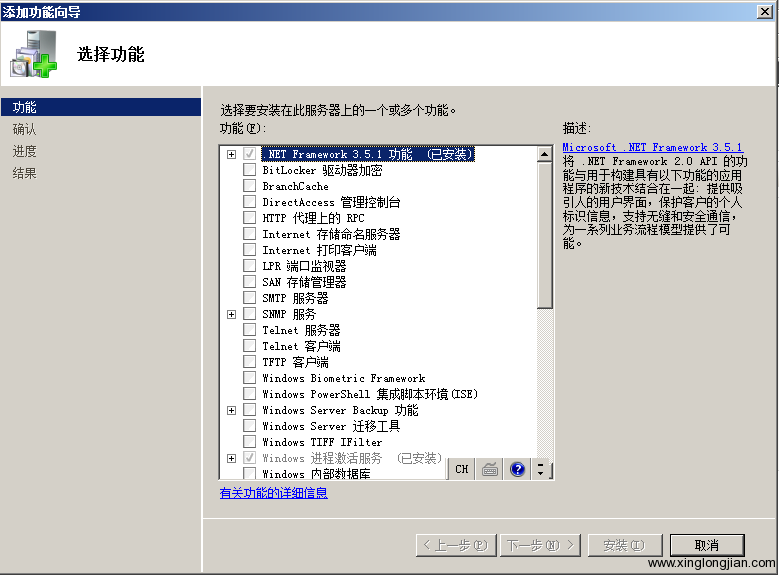
解决办法:在“服务器管理器”的“功能”项中,“添加功能”,选择“.NET Framework 3.5.1功能”安装。
HTTP 错误 500.19 - Internal Server Error
无法访问请求的页面,因为该页的相关配置数据无效。
| 模块 | IIS Web Core |
|---|---|
| 通知 | 未知 |
| 处理程序 | 尚未确定 |
| 错误代码 | 0x8007000d |
| 配置错误 | |
| 配置文件 | \\?\D:\Web\et\web.config |
| 请求的 URL | http://et.test.wanfangdata.com.cn:80/ |
|---|---|
| 物理路径 | |
| 登录方法 | 尚未确定 |
| 登录用户 | 尚未确定 |
<system.webServer>

    <validation validateIntegratedModeConfiguration="false" />

    <modules runAllManagedModulesForAllRequests="true">

      <add name="SimpleTradeConvert" type="WFKS.WebUtility.SimpleTradeConvertHttpModule, WFKS.WebUtility" />

      <add name="WFKSAuthentication" type="WFKS.Authentication.WebAuthenticationModule, WFKS.Authentication" />

    </modules>

    <handlers>

      <remove name="ExtensionlessUrlHandler-ISAPI-4.0_32bit" />

      <remove name="ExtensionlessUrlHandler-ISAPI-4.0_64bit" />

      <remove name="ExtensionlessUrlHandler-Integrated-4.0" />

      <add name="ExtensionlessUrlHandler-ISAPI-4.0_32bit" path="*." verb="GET,HEAD,POST,DEBUG,PUT,DELETE,PATCH,OPTIONS" modules="IsapiModule" scriptProcessor="%windir%\Microsoft.NET\Framework\v4.0.30319\aspnet_isapi.dll" preCondition="classicMode,runtimeVersionv4.0,bitness32" responseBufferLimit="0" />

      <add name="ExtensionlessUrlHandler-ISAPI-4.0_64bit" path="*." verb="GET,HEAD,POST,DEBUG,PUT,DELETE,PATCH,OPTIONS" modules="IsapiModule" scriptProcessor="%windir%\Microsoft.NET\Framework64\v4.0.30319\aspnet_isapi.dll" preCondition="classicMode,runtimeVersionv4.0,bitness64" responseBufferLimit="0" />

      <add name="ExtensionlessUrlHandler-Integrated-4.0" path="*." verb="GET,HEAD,POST,DEBUG,PUT,DELETE,PATCH,OPTIONS" type="System.Web.Handlers.TransferRequestHandler" preCondition="integratedMode,runtimeVersionv4.0" />

    </handlers>

    <rewrite>

      <rules>

        <rule name="Services" stopProcessing="true">

          <match url="customerservice/Services.aspx" />

          <action type="Redirect" url="customerservice/Services" />

        </rule>

        <rule name="helpindex" stopProcessing="true">

          <match url="help/index.html" />

          <action type="Redirect" url="/Help/Index" />

        </rule>

        <rule name="AboutUsDefault" stopProcessing="true">

          <match url="AboutUs/Default.aspx" />

          <action type="Redirect" url="AboutUs/Index" />

        </rule>

        <rule name="AboutUsContactUs" stopProcessing="true">

          <match url="AboutUs/ContactUs.aspx" />

          <action type="Redirect" url="AboutUs/ContactUs" />

        </rule>

        <rule name="CustomerserviceAnnounce" stopProcessing="true">

          <match url="customerservice/Announce.aspx" />

          <action type="Redirect" url="customerservice/Announce" />

        </rule>

        <rule name="OtherLinks" stopProcessing="true">

          <match url="Others/Links.aspx" />

          <action type="Redirect" url="/AboutUs/OtherLinks" />

        </rule>

        <rule name="ResourceDescriptionNstl" stopProcessing="true">

          <match url="ResourceDescription/Nstl.aspx" />

          <action type="Redirect" url="ResourceDescription/Nstl" />

        </rule>

        <rule name="ResourceBrowseScholar" stopProcessing="true">

          <match url="ResourceBrowse/Scholar.aspx" />

          <action type="Redirect" url="ResourceBrowse/Scholar" />

        </rule>

      </rules>

    </rewrite>

    <directoryBrowse enabled="true" />

    <staticContent>

      <remove fileExtension=".gif" />

    </staticContent>

  </system.webServer>
HTTP 错误 500.19 配置文件错误 ( 0x8007000d,0x80070032)的更多相关文章
- 解决IIS7虚拟目录出现HTTP 错误 500.19(由于权限不足而无法读取配置文件)的问题
今天在windows 7笔记本上搭建一个ASP.NET网络平台,启动IIS 7 时候出现错误: 错误摘要HTTP 错误 500.19 - Internal Server Error无法访问请求的页面, ...
- IIS7虚拟目录出现HTTP错误500.19(由于权限不足而无法读取配置文件)的解决方案
今天在window7上配置asp.net网站,但是访问总是提示 错误摘要HTTP 错误 500.19 - Internal Server Error无法访问请求的页面,因为该页的相关配置数据无效.详细 ...
- HTTP 错误 500.19 - Internal Server Error 错误代码 0x80070005 由于权限不足而无法读取配置文件
HTTP 错误 500.19 - Internal Server Error 无法访问请求的页面,因为该页的相关配置数据无效. 模块 IIS Web Core 通知 未知 处理程序 尚未确定 错误代码 ...
- HTTP 错误 500.19 Internal Server Error的解决方法
第一种可能,能解决一部分问题 http://wenku.baidu.com/view/c5cb4a08bb68a98271fefa3f.html 第二种可能,解决另外一部分问题 经过检查发现是由于先安 ...
- HTTP 错误500.19 -Internal Server Error 错误代码 0x80070021
转自:http://blog.csdn.net/goux_s/article/details/5676689 错误摘要 HTTP 错误500.19 -Internal Server Error 无法访 ...
- 【转载】HTTP 错误 500.19 - Internal Server Error
windows 2008下IIS7 安装ASP.NET 遇到如下错误: HTTP 错误 500.19 - Internal Server Error 无法访问请求的页面,因为该页的相关配置数据无效. ...
- HTTP 错误 500.19 - Internal Server Error 无法访问请求的页面,因为该页的相关配置数据无效。
HTTP 错误 500.19 - Internal Server Error 无法访问请求的页面,因为该页的相关配置数据无效. 详细错误信息模块 IIS Web Core 通知 BeginReques ...
- HTTP 错误 500.19 - Internal Server Error
ylbtech-Error-IIS: HTTP 错误 500.19 - Internal Server Error 1.A,错误代码返回顶部 错误摘要 HTTP 错误 500.19 - Interna ...
- "HTTP 错误 500.19 请求的页面的相关配置数据无效" 解决办法
HTTP 错误 500.19 - Internal Server Error无法访问请求的页面,因为该页的相关配置数据无效. 问题"详细错误信息模块 IIS Web Core通知 Begin ...
随机推荐
- ubuntu14.04 +nginx+php5-fpm
一,安装Nginx apt-get install nginx 1,配置nginx nginx所有的配置在 /etc/nginx/nginx.conf中 nginx.conf配置里面包括了 inclu ...
- Mac上把python源文件编译成so文件
把python源文件编译成so文件 前言 实际上属于一种代码混淆/加密的技术,大家知道python的源文件放在那里,大家是都可以看的,不像C语言编译出来可以拿编译后的东西去运行,所以就出现了这种需求. ...
- dovecot--查询未读邮件个数
最近负责的邮箱系统项目中有一个这样的需求:提供一个接口给业务层,可以通过邮箱查询到该用户的未读邮件个数. 之前的方案是通过查看用户目录下.INBOX/new目录中的文件个数,但是这个方法不准确,当有用 ...
- Ant编译android程序
http://blog.csdn.net/xyz_lmn/article/details/7268582 这一篇主要做了创建android项目.update已存在项目.ant编译项目. 一,准备ant ...
- js实现上传图片本地预览功能以及限制图片的文件大小和尺寸大小
方法一: js: /** * 上传图片本地预览方法 * @param {Object} fileObj 上传文件file的id元素 fresh-fileToUpload * ...
- 基于python3在nose测试框架的基础上添加测试数据驱动工具
[本文出自天外归云的博客园] Python3下一些nose插件经过2to3的转换后失效了 Python的nose测试框架是通过python2编写的,通过pip3install的方式安装的nose和相关 ...
- RabbitMQ基础组件和SpringBoot整合RabbitMQ简单示例
交换器(Exchange) 交换器就像路由器,我们先是把消息发到交换器,然后交换器再根据绑定键(binding key)和生产者发送消息时的路由键routingKey, 按照交换类型Exchange ...
- python 获取有关访问者的浏览器的 细节
检测访问者的浏览器和版本号有关访问者的浏览器的更多信息有关访问者的浏览器的全部细节根据浏览器来提醒用户 <html><body><script type="te ...
- jQuery Validate验证方法及教程
//实名认证 验证 $(function(){ //中文姓名验证 jQuery.validator.addMethod("zh_verify", function(value, e ...
- regsvr32.exe是什么东西
Regsvr32命令修复系统故障实例使用过activex的人都知道,activex不注册是不能够被系统识别和使用的,一般安装程序都会自动地把它所使用的activex控件注册,但如果你拿到的一个控件需要 ...