
3分钟搞定Linux系统正则表达式
| 正则表达式是一种字符模式,用于在查找过程中匹配制定的字符。 |
元字符通常在Linux中分为两类:Shell元字符,由Linux Shell进行解析;
正则表达式元字符,由vi/grep/sed/awk等文本处理工具进行解析;
正则表达式一般以文本行进行处理,在进行下面实例之前,先为grep命令设置--color参数:
class="">$ alias grep='grep --color=auto'
这样每次过滤出来的字符串都会带色彩了。
在开始之前还需要做一件事情,就是创建一个测试用的re-file文件,内容如下:
 class="">$ cat re-file

I had a lovely time on our little picnic.

Lovers were all around us. It is springtime. Oh

love, how much I adore you. Do you know

the extent of my love? Oh, by the way, I think

I lost my gloves somewhere out in that field of

clover. Did you see them?  I can only hope love.

is forever. I live for you. It's hard to get back in the

groove.
 class="">$ cat linux.txt

Linux is a good

god assdxw bcvnbvbjk

greatttttt  wexcvxc

operaaaating  dhfghfvx

gooodfs awrerdxxhkl

gdsystem awxxxx

glad

good
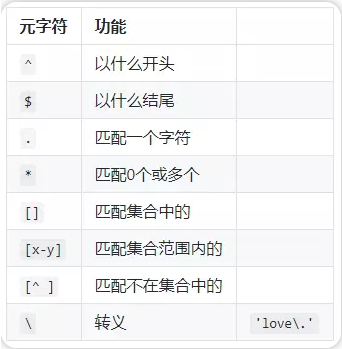

 class="">$ grep '^love' re-file

love, how much I adore you. Do you know
 class="">$ grep 'love$' re-file

clover. Did you see them?  I can only hope love.
 class="">$ grep 'l..e' re-file

I had a lovely time on our little picnic.

love, how much I adore you. Do you know

the extent of my love? Oh, by the way, I think

I lost my gloves somewhere out in that field of

clover. Did you see them?  I can only hope love.

is forever. I live for you. It's hard to get back in the
 class="">$ grep ' *love' re-file

I had a lovely time on our little picnic.

love, how much I adore you. Do you know

the extent of my love? Oh, by the way, I think

I lost my gloves somewhere out in that field of

clover. Did you see them?  I can only hope love.
 class="">$ grep '[Ll]ove' re-file  # 对l不区分大小写

I had a lovely time on our little picnic.

Lovers were all around us. It is springtime. Oh

love, how much I adore you. Do you know

the extent of my love? Oh, by the way, I think

I lost my gloves somewhere out in that field of

clover. Did you see them?  I can only hope love.
 class="">$ grep '[A-Z]ove' re-file

Lovers were all around us. It is springtime. Oh
 class="">$ grep '[^A-Z]' re-file

I had a lovely time on our little picnic.

Lovers were all around us. It is springtime. Oh

love, how much I adore you. Do you know

the extent of my love? Oh, by the way, I think

I lost my gloves somewhere out in that field of

clover. Did you see them?  I can only hope love.

is forever. I live for you. It's hard to get back in the

groove.
 class="">$ grep 'love\.' re-file

clover. Did you see them?  I can only hope love.
class="">$ grep '^$' re-file
class="">$ grep '.*' re-file

I had a lovely time on our little picnic.

Lovers were all around us. It is springtime. Oh

love, how much I adore you. Do you know

the extent of my love? Oh, by the way, I think

I lost my gloves somewhere out in that field of

clover. Did you see them?  I can only hope love.

is forever. I live for you. It's hard to get back in the

groove.
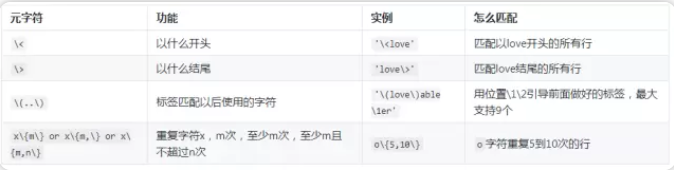
 class="">$ grep 'o\{2,4\}' re-file

groove.
 class="">$ grep 'o\{2,\}' re-file

groove.
 class="">$ grep 'o\{,2\}' re-file

I had a lovely time on our little picnic.

Lovers were all around us. It is springtime. Oh

love, how much I adore you. Do you know

the extent of my love? Oh, by the way, I think

I lost my gloves somewhere out in that field of

clover. Did you see them?  I can only hope love.

is forever. I live for you. It's hard to get back in the

groove.
 class="">$ egrep "go+d" linux.txt

Linux is a good

god assdxw bcvnbvbjk

gooodfs awrerdxxhkl

good

#####0个或者一个字符

ansheng@Ubuntu:/tmp$ egrep "go?d" linux.txt

god assdxw bcvnbvbjk

gdsystem awxxxx
或,查找多个字符串
 class="">$ egrep "gd|good" linux.txt

Linux is a good

gdsystem awxxxx

good
 class="">$ egrep "g(la|oo)d" linux.txt

Linux is a good

glad

good
3分钟搞定Linux系统正则表达式的更多相关文章
- 五分钟搞定 Linux 文档全部知识,就看这篇文章
作者:无痴迷,不成功 来源:见文末 写在前面 我们都知道Linux是一个支持多用户.多任务的系统,这也是它最优秀的特性,即可能同时有很多人都在系统上进行工作,所以千万不要强制关机,同时,为了保护每个人 ...
- 五分钟搞定Linux容器
[TechTarget中国原创] Linux容器针对特定工作负载提供了全新的灵活性与可能性.存在很多解决方案,但是没有一个解决方案能够像systemd容器那样进行快速部署.给我五分钟,本文将介绍如何使 ...
- JS组件系列——又一款MVVM组件:Vue(一:30分钟搞定前端增删改查)
前言:关于Vue框架,好几个月之前就听说过,了解一项新技术之后,总是处于观望状态,一直在犹豫要不要系统学习下.正好最近有点空,就去官网了解了下,看上去还不错的一个组件,就抽空研究了下.最近园子里vue ...
- zookeeper-架构设计与角色分工-《每日五分钟搞定大数据》
本篇文章阅读时间5分钟左右 点击看<每日五分钟搞定大数据>完整思维导图 zookeeper作为一个分布式协调系统,很多组件都会依赖它,那么此时它的可用性就非常重要了,那么保证可用性的同 ...
- windows+mysql集群搭建-三分钟搞定集群
注:本文来源: 陈晓婵 < windows+mysql集群搭建-三分钟搞定集群 > 一:mysql集群搭建教程-基础篇 计算机一级考试系统要用集群,目标是把集群搭建起来,保证一 ...
- 转载-30分钟搞定后台登录界面(103个后台PSD源文件、素材网站)
原文:30分钟搞定后台登录界面(103个后台PSD源文件.素材网站) 目录 一.界面预览 二.PSD源文件预览 三.工具分享 四.资源说明 五.素材下载网站 六.下载 去年八月时要做一个OA系统为 ...
- 【转】让你10分钟搞定Mac--最简单快速的虚拟安装
文章出处:让你10分钟搞定Mac--最简单快速的虚拟安装http://bbs.itheima.com/thread-106643-1-1.html (出处: 黑马程序员训练营论坛) 首先说明一下. 第 ...
- 一分钟搞定AlloyTouch图片轮播
一分钟搞定AlloyTouch图片轮播 轮播图也涉及到触摸和触摸反馈,同时,AlloyTouch可以把惯性运动打开或者关闭,并且设置min和max为运动区域,超出会自动回弹.除了一般的竖向滚动,A ...
- 五分钟搞定Go.js
五分钟搞定Go.js 1.基于html5~因为Go.js是一个依赖于HTML5特性的JavaScript库,所以需要确保您的页面声明它是一个HTML5文档,当然需要加载库 <!DOCTYPE ...
随机推荐
- phpexcel错误 You tried to set a sheet active by the out of bounds index: 1解决办法
$objPHPExcel->createSheet($k);
- Meta对照表
Http Content_type对照表: 文件扩展名 Content-Type(Mime-Type) 文件扩展名 Content-Type(Mime-Type) .*( 二进制流,不知道下载文件类型 ...
- CentOS下的apache配置支持php
修改Apache的配置文件httpd.conf(vi /etc/httpd/conf/httpd.conf) DirectoryIndex index.html index.php #添加index. ...
- 使用CefSharp在.Net程序中嵌入Chrome浏览器(九)——性能问题
在使用CEF的过程中,我发现了一个现象:WPF版的CEF比Chrome性能要差:一些有动画的地方会掉帧(例如,CSS动画,全屏图片拖动等),视频播放的效果也没有Chrome流畅. 查了一下相关资料,发 ...
- oracle like 条件拼接
(1) ibatis xml配置:下面的写法只是简单的转义 namelike '%$name$%' (2) 这时会导致sql注入问题,比如参数name传进一个单引号“'”,生成的sql语句会是:nam ...
- 理解 process.initgroups(user, extra_group)
这个函数是对 linux C函数 initgroups() 的包装 node.js 官方文档非常含糊,还是看 linux C函数文档的解释!非常清楚明确. The initgroups() fun ...
- 在VC中使用SendInput函数实现中文的自动输入
很早以前写了一个刷卡程序,功能是定时监控读卡器,当发现有IC卡放到读卡器上后,自动识别出卡号,然后带着这个卡号搜索一个英文用户名和卡号的对照表,最后把英文用户名直接自动输入到当前光标所在的位置.本来程 ...
- DIOCP数据包太大,请在业务层分拆发送
DIOCP数据包太大,请在业务层分拆发送 DIOCP日志记录异常:数据包太大,请在业务层分拆发送...... 跟踪发现,原因在下图:
- BootStrap中的button使用
原文地址:http://www.phloxblog.in/bootstrap-buttons/#.U5xYso2fclm 站点中事件的触发往往依赖于button或者超链接.因此,button能够觉得是 ...
- 找不到"javax.servlet.annotation.WebServlet"解决方法
以前创建的一个项目,打开的时候总是报错. import javax.servlet.annotation.WebServlet; 后来想起当时这个项目是发布在tomcat7.0下面的, 也就是说当时这 ...