
Explaining Delegates in C# - Part 1 (Callback and Multicast delegates)
I hear a lot of confusion around Delegates in C#, and today I am going to give it shot of explaining the stuff with easy to understand examples. First things first... I will consciously try NOT to use any technical jargon to explain this concept.
So here we go, without giving any technical explanation, let's start with a console application...
// Declaration

public delegate void VerySimpleDelegate();

class TestDelegate

{

    public static void Foo()

    {

        Console.WriteLine("Foo was called by a delegate!");

    }

    public static void Bar()

    {

        Console.WriteLine("Bar was called by a delegate!");

    }

    public static void Main()

    {

        // Instantiation

        VerySimpleDelegate vsd = new VerySimpleDelegate(Foo);  //#1

        // Invocation

        vsd();

        //Another Instantiation

        vsd = Bar;

        vsd();

    }

}
What do you notice when you run the application? Yes, you are right... you are not calling the functions Foo and Bar directly! Instead, you are creating a delegate (#1). Also notice, you just assigned vsd = Bar, which was another function name. Calling vsd again in the next line called the function called Bar as you can see in the output below!!!
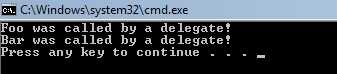
Thus, to use delegate you need to use the following approach... (check the comments in code snipped above to find the following)
Declaration
May be you are thinking, why all this headache? What is the need to do all this?
Reason 1> You have to call different functions based on some dynamic requirement but you don't want your function calls to change. In our previous code snipped vsd() doesn't change, although the actual function that it is referring to has changed altogether.
Let's take a look at another sample... Example2
public class Example2

{

    // Declaration - Take 1 parameter, return nothing

    public delegate void LogHandler(string message);

    // Instantiation - Create a function which takes delegate as one parameter

    // Verify if it is null before you use it

    public void Process(LogHandler logHandler)

    {

        if (logHandler != null)

        {

            logHandler("Process() begin");

        }

        if (logHandler != null)

        {

            logHandler("Process() end");

        }

    }

}

public class Example2DelegateConsumer

{

    // Create a method with the same signature as the delegate

    static void Logger(string s)

    {

        Console.WriteLine(s);

    }

    public static void Main(string[] args)

    {

        Example2 ex2 = new Example2();

        // Invocation in the client

        Example2.LogHandler myLogger = new Example2.LogHandler(Logger);

        ex2.Process(myLogger);

    }

}
Reason 2> As you can see above, you can use delegates to call static functions. In our case, the function Logger with a parameter was being called by Process function in the Example2 class. This approach is called Callback.
 public class Example3

    {

        // Declaration - Take 1 parameter, return nothing

        public delegate void LogHandler(string message);

        // Instantiation - Create a function which takes delegate as one parameter

        // Verify if it is null before you use it

        public void Process(LogHandler logHandler)

        {

            if (logHandler != null)

            {

                logHandler("Process() begin");

            }

            if (logHandler != null)

            {

                logHandler("Process() end");

            }

        }

    }

    public class FileLogger

    {

        FileStream fs;

        StreamWriter sw;

        // Constructor

        public FileLogger(string filename)

        {

            fs = new FileStream(filename, FileMode.Create);

            sw = new StreamWriter(fs);

        }

        // Create a method with the same signature as the delegate

        public void Logger(string s)

        {

            sw.WriteLine(s);

        }

        public void Close()

        {

            sw.Close();

            fs.Close();

        }

    }

    public class Example3DelegateConsumer

    {

        static void Main(string[] args)

        {

            FileLogger fl = new FileLogger("C:\\Labfiles\\process.log");

            Example3 ex3 = new Example3();

            // Invocation in the client

            // Notice that now instead of Logger function, we are passing fl.Logger function.

            Example3.LogHandler myLogger = new Example3.LogHandler(fl.Logger);

            ex3.Process(myLogger);

            fl.Close();

        }

    }
Reason 3> Without changing the Example3 delegate, we were able to change the location where a log needs to be written. In the previous example, you would have noticed that we had a Logger function in the same class. Now, we know we can point to any function with the same signature as a delegate from a different class as well. In our example we called the function from the class FileLogger. The key here is that the Logger function is not in the Example3DelegateConsumer class!!!
What if you want to display the results, and write them at the same time??
namespace Delegates4

{

    public class Example4

    {

        // Declaration - Take 1 parameter, return nothing

        public delegate void LogHandler(string message);

        // Instantiation - Create a function which takes delegate as one parameter

        // Verify if it is null before you use it

        public void Process(LogHandler logHandler)

        {

            if (logHandler != null)

            {

                logHandler("Process() begin");

            }

            if (logHandler != null)

            {

                logHandler("Process() end");

            }

        }

    }

    public class FileLogger

    {

        FileStream fs;

        StreamWriter sw;

        // Constructor

        public FileLogger(string filename)

        {

            fs = new FileStream(filename, FileMode.Create);

            sw = new StreamWriter(fs);

        }

        // Create a method with the same signature as the delegate

        public void Logger(string s)

        {

            sw.WriteLine(s);

        }

        public void Close()

        {

            sw.Close();

            fs.Close();

        }

    }

    public class Example4DelegateConsumer

    {

        // Create a method with the same signature as the delegate

        static void Logger(string s)

        {

            Console.WriteLine(s);

        }

        static void Main(string[] args)

        {

            FileLogger fl = new FileLogger("C:\\Labfiles\\process.log");

            Example4 ex4 = new Example4();

            // Invocation in the client

            // Notice that now instead of Logger function, we are passing fl.Logger function

            // along with another Logger which is defined in the same class

            Example4.LogHandler myLogger = null;

            myLogger += new Example4.LogHandler(Logger);

            myLogger += new Example4.LogHandler(fl.Logger);

            ex4.Process(myLogger);

            fl.Close();

        }

    }

}
Reason 4> As you can see above, we have registered two methods for the same delegate. This is what is typically mentioned as Multicast delegate. By default in C#, delegates are multicast.
I hope this clarifies the basic concepts of delegates, and why you would use them in the first place. In the next post, I will tell you about how to use delegates for events.
转: http://www.dotnetscraps.com/dotnetscraps/post/explaining-delegates-in-c.aspx
Explaining Delegates in C# - Part 1 (Callback and Multicast delegates)的更多相关文章
- Explaining Delegates in C# - Part 7 (Asynchronous Callback - Way 4)
This is the final part of the series that started with... Callback and Multicast delegatesOne more E ...
- Explaining Delegates in C# - Part 6 (Asynchronous Callback - Way 3)
By now, I have shown the following usages of delegates... Callback and Multicast delegatesEventsOne ...
- C# delegate multicast single delegate
using System; using System.Collections.Generic; using System.Linq; using System.Runtime.Serializatio ...
- Explaining Delegates in C# - Part 4 (Asynchronous Callback - Way 1)
So far, I have discussed about Callback, Multicast delegates, Events using delegates, and yet anothe ...
- Part 36 to 39 Talking about Delegates in c#
Part 36 Delegates in c# Part 37 Delegates usage in c# class Progim { public static void Main() { Lis ...
- c# 关键字delegate、event(委托与事件)[MSDN原文摘录][1]
A delegate is a type that safely encapsulates a method, similar to a function pointer in C and C++. ...
- c++中实现委托
成员函数指针与高性能的C++委托(上篇) 撰文:Don Clugston 引子 标准C++中没有真正的面向对象的函数指针.这一点对C++来说是不幸的,因为面向对象的指针(也叫做"闭包(clo ...
- 为 ngui TweenPosition 添加 pingpongone
//---------------------------------------------- // NGUI: Next-Gen UI kit // Copyright © 2011-2015 T ...
- koa2源码解读及实现一个简单的koa2框架
阅读目录 一:封装node http server. 创建koa类构造函数. 二:构造request.response.及 context 对象. 三:中间件机制的实现. 四:错误捕获和错误处理. k ...
随机推荐
- r语言 load Rdata 获取表名 并直接转为数据表
首先指定 load结果为一个对象 然后此对象的值 即为 str的 数据表名 然后使用 eval(parse(text = l)) 两个函数 将字符串 转可执行对象 即可完成重新赋值 > l & ...
- Playing FPS Games with Deep Reinforcement Learning
论文不同点: (1)用两套网络分别实现移动和射击. (2)使用LSTM来处理不完全信息. 疑问: (1)为什么对于射击使用RNN,对导航却没有使用RNN.一般来说,当我们看见视野里面有敌人的时候,我们 ...
- (笔记)linux设备驱动--LED驱动
linux设备驱动--LED驱动 最近正在学习设备驱动开发,因此打算写一个系列博客,即是对自己学习的一个总结,也是对自己的一个督促,有不对,不足,需要改正的地方还望大家指出,而且希望结识志同道合的朋友 ...
- android 拍照声音文件路径
Android拍照音频文件位于\frameworks\base\data\sounds\effects目录,更具不同的平台区分不同音频文件. 例如拍照声音文件位于\frameworks\base\da ...
- Android O 可以上网 提示无法访问网络
android O连接Wifi,可以上网,但是却提示无法访问网络,并且在wifi图标上有一个'x'. 从android N开始引入了监控机制,每次连接都会访问一下google的服务器,由于国内被墙,所 ...
- 计蒜客2018 蓝桥杯省赛 B 组模拟赛(一)
1,结果填空:年龄 今天蒜头君带着花椰妹和朋友们一起聚会,当朋友们问起年龄的时候,蒜头君打了一个哑谜(毕竟年龄是女孩子的隐私)说:“我的年龄是花椰妹年龄个位数和十位数之和的二倍”. 花椰妹看大家一脸懵 ...
- MFC绘图小实验(2)
1,以正五边形的5个顶点为基础,隔点存储构成五角星.填充模式采用WINDING.五角星边界线为5个像素宽的蓝色实线,内部使用红色填充. CRect rect; //定义矩形 GetClientRect ...
- 将项目安装到Maven本地资源库
在Maven中,可以使用“mvn install”打包项目,并自动部署到本地资源库,让其他开发人员使用它. mvn install 注意,当“install”在执行阶段,上述所有阶段 “validat ...
- unity执行顺序问题(如何再次执行start方法)
2016-09-08 20:13 2084人阅读 评论(1) 收藏 举报 分类: unity3D(66) 版权声明:本文为博主原创文章,未经博主允许不得转载. unity执行顺序的文章已经很多了, ...
- (转)编译android5.1,添加swap分区的方法
clang++: error: unable to execute command: Killedclang++: error: assembler command failed due to sig ...