
Change position in observation
HTML
<!DOCTYPE HTML>

<HTML>

<head>

    <meta charset="    UTF-8">

    <title>position</title>

    <link rel="stylesheet" type="text/css" href="indextype.css">

</head>

<body>

    </form>

    <div class="box" id="one">One</div>

    <div class="box" id="two">Two</div>

    <div class="box" id="three">Three</div>

    <div class="box" id="four">Four</div>

    <br>

</body>

</HTML>
CSS
.box {

  display: inline-block;

  width: 100px;

  height: 100px;

  background: red;

  color: white;

}

#two {

  /*position:static;*/

  top: 20px;

  left: 20px;

  background: blue;

}
CSS代码,当改变position的值时:
0 没position时:
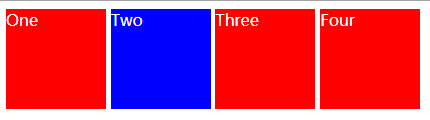
1 
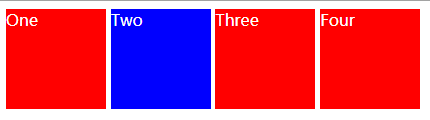
This is the default value.
2 
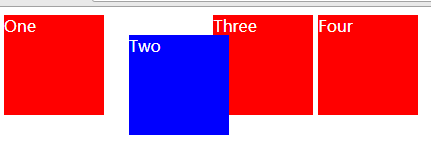
The element is positioned according to the normal flow of the document, and then offset relative to itself based on the values of top, right, bottom, and left. The offset does not affect the position of any other elements; thus, the space given for the element in the page layout is the same as if position were static.
元素根据文档的正常流进行定位,然后根据顶部、右侧、底部和左侧的值相对于自身进行偏移。偏移量不影响任何其他元素的位置;因此,页面布局中元素的空间与静态位置相同。
3 
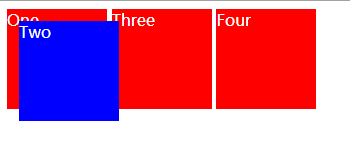
The element is removed from the normal document flow, and no space is created for the element in the page layout. It is positioned relative to the initial containing block established by the viewport,
4 
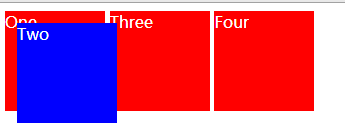
The element is removed from the normal document flow, and no space is created for the element in the page layout. It is positioned relative to its closest positioned ancestor, if any; otherwise, it is placed relative to the initial containing block. Its final position is determined by the values of top, right, bottom, and left.
5
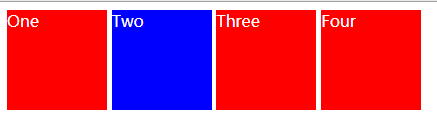
The element is positioned according to the normal flow of the document, and then offset relative to its nearest scrolling ancestor and containing block (nearest block-level ancestor), including table-related elements, based on the values of top, right, bottom, and left. The offset does not affect the position of any other elements.
由于有些效果一样,于是我增加网页显示的长度,出现了其他的效果,
我把box加在在以前写过的html后面,出现了下面的效果:
传视频在博客上,利用优酷的话,要先认证。我还在认证,过几天再传视频的效果图啦。
0000
<!DOCTYPE html>     <!--浏览器得知自己的处理内容是html-->

<!--<!DOCTYPE html>-->

 <!--注释-->

<!--<html lang="en">

    <!--文档中html部分的开始,en英语zh中文-->

<html>

<head>    <!--提供有关文档的内容和注释信息的-->

    <meta charset="UTF-8">        <!--一种编码方式-->

    <title>blogs</title>    <!--head里面必须有title元素-->

    <link rel="stylesheet" type="text/css" href="indextype.css">>

</head>

<body>

    <!--hypertext reference-->

    <a href="https://www.cnblogs.com/" target="_blank">blogs a</a>

    <a href="https://www.cnblogs.com/"> blogs b</a>

    <a href="https://www.cnblogs.com/" target="_self">blogs c</a>

***************************************

    <!--bold type-->

    <b>blogs</b>

    <!--emphasis-->

    <em>blogs</em>

    <!--下划线-->

    <u>blogs</u>

    <!--中间横线-->

    <s>blogs</s>

    <hl>

        啦啦啦啦啦啦啦啦

    </hl>

******************************************

    <table  border="1px" align="center">

        <thead>

        <tr>    <!--加粗居中-->

            <th>用户名</th>

            <th>性别</th>

            <th>密码</th>

        </tr>

        </thead>

        <tbody>

        <tr>

            <td>Admin</td>

            <td>man</td>

            <td>123</td>

        </tr>

        <tr>

            <td>Admin12334567</td>

            <td>man</td>

            <td>123</td>

        </tr>

        </tbody>

        <tfoot>

        <tr>

            <td>用户名</td>

            <td>性别</td>

            <td>密码</td>

        </tr>

        </tfoot>

    </table>

<br>        <!--换行-->

<table border="1px">

    <tr>

        <th rowspan="2">444</th>    <!--行row-->

        <th>444</th>

        <th>444444</th>

        <th>444</th>

    </tr>

    <tr>

        <td colspan="2">sdsd</td> <!--合并列单元格column -->

        <td>sdss</td>

    </tr>

    <tr>

        <td>sdsds</td>

        <td>sdsd</td>

        <td>sdsd</td>

        <td>sdsd</td>

    </tr>

</table>

******************************

<ol>

    <li>a</li>

    <li>a</li>

    <li>a</li>

</ol>

<ol reversed>

    <li>a</li>

    <li>a</li>

    <li>a</li>

</ol>

<ol type="a"><!--a A I -->

    <li>a</li>

    <li>a</li>

    <li>a</li>

</ol>

<ol>

    <li>何将用户选择的内</li>

    <ol type="a">

    <li>他们会提到Flash</li>

    <li>中关键技术的支持的改进</li>

    </ol>

</ol>

<ul>

    <li>a</li>

    <li>a</li>

    <li>a</li>

</ul>

********************************************************************************

<!--        表单        -->

<for method="get" action="6htmlform.php">

    <input type="text">

    <!--=<input>-->

    <br><br>

    <input type="text" value="blogs"><!--占位符-->

    <br><br>

    <input type="text" placeholder="blogs"><!--不占文本框内-->

    <br><br>

    <input type="text" placeholder="blogs" maxlength="8"><!--最大能输入的字符-->

    <br><br>

    <input type="text" placeholder="blogs" size="50"><!--拓宽单行文本框-->

    <br><br>

    <input type="text" value="blogs" readonly><!--只读-->

    <br><br>

    <input type="password" placeholder="密码">

    <textarea rows="20">aaaaaaaaaaadddddddddddddddggggggggggggggggggggggggaaa</textarea>

    <input type=button value="按钮">

    <button>按钮</button>         <!--js合作并且作为绑定事件的-->

    <input type="submit" value="提交"><!--提交表单-->

    <!--button>input button>input submit-->

    <input type="rang" min="-100" max="200" step="100">

    <input type="rang" min="-100" max="200" step="100" value="-100"><!--数字滑动-->

    <input type="number" min="-100" max="200"  value="-100"><!--手动输入数字-->

    <input type="checkbox">选择1<!--选择1-->

    <input type="radio">选择2

    你喜欢什么?

    <br>

    <input type="radio" name="d" checked>苹果

    <input type="radio" name="d">葡萄

    <input type="radio" name="d">琵琶

    <select>

        <option>苹果</option>

        <option>苹果2</option>

        <option>苹果3</option>

    </select>

    <input type="text" list="datalist111">

    <datalist id="datalist111">

        <option>苹果</option>

        <option>苹果2</option>

        <option>苹果3</option>

    </datalist>

    <br>

    <br>

    <br>

    <br>

    <br>

    <br>

    <br>

    <br>

    <br>

    <!--<input type ="email">

    <input type="tel">

    <input type="url">

    <input type="date">

    <input type="color">

    <input type="hidden" value="123">-->

    <input type="image" src="111.png" witn="80px"><!--图片按钮-->

    <input type="file" multiple><--上传多个文件-->

    <br>

    <br>

    <div class="box" id="one">One</div>

    <div class="box" id="two">Two</div>

    <div class="box" id="three">Three</div>

    <div class="box" id="four">Four</div>

    <br>

    <br>

    <br>

    <br>

    <!--

<div class="wrapper">

  <div class="one">One</div>

  <div class="two">Two</div>

  <div class="three">Three</div>

  <div class="four">Four</div>

  <div class="five">Five</div>

  <div class="six">Six</div>

</div>-->

</body>

</html>

</form>
Change position in observation的更多相关文章
- 使用CSS3动画属性实现360°无限循环旋转【代码片段】
使用CSS3的animation动画属性实现360°无限循环旋转. 代码片段: <div id="test"> <img src="/CSS3/img/ ...
- transitionend的运用案例
transitionend事件代表着过渡动画结束后 原生的绑定方法 obj.addEventListener('transitionEnd', function(){ //do soming }) 我 ...
- matlab文件操作及读txt文件(fopen,fseek,fread,fclose)
文件操作是一种重要的输入输出方式,即从数据文件读取数据或将结果写入数据文件.MATLAB提供了一系列低层输入输出函数,专门用于文件操作. 1.文件的打开与关闭 1)打开文件 在读写文件之前,必须先用f ...
- u11-nav02
header:before, header:after ,.navigation:before, .navigation:after,.nav-row:before, .nav-row:after,. ...
- new-nav-css
header:before, header:after ,.navigation:before, .navigation:after,.nav-row:before, .nav-row:after,. ...
- u1-nav-css
header:before, header:after ,.navigation:before, .navigation:after,.nav-row:before, .nav-row:after,. ...
- nav ccsss
/*header: Navigation public style*/header:before, header:after ,.navigation:before, .navigation:afte ...
- G-nav-03
/*dele masthead.css style*/.masthead .navigation .btn.btn-masthead.btn-apply:after { content: ''; di ...
- Android viewPage notifyDataSetChanged无刷新
转载 http://www.67tgb.com/?p=624 最近项目结束,搞了一次代码分享.其中一位同学分享了一下自己在解决问题过程中的一些心得体会,感觉受益匪浅.整理出来,分享给大家. 建议使用自 ...
随机推荐
- medir设置
setting中 MEDIA_URL="/media/"MEDIA_ROOT=os.path.join(BASE_DIR, "app01","medi ...
- vue项目中 axios 和Vue-axios的关系
文章收集于:https://segmentfault.com/q/1010000010812113 在vue项目中,会经常看到如下代码: 今天看到有些项目是这样写的,就有点看不懂了. ----解 ...
- Python元组与列表的区别
列表类似于我们用铅笔在纸上写字,写错了还可以擦掉:而元组则类似于用钢笔写字,写错了就擦不掉了,除非换张纸重写. 列表和元组的区别主要体现在一下几个方面: 列表属于可变序列,他的元素可以随时修改或删除: ...
- mysql如何在一张表中插入一万条数据?(用存储过程解决)
写一个存储过程,里面写一个循环,就可以了.主键你现在不是自增的,所以写语句的时候,就Insert到3个字段中. DELIMITER $$ DROP PROCEDURE IF EXISTS `proc_ ...
- 原生开发小程序 和 wepy 、 mpvue, Taro 对比
https://blog.csdn.net/yang450712123/article/details/79623518 mpvue https://www.cnblogs.com/bgwhite/p ...
- 在ionic2中集成swiper插件
1. 下载官方的js和css文件分别放在assets下的js和css文件夹,然后在index.html中引入 <!DOCTYPE html> <html lang="en& ...
- jQuery懒加载插件 – jquery.lazyload.js简单调用
Lazy Load 是一个用 JavaScript 编写的 jQuery 插件. 它可以延迟加载长页面中的图片. 在浏览器可视区域外的图片不会被载入, 直到用户将页面滚动到它们所在的位置. 这与图片预 ...
- Python图表数据可视化Seaborn:4. 结构化图表可视化
1.基本设置 import numpy as np import pandas as pd import matplotlib.pyplot as plt import seaborn as sns ...
- 002 如何在一台PC上装两个版本的python
在之前学习爬虫的时候,使用的是python2.7,现在主流已经是3.7了. 在这里,写了一下如何在2.7的基础上安装python3.6 一:检查python版本 1.cmd 二:安装python3 1 ...
- Linux下C语言的进程控制编程
代码: #include <stdio.h> #include <unistd.h> #include <stdlib.h> #include <sys/ty ...