
G2( bizCharts ) React 绘制混合图例
G2( bizCharts ) React 绘制混合图例,
// data-set 可以按需引入,除此之外不要引入别的包

import React from 'react';

import { Chart, Axis, Tooltip, Geom, Legend, Label } from 'bizcharts';

import DataSet from '@antv/data-set';

// 下面的代码会被作为 cdn script 注入 注释勿删

// CDN START

const data = [

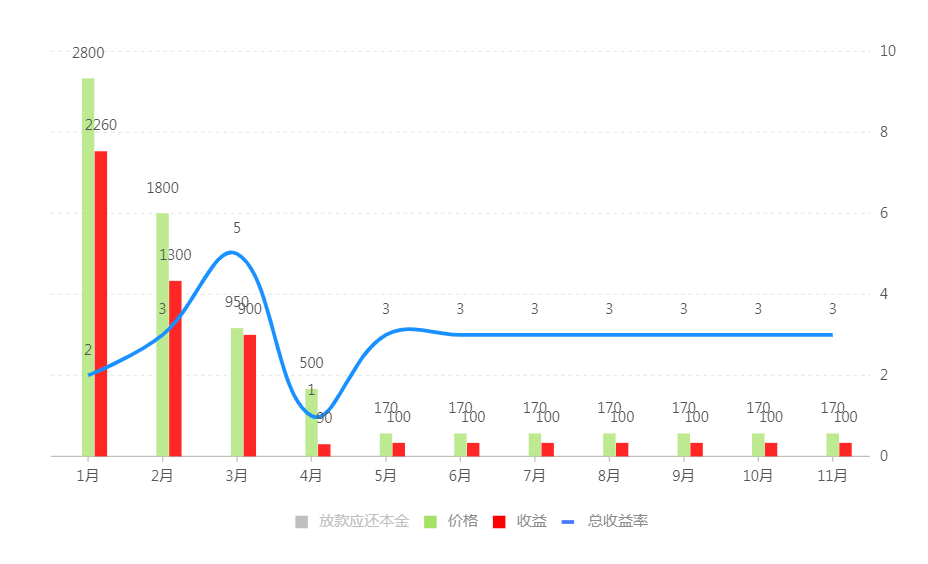
  { label: '0.1', 放款应还本金: 2800, 价格: 2800, 收益: 2260, 总收益率: 2 },

  { label: '0.2', 放款应还本金: 1800, 价格: 1800, 收益: 1300, 总收益率: 3 },

  { label: '0.3', 放款应还本金: 950, 价格: 950, 收益: 900, 总收益率: 5 },

  { label: '0.4', 放款应还本金: 500, 价格: 500, 收益: -390, 总收益率: 1 },

  { label: '0.5', 放款应还本金: 170, 价格: 170, 收益: 100, 总收益率: 3 },

  { label: '0.6', 放款应还本金: 170, 价格: 170, 收益: 100, 总收益率: 3 },

  { label: '0.7', 放款应还本金: 170, 价格: 170, 收益: -100, 总收益率: 3 },

  { label: '0.8', 放款应还本金: 170, 价格: 170, 收益: 100, 总收益率: 3 },

  { label: '0.9', 放款应还本金: 170, 价格: 170, 收益: 100, 总收益率: 3 },

  { label: '1.0', 放款应还本金: 170, 价格: 170, 收益: 100, 总收益率: 3 },

  { label: '未评分', 放款应还本金: 170, 价格: 170, 收益: 100, 总收益率: 3 },

];

const ds = new DataSet();

const dv = ds.createView().source(data);

dv.transform({

  type: 'fold',

  fields: ['放款应还本金', '价格', '收益'], // 展开字段集

  key: 'type', // key字段

  value: 'value', // value字段

});

const scale = {

  总收益率: {

    type: 'linear',

    min: 0,

    max: 10,

  },

};

let chartIns = null;

const getG2Instance = chart => {

  chartIns = chart;

};

console.log(getG2Instance, 'getG2Instance');

class Demo extends React.Component {

  render() {

    return (

      <Chart

        height={400}

        width={500}

        forceFit

        data={dv}

        scale={scale}

        padding="auto"

        onGetG2Instance={getG2Instance}

      >

        <Legend

          custom

          allowAllCanceled

          items={[

            {

              value: '放款应还本金',

              marker: { symbol: 'square', fill: '#3182bd', radius: 5 },

            },

            {

              value: '价格',

              marker: { symbol: 'square', fill: '#41a2fc', radius: 5 },

            },

            {

              value: '收益',

              marker: { symbol: 'square', fill: '#54ca76', radius: 5 },

            },

            {

              value: '总收益率',

              marker: {

                symbol: 'hyphen',

                stroke: '#fad248',

                radius: 5,

                lineWidth: 3,

              },

            },

          ]}

          onClick={ev => {

            const item = ev.item;

            const value = item.value;

            const checked = ev.checked;

            const geoms = chartIns.getAllGeoms();

            console.log('geoms', geoms);

            for (let i = 0; i < geoms.length; i++) {

              const geom = geoms[i];

              if (geom.getYScale().field === value && value === '总收益率') {

                if (checked) {

                  geom.show();

                } else {

                  geom.hide();

                }

              } else if (

                geom.getYScale().field === 'value' &&

                value !== '总收益率'

              ) {

                geom.getShapes().map(shape => {

                  if (shape._cfg.origin._origin.type == value) {

                    shape._cfg.visible = !shape._cfg.visible;

                  }

                  shape.get('canvas').draw();

                  return shape;

                });

              }

              const g_shapes = geom.get('labelContainer');

              let labels = g_shapes._cfg.labelsGroup._cfg.children;

              labels.map(label => {

                if (checked) {

                  if (label._id.includes(value)) {

                    label._cfg.visible = true;

                  }

                } else {

                  if (label._id.includes(value)) {

                    label._cfg.visible = false;

                  }

                }

              });

            }

          }}

        />

        <Axis name="label" />

        <Axis name="value" position={'left'} />

        <Tooltip />

        <Geom

          type="interval"

          position="label*value"

          color={[

            'type',

            value => {

              if (value === '放款应还本金') {

                return '#2b6cbb';

              }

              if (value === '价格') {

                return '#41a2fc';

              }

              if (value === '收益') {

                return '#54ca76';

              }

            },

          ]}

          adjust={[

            {

              type: 'dodge',

              marginRatio: 1 / 32,

            },

          ]}

        >

          <Label content="value" />

        </Geom>

        <Geom type="line" position="label*总收益率" color="#fad248" size={3}>

          <Label content="label" />

        </Geom>

      </Chart>

    );

  }

}

// CDN END

ReactDOM.render(<Demo />, mountNode);
G2( bizCharts ) React 绘制混合图例的更多相关文章
- G2 绘制混合图例 demo
G2 绘制混合图例 demo import G2 from '@antv/g2'; import DataSet from '@antv/data-set'; // G2 对数据源格式的要求,仅仅是 ...
- react+echarts/g2/bizcharts可视化图表
一.echarts的折线图的使用demo如下,linecharts为实例化的封装组件,line为实际应用的组件 cnpm install echarts import React from 'reac ...
- React Native 混合开发与实现
关于 微信公众号:前端呼啦圈(Love-FED) 我的博客:劳卜的博客 知乎专栏:前端呼啦圈 前言 随着 React 的盛行,其移动开发框架 React Native 也收到了广大开发者的青睐,以下简 ...
- 你不可不知的 React Native 混合用法(Android 篇)
前言 当前 React Native 虽说版本更新比较快,各种组件也提供的很全面了,但是在某些情况下,混合开发的方式才会快速缩短开发周期,原因无非就是原生平台的"底蕴"无疑更深,拥 ...
- 【Qt编程】基于QWT的曲线绘制及图例显示操作
在<QWT在QtCreator中的安装与使用>一文中,我们完成了QWT的安装,这篇文章我们讲讲基础曲线的绘制功能. 首先,我们新建一个Qt应用程序,然后一路默认即可.这时,你会发现总共有: ...
- 《React Native 精解与实战》书籍连载「Android 平台与 React Native 混合开发」
此文是我的出版书籍<React Native 精解与实战>连载分享,此书由机械工业出版社出版,书中详解了 React Native 框架底层原理.React Native 组件布局.组件与 ...
- 《React Native 精解与实战》书籍连载「iOS 平台与 React Native 混合开发」
此文是我的出版书籍<React Native 精解与实战>连载分享,此书由机械工业出版社出版,书中详解了 React Native 框架底层原理.React Native 组件布局.组件与 ...
- 【Qt编程】基于QWT的曲线绘制及图例显示操作——有样点的实现功能
在<QWT在QtCreator中的安装与使用>一文中,我们完成了QWT的安装,这篇文章我们讲讲基础曲线的绘制功能. 首先,我们新建一个Qt应用程序,然后一路默认即可.这时,你会发现总共有: ...
- React Native混合开发中必须要学会点FlexBox布局
在前面的案例中,界面的搭建都是采用CSS的布局,基于盒子模型,依赖 display属性 , position属性, float属性.但对于那些特殊布局非常不方便,比如,垂直居中. 一种全新的针对web ...
随机推荐
- Flutter采坑之路 Run Configuration error:broken configuration due to unavailable
今天把AndroidStudio升级成了3.3.1 原先还能编译成功的Flutter工程突然连编译都不行了, 错误是 Run Configuration error:broken configurat ...
- vscode之快速生成vue模板
文件-首选项-用户代码片段-搜索“vue”点击进入vue.json 复制这个片段 { "Vue component": { "prefix": "vu ...
- zzw_rsync命令中的/的作用
[root@sv0379 rsync]# rsync -vzrtopg --password-file=/usr/local/rsync/rsync.passwd /opt/aspire/prod ...
- 用VSCode的debugger for chrome插件调试服务器项目的配置方式
项目放到tomcat服务器启动起来(以tomcat服务器为例). 配置launch 把谷歌浏览器彻底关闭!(要彻底) 打断点 点左侧的调试 点刷新!(这一步也需要)
- 模糊测试(fuzzing)是什么
一.说明 大学时两个涉及“模糊”的概念自己感觉很模糊.一个是学数据库出现的“模糊查询”,后来逐渐明白是指sql的like语句:另一个是学专业课时出现的“模糊测试”. 概念是懂的,不外乎是“模糊测试是一 ...
- 跟随我在oracle学习php(7)
盒子模型布局 盒子模型:每个标签都是一个盒子 计算宽高:box-sizing:border-box盒子的宽度就是设置的宽度,里面的内容自适应 从里到外:padding(内边距) Border(边框) ...
- 【阅读笔记】《C程序员 从校园到职场》第六章 常用文件操作函数 (Part 1)
参考链接:https://blog.csdn.net/zhouzhaoxiong1227/article/details/24926023 让你提前认识软件开发(18):C语言中常用的文件操作函数总结 ...
- Linux下安装Julia1.0.0
MIT正式发布编程语言Julia 1.0:Python.R.C++三合一! 由于官方文档提示中安装的不是最新的Julia版本,官方的0.7版本安装方法为: ...
- C语言一维数组定义及引用时括号[]内容
一维数组定义:数组名[常量表达式] 一维数组引用:数组名[整型常量或整型表达式] *说明:常量表达式 > 整型表达式 > 整型常量 #define N 100 宏定义没有具体的数据类型, ...
- 事务理解及Spring中的事务
一.隔离级别理解 1.脏读 首先理解,一个事务对数据进行了改变,尽管该事务尚未提交,但此时其他事务中的查询语句(注意一定是处于事务中的语句,不处于事务中的语句查到的是正常的)查到的数据,是该事务修改之 ...