
CoordinatorLayout使用详解: 打造折叠悬浮效果
1.简介
CoordinatorLayout遵循Material 风格,包含在 support Library中,结合AppbarLayout, CollapsingToolbarLayout等 可 产生各种炫酷的折叠悬浮效果。
- 作为最上层的View
- 作为一个 容器与一个或者多个子View进行交互
2.AppBarLayout
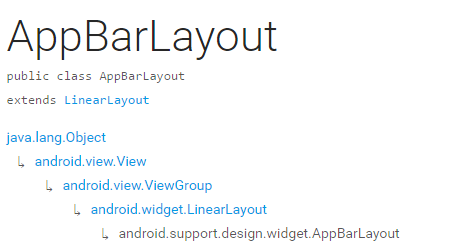
它是继承与LinearLayout的,默认 的 方向 是Vertical
appbarLayout的滑动flag
类型 说明
int SCROLL_FLAG_ENTER_ALWAYS W((entering) / (scrolling on screen))下拉的时候,这个View也会跟着滑出。
int SCROLL_FLAG_ENTER_ALWAYS_COLLAPSED 另一种enterAlways,但是只显示折叠后的高度。
int SCROLL_FLAG_EXIT_UNTIL_COLLAPSED ((exiting) / (scrolling off screen))上拉的时候,这个View会跟着滑动直到折叠。
int SCROLL_FLAG_SCROLL 这个View将会响应Scroll事件
int SCROLL_FLAG_SNAP 在Scroll滑动事件结束以前 ,如果这个View部分可见,那么这个View会停在最接近当前View的位置
我们可以通过两种 方法设置这个Flag
方法一
setScrollFlags(int)
方法二
app:layout_scrollFlags="scroll|enterAlways"
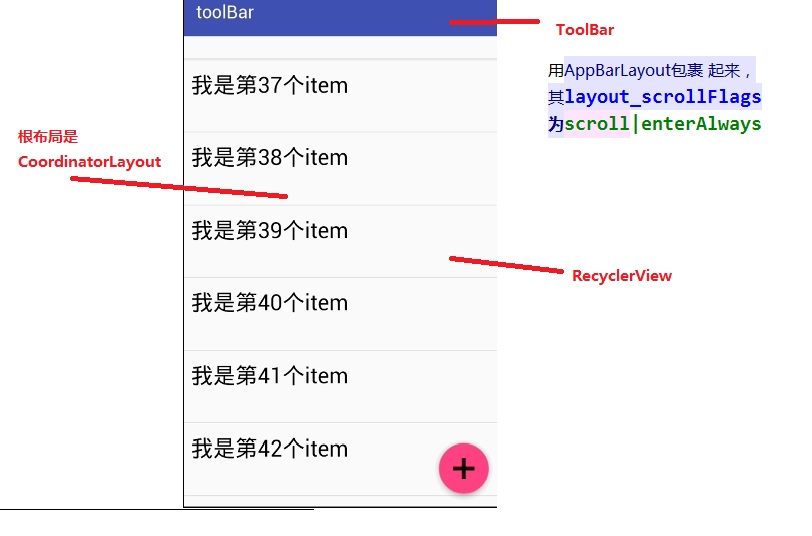
AppBarLayout必须作为CoordinatorLayout的直接子View,否则它的大部分功能将不会生效,如layout_scrollFlags等。
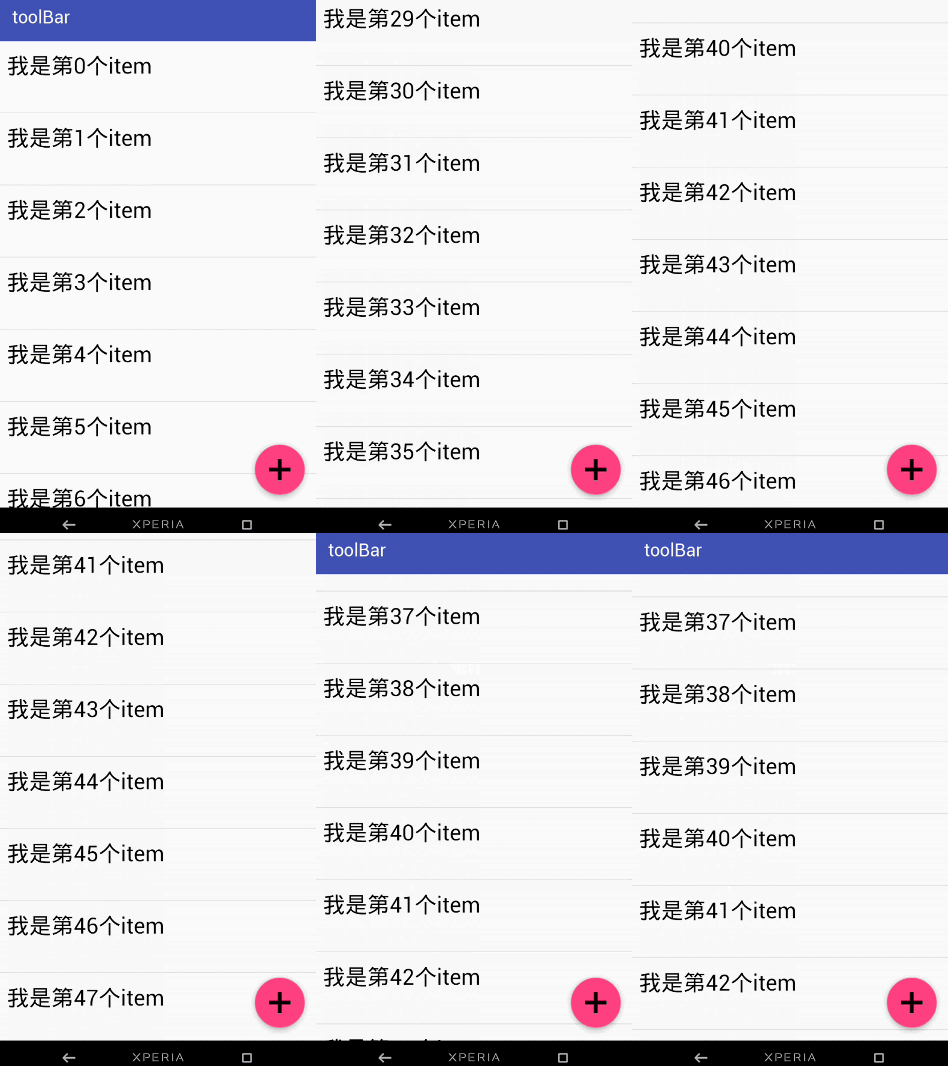
效果图一:
布局:
<android.support.design.widget.CoordinatorLayout
android:id="@+id/main_content"
xmlns:android="http://schemas.android.com/apk/res/android"
xmlns:app="http://schemas.android.com/apk/res-auto"
android:layout_width="match_parent"
android:layout_height="match_parent">
<android.support.design.widget.AppBarLayout
android:id="@+id/appbar"
android:layout_width="match_parent"
android:layout_height="wrap_content"
android:theme="@style/ThemeOverlay.AppCompat.Dark.ActionBar">
<android.support.v7.widget.Toolbar
android:id="@+id/toolbar"
android:layout_width="match_parent"
android:layout_height="?attr/actionBarSize"
android:background="?attr/colorPrimary"
app:layout_scrollFlags="scroll|enterAlways"
app:popupTheme="@style/ThemeOverlay.AppCompat.Light"/>
.
</android.support.design.widget.AppBarLayout>
<android.support.v7.widget.RecyclerView
android:id="@+id/recyclerView"
android:layout_width="match_parent"
android:layout_height="match_parent"
app:layout_behavior="@string/appbar_scrolling_view_behavior"/>
<android.support.design.widget.FloatingActionButton
android:id="@+id/fab"
android:layout_width="wrap_content"
android:layout_height="wrap_content"
android:layout_gravity="end|bottom"
android:layout_margin="15dp"
android:src="@drawable/add_2"/>
</android.support.design.widget.CoordinatorLayout>
思路分析:
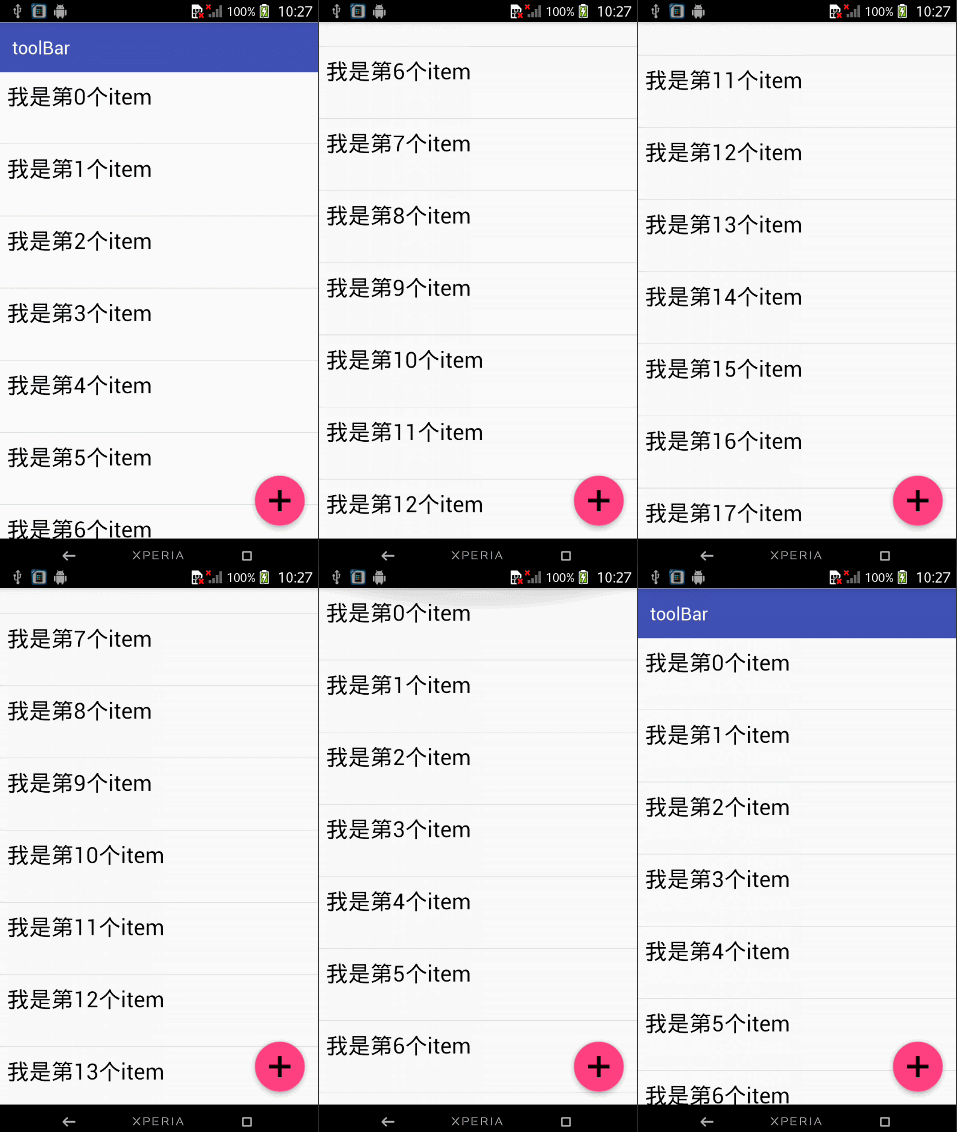
那如果当我们的toolBar 等于 app:layout_scrollFlags=”scroll|snap”的时候 ,
layout_scrollFlags=scroll的时候,这个View会 跟着 滚动 事件响应,
layout_scrollFlags=“snap”的时候 在Scroll滑动事件结束以前 ,如果这个View部分可见,那么这个View会停在最接近当前View的位置。
效果如下:
结合ViewPage,布局代码如下:
<android.support.design.widget.CoordinatorLayout
android:id="@+id/main_content"
xmlns:android="http://schemas.android.com/apk/res/android"
xmlns:app="http://schemas.android.com/apk/res-auto"
android:layout_width="match_parent"
android:layout_height="match_parent">
<android.support.design.widget.AppBarLayout
android:layout_width="match_parent"
android:layout_height="250dp">
<ImageView android:layout_width="match_parent"
android:layout_height="200dp"
android:background="?attr/colorPrimary"
android:scaleType="fitXY"
android:src="@drawable/tangyan"
app:layout_scrollFlags="scroll|enterAlways"/>
<android.support.design.widget.TabLayout
android:id="@+id/tabs"
android:layout_width="match_parent"
android:layout_height="wrap_content"
android:layout_alignParentBottom="true"
android:background="?attr/colorPrimary"
app:tabIndicatorColor="@color/colorAccent"
app:tabIndicatorHeight="4dp"
app:tabSelectedTextColor="#000"
app:tabTextColor="#fff"/>
</android.support.design.widget.AppBarLayout>
<android.support.v4.view.ViewPager
android:id="@+id/viewpager"
android:layout_width="match_parent"
android:layout_height="match_parent"
app:layout_behavior="@string/appbar_scrolling_view_behavior"/>
<android.support.design.widget.FloatingActionButton
android:id="@+id/fab"
android:layout_width="wrap_content"
android:layout_height="wrap_content"
android:layout_gravity="end|bottom"
android:layout_margin="15dp"
android:src="@drawable/add_2"/>
</android.support.design.widget.CoordinatorLayout>
思路分析:
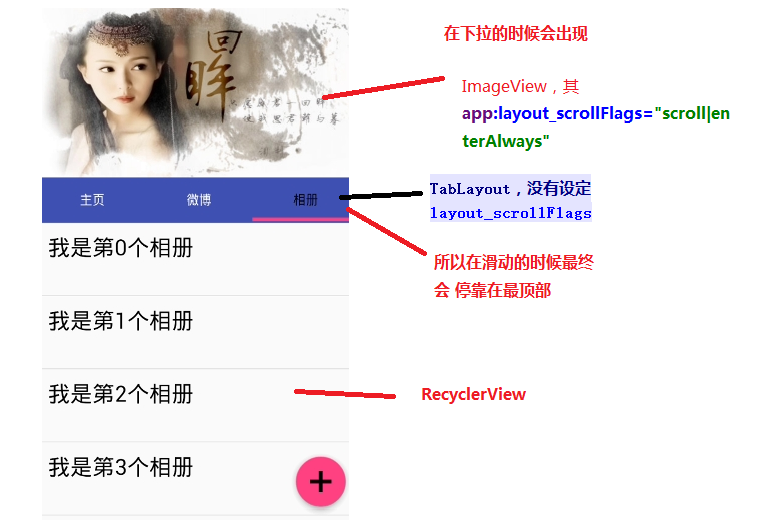
其实相对于前 一个例子,只是把 摆放RecyclerView 的位置替换成ViewPager而已,为了有页面导航器的效果,再使用 TabLayout而已,而TabLayout 在我们滑动的时候最终会停靠在 最顶部,是因为我们没有设置其layout_scrollFlags,即TabLayout是静态的
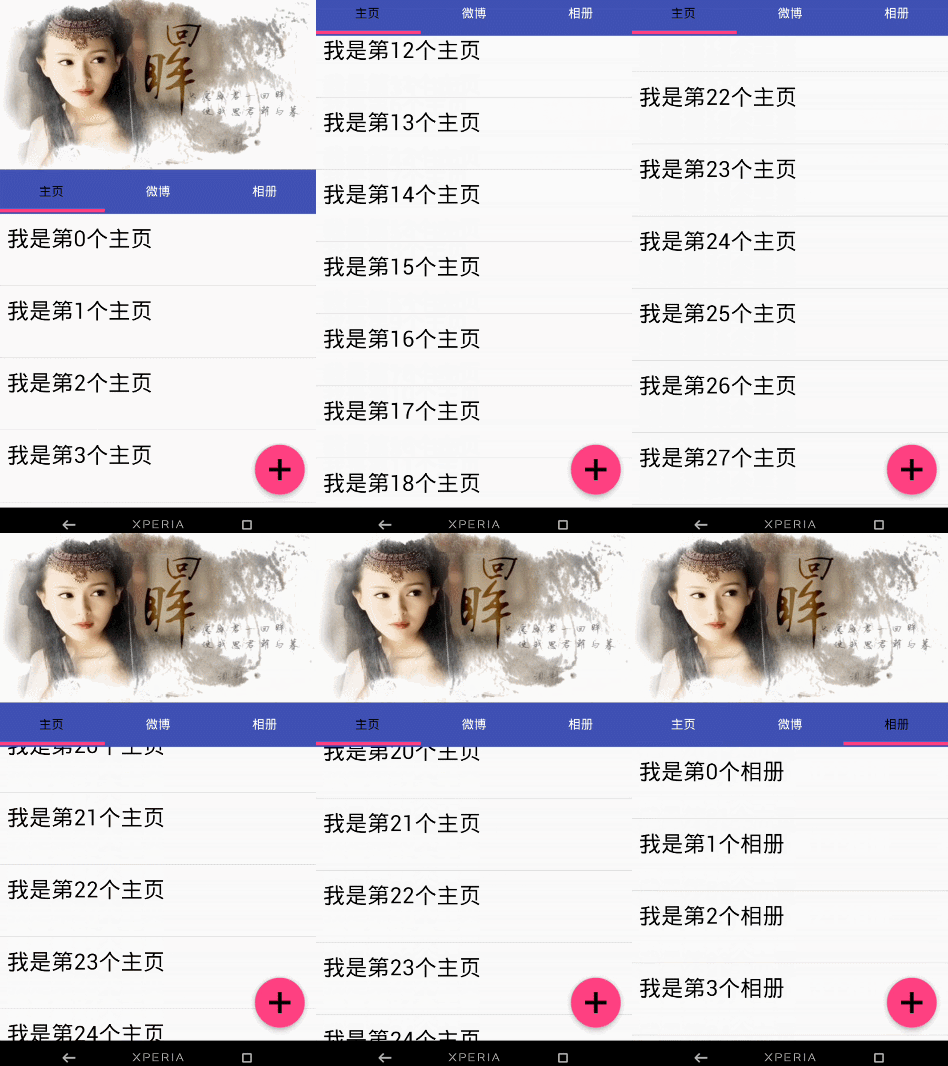
运行以后,即可看到以下的结果
3.CollapsingToolbarLayout
简单来说 ,CollapsingToolbarLayout是工具栏的包装器,它通常作为AppBarLayout的孩子。主要实现以下功能
- Collapsing title(可以折叠 的 标题 )
- Content scrim(内容装饰),当我们滑动的位置 到达一定阀值的时候,内容 装饰将会被显示或者隐藏
- Status bar scrim(状态栏布)
- Parallax scrolling children,滑动的时候孩子呈现视觉特差效果
- Pinned position children,固定位置的 孩子
常量 解释说明
int COLLAPSE_MODE_OFF The view will act as normal with no collapsing behavior.(这个 View将会 呈现正常的结果,不会表现出折叠效果)
int COLLAPSE_MODE_PARALLAX The view will scroll in a parallax fashion. See setParallaxMultiplier(float) to change the multiplier used.(在滑动的时候这个View 会呈现 出 视觉特差效果 )
int COLLAPSE_MODE_PIN The view will pin in place until it reaches the bottom of the CollapsingToolbarLayout.(当这个View到达 CollapsingToolbarLayout的底部的时候,这个View 将会被放置,即代替整个CollapsingToolbarLayout)
我们有两种方法可以设置这个常量,
方法一:在代码中使用这个方法
setCollapseMode(int collapseMode)
方法 二:在布局文件中使用自定义属性
app:layout_collapseMode="pin"
结合ViewPager的视觉特差
布局代码:
<?xml version="1.0" encoding="utf-8"?>
<android.support.design.widget.CoordinatorLayout
xmlns:android="http://schemas.android.com/apk/res/android"
xmlns:app="http://schemas.android.com/apk/res-auto"
android:layout_width="match_parent"
android:layout_height="match_parent"
android:background="@android:color/background_light"
android:fitsSystemWindows="true"
>
<android.support.design.widget.AppBarLayout
android:id="@+id/main.appbar"
android:layout_width="match_parent"
android:layout_height="300dp"
android:fitsSystemWindows="true"
android:theme="@style/ThemeOverlay.AppCompat.Dark.ActionBar"
>
<android.support.design.widget.CollapsingToolbarLayout
android:id="@+id/main.collapsing"
android:layout_width="match_parent"
android:layout_height="250dp"
android:fitsSystemWindows="true"
app:contentScrim="?attr/colorPrimary"
app:expandedTitleMarginEnd="64dp"
app:expandedTitleMarginStart="48dp"
app:layout_scrollFlags="scroll|exitUntilCollapsed"
>
<ImageView
android:id="@+id/main.backdrop"
android:layout_width="match_parent"
android:layout_height="match_parent"
android:fitsSystemWindows="true"
android:scaleType="centerCrop"
android:src="@drawable/tangyan"
app:layout_collapseMode="parallax"
/>
<android.support.v7.widget.Toolbar
android:id="@+id/toolbar"
android:layout_width="match_parent"
android:layout_height="?attr/actionBarSize"
app:layout_collapseMode="pin"
app:popupTheme="@style/ThemeOverlay.AppCompat.Light"
/>
</android.support.design.widget.CollapsingToolbarLayout>
<android.support.design.widget.TabLayout
android:id="@+id/tabs"
android:layout_width="match_parent"
android:layout_height="wrap_content"
android:layout_alignParentBottom="true"
android:background="?attr/colorPrimary"
app:tabIndicatorColor="@color/colorAccent"
app:tabIndicatorHeight="4dp"
app:tabSelectedTextColor="#000"
app:tabTextColor="#fff"/>
</android.support.design.widget.AppBarLayout>
<android.support.v4.view.ViewPager
android:id="@+id/viewpager"
android:layout_width="match_parent"
android:layout_height="match_parent"
app:layout_behavior="@string/appbar_scrolling_view_behavior">
</android.support.v4.view.ViewPager>
<android.support.design.widget.FloatingActionButton
android:id="@+id/fab"
android:layout_width="wrap_content"
android:layout_height="wrap_content"
android:layout_gravity="end|bottom"
android:layout_margin="15dp"
android:src="@drawable/add_2"/>
</android.support.design.widget.CoordinatorLayout>
效果图如下:

思路解析:
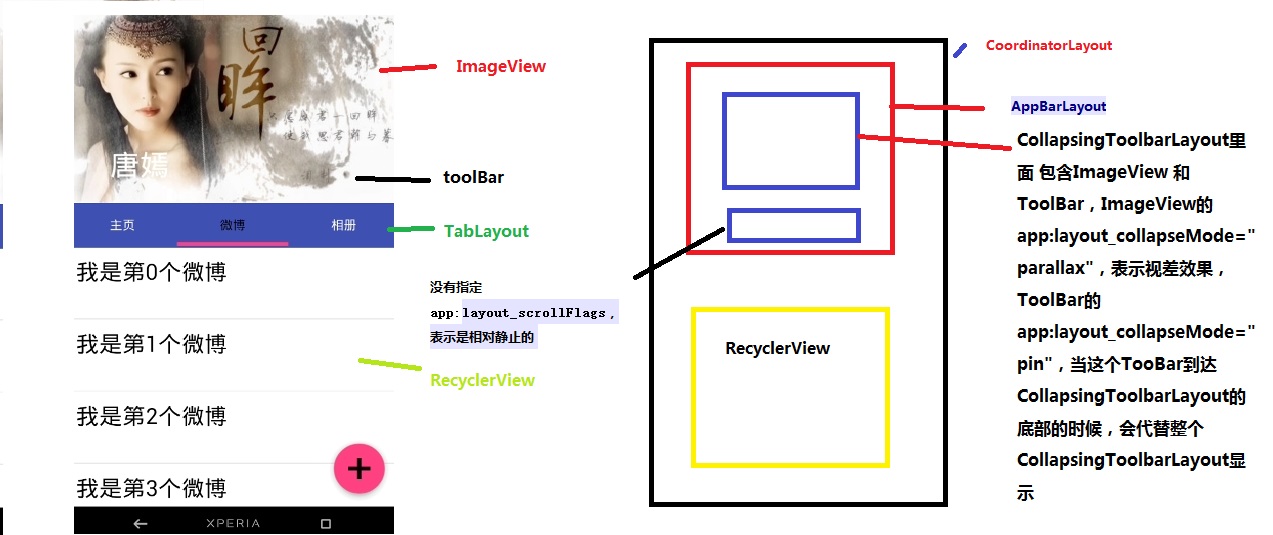
结构图如图片所示,先说明CollapsingToolbarLayout的变化
CollapsingToolbarLayout里面 包含ImageView 和ToolBar,ImageView的app:layout_collapseMode=”parallax”,表示视差效果,ToolBar的 app:layout_collapseMode=”pin”,当这个TooBar到达 CollapsingToolbarLayout的底部的时候,会代替整个CollapsingToolbarLayout显示
接着说明TabLayout的变化
从前面的描述我们已经知道当 没有指定app:layout_scrollFlags的时候,最终TabLayout会静止,不会随着滑动的 时候消失不见
这篇博客主要讲解了CoordinatorLayout,AppBarLayout,CollapsingToolbarLayout的一些相关属性。
- 对于AppBarLayout,我们主要 讲解了这个属性app:layout_scrollFlags,设置不同 的属性我们可以在滚动的时候显示不同 的效果
- 对于CollapsingToolbarLayout,我们主要讲解了app:layout_collapseMode这个属性,设置不同的值,我们可以让其子View呈现不同的 炫酷效果,如parallax和pin等
:https://blog.csdn.net/jxf_access/article/details/79564669
CoordinatorLayout使用详解: 打造折叠悬浮效果的更多相关文章
- css3学习--css3动画详解二(3d效果)
一.设置3D场景 perspective:800 //浏览器到物体的距离(像素)perspective-origin:50% (x轴) 50% (y轴) //视点的位置 transf ...
- Python-Flask框架之"图书管理系统"项目,附详解源代码及页面效果截图
该图书管理系统要实现的功能如下: 1. 可以通过添加窗口添加书籍或作者,如果要添加的作者和书籍已存在于书架上, 则给出相应的提示: 2. 如果要添加的作者存在,而要添加的书籍书架上没有,则将该书籍添加 ...
- JS组件系列——JsPlumb制作流程图及相关效果详解
上 篇 前言:之前项目里面用到了Web里面的拖拽流程图的技术JsPlumb,其实真不算难,不过项目里面用HTML做的一些类似flash的效果,感觉还不错,在此分享下. Jsplumb官网:htt ...
- IOS详解TableView——选项抽屉(天猫商品列表)
在之前的有篇文章讲述了利用HeaderView来写类似QQ好友列表的表视图. 这里写的天猫抽屉其实也可以用该方法实现,具体到细节每个人也有所不同.这里采用的是点击cell对cell进行运动处理以展开“ ...
- 【动画消消乐】HTML+CSS 自定义加载动画:清新折叠方块效果 063(附源码及原理详解)
前言 Hello!小伙伴! 非常感谢您阅读海轰的文章,倘若文中有错误的地方,欢迎您指出- 自我介绍ଘ(੭ˊᵕˋ)੭ 昵称:海轰 标签:程序猿|C++选手|学生 简介:因C语言结识编程,随后转入计算机专 ...
- WindowManager 实现悬浮窗 详解
WindowManager 实现悬浮窗 详解 一:对于想直接看效果的,可以看看我的demo app. 链接:http://sj.qq.com/myapp/detail.htm?apkName=com. ...
- 每天记录一点:NetCore获得配置文件 appsettings.json vue-router页面传值及接收值 详解webpack + vue + node 打造单页面(入门篇) 30分钟手把手教你学webpack实战 vue.js+webpack模块管理及组件开发
每天记录一点:NetCore获得配置文件 appsettings.json 用NetCore做项目如果用EF ORM在网上有很多的配置连接字符串,读取以及使用方法 由于很多朋友用的其他ORM如S ...
- 详解如何实现斗鱼、B站等全局悬浮窗直播小窗口
最近业务需求需要我们直播返回或者退出直播间时,开一个小窗口在全局继续直播视频,先看效果图. 调研了一下当下主流直播平台,斗鱼.BiliBili等app,都是用WindowManger做的(这个你可以在 ...
- fullPage教程 -- 整屏滚动效果插件 fullpage详解
1.引用文件 [html] view plain copy print?在CODE上查看代码片派生到我的代码片 <link rel="stylesheet" href=&qu ...
随机推荐
- Python学习(十七)—— 数据库(二)
转载自http://www.cnblogs.com/linhaifeng/articles/7356064.html 一. 数据库管理软件的由来 基于我们之前所学,数据要想永久保存,都是保存于文件中, ...
- IDEA链接mySql问题 : You have an error in your SQL syntax : 'OPTION SQL_SELECT_LIMIT=1000' (or 'OPTION SQL_SELECT_LIMIT=DEFAULT')
IDEA控制台错误信息: check the manual that corresponds to your MySQL server version for the right Code: 1064 ...
- Python多继承之MRO算法
MRO即Method Resolution Order 方法解析顺序,它的提出主要是为了解决Python中多继承时,当父类存在同名函数时,二义性的问题 下面先看一个例子: import inspe ...
- scrapy之Crawspider 腾讯招聘实战案例
1. 在虚拟机中cd到项目目录,再运行下面代码创建spider文件: scrapy genspider -t crawl test www.baidu.com 2. spider.py代码 impor ...
- HDU-1170的解题报告
题目链接:http://acm.hdu.edu.cn/showproblem.php?pid=1170 题意:要求输入几个案例,每个案例包含操作符(+,-,*,/),操作数(两个整数).现在要求分别输 ...
- POJ 3258 River Hopscotch (最大最小距离)【二分】
<题目链接> 题目大意:现在有起点和终点两个石块,这两个石块之间有N个石块,现在对这N个石块移除M个石块,使得这些石块之间的最短距离最大,注意,起点和终点这两个石块不能被移除. 解题分析: ...
- Java 浮点数精度丢失
Java 浮点数精度丢失 问题引入 昨天帮室友写一个模拟发红包抢红包的程序时,对金额统一使用的 double 来建模,结果发现在实际运行时程序的结果在数值上总是有细微的误差,程序运行的截图: 输入依次 ...
- Visual Assist X 助手下载
链接:http://pan.baidu.com/s/1pLUErhT 密码:c6in
- BZOJ.2653.[国家集训队]middle(可持久化线段树 二分)
BZOJ 洛谷 求中位数除了\(sort\)还有什么方法?二分一个数\(x\),把\(<x\)的数全设成\(-1\),\(\geq x\)的数设成\(1\),判断序列和是否非负. 对于询问\(( ...
- (网络数据交互)Android解析Internet的Json资源文件
常用的Internet数据解析格式和工具: 网页显示的json数据如下: {"type":"FeatureCollection","metadata& ...