
google protobuf VC下的使用笔记
1
使用protobuf 2.x 下载地址(3.x 在c++11 vs2017下报错)
源码 https://github.com/google/protobuf
或者直接下载 二进制文件
2 如果下载的是代码 编译需要使用cmake 来生成VC的工程
cmake的使用从略
编译设置如图
3 如果下载的是代码 开启VC工程编译protobuf 由于以后自写代码需要使用protobuf的LIB 所以编译时请确认编译的版本
我使用的是VC2017编译的 x64 debug 版本
如图 
4 以protobuf中的例子 来进行实验
addressbook.proto
内容如下
 // See README.txt for information and build instructions.

 //

 // Note: START and END tags are used in comments to define sections used in

 // tutorials.  They are not part of the syntax for Protocol Buffers.

 //

 // To get an in-depth walkthrough of this file and the related examples, see:

 // https://developers.google.com/protocol-buffers/docs/tutorials

 // [START declaration]

 syntax = "proto3";

 package tutorial;

 // [END declaration]

 // [START java_declaration]

 option java_package = "com.example.tutorial";

 option java_outer_classname = "AddressBookProtos";

 // [END java_declaration]

 // [START csharp_declaration]

 option csharp_namespace = "Google.Protobuf.Examples.AddressBook";

 // [END csharp_declaration]

 // [START messages]

 message Person {

   string name = ;

   int32 id = ;  // Unique ID number for this person.

   string email = ;

   enum PhoneType {

     MOBILE = ;

     HOME = ;

     WORK = ;

   }

   message PhoneNumber {

     string number = ;

     PhoneType type = ;

   }

   repeated PhoneNumber phones = ;

 }

 // Our address book file is just one of these.

 message AddressBook {

   repeated Person people = ;

 }

 // [END messages]
addressbook.proto
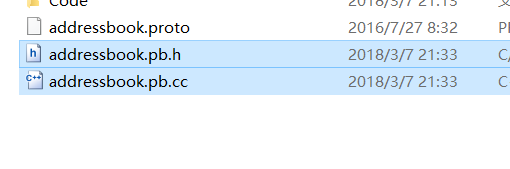
使用编译好的protoc.exe 通过addressbook.proto 生成CPP文件
指令如下 protoc -I=proto文件所在路径 -I=protobuf下src所在目录 --cpp_out=指定生成文件的路径 addressbook.proto(完整路径)
5 VC创建一个命令行工程 根目录下创建lib文件夹
将步骤4生成的lib文件拷贝到该文件夹
根目录下创建include文件夹
将protobuf->src下的google文件夹拷贝到该文件夹下
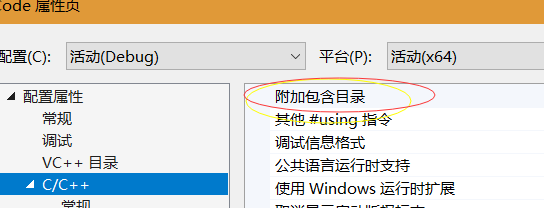
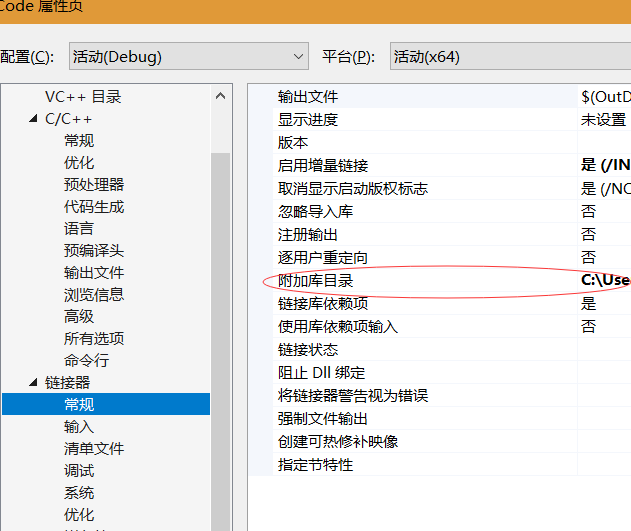
6 VC配置工程的属性
添加文件夹和lib文件夹 以及lib的文件名
如图

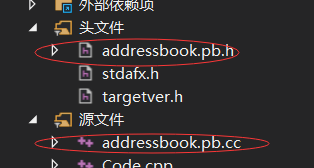
工程需要加入生成的protobuf CC文件
关闭预编译头

关闭 sdl检测

7 编译代码 代码内容可参考
protobuf->examples->add_person.cc
 // See README.txt for information and build instructions.

 #include <iostream>

 #include <fstream>

 #include <string>

 #include "addressbook.pb.h"

 using namespace std;

 // This function fills in a Person message based on user input.

 void PromptForAddress(tutorial::Person* person) {

   cout << "Enter person ID number: ";

   int id;

   cin >> id;

   person->set_id(id);

   cin.ignore(, '\n');

   cout << "Enter name: ";

   getline(cin, *person->mutable_name());

   cout << "Enter email address (blank for none): ";

   string email;

   getline(cin, email);

   if (!email.empty()) {

     person->set_email(email);

   }

   while (true) {

     cout << "Enter a phone number (or leave blank to finish): ";

     string number;

     getline(cin, number);

     if (number.empty()) {

       break;

     }

     tutorial::Person::PhoneNumber* phone_number = person->add_phones();

     phone_number->set_number(number);

     cout << "Is this a mobile, home, or work phone? ";

     string type;

     getline(cin, type);

     if (type == "mobile") {

       phone_number->set_type(tutorial::Person::MOBILE);

     } else if (type == "home") {

       phone_number->set_type(tutorial::Person::HOME);

     } else if (type == "work") {

       phone_number->set_type(tutorial::Person::WORK);

     } else {

       cout << "Unknown phone type.  Using default." << endl;

     }

   }

 }

 // Main function:  Reads the entire address book from a file,

 //   adds one person based on user input, then writes it back out to the same

 //   file.

 int main(int argc, char* argv[]) {

   // Verify that the version of the library that we linked against is

   // compatible with the version of the headers we compiled against.

   GOOGLE_PROTOBUF_VERIFY_VERSION;

   if (argc != ) {

     cerr << "Usage:  " << argv[] << " ADDRESS_BOOK_FILE" << endl;

     return -;

   }

   tutorial::AddressBook address_book;

   {

     // Read the existing address book.

     fstream input(argv[], ios::in | ios::binary);

     if (!input) {

       cout << argv[] << ": File not found.  Creating a new file." << endl;

     } else if (!address_book.ParseFromIstream(&input)) {

       cerr << "Failed to parse address book." << endl;

       return -;

     }

   }

   // Add an address.

   PromptForAddress(address_book.add_people());

   {

     // Write the new address book back to disk.

     fstream output(argv[], ios::out | ios::trunc | ios::binary);

     if (!address_book.SerializeToOstream(&output)) {

       cerr << "Failed to write address book." << endl;

       return -;

     }

   }

   // Optional:  Delete all global objects allocated by libprotobuf.

   google::protobuf::ShutdownProtobufLibrary();

   return ;

 }
add_person.cc
运行结果如图

google protobuf VC下的使用笔记的更多相关文章
- google::protobuf 编译方法
这两天用了一下Protobuf 感觉很方便, 记录一下编译过程, 以做务忘(需要安装cmake): 1: 下载地址: https://developers.google.com/protocol-bu ...
- 《Dotnet9》系列-Google ProtoBuf在C#中的简单应用
时间如流水,只能流去不流回! 点赞再看,养成习惯,这是您给我创作的动力! 本文 Dotnet9 https://dotnet9.com 已收录,站长乐于分享dotnet相关技术,比如Winform.W ...
- google protobuf学习笔记:windows下环境配置
欢迎转载,转载请注明原文地址:http://blog.csdn.net/majianfei1023/article/details/45371743 protobuf的使用和原理,请查看:http:/ ...
- window下编译并使用google protobuf
参考网址: http://my.oschina.net/chenleijava/blog/261263 http://www.ibm.com/developerworks/cn/linux/l-cn- ...
- 在C语言环境下使用google protobuf
本文写给经常使用C编程且不喜欢C++而又要经常使用google protobuf的人. 经常写通讯程序的人对数据进行序列化或者反序列化时,可能经常使用google的protobuf(PB ...
- Windows环境下google protobuf入门
我使用的是最新版本的protobuf(protobuf-2.6.1),编程工具使用VS2010.简单介绍下google protobuf: google protobuf 主要用于通讯,是google ...
- VS下使用Google Protobuf完成SOCKET通信
如何在Windows环境下的VS中安装使用Google Protobuf完成SOCKET通信 出处:如何在Windows环境下的VS中安装使用Google Protobuf完成SOCKET通信 最近一 ...
- 《精通并发与Netty》学习笔记(05 - Google Protobuf与Netty的结合)
protobuf是由Google开发的一套对数据结构进行序列化的方法,可用做通信协议,数据存储格式,等等.其特点是不限语言.不限平台.扩展性强 Netty也提供了对Protobuf的天然支持,我们今天 ...
- 《精通并发与Netty》学习笔记(04 - Google Protobuf介绍)
一 .Google Protobuf 介绍 protobuf是google团队开发的用于高效存储和读取结构化数据的工具,是Google的编解码技术,在业界十分流行,通过代码生成工具可以生成不同语言版本 ...
随机推荐
- JavaScript开发中使用频率较高的一些方法
1.填充字符串 ES7推出了字符串补全长度的功能.如果某个字符串不够指定长度,会在头部或尾部补全. String.prototype.padStart(maxLength, fillString=’ ...
- Flask--(一对多demo)作者书籍模型
一对多模型的增加和删除 后端实现: from flask import Flask from flask import flash from flask import redirect from fl ...
- 虚拟机网络连接NAT模式,本地用Xshell连接
当虚拟机centos6网络连接使用NAT模式时,因为共用宿主机ip所以当使用Xshell时直接填写虚拟机的ip地址和22端口是无法连接虚拟机的. 这样就需要配置端口映射关系! 1. 打开虚拟网络编辑器 ...
- 原生js中用Ajax进行get传参
原生js中用Ajax进行get传参 案例: <!DOCTYPE html> <html> <head> <meta charset="UTF-8&q ...
- DataBaseDaoAbstract
import java.lang.reflect.Method; import java.math.BigDecimal; import java.sql.PreparedStatement; imp ...
- HTML5 使用小结
1.html5新增的常用元素 (a) <article.../>代表独立完整的一遍文章 (b)<section.../>对页面内容进行分块 (c)<nav.../> ...
- shell脚本(二)
shell脚本(二)——变量 一.定义:用来存放各种数据,编程语言组成部分 变量的命名规则: 变量名由数字 字母下划线组成 必须以字母或者下划线开头 不能使用shell里面的关键词 ...
- redis排序
1.sort 排序最常见的是sort命令,可以对列表或者有序集合排序,最简单的排序方式如下: > lpush list (integer) > lpush list (integer) & ...
- c# ref与out用法
class Program { static void Main(string[] args) { //普通 : ; ); Console.WriteLine("/*普通:*/") ...
- Laravel线上布暑到linux的问题汇总
1.直接报403错误 ,配置文件中增加: location / { try_files $uri $uri/ /index.php?$query_string; } 同时根目录不是指到项目名,而是指到 ...