
php代码画足球场
用代码画了个足球场
原图:
代码画出的效果图:
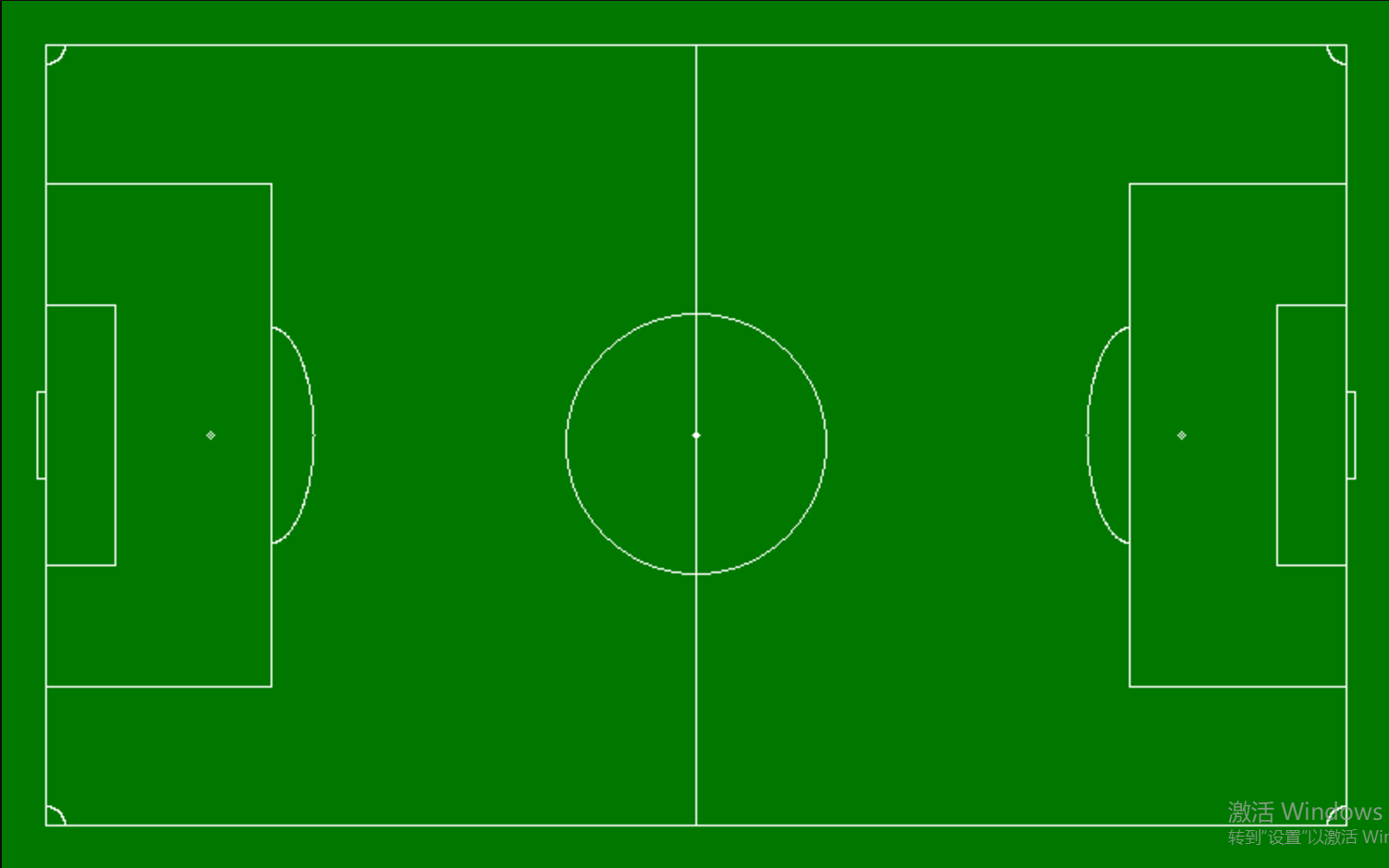
代码如下:
// 创建一个 200X200 的图像

$img = imagecreate(800, 500);

// 分配颜色

$bg = imagecolorallocate($img, 0, 120, 0);

$white = imagecolorallocate($img, 255, 255, 255);

$black = imagecolorallocate($img, 0, 0, 0);

// 填充背景色

imagefill($img, 800, 500, $bg);

// 画线

// 四边

imageline($img, 25, 25, 775, 25, $white);

imageline($img, 25, 475, 775, 475, $white);

imageline($img, 25, 25, 25, 475, $white);

imageline($img, 775, 25, 775, 475, $white);

// 中分线

imageline($img, 400, 25, 400, 475, $white);

// 中分点

imagesetpixel($img, 400, 250, $white);

imagesetpixel($img, 399, 250, $white);

imagesetpixel($img, 401, 250, $white);

imagearc($img, 400, 250, 4, 4, 0, 360, $white);

// 中分圆

imagearc($img, 400, 255, 150, 150, 0, 360, $white);

// 左球门

imageline($img, 25, 175, 65, 175, $white);

imageline($img, 25, 325, 65, 325, $white);

imageline($img, 65, 175, 65, 325, $white);

imageline($img, 25, 105, 155, 105, $white);

imageline($img, 25, 395, 155, 395, $white);

imageline($img, 155, 105, 155, 395, $white);

imagesetpixel($img, 120, 250, $white);

imagearc($img, 120, 250, 4, 4, 0, 360, $white);

imagearc($img, 155, 250, 50, 125, 270, 450, $white);

// 右球门

imageline($img, 735, 175, 775, 175, $white);

imageline($img, 735, 325, 775, 325, $white);

imageline($img, 735, 175, 735, 325, $white);

imageline($img, 775, 105, 650, 105, $white);

imageline($img, 775, 395, 650, 395, $white);

imageline($img, 650, 105, 650, 395, $white);

imagesetpixel($img, 680, 250, $white);

imagearc($img, 680, 250, 4, 4, 0, 360, $white);

imagearc($img, 650, 250, 50, 125, 90, 270, $white);

// 两边小长方形

imageline($img, 25, 225, 20, 225, $white);

imageline($img, 25, 275, 20, 275, $white);

imageline($img, 20, 225, 20, 275, $white);

imageline($img, 775, 225, 780, 225, $white);

imageline($img, 775, 275, 780, 275, $white);

imageline($img, 780, 225, 780, 275, $white);

// 四个角

imagearc($img, 25, 25, 23, 23, 0, 90, $white);

imagearc($img, 775, 25, 23, 23, 90, 180, $white);

imagearc($img, 25, 475, 23, 23, 270, 360, $white);

imagearc($img, 775, 475, 23, 23, 180, 270, $white);

// 将图像输出到浏览器

header("Content-type: image/png");

imagepng($img);

// 释放内存

imagedestroy($img);
php代码画足球场的更多相关文章
- ReportMachine 自定义代码 画细线
ReportMachine 自定义代码 画细线 procedure Memo3_OnBeforePrint(Sender: TObject); begin Memo3.Text := inttostr ...
- 程序员式优雅表白,教你用python代码画爱心
还能用python代码画爱心?还有这种操作?这是什么原理? 不相信python代码可以画爱心?先来一张效果图来看看效果吧! 用python代码画爱心的思路是怎样的? 1.怎么画心形曲线 2.怎么填满心 ...
- android 用代码画虚线边框背景(转)
1.虚线画效果,可以使用Android中的xml来做. 2.直接上代码: <RelativeLayout android:id="@+id/coupon_popup" and ...
- 20行以内python代码画出各种减压图
一.太阳花 看到一个很有意思的代码,你若安好,便是晴天!太阳花向你开~ 绘画效果如下: 代码如下: from turtle import * color('red', 'yellow') begin_ ...
- android 用代码画虚线边框背景
1.虚线画效果,可以使用Android中的xml来做. 2.直接上代码: <RelativeLayout android:id="@+id/coupon_ ...
- Android通过用代码画虚线椭圆边框背景来学习一下shape的用法
在Android程序开发中,我们经常会去用到Shape这个东西去定义各种各样的形状,shape可以绘制矩形环形以及椭圆,所以只需要用椭圆即可,在使用的时候将控件比如imageview或textview ...
- 使用canvas 代码画小猪佩奇
最近不是小猪佩奇很火嘛!!! 前几天 在知乎 看见了别人大佬用python写的 小猪佩奇, 顿时想学 ,可是 自己 没学过python(自己就好爬爬图片,,,,几个月没用 又丢了) 然后 就想画一个 ...
- html5 代码画兰博基尼跑车,6不6你说的算!
源代码下方 由于本人喜爱html5,无聊所画: 画图需要掌握; 1.画布,画笔,画圆,给画笔添加颜色.(注:掌握这几点,你就可以称霸画图界了.) 虽然没有画画天赋,但代码写的也是溜溜滴!(注:此图没有 ...
- PlantUml 使用代码画各种图
资源 网址 官方github https://github.com/plantuml/plantuml 官方网站 http://plantuml.com/zh/ mac 下,webstorm 中使用 ...
随机推荐
- CSS关键词的值-currentColor关键字提示文字(当前颜色)
currentColor关键字 currentColor关键字相当于一个CSS变量. currentColor关键字与CSS变量也是有区别的: (1)他只可以能接受<color>值的地方使 ...
- An entry point cannot be marked with the 'async' modifier
I copied below code from this link.But when I am compiling this code I am getting an entry point can ...
- tensorflow由于未初始化变量所导致的错误
版权声明:本文为博主原创文章,如需转载请注明出处,谢谢. https://blog.csdn.net/qq_38542085/article/details/78742295 初始代码 import ...
- Windows上的字符转换之CP_ACP和CP_OEMCP
原文地址:http://blog.sina.com.cn/s/blog_53c1950a010158mw.html Windows API函数MultiByteToWideChar用于多字节编码字符串 ...
- SSH + Google Authenticator 安全加固
1. SSH连接 Secure Shell(安全外壳协议,简称SSH)是一种加密的网络传输协议,可在不安全的网络中为网络服务提供安全的传输环境.SSH通过在网络中创建安全隧道来实现SSH客户端与服务器 ...
- ChartControl控件0和null的效果
DevExpress的ChartControl虽然还不能完全代替Office图表(例如它暂时不支持添加数据表),但它算同类产品中相当优秀的了,下面是对0值和空值的处理. DataTable zeroD ...
- Visual Studio 2015 update 3各版本下载地址
微软在06月27日发布了Visual Studio 2015 Update 3 .在MSDN中微软也提供下载,而且MSDN的Visual Studio 2015 Update 3与官方免费下载的文件是 ...
- 关联规则挖掘算法之Apriori算法
Apriori算法是一种挖掘关联规则的频繁项集算法,其核心思想是通过候选集生成和情节的向下封闭检测两个阶段来挖掘频繁项集. 关于这个算法有一个非常有名的故事:"尿布和啤酒".故事是 ...
- easyui textbox 获取焦点
function Admin_ListAdd() { $('#ListInfo').css({ display: "inherit" }); $("#Department ...
- 离线环境下安装ansible,借助有网环境下pip工具
环境 有网的机器(192.168.19.222):rhe65,python2.7.13,pip9.0.1 离线机器(192.168.19.203):rhe65,python2.6 FTP(192.16 ...