
iOS动画学习
学习一下动画,感谢以下大神的文章:
UIView:基础动画.关键帧动画.转场动画
Core Animation :基础动画,关键帧动画,动画组,转场动画,逐帧动画
CALayer :CALayer简介,CALayer常用属性,CALayer绘图
===> http://www.cnblogs.com/kenshincui/p/3972100.html
在看完这些文章之后,本猿照葫芦画猴子,写了个小demo,算是简单学习下动画.该demo中使用CABasicAnimation CAKeyframeAnimation keyframeAnimation
贝塞尔曲线绘制路径 UIView动画 逐帧动画 UIView动画 转场动画 动画组 CALayer动画,传感器仿膜拜动画大锅乱炖.
1.首先为各个动画写个入口
 - (void)viewDidLoad {

     [super viewDidLoad];

     //背景

     UIImage * bgImg = [UIImage imageNamed:@"树林"];

     self.bgImg = [[UIImageView alloc]initWithFrame:CGRectMake(, , SCRCCEWH.width, SCRCCEWH.height)];

     self.bgImg.image = bgImg;

     [self.view addSubview:self.bgImg];

     self.currentIndex = ; //默认第一张图片

     self.ballAry = @[@"大师球",@"高级球",@"超级球",@"精灵球"];  //先准备4个球体

     //晴天娃娃摇摆动画

     [self sunChildAniamtion];    //基础动画   CABasicAnimation

     //制作树叶layer

     [self makeLeafLayer];

     //制作小汽车

     [self makeCarLayer];

     //落叶下落动画

     [self fallLeafAnimation];   //关键帧动画  CAKeyframeAnimation    通过贝塞尔曲线绘制下路路径  CGPathCreateMutable

     //落叶旋转动画

     [self leafOverturnAnimation];   //基础动画  CABasicAnimation

    //落叶生长动画

     [self leafGrowAnimation];    //UIView动画

     //蝴蝶飞舞动画

     [self butterflyAnimation];   //逐帧动画:振翅   飞翔:关键帧动画  路径:keyframeAnimation

 }
2.点击屏幕的时候,展开转场动画(水波效果),仿膜拜动画,组合动画(汽车动画)
 //MARK:点击屏幕

 -(void)touchesBegan:(NSSet<UITouch *> *)touches withEvent:(UIEvent *)event{

     //制作球体

     WLBallView * ballView = [[WLBallView alloc] initWithFrame:CGRectMake(, , , ) AndImageName:self.ballAry[arc4random_uniform()]];

     [self.view addSubview:ballView];

     [ballView starMotion];

     //系统转场动画

     CATransition *transition = [CATransition animation];

     transition.type = @"rippleEffect";   //部分动画类型是未公开的,但仍然可以使用

     transition.duration = ;

     [self.bgImg.layer addAnimation:transition forKey:nil];

     //组合动画

     [self groupAnimation];   //组合动画(汽车)

 }
3.接下来是组合动画(汽车)的代码,组合CABasicAnimation + CAKeyframeAnimation
 //MARK:制作小汽车

 -(void)makeCarLayer{

     self.carLayer = [[CALayer alloc]init];

     self.carLayer.bounds = CGRectMake(, , , );

     self.carLayer.position = CGPointMake(SCRCCEWH.width - , SCRCCEWH.height - );

     self.carLayer.contents = (id)[UIImage imageNamed:@"小汽车"].CGImage;

     [self.view.layer addSublayer:self.carLayer];

 }

 //MARK:组合动画

 -(void)groupAnimation{

 //    1.创建动画组

     CAAnimationGroup * animationGroup = [CAAnimationGroup animation];

 //    2.设置组中的动画和其他属性

     CABasicAnimation * basicAnimation = [self carBasicAnimation];

     CAKeyframeAnimation * keyframeAnimation = [self carKeyFrameAnimation];

     animationGroup.animations = @[keyframeAnimation,basicAnimation];

     animationGroup.duration=10.0;//设置动画时间,如果动画组中动画已经设置过动画属性则不再生效

     animationGroup.beginTime=CACurrentMediaTime()+;//延迟五秒执行

     //3.给图层添加动画

     [self.carLayer addAnimation:animationGroup forKey:nil];

 }

 //小汽车加速动画

 -(CABasicAnimation *)carBasicAnimation{

     CABasicAnimation *basicAnimation=[CABasicAnimation animationWithKeyPath:@"transform.rotation.z"];

     CGFloat toValue=  M_PI_2 / 2.5;

     basicAnimation.toValue=[NSNumber numberWithFloat:  M_PI_2/2.5];

     [basicAnimation setValue:[NSNumber numberWithFloat:toValue] forKey:@"carTransform"];

     return basicAnimation;

 }

 //MARK:小汽车移动动画

 -(CAKeyframeAnimation *)carKeyFrameAnimation{

     CAKeyframeAnimation *keyframeAnimation=[CAKeyframeAnimation animationWithKeyPath:@"position"];

     CGPoint endPoint= CGPointMake(-, SCRCCEWH.height - );

     CGPathRef path=CGPathCreateMutable();

     CGPathMoveToPoint(path, NULL, self.carLayer.position.x, self.carLayer.position.y);

     CGPathAddCurveToPoint(path, NULL, endPoint.x/, endPoint.y, endPoint.x/, endPoint.y, endPoint.x, endPoint.y);

     keyframeAnimation.path=path;

     CGPathRelease(path);

     [keyframeAnimation setValue:[NSValue valueWithCGPoint:endPoint] forKey:@"carRunAnimation"];

     return keyframeAnimation;

 }
4.落叶动画.落叶通过CALayer绘制,UIVIew动画控制叶子生长动画,叶子下落动画通过关键帧动画.路径通过绘制二次贝塞尔曲线,叶子旋转动画通过基础动画CABasicAnimation
 /*---------------------------------------------------------------------------------------*/

 //MARK:制作落叶Layer

 -(void)makeLeafLayer{

     self.leafLayer = [[CALayer alloc]init];

     self.leafLayer.bounds = CGRectMake(, , , );

     self.leafLayer.position = CGPointMake(, );

     self.leafLayer.anchorPoint = CGPointMake(0.5, 0.6); //锚点,便于旋转动画

     self.leafLayer.contents = (id)[UIImage imageNamed:@"落叶"].CGImage;

     [self.view.layer addSublayer:self.leafLayer];

 }

 //MARK:落叶生长动画

 -(void)leafGrowAnimation{

     UIImageView * imgView = [[UIImageView alloc]initWithFrame:CGRectMake(, , , )];

     imgView.image = [UIImage imageNamed:@"落叶"];

     imgView.layer.position = CGPointMake(, );

     [self.view addSubview:imgView];

     [UIView animateWithDuration:8.5 animations:^{

         imgView.frame = CGRectMake(, , , );

         imgView.layer.position = CGPointMake(, );

     } completion:^(BOOL finished) {

         [imgView removeFromSuperview];

         [self leafGrowAnimation];

     }];

 }

 //MARK: 落叶下落动画

 -(void)fallLeafAnimation{

     //1.创建关键帧动画并设置动画属性

     CAKeyframeAnimation *keyframeAnimation=[CAKeyframeAnimation animationWithKeyPath:@"position"];

     //2.设置路径

     //绘制贝塞尔曲线

     CGPathRef path=CGPathCreateMutable();

     CGPathMoveToPoint(path, NULL, self.leafLayer.position.x, self.leafLayer.position.y);//移动到起始点

     CGPathAddCurveToPoint(path, NULL, , , -, , ,SCRCCEWH.height);//绘制二次贝塞尔曲线

     keyframeAnimation.path=path;//设置path属性

     CGPathRelease(path);//释放路径对象

     keyframeAnimation.repeatCount = HUGE_VALF; //重复次数

     keyframeAnimation.calculationMode = kCAAnimationCubicPaced;  //动画的计算模式

     keyframeAnimation.keyTimes = @[@0.0,@0.5,@0.7,@1.0]; //控制各个帧的时间

     //设置其他属性

     keyframeAnimation.duration=8.0;

     keyframeAnimation.beginTime=CACurrentMediaTime()+;//设置延迟执行

     //3.添加动画到图层,添加动画后就会执行动画

     [self.leafLayer addAnimation:keyframeAnimation forKey:@"fallLeaf"];

 }

 //MARK:落叶旋转动画

 -(void)leafOverturnAnimation{

     //    1.创建动画并制定动画属性

     CABasicAnimation * basicAnimation = [CABasicAnimation animationWithKeyPath:@"transform.rotation.z"];

     //    2.设置动画属性结束值

     basicAnimation.toValue = [NSNumber numberWithFloat:M_PI_2*];

     basicAnimation.repeatCount = HUGE_VALF;

     //    3.设置动画属性的属性

     basicAnimation.duration = 6.0;

     basicAnimation.autoreverses = YES;  //旋转后再旋转回原来的位置

     //    4.添加动画到图层,注意key仅仅相当于给动画命名,以后获取动画可以采用该名字获取

     [self.leafLayer addAnimation:basicAnimation forKey:@"leafOverturn"];

 }
4.娃娃摇摆动画,通过基础动画CABasicAnimation
 //MARK: 晴天娃娃摇摆动画

 -(void)sunChildAniamtion{

     UIImageView * imgView = [[UIImageView alloc]initWithFrame:CGRectMake(, , , )];

     imgView.center = CGPointMake(SCRCCEWH.width/, );

     imgView.image = [UIImage imageNamed:@"娃娃"];

     imgView.layer.anchorPoint = CGPointMake(28.5/, /);

     [self.view addSubview:imgView];

     id fromValue = [NSNumber numberWithFloat:-M_PI/ 10.0];

     id toValue = [NSNumber numberWithFloat:M_PI/ 10.0];

     CABasicAnimation *animation = [CABasicAnimation animationWithKeyPath:@"transform.rotation.z"];

     animation.duration = 1.5; // 持续时间

     CAMediaTimingFunction *mediaTiming = [CAMediaTimingFunction functionWithName:kCAMediaTimingFunctionEaseInEaseOut];

     animation.timingFunction = mediaTiming;

     animation.repeatCount = HUGE_VALF; // 重复次数

     animation.fromValue =  fromValue;// 起始角度

     animation.toValue = toValue; // 终止角度

     animation.autoreverses = YES;

     [imgView.layer addAnimation:animation forKey:nil];

 }
5.蝴蝶动画,震翅通过逐帧动画,路径通过关键帧动画的属性,设置关键帧实现
 //得到蝴蝶当前图片

 - (UIImage *)getImage:(BOOL)isNext{

     if(isNext){

         self.currentIndex = (self.currentIndex + )%IMAGE_COUNT;

     }else{

         self.currentIndex = (self.currentIndex -  + IMAGE_COUNT)%IMAGE_COUNT;

     }

     NSString * imageName = [NSString stringWithFormat:@"%i.jpg",self.currentIndex];

     return [UIImage imageNamed:imageName];

 }

 //蝴蝶飞舞动画

 -(void)butterflyAnimation{

     self.butterflyLayer = [[CALayer alloc]init];

     self.butterflyLayer.bounds = CGRectMake(, , , );

     self.butterflyLayer.position = CGPointMake(SCRCCEWH.width, SCRCCEWH.height/);

     [self.view.layer addSublayer:self.butterflyLayer];

     self.images = [NSMutableArray array];

     for (int i = ; i <= ; i++){

         NSString * imageName = [NSString stringWithFormat:@"fly%i.png",i];

         UIImage * image = [UIImage imageNamed:imageName];

         [self.images addObject:image];

     }

     //    定义时钟对象

     CADisplayLink * displayLink = [CADisplayLink displayLinkWithTarget:self selector:@selector(step)];

     //    添加时钟对象到主队列循环

     [displayLink addToRunLoop:[NSRunLoop mainRunLoop] forMode:NSDefaultRunLoopMode];

     //    蝴蝶飞舞路径

     [self butterflypath];

 }

 //MARK:蝴蝶飞舞路径

 -(void)butterflypath{

     //1.创建关键帧动画并设置动画属性

     CAKeyframeAnimation *keyframeAnimation=[CAKeyframeAnimation animationWithKeyPath:@"position"];

     //2.设置关键帧

     NSValue * key1 = [NSValue valueWithCGPoint:self.butterflyLayer.position];  //对于关键帧动画初始值不能省略

     NSValue * key2 = [NSValue valueWithCGPoint:CGPointMake(, )];

     NSValue * key3 = [NSValue valueWithCGPoint:CGPointMake(, )];

     NSValue * key4 = [NSValue valueWithCGPoint:CGPointMake(, )];

     NSValue * key5 = [NSValue valueWithCGPoint:CGPointMake(, )];

     NSArray * values = @[key1,key2,key3,key4,key5];

     keyframeAnimation.values = values;

     keyframeAnimation.repeatCount = HUGE_VALF; //重复次数

     keyframeAnimation.calculationMode = kCAAnimationCubicPaced;  //动画的计算模式

     keyframeAnimation.keyTimes = @[@0.0,@0.5,@0.7,@1.0]; //控制各个帧的时间

     //设置其他属性

     keyframeAnimation.duration=;

     keyframeAnimation.beginTime=CACurrentMediaTime()+;//设置延迟执行

     //3.添加动画到图层,添加动画后就会执行动画

     [self.butterflyLayer addAnimation:keyframeAnimation forKey:@"butterfly"];

 }

 //MARK: 每次屏幕刷新就会执行一次此方法

 -(void)step{

     //定义一个变量记录执行次数

     static int s = ;

     if(++s %  == ){

         UIImage * image = self.images[self.currentIndex];

         self.butterflyLayer.contents = (id)image.CGImage;

         self.currentIndex = (self.currentIndex + )%IMAGE_COUNT;

     }

 }
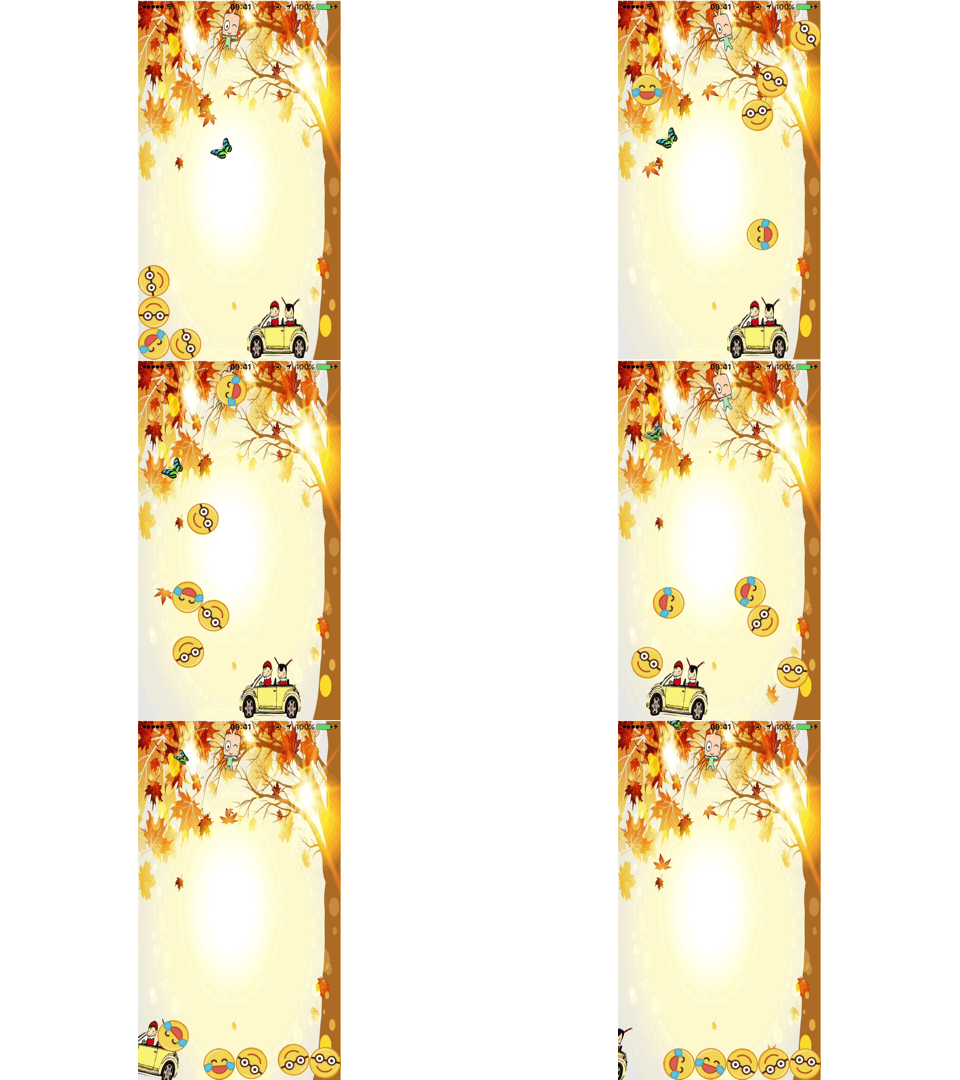
github源代码: https://github.com/pheromone/iOSAnimationLearn
iOS动画学习的更多相关文章
- iOS动画学习-视觉效果
CALayer不仅仅是iOS动画学习-CALayer中介绍的那些内容,他还有一些其他属性,比如shadowColor,borderWidth,borderColor等等,这些属性我们只需要简单点设置就 ...
- ios 动画学习的套路 (二)
有它们俩你就够了! 说明:下面有些概念我说的不怎么详细,网上实在是太多了,说了我觉得也意义不大了!但链接都给大家了,可以自己去看,重点梳理学习写动画的一个过程和一些好的博客! (一) 说说这两个三方库 ...
- iOS动画学习-CALayer
iOS中有很多方法可以实现动画,我们可以用CAKeyframeAnimation, CABasicAnimation,CASpringAnimation(iOS9.0中添加的,实现弹簧的效果),也可以 ...
- iOS 动画学习
图层树.寄宿图以及图层几何学(一)图层的树状结构 技术交流新QQ群:414971585 巨妖有图层,洋葱也有图层,你有吗?我们都有图层 -- 史莱克 Core Animation其实是一个令人误解的命 ...
- iOS动画学习 -隐式动画
事务 Core Animation基于一个假设,说屏幕上的任何东西都可以(或者可能)做动画.你并不需要在Core Animation中手动打开动画,但是你需要明确地关闭它,否则它会一直存在. 当你改变 ...
- iOS 动画学习之视图控制器转场动画
一.概述 1.系统会创建一个转场相关的上下文对象,传递到动画执行器的animateTransition:和transitionDuration:方法,同样,也会传递到交互Controller的star ...
- iOS 动画笔记 (一)
你也肯定喜欢炫酷的动画! 在APP中,动画就是一个点睛之笔!可以给用户增加一些独特的体验感,估计也有许多的和我一样的,看着那些觉得不错的动画,也就只能流口水的孩子,毕竟可能不知道从哪里下手去写!动画学 ...
- iOS核心动画学习整理
最近利用业余时间终于把iOS核心动画高级技巧(https://zsisme.gitbooks.io/ios-/content/chapter1/the-layer-tree.html)看完,对应其中一 ...
- iOS 动画基础
原文:http://www.cnblogs.com/lujianwenance/p/5733846.html 今天说一下有关动画的基础,希望能帮助到一些刚接触iOS动画或者刚开始学习iOS的同学, ...
随机推荐
- 不同路由器下远程ssh登录Beaglebone系统(通过路由器端口转发,配合花生壳的DDNS功能)
使用场景: 一般家庭设备都是通过路由器中转连上互联网的,而且运营商给家庭宽带分配的IP地址也是动态的.随时可能变动的.所以当程序员们离开家之后,是很难直接和家里的设备进行交互的.但是通过TPLINK路 ...
- linux 英汉词典程序shell+postgresql版
在linux控制台下工作,有时候遇到不懂的单词,想要找个linux下的词典程序,搜寻无果,只好自己动手写个了. 首先获取词典文本文件,在github上找到一个 建立数据库 create databas ...
- markdown的css样式(自己写的)
markdown的css样式,这些是我自己配置的,感觉可以的话你可以添加下,不适合自己的话可以仿照第二种自己写个比较好的css样式. 第一种 /* RESET ==================== ...
- css的再深入6(更新中···)
background-position 雪碧图 我们的html和css中有三个属性可以向服务器发送请求,src href url. overflow (1) 值hidden 超出就隐藏 (2) 值s ...
- 【C#数据结构系列】图
一:图 图状结构简称图,是另一种非线性结构,它比树形结构更复杂.树形结构中的结点是一对多的关系,结点间具有明显的层次和分支关系.每一层的结点可以和下一层的多个结点相关,但只能和上一层的一个结点相关.而 ...
- sql添加一个list的查询条件
编程中往往会有需要对某个list的值进行查询的需求,而将一个list作为查询条件,我所知道的有两种方法: 1.for循环遍历,每次循环一个sql,每次查list中一个条件的数据,最后累加 ...(最基 ...
- 4th,Python三级菜单
1. 运行程序输出第一级菜单 2. 选择一级菜单某项,输出二级菜单,同理输出三级菜单 3. 菜单数据保存在文件中 4. 让用户选择是否要退出 5. 有返回上一级菜单的功能 data = { '北京': ...
- $set()的正确使用方式
vue给对象新增属性,并触发视图更新 如下代码:给student对象新增age属性 data () { return { student: { name: '', sex: '' } } } 众所周知 ...
- linux解压类型总结
1.*.tar 用 tar –xvf 解压2.*.gz 用 gzip -d或者gunzip 解压3.*.tar.gz和*.tgz 用 tar –xzf 解压4.*.bz2 用 bzip2 -d或者用b ...
- Yarn 踩坑 : Could not find or load main class org.apache.hadoop.mapreduce.v2.app.MRAppMaster
原因:yarn-site.xml 中,yarn.application.classpath 未配置 解决:其中 hadoop 版本对应更改 <property> <name>y ...