
Unable to find utility "instruments", not a developer tool or in PATH
unable to find utility "instruments", not a developer tool or in PATH
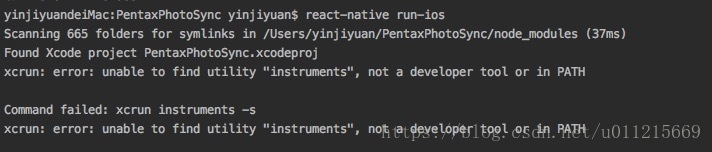
报错原因:
升级过xcode或者xcode多版本共存下没有设置默认版本
解决方案:
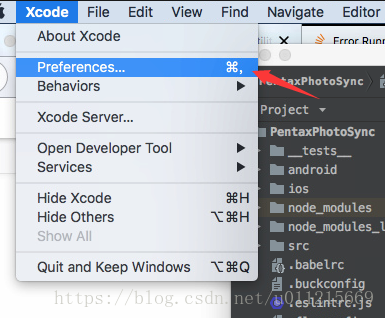
打开xcode,选择
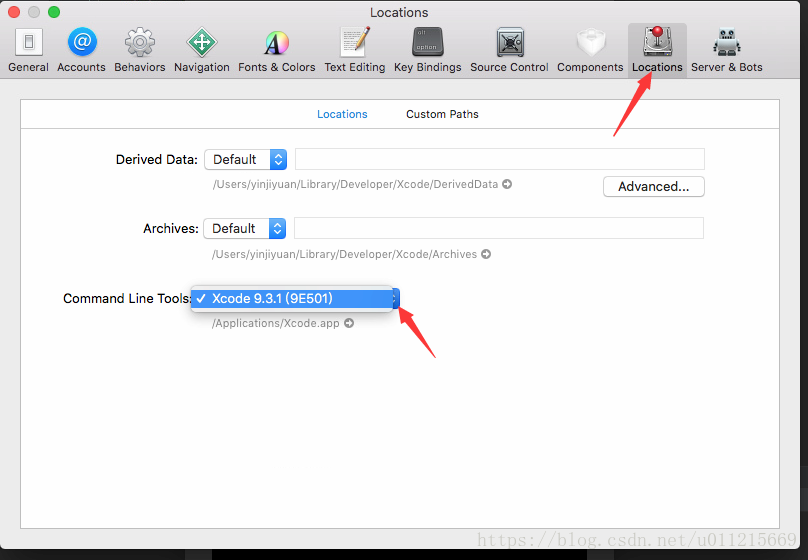
切换到Locations,在command line tools 中选择你需要用的版本
此时完全退出xcode,再次尝试run-ios,一切正常!
Unable to find utility "instruments", not a developer tool or in PATH的更多相关文章
- react-native run-ios时报错xcrun: error: unable to find utility "instruments", not a developer tool or in PATH
命令行运行react-native 项目时,报错:xcrun: error: unable to find utility "instruments", not a develop ...
- xcrun: error: unable to find utility "instruments", not a developer tool or in PATH
xcrun: error: unable to find utility "instruments", not a developer tool or in PATH 用web ...
- 用Webstorm 运行React-native 工程时,出错:xcrun: error: unable to find utility "instruments", not a developer tool or in PATH
解决方法:在 终端执行如下命令 sudo xcode-select -s /Applications/Xcode.app/Contents/Developer/ 注意:前提是你已经安装了xcode
- xcrun: error: unable to find utility "PackageApplication", not a developer tool or in PATH
xcrun: error: unable to find utility "PackageApplication", not a developer tool or in PATH ...
- xcrun: error: unable to find utility "PackageApplication", not a developer tool or in PATH
Xcode升级到8.3后 用命令进行打包 提示下面这个错误 xcrun: error: unable to find utility "PackageApplication", n ...
- Xcode脚本自动化打包问题:xcrun: error: unable to find utility "PackageApplication", not a developer tool or in PATH
运行脚本后报错: xcrun: error: unable to find utility "PackageApplication", not a developer tool o ...
- unable to find utility "simctl", not a developer tool or in PATH解决方案
解决方案就是去xcode设置里面,将Command line Tools设置一下,在Xcode>preferences>Locations里面,设置之后再运行终端即可
- chrome developer tool—— 断点调试篇
断点,调试器的功能之一,可以让程序中断在需要的地方,从而方便其分析.也可以在一次调试中设置断点,下一次只需让程序自动运行到设置断点位置,便可在上次设置断点的位置中断下来,极大的方便了操作,同时节省了时 ...
- chrome developer tool 调试技巧
这篇文章是根据目前 chrome 稳定版(19.0.1084.52 m)写的, 因为 google 也在不断完善chrome developer tool, 所以 chrome 版本不同可能稍有差别. ...
随机推荐
- spring cloud config--client
概述 之前我们简单的搭建了一个单点的config-server服务,实现配置文件的统一管理,本次文章将实现config-client是如何从config-server中获取到统一配置文件信息的 1.创 ...
- C++中的继承(1) 继承方式
1.继承与派生 继承是使代码可以复用的重要手段,也是面向对象程序设计的核心思想之一.简单的说,继承是指一个对象直接使用另一对象的属性和方法.继承呈现了 面向对象程序设 计的层次结构, 体现了 由简单 ...
- java数据
因为曾经干了啥事儿,才印象特别深刻. 将byte存入String的后果 String res = ""; res += (char) 0xc3; byte[] bytes = re ...
- GO语言标准库—命令行参数解析FLAG
flag包是Go语言标准库提供用来解析命令行参数的包,使得开发命令行工具更为简单 常用方法 1.flag.Usage 输出使用方法,如linux下ls -h的帮助输出 2.flag.Type(参数名, ...
- WINDOWS 2008Server 配置nginx 反向代理服务器 安装成服务
本案例有用过可行 反向代理就是是网站通过一台机器发布到公网,客户访问的时候是直接访问那台代理机器的,然后通过那台机器才访问到内网网站. 0.先要在域名官网上面配置域名对应的IP地址,然后要在自己路 ...
- 【Android】Android 4.0 Launcher2源码分析——启动过程分析
Android的应用程序的入口定义在AndroidManifest.xml文件中可以找出:[html] <manifest xmlns:android="http://schemas. ...
- VMware安装操作系统提示 " Intel VT-x 处于禁用状态"解决方法
VMWARE WORKSTATION 在安装64为操作系统(kali)报错,报错内容为:“已将该虚拟机配置为使用 64 位客户机操作系统.但是,无法执行 64 位操作. 此主机支持 Intel VT- ...
- sparkStreaming消费kafka-1.0.1方式:direct方式(存储offset到zookeeper)-- 2
参考上篇博文:https://www.cnblogs.com/niutao/p/10547718.html 同样的逻辑,不同的封装 package offsetInZookeeper /** * Cr ...
- eclipse中设置自动生成的author,date等注释
转自:http://blog.csdn.net/zhouhong1026/article/details/38396311 转自:http://hi.baidu.com/qianjian21/blog ...
- P2024 [NOI2001]食物链 并查集
题目描述 动物王国中有三类动物 A,B,C,这三类动物的食物链构成了有趣的环形.A 吃 B,B 吃 C,C 吃 A. 现有 N 个动物,以 1 - N 编号.每个动物都是 A,B,C 中的一种,但是我 ...