
datagrid 绑定选中数据,列头全选
成品图:

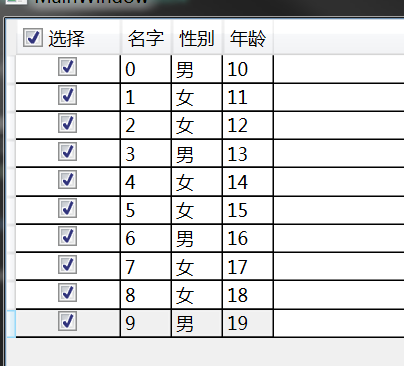
xaml代码
<Grid>

        <DataGrid x:Name="datagrid" Height="Auto" Width="Auto" Grid.Row="1"

                  AutoGenerateColumns="False"

                  CanUserAddRows="False"

                  CanUserDeleteRows="False"

                  CanUserReorderColumns="False"

                  CanUserResizeColumns="False" >

            <DataGrid.RowStyle>

                <Style  TargetType="DataGridRow">

                    <EventSetter Event="GotFocus" Handler="Item_GotFocus"/>

                </Style>

            </DataGrid.RowStyle>

            <DataGrid.Columns>

                <DataGridCheckBoxColumn Header="全选" Binding="{Binding IsSelected,Mode=TwoWay}">

                    <DataGridCheckBoxColumn.HeaderTemplate>

                        <DataTemplate>

                            <CheckBox Name="cbCheck" IsChecked="{Binding ElementName=root,Path=CheckboxIsSelected}" Content="选择" Width="60" Click="cbCheck_Click"/>

                        </DataTemplate>

                    </DataGridCheckBoxColumn.HeaderTemplate>

                </DataGridCheckBoxColumn>

                <DataGridTextColumn Header="名字" Binding="{Binding Name}"/>

                <DataGridTextColumn Header="性别" Binding="{Binding Sex}"/>

                <DataGridTextColumn Header="年龄" Binding="{Binding Age}"/>

            </DataGrid.Columns>

        </DataGrid>

    </Grid>
cs代码
        /// <summary>

        /// 设置数据源

        /// </summary>

        void SetItemsSource()

        {

            List<Person> list = new List<Person>();

            for (int i = 0; i < 10; i++)

            {

                list.Add(new Person() { Name = "" + i, Age = "1" + i, Sex = i % 3 == 0 ? "男" : "女" });

            }

            datagrid.ItemsSource = list;

        }

        int selectedCount = 0;

        /// <summary>

        /// 绑定列头的勾选框

        /// </summary>

        public bool? CheckboxIsSelected

        {

            get { return (bool?)GetValue(CheckboxIsSelectedProperty); }

            set { SetValue(CheckboxIsSelectedProperty, value); }

        }

        public static readonly DependencyProperty CheckboxIsSelectedProperty =

            DependencyProperty.Register("CheckboxIsSelected", typeof(bool?), typeof(MainWindow), new PropertyMetadata(false));

        /// <summary>

        /// 选中列自动勾选勾选框

        /// </summary>

        /// <param name="sender"></param>

        /// <param name="e"></param>

        private void Item_GotFocus(object sender, RoutedEventArgs e)

        {

            var item = (DataGridRow)sender;

            var ss = item.Item as Person;

            if (ss != null)

            {

                ss.IsSelected = !ss.IsSelected;

                selectedCount += ss.IsSelected ? 1 : -1;

                //if(ss.IsSelected)

                //{

                //    ss.IsSelected = false;

                //    selectedCount--;

                //}

                //else

                //{

                //    ss.IsSelected = true;

                //    selectedCount++;

                //}

            }

            CheckboxIsSelected = selectedCount > 0 ? selectedCount == datagrid.Items.Count ? true : (bool?)null : false;

            //if (selectedCount > 0)

            //{

            //    if (selectedCount == datagrid.Items.Count)

            //    {

            //        CheckboxIsSelected = true;

            //    }

            //    else

            //    {

            //        CheckboxIsSelected = null;

            //    }

            //}

            //else

            //{

            //    CheckboxIsSelected = false;

            //}

        }

        /// <summary>

        /// 全选和反选

        /// </summary>

        /// <param name="sender"></param>

        /// <param name="e"></param>

        private void cbCheck_Click(object sender, RoutedEventArgs e)

        {

            var items = datagrid.ItemsSource as List<Person>;

            if (items != null)

            {

                var result = (sender as CheckBox).IsChecked == true ? true : false;

                items.ForEach(s => s.IsSelected = result);

            }

        }
model代码
public class Person : ViewModelBase

    {

        private bool _IsSelected;

        /// <summary>

        ///

        /// </summary>

        public bool IsSelected

        {

            get { return _IsSelected; }

            set

            {

                _IsSelected = value;

                RaisePropertyChanged("IsSelected");

            }

        }

        private string _Name;

        public string Name

        {

            get { return _Name; }

            set

            {

                _Name = value;

                RaisePropertyChanged("Name");

            }

        }

        private string _Age;

        public string Age

        {

            get { return _Age; }

            set

            {

                _Age = value;

                RaisePropertyChanged("Age");

            }

        }

        private string _Sex;

        public string Sex

        {

            get { return _Sex; }

            set

            {

                _Sex = value;

                RaisePropertyChanged("Sex");

            }

        }

    }
ViewModelBase
public class ViewModelBase : INotifyPropertyChanged

    {

        public event PropertyChangedEventHandler PropertyChanged;

        public void RaisePropertyChanged(string propertyName)

        {

            if (this.PropertyChanged != null)

            {

                this.PropertyChanged(this, new PropertyChangedEventArgs(propertyName));

            }

        }

    }
datagrid 绑定选中数据,列头全选的更多相关文章
- Easyui datagrid加载数据时默认全选的问题
问题描述: 最近使用 Easyui datagrid 展示数据,之前一直使用很正常,今天出现了一个怪异问题 加载数据后,只要点击选中列 ck 的任意行或多行,再刷新时整个datagrid的所有数据都 ...
- WPF中DataGrid中的DataGridCheckBoxColumn用法(全选,全否,反选)
原文:WPF中DataGrid中的DataGridCheckBoxColumn用法(全选,全否,反选) 前台代码 <DataGrid.Columns> <DataGridCheckB ...
- WPF DataGrid绑定一个组合列
WPF DataGrid绑定一个组合列 前台: <Page.Resources> <local:InfoConverter x:Key="converter& ...
- springMvc接收ajax数组参数,以及jquery复选框选中、反选、全选、全不选
一.复选框选中.反选.全选.全不选 html代码: <input type='checkbox' name='menuCheckBox' value='10' >苹果 <input ...
- easyui datagrid checkbox复选框取消单击选中事件、初始全选全不选等问题解决
系统业务需要,导入的列表数据默认全部选中,且不可取消选中行.全部店铺优惠券发放过后导入的数据全部清空.如图所示: 一.初始化页面默认全部选中“selectAll”,全部不选中“unselectAll” ...
- JQuery EasyUI之DataGrid列名和数据列分别设置不同对齐方式(转)
需求如下 现有数据列三列 Name,Age,CreateDate 数据 张三,18,2000-12-09 :12:34:56 李四,28,2000-12-09 :12:34:56 王麻子,38,200 ...
- WPF DataGrid 绑定DataSet数据 自动生成行号
1.绑定数据:dataGrid1.ItemsSource = dataSet.Tables[0].DefaultView; 注意:在创建DataGrid 时可以通过AutoGenerateColumn ...
- asp:DataGrid之添加asp:CheckBox做全选功能时涉及到绑值问题解决
最大的意图是为asp:CheckBox的value绑定上自己需要的value值,而不是默认的字符串"on" 参考了这篇文章带Value属性的扩展CheckBox控件,意义不大,换了 ...
- jquery checkbox选中状态以及实现全选反选
jquery1.6以下版本获取checkbox的选中状态: $('.ck').attr('checked'); $('.ck').attr('checked',true);//全选 $('.ck'). ...
随机推荐
- 51nod 1513 && CF570D
题意:给定一棵树,每个节点有一个字母.给定若干个询问,询问某个子树内某一深度的节点是否能将这些节点组合成一个回文串.(深度是以根节点为基准的,不是当前子树根.)数据规模10^5. 神犇题解 子树问题, ...
- 算法(Algorithms)第4版 练习 2.1.1
E A S Y Q U E S T I O N A E S Y Q U E S T I O N A E S Y Q U E S T I O N A E E Y Q U S S T I O N A E ...
- 解决Eclipse和myeclipse在进行 html,jsp等 页面编辑时,自动格式化变丑的问题
在eclipse和myelipse写JAVA代码时中使用ctrl+shift+f 快捷键自动排版省时又省力,排版后的代码规范美观又层次性,但在我们写jsp或html代码时,使用这个快捷键排版简直奇丑无 ...
- Java企业微信开发_05_消息推送之被动回复消息
一.本节要点 1.消息的加解密 微信加解密包 下载地址:http://qydev.weixin.qq.com/java.zip ,此包中封装好了AES加解密方法,直接调用方法即可. 其中,解 ...
- 将jsp页面内容保存到excel(转)
在此,强调一下搜索时关键词的重要性,这样一下子可以定位到文章,否则处于盲人摸象,毫无目的尴尬境地.本篇就是通过export jsp to excel找到的. 原文地址:How to Export We ...
- 如果你的NavigationDrawer里面的Item没有响应,Drawer不能左滑关闭
如果你的NavigationDrawer里面的Item没有响应,Drawer不能左滑关闭,应该是因为你没有把主要内容放在DrawerLayout标签下的第一位. The main content vi ...
- Qt Create 4.6.2无法自动生成Android Kit
开发环境: OS,Microsoft Windows [Version 10.0.17134.523] Qt,5.11.1 Qt Creator,4.6.2 JDK,1.8.0_181 Android ...
- H264 NALU 使用PS封装 RTP发送
最近由于项目平台需求,要将H264 NALU封装为PS再用RTP发送,PS封装按照ISO DEC-13818-1标准.一个PS包包含PS Header, PES Header, PS system h ...
- ACM学习历程—HDU1030 Delta-wave(数学)
Description A triangle field is numbered with successive integers in the way shown on the picture be ...
- cmd命令,输出为txt文本
在命令行后面,加上'-t > d:output.txt'. 具体可参考如下图: //=====补充===== 所以,在调试nodejs的时候,如果用命令行调试,则可把输出信息都重定向到一个文件中 ...