
HttpWebRequest Post请求webapi
1、WebApi设置成Post请求
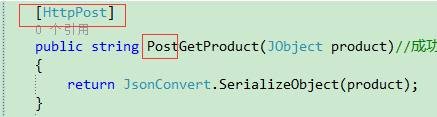
在方法名加特性[HttpPost]或者方法名以Post开头
如下截图:
2、使用(服务端要与客户端对应起来)
【单一字符串方式】:
注意:ContentType = "application/x-www-form-urlencoded";
格式一:
客户端参数格式:如 "=abc123"或者{'':abc123}
        [HttpPost]

        public string PostHello([FromBody] string str)

        {

            return "Hello," + str;

        }
格式二:
客户端参数格式: url地址加上Values 如:"http://localhost:21235/api/Products/PostTest?str=abc123"
        public string PostTest(string str)

        {

            return str;

        }
格式三:
客户端参数格式:// 如:"Name=MrBlack"
        public string PostTest2()

        {

            string name = HttpContext.Current.Request.Form["Name"].ToString();

            return name ;

        }
【实体类作为参数】(json格式或Dictionary)
注意:request.ContentType = "application/json; charset=utf-8 ";
客户端参数:如 {"Id":"9527","Name":"zhangSan","Category":"A8","Price":"88"}
或者Id=9527&Name=zhangSan&Category=A8&Price=88
格式一:
        public HttpResponseMessage PostProduct([FromBody] Product product)

        {

            HttpResponseMessage result = new HttpResponseMessage { Content = new StringContent("{\"name\":\"hello\"}", Encoding.GetEncoding("UTF-8"), "application/json") };

            return result;

        }
格式二:
        [HttpPost]

        public object SaveData(dynamic obj)

        {

            var strName = Convert.ToString(obj.Name);

            return strName;

        }
格式三:
        [HttpPost]

        public string PostGetProduct(JObject product)

        {

            return JsonConvert.SerializeObject(product);

        }
最好加上几个常见的请求方法:
        public static string HttpPost(string url, string PostData)

        {

            Encoding encoding = Encoding.UTF8;

            HttpWebRequest request = (HttpWebRequest)WebRequest.Create(url);

            request.Method = "POST";

            request.Accept = "text/html, application/xhtml+xml, */*";

            //request.ContentType = "application/x-www-form-urlencoded ";//根据服务端进行 切换

            request.ContentType = "application/json; charset=utf-8 ";

            byte[] buffer = encoding.GetBytes(PostData);

            request.ContentLength = buffer.Length;

            request.GetRequestStream().Write(buffer, , buffer.Length);

            HttpWebResponse response = (HttpWebResponse)request.GetResponse();

            using (StreamReader reader = new StreamReader(response.GetResponseStream(), Encoding.UTF8))

            {

                return reader.ReadToEnd();

            }

        }
public static string HttpPost(string url, IDictionary<string, string> dic)

        {

            HttpWebRequest request = null;

            request = WebRequest.Create(url) as HttpWebRequest;

            request.ProtocolVersion = HttpVersion.Version10;

            request.Method = "POST";

            request.ContentType = "application/x-www-form-urlencoded";

            //POST参数拼接

            if (!(dic == null || dic.Count == ))

            {

                StringBuilder buffer = new StringBuilder();

                int i = ;

                foreach (string key in dic.Keys)

                {

                    if (i > )

                    {

                        buffer.AppendFormat("&{0}={1}", key, dic[key]);

                    }

                    else

                    {

                        buffer.AppendFormat("{0}={1}", key, dic[key]);

                    }

                    i++;

                }

                byte[] data = Encoding.UTF8.GetBytes(buffer.ToString());

                using (Stream stream = request.GetRequestStream())

                {

                    stream.Write(data, , data.Length);

                }

            }

            HttpWebResponse response = (HttpWebResponse)request.GetResponse();

            using (StreamReader reader = new StreamReader(response.GetResponseStream(), Encoding.UTF8))

            {

                return reader.ReadToEnd();

            }

        }
HttpWebRequest Post请求webapi的更多相关文章
- 请求WebApi的几种方式
目前所了解的请求WebAPI的方式有通过后台访问api 和通过js 直接访问api接口 首先介绍下通过后台访问api的方法,可以使用HttpClient的方式也可以使用WebRequest的方式 1. ...
- C# HttpClient请求Webapi帮助类
引用 Newtonsoft.Json // Post请求 public string PostResponse(string url,string postData,out string status ...
- C#使用HttpWebRequest 进行请求,提示 基础连接已经关闭: 发送时发生错误。
本人今天遇到的错误,C#使用HttpWebRequest 进行请求,提示 基础连接已经关闭: 发送时发生错误. 测试了很久,才发现,是安全协议问题,把安全协议加上就可以了
- Fiddler4无法抓取HttpWebRequest本地请求的解决办法
网上很多解决案例是如下方代码设置代理,但在我的Fiddler4环境下无效,后寻得官方处理方法证实与代理无关. HttpWebRequest request= WebRequest.Create(&qu ...
- google插件跨域含用户请求WebApi解决的方案
问题描述: google插件跨域请求WebApi相关解决方案 1.ajax解决含登录用户信息 $.ajax({ url: url, type: "POST", timeout: 6 ...
- jquery.ajax 跨域请求webapi,设置headers
解决跨域调用服务并设置headers 主要的解决方法需要通过服务器端设置响应头.正确响应options请求,正确设置 JavaScript端需要设置的headers信息 方能实现. 1.第一步 服务端 ...
- HttpWebRequest post 请求超时问题
在使用curl做POST的时候, 当要POST的数据大于1024字节的时候, curl并不会直接就发起POST请求, 而是会分为俩步, 发送一个请求, 包含一个Expect:100-continue, ...
- 通过HTTP请求WEBAPI的方式
平时工作中长期需要用到通过HTTP调用API进行数据获取以及文件上传下载(C#,JAVA...都会用到).这里获取的是包括网页的所有信息.如果单纯需要某些数据内容.可以自己构造函数甄别抠除出来!一般的 ...
- C# HttpWebRequest post 请求传参数
Dictionary<string, string> parameters = new Dictionary<string, string>(); //参数列表 paramet ...
随机推荐
- maven 项目 配置docker镜像生成(dockerfile-maven-plugin)
插件地址:https://github.com/spotify/dockerfile-maven 依github上备注,只要在项目根上录上编写dockerfile,然后引用插件即可 编写Dockerf ...
- SprimgMVC学习笔记(二)—— 整合Mybatis
一.整合思路 1.1 Dao层 SqlMapConfig.xml:空文件即可,但是需要文件头. applicationContext-dao.xml 数据库连接池 SqlSessionFactory对 ...
- Kibana6.x.x——启动后警告信息:Session cookies will be transmitted over insecure connections. This is not recommended.
启动Kibana后,如果你看到如下警告信息: server log [08:03:18.001] [warning][security] Session cookies will be transmi ...
- P2895 [USACO08FEB]流星雨Meteor Shower
传送门 预处理出每个位置最早被摧毁的时间,在此之前都可以走 直接dfs加个记忆化和最优性剪枝就好了 一定要注意流星的边界,如果波及到负数坐标的位置不要去考虑会RE 一定要考虑流星砸到边界的情况 如 ( ...
- lintcode - 恢复ip地址
class Solution { public: /* * @param s: the IP string * @return: All possible valid IP addresses */ ...
- k2安装LEDE
固件下载时请用Breed Web 恢复控制台恢复固件,步骤如下:1.到LEDE官方网站下载最新开发版固件2.Web Breed台刷写固件3.将一台能上网的路由器LAN口接至K2 WAN口,等待K2连上 ...
- Juniper SRX550防火墙web页面CPU达到100%的故障解决办法
Juniper SRX550防火墙web页面CPU达到100%的故障解决办法 利用telnet远程连接主机,对web页面注销重新登录即可,在配置中输入命令:run restart web-manage ...
- 原生JS实现图片拖拽移动与缩放
看一下最终效果,图片可以拖动,可以缩放 把代码贴出来,可以直接粘贴使用,大致的思想就是鼠标按下的时候获取当时的鼠标位置,要减去left和top值,移动的时候获取位置减去初始的值就得到移动的时候的lef ...
- idea进行断点快捷键
快捷键 功能描述 F8 单步调试,不进入函数内部 F7 单步调试,进入函数内部 Shift+F7 选择要进入的函数 Shift+F8 跳出函数 Alt+F9 运行到断点 Alt+F8 执行表达式查看结 ...
- formValidation校验
引用: https://www.cnblogs.com/aliger/p/3898216.html