
自动改变html font-size,实现移动端rem适配
移动端采用rem适配非常方便
比如在iphone6尺寸下,将html font-size 设置为 100px,那么写css时,只要将尺寸/100 + rem 即可。
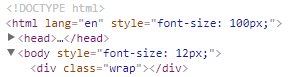
在iphone6Plus尺寸下,html font-size会自动调节,兼容多种尺寸的手机

以下是js代码,复制到你的项目中即可使用
(function(win) {

var ratio, scaleValue, renderTime,

    htmlEle = document.documentElement,

    vpMeta = document.querySelector('meta[name="viewport"]');

if (vpMeta) {

    var tempArr = vpMeta.getAttribute("content").match(/initial\-scale=(["']?)([\d\.]+)\1?/);

    if (tempArr) {

        scaleValue = parseFloat(tempArr[2]);

        ratio = parseInt(1 / scaleValue);

    }

} else {

    vpMeta = document.createElement("meta");

    vpMeta.setAttribute("name", "viewport");

    vpMeta.setAttribute("content", "width=device-width, initial-scale=0.5, user-scalable=no, minimal-ui");

    htmlEle.firstElementChild.appendChild(vpMeta);

    ratio = 2;

}

win.addEventListener("resize", function() {

    clearTimeout(renderTime);

    renderTime = setTimeout(initPage, 300);

}, false);

win.addEventListener("pageshow", function(e) {

    if(e.persisted){

        clearTimeout(renderTime);

        renderTime = setTimeout(initPage, 300)

    }

}, false);

if("complete" === document.readyState){

    document.body.style.fontSize = 12 * ratio + "px";

}else{

    document.addEventListener("DOMContentLoaded", function() {

        document.body.style.fontSize = 12 * ratio + "px";

    }, false);

}

initPage();

function initPage() {

    var htmlWidth = htmlEle.getBoundingClientRect().width;

    htmlWidth / ratio > 768 && (htmlWidth = 768 * ratio);

    win.rem = 100 * (htmlWidth / 375);

    htmlEle.style.fontSize = win.rem + "px";

}

})(window);
代码分析
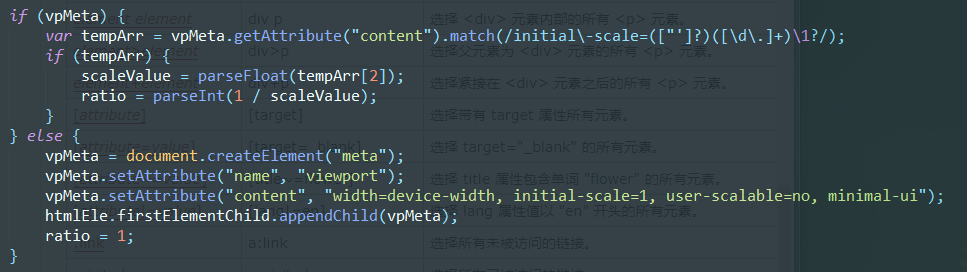
如果你设置了meta标签的视口属性,则获取initial-scale缩放比例,如果没设置,则自动添加。
一般initial-scale为1
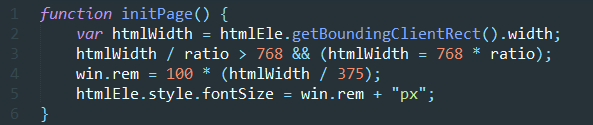
- line 2 获取屏幕宽度
- line 3 如果宽度超过768(ipad平板宽度),则不再进行调节
- line 4、5 设置rem,我以iphone6宽度375设置的,在该尺寸下,rem=100px,如果是其他尺寸,修改375即可
(htmlWidth/375)得到的是缩放比例,在IPHONE6下计算时,不用管html的font-size,直接px/100即算出rem
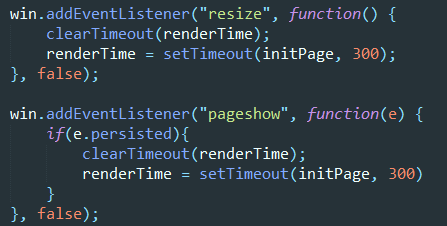
- 当页面改变尺寸,或者初次显示的时候,执行方法
persisted是pageshow事件的属性,检测浏览器是否读取缓存,是的话为true
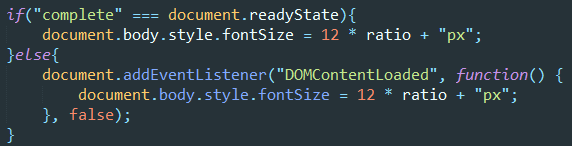
当页面渲染完后,设置body html-size,防止使用默认样式的元素出错
自动改变html font-size,实现移动端rem适配的更多相关文章
- 谈谈我的移动端rem适配方案
最近有点怀疑人生,毕竟一个人写前端,有时候会怀疑自己理解的一些东西包括用法有没有符合标准.趁着这阵子闲下来,翻了翻别人的rem适配博客,发现有点绕口,怪自己是个强迫症,啥都要自己去试试结果并从中理解, ...
- 07. 如何实现移动端rem适配
如何实现移动端rem适配 <!DOCTYPE html> <html> <head> <meta charset="UTF-8"> ...
- 移动端rem适配&iOS兼容
移动端rem适配js // 默认375,750设计稿请将375替换为750 (function (doc, win) { // 移动端适配 var docEl = doc.documentElemen ...
- H5 端 rem 适配方案与 viewport 适配
H5 端 rem 适配方案与 viewport 适配 rem rem 是 CSS3 新增的一个相对单位(root em,根 em) 只根据当前页面 HTML 页面的 font-size 设置,如果根目 ...
- 移动端rem适配屏幕
九月已成历史,十月如期而至...可能是九月工作比较清闲,周记就没怎么写,十月决不能这么堕落,立贴为证,至少保证5篇博客!!!如果没学到什么新知识,就对以往的那些工作中常用到的知识点做个总结...话不多 ...
- 移动端 rem适配方法
rem适配 一, 网易适配方法 屏幕宽度/设计稿rem宽度=页面动态font-size值(如:375/7.5=50) document.documentElement. ...
- H5移动端rem适配
/** * 移动端自适应 */ <meta name="viewport" content="width=device-width,user-scalable=no ...
- vue中使用第三方UI库的移动端rem适配方案
需求:使用vue-cli脚手架搭建项目,并且使用第三方的UI库(比如vant,mint ui)的时候,因为第三方库用的都是用px单位,无法使用rem适配不同设备的屏幕. 解决办法:使用px2rem-l ...
- 关于移动端rem适配
var num = 1 / window.devicePixelRatio; var fontSize = document.documentElement.clientWidth / 10; doc ...
随机推荐
- elasticsearch 插件使用
5.3.0新版本好像插件和开源的项目没有以前的多,官网就那么几个 常用的先安装Kibana: 提供炫丽的可视化图形展示并且作为elasticsearch的搜索的小清新客户端 1.下载安装包 wget ...
- 1,java的跨平台原理
简单讲一下java的跨平台原理: (1)为什么跨平台: 由于各OS支持的指令集各不相同,就需要程序在不同的平台执行不同的代码 (2)JAVA是如何实现的: ava开发了适合不同的OS及不同位数的jav ...
- Django学习笔记2:处理表单
1.HTTP请求 HTTP协议以"请求-回复"的方式工作. 客户发送请求时,可以在请求中附加数据.服务器通过解析请求,就可以获得客户传来的数据,并根据URL来提供特定的服务. (1 ...
- 彻底解决INSTALL_FAILED_UPDATE_INCOMPATIBLE的安装错误、安装包与之前设备上的安装包签名不一致
有时候开发的问题:会遇到在公司上班的时候,公司的IDE能跑程序,把程序拷贝回家,再跑一次,就会出现以下错误: INSTALL_FAILED_UPDATE_INCOMPATIBLE 原因:就是你的安装包 ...
- 设计模式之适配器模式(php实现)
/* github地址:https://github.com/ZQCard/design_pattern * 适配器模式:将一个类的接口转换成客户希望的另外一个接口. * 适配器模式使得原本由于接口不 ...
- react with JSX for {if…else…}
在react中用jsx渲染dom的时候经常会遇到if条件判断,然而在jsx中竟是不允许if条件判断的.以下有几种判断方式,可以根据自己的应用场景,挑选适合的 https://blog.csdn.net ...
- 【OpenGL4.0】GLSL渲染语言入门与VBO、VAO使用:绘制一个三角形 【转】
http://blog.csdn.net/xiajun07061225/article/details/7628146 以前都是用Cg的,现在改用GLSL,又要重新学,不过两种语言很多都是相通的. 下 ...
- [转载]Install Opera 12.16 Web Browser in CentOS/RHEL and Fedora
FROM: http://tecadmin.net/install-opera-web-browser-in-centos-rhel-fedora/ Opera is an modern web br ...
- 固态硬盘(Solid State Drives)
固态硬盘(Solid State Drives) 学习了:https://baike.baidu.com/item/%E5%9B%BA%E6%80%81%E7%A1%AC%E7%9B%98/45351 ...
- Effective C++--经验条款
高效C++ --模板与泛型编程 在C++中模板体现的是编译期多态,virtual体现的是执行期多态. 关于typename的双重含义: 在声明template參数时,不论使用keywordclass或 ...