
linux 中varnish服务
在server1中安装两个包
varnish-3.0.5-1.el6.x86_64.rpm
varnish-libs-3.0.5-1.el6.x86_64.rpm
1.在server1中(varnish)配置varnish服务
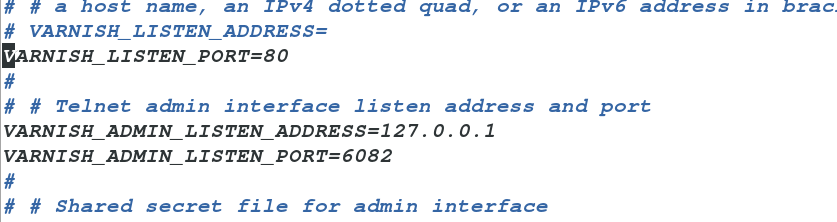
vim /etc/sysconfig/varnish
VARNISH_LISTEN_PORT=80 ##varnish监听端口
backend default {
.host = "172.25.8.2";
.port = "80";
}

然后开启服务
/etc/init.d/varnish start
yum install httpd
vim /var/www/html/index.html
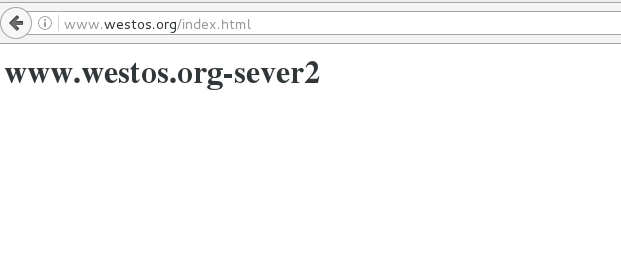
<h1>www.westos.org-sever2</h1>
会出现server2index.html内容

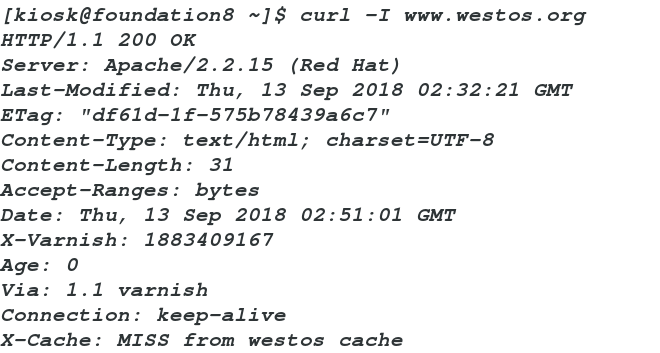
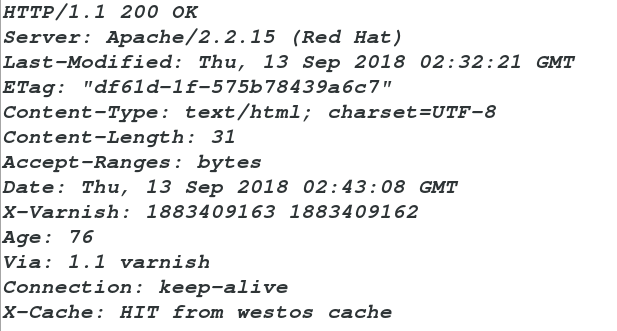
二、缓存命中
vim default.vcl
sub vcl_deliver {
if (obj.hits > 0) {
set resp.http.X-Cache = "HIT from westos cache";
}
else {
set resp.http.X-Cache = "MISS from westos cache";
}
return (deliver);
}
www.westos.org-sever2
vim /etc/hosts
172.25.8.1 server1 www.westos.org www.linux.org westos.org ##加入本地解析
varnishadm ban.url .*$ 清除所有
varnishadm ban.url /index.html 清除 index.html 页面缓存
varnishadm ban.url /admin/$ 清除 admin 目录缓存
再开启一台虚拟机(server3)
yum install httpd
vim /var/www/html/index.html
<h1>www.linux.org</h1>
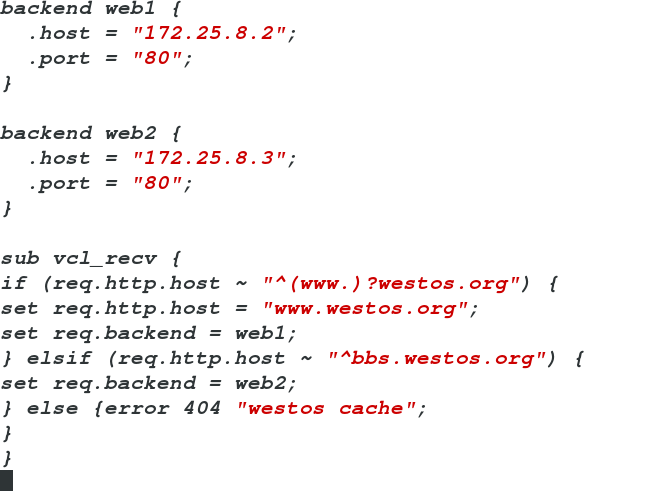
vim default.vcl
.host = "172.25.8.2";
.port = "80";
}
.host = "172.25.8.3";
.port = "80";
}
if (req.http.host ~ "^(www.)?westos.org") {
set req.http.host = "www.westos.org";
set req.backend = lb;
} elsif (req.http.host ~ "^www.linux.org") {
set req.backend = web2;
} else {error 404 "westos cache";
}
}
/etc/init.d/varnish reload 重载
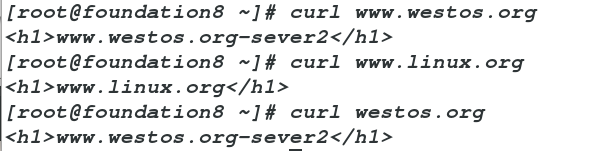
curl www.westos.org
www.westos.org-sever2
curl westos.org
www.westos.org-sever2
curl www.linux.org
www.linux.org
vim /etc/httpd/conf/httpd.conf
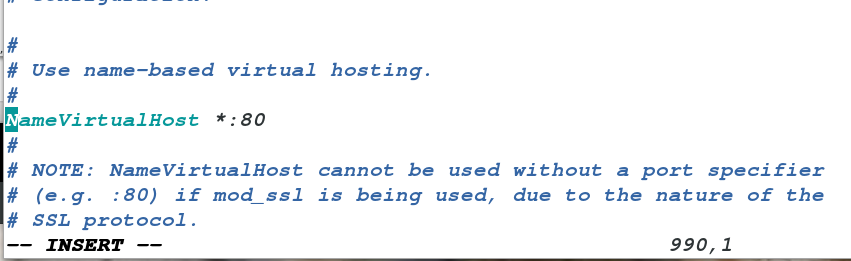
<VirtualHost *:80>
DocumentRoot /var/www/html
ServerName www.linux.org
</VirtualHost>
<VirtualHost *:80>
DocumentRoot /www1
ServerName www.westos.org
</VirtualHost>
mkdir /www1
vim /www1/index.html
<h1>www.westos.org-server3</h1>
[root@server3 ~]# curl www.linux.org
<h1>www.linux.org</h1>
<h1>www.westos.org-server3</h1>
vim default.vcl
backend web1 {
.host = "172.25.8.2";
.port = "80";
}
.host = "172.25.8.3";
.port = "80";
}
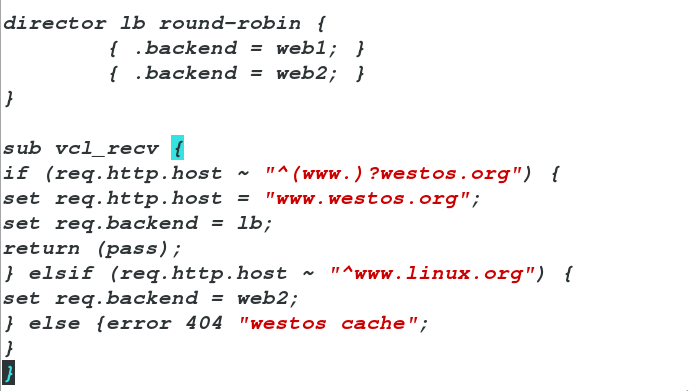
{ .backend = web1; }
{ .backend = web2; }
}
if (req.http.host ~ "^(www.)?westos.org") {
set req.http.host = "www.westos.org";
set req.backend = lb;
#return (pass) 加入此行可以更加直观看到实验效果,正常情况下不加
} elsif (req.http.host ~ "^www.linux.org") {
set req.backend = web2;
} else {error 404 "westos cache";
}
}
/etc/init.d/varnish reload
<h1>www.westos.org-server3</h1>
[root@foundation8 ~]# curl westos.org/index.html
<h1>www.westos.org-server3</h1>

当server3的httpd闭
[root@foundation8 ~]# curl westos.org/index.html
<h1>www.westos.org-sever2</h1>
[root@foundation8 ~]# curl westos.org/index.html
<h1>www.westos.org-sever2</h1>

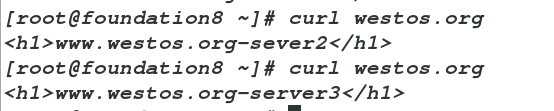
当server2和server3的http都开启
<h1>www.westos.org-server3</h1>
[root@foundation8 ~]# curl westos.org
<h1>www.westos.org-sever2</h1>
[root@foundation8 ~]# curl westos.org
<h1>www.westos.org-server3</h1>
vim /etc/httpd/conf/http.conf
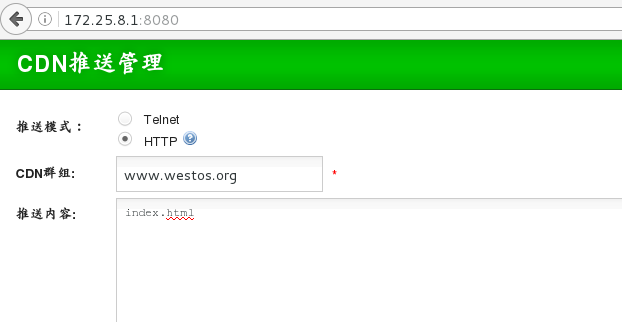
将监听端口改为8080,防止和varnish主机80端口冲突
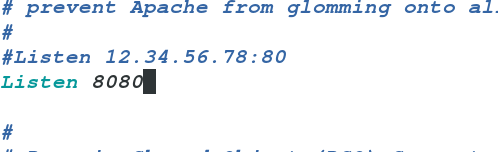
/etc/init.d/httpd restart
yum install unzip
unzip bansys.zip -d /var/www/html
cd /var/www/html/bansys
mv * ..
cd ..
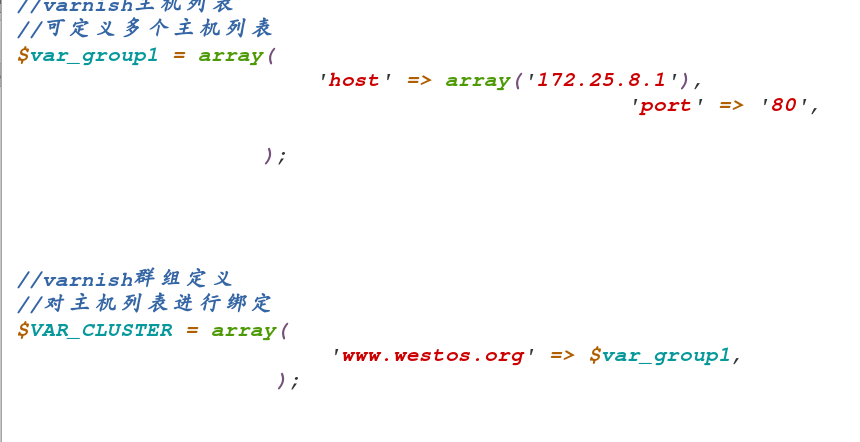
vim config.php
/etc/init.d/httpd start
<?php
//可定义多个主机列表
$var_group1 = array(
'host' => array('172.25.8.1'),
'port' => '80',
);
//对主机列表进行绑定
$VAR_CLUSTER = array(
'www.westos.org' => $var_group1,
);
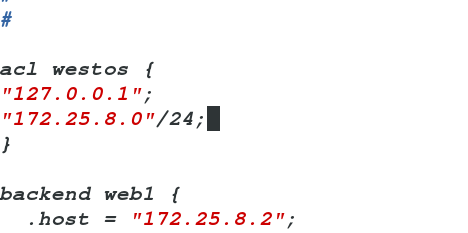
"127.0.0.1";
"172.25.8.0"/24;
}
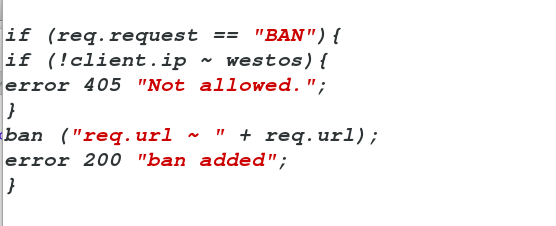
sub vcl_recv {
if (!client.ip ~ westos){
error 405 "Not allowed.";
}
ban ("req.url ~ " + req.url);
error 200 "ban added";
}
linux 中varnish服务的更多相关文章
- Linux中Sshd服务配置文件优化版本(/etc/ssh/sshd_config)
Linux中Sshd服务配置文件优化版本(/etc/ssh/sshd_config) # $OpenBSD: sshd_config,v 1.93 2014/01/10 05:59:19 djm Ex ...
- Spring Boot 如何部署到 Linux 中的服务
打包完成后的 Spring Boot 程序如何部署到 Linux 上的服务? 你可以参考官方的有关部署 Spring Boot 为 Linux 服务的文档. 文档链接如下: https://docs. ...
- 转:Linux中tomcat服务成功发布但局域网浏览器无法访问
转自:http://blog.csdn.net/mooncom/article/details/53168143 昨天,我在搭建Linux中服务器环境时,碰见一个问题,这里和大家分享一下. 问题描述: ...
- Linux中设置服务自启动的三种方式
有时候我们需要Linux系统在开机的时候自动加载某些脚本或系统服务 主要用三种方式进行这一操作: ln -s 在/etc/rc.d/rc*.d目录中建立/e ...
- [转]Linux中设置服务自启动的三种方式
from:http://www.cnblogs.com/nerxious/archive/2013/01/18/2866548.html 有时候我们需要Linux系统在开机的时候自动加载某些脚本或系统 ...
- Linux中crond服务与crontab用法
需要写个在Linux下定时更新系统的脚本,man crondtab 不甚详细,现将网络上的介绍列举如下: crontab是一个很方便的在unix/linux系统上定时(循环)执行某个任务的程序使用cr ...
- Linux中设置服务自启动的三种方式,ln -s 建立启动软连接
有时候我们需要Linux系统在开机的时候自动加载某些脚本或系统服务(http://www.0830120.com) 主要用三种方式进行这一操作: ln -s 在/etc/rc.d/rc*.d目录中建立 ...
- (转)Linux中设置服务自启动的三种方式
有时候我们需要Linux系统在开机的时候自动加载某些脚本或系统服务 主要用三种方式进行这一操作: ln -s 在/etc/rc.d/rc*.d目录中建立/e ...
- 【转发】Linux中设置服务自启动的三种方式
有时候我们需要Linux系统在开机的时候自动加载某些脚本或系统服务 主要用三种方式进行这一操作: ln -s 在/etc/rc.d/rc*.d目录中建立/e ...
随机推荐
- 文科妹学 GitHub 简易教程(转)
文科妹学 GitHub 简易教程 #什么是 Github ?必须要放这张图了!!! Git 是由 Linux 之父 Linus Tovalds 为了更好地管理linux内核开发而创立的分布式版 ...
- SQL获取时间戳流水号
流水号生成规则: 1:流水号总长度为22位数 2:流水号总共分三部分:标头(2位)+ 时间戳(YYYYMMDDHHmmSSsss共17位)+ 随机码(3位) 举例流水号:SN2015081210240 ...
- ROS Learning-012 beginner_Tutorials (编程) 创建自定义的ROS消息和ROS服务
ROS Indigo beginner_Tutorials-11 创建自定义的ROS消息和ROS服务 我使用的虚拟机软件:VMware Workstation 11 使用的Ubuntu系统:Ubunt ...
- Qt嵌入式开发环境搭建
一.Qt版本介绍 按照不同的图形界面来划分,分为四个版本: 1.Win32版:适用于windows平台 2.X11版:适用于各种X系统的Linux和Unix平台 3.Mac版:适用于苹果的MacOS ...
- 后台执行UNIX/Linux命令和脚本的五种方法
hiveserver 后台启动 nohup "${HIVE_HOME}"/bin/hive --service hiveserver2 & 1. 使用&符号在后台执 ...
- 2015年阿里实习生面试Java研发工程师 小记
5月5日,广州,阿里实习生面试,Java研发工程师,完全被虐orz 几乎没有Java项目开发经验,接近零基础,去水了一发,毫无悬念的被刷了..RP也是杠杠的,准备过的题目一个都没被问到,算法题也是一条 ...
- 查看Linux各发行版本方法
SUSE: cat /etc/SuSE-release Slackware: cat /etc/slackware-version Redhat: cat /etc/redhat-releas ...
- 《Head First Servlets & JSP》-2-概述
什么是容器 Servlet没有main()方法,他们受控于另一个Java应用,这个java应用称为容器(Container). Web服务器应用(如Apache)得到一个指向Servlet的请求(如何 ...
- 反欺诈(Fraud Detection)中所用到的机器学习模型
反欺诈应用的机器模型算法,多为二分类算法. 1.gbdt梯度提升决策树(Gradient Boosting Decision Tree,GBDT)算法,该算法的性能高,且在各类数据挖掘中应用广泛,表现 ...
- 读《JavaScript权威指南》笔记(四)--数组、函数
一.数组 1.数组是值的有序集合.每个值叫做一个元素,而每个元素在数组中有一个位置,以数字表示,称为索引.JavaScript数组是无类型的:数组元素可以是任意类型,并且同一个数组中的不同元素也可能有 ...