
使用Anthem.NET 1.5中的FileUpload控件实现Ajax方式的文件上传
Anthem.NET刚刚发布了其最新的1.5版本,其中很不错的一个新功能就是对文件上传功能的Ajax实现。本文将简要介绍一下该功能的使用方法。
Anthem.NET的下载与安装
Anthem.NET可以在此下载:http://sourceforge.net/project/showfiles.php?group_id=151897&package_id=168043&release_id=493609
下载之后解压缩至硬盘中的某一目录中,编译项目得到Anthem.dll。然后将其拷贝到Web站点的bin目录下:
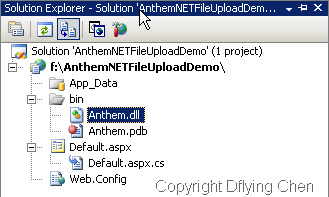
打开Web站点的Web.config文件,在configuration>\ <system.web>\ <pages>\ <controls>中添加如下一行,注册Anthem.NET控件:
<add tagPrefix="anthem" namespace="Anthem" assembly="Anthem"/>
Anthem.NET提供了一套自己就带有Ajax功能的、继承于现有ASP.NET控件的服务器端控件。根据上面在web.config文件中的注册,这部分控件的前缀为anthem。
Anthem.NET支持ASP.NET 1.1和ASP.NET 2.0,不过本文的示例程序均基于ASP.NET 2.0。
普通的ASP.NET文件上传
先看一下普通的ASP.NET文件上传功能的实现,代码如下:
<asp:FileUpload ID="defaultFileUpload" runat="server" />
<asp:Button ID="defaultUploadButton" runat="server"
OnClick="defaultUploadButton_Click" Text="Upload" />
<asp:Label ID="defaultResultLabel" runat="server" Text=""></asp:Label>
后台代码,只是简单地将文件名和文件大小显示出来:
protected void defaultUploadButton_Click(object sender, EventArgs e)
{
defaultResultLabel.Text = string.Format("File \"{0}\" uploaded ({1} bytes).",
defaultFileUpload.FileName,
defaultFileUpload.FileBytes.Length
);
}
Anthem.NET的Ajax文件上传
Anthem.NET中的Ajax文件上传功能靠的是其自己的FileUpload控件,其实使用起来和普通的ASP.NET FileUpload控件差不多,下面是HTML部分的代码:
<anthem:FileUpload ID="anthemFileUpload" runat="server" />
<anthem:Button ID="anthemUploadButton" TextDuringCallBack="uploading..." EnabledDuringCallBack="false"
runat="server" Text="Upload" OnClick="anthemUploadButton_Click" />
<anthem:Label ID="anthemResultLabel" runat="server" Text=""></anthem:Label>
注意控件的前缀都是anthem。那个Button的TextDuringCallBack属性设置了异步回送时按钮中的文本;EnabledDuringCallBack属性让该按钮在进行异步回送时禁用,免得用户等得不耐烦。
后台代码同样是将文件名和文件大小显示出来,不过注意这一句anthemResultLabel.UpdateAfterCallBack = true;,用来在回调之后更新anthemResultLabel上的文字:
protected void anthemUploadButton_Click(object sender, EventArgs e)
{
anthemResultLabel.Text = string.Format("File \"{0}\" uploaded ({1} bytes).",
anthemFileUpload.FileName,
anthemFileUpload.FileBytes.Length
);
anthemResultLabel.UpdateAfterCallBack = true;
}
示例程序演示
示例程序的界面如下,上面部分是普通的ASP.NET文件上传,下面是Anthem.NET的Ajax文件上传:
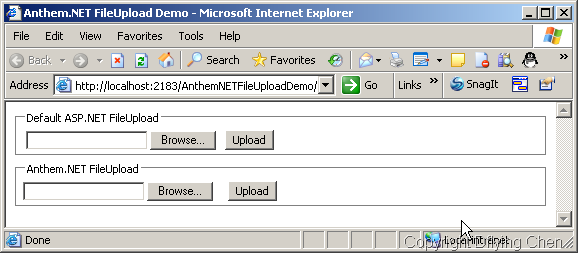
使用普通的ASP.NET文件上传,可以看到页面有一次闪烁,不过上传功能没什么问题:

而使用下面部分的Anthem.NET的Ajax文件上传,可以看到上传时的界面(按钮禁用,文本变化):

上传完成之后,没有页面闪烁:

打开Fiddler看看HTTP请求,上面的是传统上传,下面是Ajax的,差别显而易见……

代码下载
本文提到的完整的示例程序代码:http://files.cnblogs.com/dflying/AnthemNETFileUploadDemo.zip
更多参考资料
Anthem.NET官方网站:http://sourceforge.net/projects/anthem-dot-net/
Anthem.NET在线文档:http://anthem-dot-net.sourceforge.net/docs/
Anthem.NET在线示例程序:http://anthem.talloaksoftware.com/Default.aspx
Fiddler官方网站:http://www.fiddlertool.com/
to jeff(实现方式)
除了用IFrame,还有什么好办法么?它也是用的IFrame,相关代码如下:注意58-61,109-113,131-148这几段(粗体部分)。
有空的时候改到Atlas里面吧,呵呵,造福群众阿
function Anthem_CallBack(url, target, id, method, args, clientCallBack, clientCallBackArg, includeControlValuesWithCallBack, updatePageAfterCallBack) {
if (typeof(window.Anthem_PreCallBack) == "function") {
var preCallBackResult = Anthem_PreCallBack();
if (!(typeof preCallBackResult == "undefined" || preCallBackResult)) {
if (typeof(window.Anthem_CallBackCancelled) == "function") {
Anthem_CallBackCancelled();
}
return null;
}
}
var encodedData = "";
if (target == "Page") {
encodedData += "&Anthem_PageMethod=" + method;
} else if (target == "MasterPage") {
encodedData += "&Anthem_MasterPageMethod=" + method;
} else if (target == "Control") {
encodedData += "&Anthem_ControlID=" + id.split(":").join("_");
encodedData += "&Anthem_ControlMethod=" + method;
}
if (args) {
for (var argsIndex = 0; argsIndex < args.length; ++argsIndex) {
if (args[argsIndex] instanceof Array) {
for (var i = 0; i < args[argsIndex].length; ++i) {
encodedData += "&Anthem_CallBackArgument" + argsIndex + "=" + Anthem_Encode(args[argsIndex][i]);
}
} else {
encodedData += "&Anthem_CallBackArgument" + argsIndex + "=" + Anthem_Encode(args[argsIndex]);
}
}
}
if (updatePageAfterCallBack) {
encodedData += "&Anthem_UpdatePage=true";
}
// Anthem will normally use an XmlHttpRequest to communicate with the server.
// But if an Anthem.FileUpload control is discovered on the page, then Anthem
// will use a hidden IFRAME instead. This hidden IFRAME is often called an IOFrame
// by AJAX library authors, so that is the name we use here.
var useIOFrame = false;
// Scan the controls on the form and extract their values.
if (includeControlValuesWithCallBack) {
var form = Anthem_GetForm();
if (form != null) {
for (var elementIndex = 0; elementIndex < form.length; ++elementIndex) {
var element = form.elements[elementIndex];
if (element.name) {
var elementValue = null;
if (element.nodeName.toUpperCase() == "INPUT") {
var inputType = element.getAttribute("type").toUpperCase();
if (inputType == "TEXT" || inputType == "PASSWORD" || inputType == "HIDDEN") {
elementValue = element.value;
} else if (inputType == "CHECKBOX" || inputType == "RADIO") {
if (element.checked) {
elementValue = element.value;
}
} else if (inputType == "FILE") {
// If the FILE element has a value (the path to the file), then an
// IOFrame will be used to handle the callback.
useIOFrame = useIOFrame | !(element.value == null || element.value.length == 0);
}
} else if (element.nodeName.toUpperCase() == "SELECT") {
if (element.multiple) {
elementValue = [];
for (var i = 0; i < element.length; ++i) {
if (element.options[i].selected) {
elementValue.push(element.options[i].value);
}
}
} else if (element.length == 0) {
elementValue = null;
} else {
elementValue = element.value;
}
} else if (element.nodeName.toUpperCase() == "TEXTAREA") {
elementValue = element.value;
}
if (elementValue instanceof Array) {
for (var i = 0; i < elementValue.length; ++i) {
encodedData += "&" + element.name + "=" + Anthem_Encode(elementValue[i]);
}
} else if (elementValue != null) {
encodedData += "&" + element.name + "=" + Anthem_Encode(elementValue);
}
}
}
// ASP.NET 1.1 won't fire any events if neither of the following
// two parameters are not in the request so make sure they're
// always in the request.
if (typeof form.__VIEWSTATE == "undefined") {
encodedData += "&__VIEWSTATE=";
}
if (typeof form.__EVENTTARGET == "undefined") {
encodedData += "&__EVENTTARGET=";
}
}
}
if (encodedData.length > 0) {
encodedData = encodedData.substring(1);
}
if (typeof(Anthem_DebugRequestText) == "function") {
Anthem_DebugRequestText(encodedData.split("&").join("\n&"));
}
// Send the callback request to the server. Use an IOFrame if there is a file upload,
// otherwise use an XmlHttpRequest.
if (useIOFrame) {
// To allow multiple requests at the same time, all of the Anthem parameters are
// passed to the server via the querystring
var action = Anthem_GetCallBackUrl();
action = action + "&Anthem_IOFrame=true";
if (updatePageAfterCallBack) {
action = action + "&Anthem_UpdatePage=true";
}
// We could generate an anonymous function on the fly to handle the clientCallBack
// and assign that to the iframe onload event (in fact this is how XmlHttpRequests are
// handled). But that makes it very hard to debug the callback response. Instead
// we will stuff the clientCallBack function and args into an array and then hard code
// the onload event handler. The handler will find the appropriate callback info in
// the array and handle the clientCallBack.
var id = "f" + new String(Math.floor(9999 * Math.random())); // Generate frame number
if (typeof(clientCallBack) == "function") {
var frame = { "id":id, "clientCallBack":clientCallBack, "clientCallBackArg":clientCallBackArg };
callbackFrames.push(frame);
}
// Create a new, invisible iframe to handle the io.
var ioframe = null;
if (window.ActiveXObject) {
ioframe = document.createElement("<iframe name=\"" + id + "\" id=\"" + id + "\" onload=\"Anthem_HandleIOFrameResponse('" + id + "');\"/>");
} else {
ioframe = document.createElement("iframe");
ioframe.id = id;
ioframe.name = id;
ioframe.onload = function (){ Anthem_HandleIOFrameResponse(id); }
}
ioframe.style.visibility = "hidden";
ioframe.style.height = "1px";
document.body.appendChild(ioframe);
// Submit this form in the hidden iframe
var theForm = Anthem_GetForm();
var tempActionUri = theForm.action;
theForm.action = action;
theForm.target = id;
try {
theForm.submit();
} catch (e) {
result = { "value": null, "error": e.message };
if (typeof(Anthem_DebugError) == "function") {
Anthem_DebugError(e.name + ": " + e.message + " (" + e.number + ")");
}
if (typeof(window.Anthem_Error) == "function") {
Anthem_Error(result);
}
}
// Restore the form
theForm.target = "";
theForm.action = tempActionUri;
} else {
var x = Anthem_GetXMLHttpRequest();
var result = null;
if (!x) {
result = { "value": null, "error": "NOXMLHTTP" };
if (typeof(Anthem_DebugError) == "function") {
Anthem_DebugError(result.error);
}
if (typeof(window.Anthem_Error) == "function") {
Anthem_Error(result);
}
if (typeof(clientCallBack) == "function") {
clientCallBack(result, clientCallBackArg);
}
return result;
}
var action = Anthem_GetCallBackUrl();
x.open("POST", url ? url : action, clientCallBack ? true : false);
x.setRequestHeader("Content-Type", "application/x-www-form-urlencoded; charset=utf-8");
x.setRequestHeader("Accept-Encoding", "gzip, deflate");
if (typeof(clientCallBack) == "function") {
x.onreadystatechange = function() {
if (x.readyState != 4) {
return;
}
if (typeof(Anthem_DebugResponseText) == "function") {
Anthem_DebugResponseText(x.responseText);
}
result = Anthem_GetResult(x);
if (result.error) {
if (typeof(Anthem_DebugError) == "function") {
Anthem_DebugError(result.error);
}
if (typeof(window.Anthem_Error) == "function") {
Anthem_Error(result);
}
}
if (updatePageAfterCallBack) {
Anthem_UpdatePage(result);
}
Anthem_EvalClientSideScript(result);
clientCallBack(result, clientCallBackArg);
x = null;
if (typeof(window.Anthem_PostCallBack) == "function") {
Anthem_PostCallBack();
}
}
}
x.send(encodedData);
if (typeof(clientCallBack) != "function") {
if (typeof(Anthem_DebugResponseText) == "function") {
Anthem_DebugResponseText(x.responseText);
}
result = Anthem_GetResult(x);
if (result.error) {
if (typeof(Anthem_DebugError) == "function") {
Anthem_DebugError(result.error);
}
if (typeof(window.Anthem_Error) == "function") {
Anthem_Error(result);
}
}
if (updatePageAfterCallBack) {
Anthem_UpdatePage(result);
}
Anthem_EvalClientSideScript(result);
if (typeof(window.Anthem_PostCallBack) == "function") {
Anthem_PostCallBack();
}
}
}
return result;
}
出处:http://www.cnblogs.com/dflying/archive/2007/03/25/687082.html
使用Anthem.NET 1.5中的FileUpload控件实现Ajax方式的文件上传的更多相关文章
- Webform之FileUpload(上传按钮控件)简单介绍及下载、上传文件时图片预览
1.FileUpload上传控件:(原文:http://www.cnblogs.com/hide0511/archive/2006/09/24/513201.html) FileUpload 控件显示 ...
- (转)C# WinForm中 获得当前鼠标所在控件 或 将窗体中鼠标所在控件名显示在窗体标题上
原文地址:http://www.cnblogs.com/08shiyan/archive/2011/04/14/2015758.html /********************** * 课题:将窗 ...
- .NET中的FileUpload控件的使用-原生JS(二)
本篇使用原生JS进行数据传输,使用FileUpload控件上传文件,适配IE. HTML <div class="container"> <div class=& ...
- .NET中的FileUpload控件的使用-Jquery(一)
FileUpload在HTML中是个常用的基础控件,在涉及到上传各种格式的文件时候都会用到:笔者前段时间正好用到它做上传功能,记录下来做一些累积, 前端到后台用的是的Jquery中的Ajax进行数据传 ...
- 改变FileUpload文件上传控件的显示方式,确认后上传
一.Aspx页面: <%@ Page Language="C#" AutoEventWireup="true" CodeBehind="File ...
- Eclipse中使用GIT将已提交到本地的文件上传至远程仓库
GIT将已提交到本地的文件上传至远程仓库: 1. 右击项目——Team——Push to Upstream,即可将已保存在本地的文件上传推至GIT远程仓库.
- FileUpload文件上传控件
1.FileUpload控件的主要功能是向指定目录上传文件.FileUpload控件不会自动上传控件,而需要设置相关的事件处理程序,然后在程序中实现文件上传. 2.FileUpload控件常见的属性 ...
- zt对于C#中的FileUpload解决文件上传大小限制的问题设置
对于C#中的FileUpload解决文件上传大小限制的问题设置 您可能没意识到,但对于可以使用该技术上载的文件的大小存在限制.默认情况下,使用 FileUpload 控件上载到服务器的文件最大为 4M ...
- FileUpload控件使用初步
FileUpload控件使用初步 FileUpload控件使用初步: 1.实现文件上传 protected void btnSubmit_click(object sender, EventArg ...
随机推荐
- 【BZOJ3563/3569】DZY Loves Chinese II 线性基神题
[BZOJ3563/3569]DZY Loves Chinese II Description 神校XJ之学霸兮,Dzy皇考曰JC. 摄提贞于孟陬兮,惟庚寅Dzy以降. 纷Dzy既有此内美兮,又重之以 ...
- Amr and Chemistry
C. Amr and Chemistry time limit per test 1 second memory limit per test 256 megabytes input standard ...
- zabbix server 端安装
1.系统环境 [root@crazy-acong ~]# cat /etc/redhat-release CentOS release 6.6 (Final) [root@crazy-acong ~] ...
- 14.Django自带的admin配置
admin有自己的默认显示,要自定义显示的样式,一般需要自己定义一个类,在自己定义的类里进行相应的设置,然后,把自己的类交给装饰器 交给装饰器的方法有两种: 1.@admin.register(Pub ...
- Linux c编程:I/O多路复用之epoll
前面介绍了select处理,这一章继续介绍另外一种I/O多路服用的机制:epoll.来比较下两种机制的不同点. select: 调用过程如下: (1)使用copy_from_user从用户空间拷贝fd ...
- node.js版本升级
node有一个模块叫n(这名字可够短的...),是专门用来管理node.js的版本的. 首先安装n模块: npm install -g n 第二步: 升级node.js到最新稳定版 n stabl ...
- SAP内表转XML文件
今天有个兄弟问如何实现以XML的方式输出内表的内容,这个问题我以前好像没有写过.倒不是不会写,而是写的方法太多了,有极其简单的,也有很复杂的,而且网上资料也很多. 找到以前写的一个程序,稍微修改了一下 ...
- 在ubuntu上为android系统编写Linux驱动程序【转】
本文转载自:http://blog.csdn.net/luoshengyang/article/details/6568411 在智能手机时代,每个品牌的手机都有自己的个性特点.正是依靠这种与众不同的 ...
- 优化chkconfig
只保留系统服务: crond /network /sshd /rsyslog /sysstat 其他服务全部关闭 首先将所有 3:on的服务名过滤出来,然后 grep -vE 排除需要的服务 #!/b ...
- linux共享库加载
参考自: <<程序员的自我修养--链接.装载与库>> 第八章 Linux共享库的组织 以下截取部分内容 (这本书比较好的讲解了从程序的链接,装载,到运行) 共享库的兼容性 li ...