
WPF用Blend写的交通信号灯
用Blend写WPF界面和Behavior特别方便,下面是我写的一个交通信号灯,用Blend写完后代码直接Copy到wpf窗体就可以了。
1.打开Blend做一个矩形和三个圆形,然后分别填充颜色,把矩形的四角编程圆角;
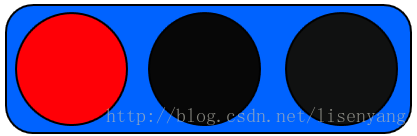
2.添加时间动画并设置动画循环显示:
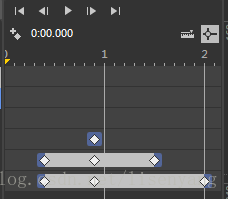
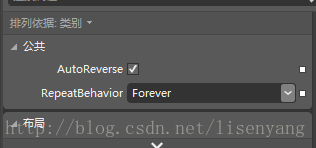
3.xaml代码如下:
<Window  x:Class="wpf红绿灯.MainWindow"

         xmlns="http://schemas.microsoft.com/winfx/2006/xaml/presentation"

         xmlns:x="http://schemas.microsoft.com/winfx/2006/xaml"

         Title="MainWindow" Height="106.879" Width="218.457">

    <Window.Resources>

        <Storyboard x:Key="Storyboard1" AutoReverse="True" RepeatBehavior="Forever">

            <ColorAnimationUsingKeyFrames Storyboard.TargetProperty="(Shape.Fill).(SolidColorBrush.Color)" Storyboard.TargetName="ellipse1">

                <EasingColorKeyFrame KeyTime="0:0:0.4" Value="sc#1, 0.004391442, 0.004024717, 0.004024717"/>

                <EasingColorKeyFrame KeyTime="0:0:0.9" Value="#FFF9FF00"/>

                <EasingColorKeyFrame KeyTime="0:0:1.5" Value="sc#1, 0.004391442, 0.004024717, 0.004024717"/>

            </ColorAnimationUsingKeyFrames>

            <ColorAnimationUsingKeyFrames Storyboard.TargetProperty="(Shape.Fill).(SolidColorBrush.Color)" Storyboard.TargetName="ellipse2">

                <EasingColorKeyFrame KeyTime="0:0:0.4" Value="#FF1B1C1B"/>

                <EasingColorKeyFrame KeyTime="0:0:0.9" Value="#FF0F0E0E"/>

                <EasingColorKeyFrame KeyTime="0:0:2" Value="#FF1DFF00"/>

            </ColorAnimationUsingKeyFrames>

            <ColorAnimationUsingKeyFrames Storyboard.TargetProperty="(Shape.Fill).(SolidColorBrush.Color)" Storyboard.TargetName="ellipse">

                <EasingColorKeyFrame KeyTime="0:0:0.9" Value="#FF0F0E0E"/>

            </ColorAnimationUsingKeyFrames>

        </Storyboard>

    </Window.Resources>

    <Window.Triggers>

        <EventTrigger RoutedEvent="FrameworkElement.Loaded">

            <BeginStoryboard Storyboard="{StaticResource Storyboard1}"/>

        </EventTrigger>

    </Window.Triggers>

    <Grid x:Name="grid">

        <Rectangle Fill="#FF0063FF" HorizontalAlignment="Left" Height="65" Margin="6,6,0,0" Stroke="Black" VerticalAlignment="Top" Width="202" RadiusY="13.394" RadiusX="13.394"/>

        <Ellipse x:Name="ellipse" Fill="#FFFF0006" HorizontalAlignment="Left" Height="57" Margin="11,10,0,0" Stroke="Black" VerticalAlignment="Top" Width="56"/>

        <Ellipse x:Name="ellipse1" Fill="#FF070707" HorizontalAlignment="Left" Height="57" Margin="77,10,0,0" Stroke="Black" VerticalAlignment="Top" Width="56"/>

        <Ellipse x:Name="ellipse2" Fill="#FF101111" HorizontalAlignment="Left" Height="57" Margin="145,10,0,0" Stroke="Black" VerticalAlignment="Top" Width="56"/>

    </Grid>

</Window>
4.最后效果如图:

下面这个是竖着的效果图:

WPF用Blend写的交通信号灯的更多相关文章
- WPF-利用Blend写的平面控制闸门开关动画
原文:WPF-利用Blend写的平面控制闸门开关动画 版权声明:本文为博主原创文章,未经博主允许不得转载. https://blog.csdn.net/yangyisen0713/article/de ...
- 用Micro:bit做交通信号灯
交通信号灯项目在控制技术中,有点像"Hello world!" 是一个入门级的范例. 对于孩子来说,交通灯跟日常生活息息相关,他们都熟悉,充分知道需要做什么这是一个让孩子开始的好项 ...
- 最新用WPF为触摸屏写了一个手写程序,双格输入的
原文:最新用WPF为触摸屏写了一个手写程序,双格输入的 双格输入可以提高手写速度,当前字写完以后可以自动识别提交,写下一个字.这样比单格手写速度提高一倍.特别适合触摸屏程序使用 界面如下: 程序如下: ...
- 【FPGA】Verilog实现交通信号灯
大二数字电路的课程设计中,有一份日常作业使用Xilinx FPGA实现简易交通信号灯,但很可惜当时时间有限,没能最终完成.正好在这一学期选修SOPC设计课程,同样采用了Xilinx FPGA,故打算重 ...
- n个并发进程共用一个公共变量Q,写出用信号灯实现n个进程互斥的程序描述,给出信号灯值得取值范围,并说明每个取值范围的物理意义。
答: var mutex: semaphore:=1; begin cobegin process i : begin // i = 1,2,……,n repeat P(mutex); 对公共变量 ...
- wpf 纯样式写按钮
<!--自定义按钮样式--> <LinearGradientBrush x:Key="LinearGradientBlueBackground" EndPoint ...
- Redux教程1:环境搭建,初写Redux
如果将React比喻成士兵的话,你的程序还需要一位将军,去管理士兵(的状态),而Redux恰好是一位好将军,简单高效: 相比起React的学习曲线,Redux的稍微平坦一些:本系列教程,将以" ...
- [Aaronyang]谈谈2015年AY对WPF全面技术总结40多篇WPF,炫到没朋友的AYUI来了
原著:AY WPF博客- 把wpf推广出去,让那些鄙视的人说不 大家好! 我是AY,首先声明,我在做一件很枯燥的事情,我是个91后程序员,每天熬夜完成计划的过着下班后的生活. 那天有 ...
- [Aaronyang] 写给自己的WPF4.5 笔记19[Visual类图文并茂讲解]
文章虽小,内容还好,且看且珍惜. aaronyang版权所有,不许转载,违者必究 当界面上使用数千个矢量图形,例如实时统计图,粒子碰撞,比如超级玛丽游戏,图像一直在绘,过量的使用WPF的元素系统和Sh ...
随机推荐
- CSS vertical-align属性的使用方法
这两天写个页面css的时候用到了vertical-align属性.使用过程中踩到了坑,所以总结例如以下: vertical-align的定义 W3C上对vertical-align的定义:vertic ...
- Xcode5新特性之注释
Xcode5新特性之注释 Xcode5在注释式文档方面也有进步,越来越象javadoc. Xcode4 参考一下教程 http://blog.chukong-inc.com/index.php/201 ...
- vmnet1 and vmnet8
在使用VMware Workstation创建虚拟机时.创建的虚拟机中能够包含网卡.你能够依据须要选择使用何种虚拟网卡.从而表明想要连接到那个虚拟交换机.在VMware Workstation中,默认 ...
- python 标准库 —— io(StringIO)
0. io流(io stream) 流是一种抽象概念,它代表了数据的无结构化传递.按照流的方式进行输入输出,数据被当成无结构的字节序或字符序列.从流中取得数据的操作称为提取操作,而向流中添加数据的操作 ...
- [Compose] 13. Lift into a Pointed Functor with of
We examine the of function we've seen on a few types and discover it's the Pointed interface. Instea ...
- Net Reactor 5
Net Reactor 5脱壳教程 今天别人发来一个.Net的DLL让我脱壳,第一步自然是先扔进de4dot 我这个de4dot 是集成了 Ivancito0z / TheProxy / PC- ...
- 【u008】瑞瑞的木棍
Time Limit: 1 second Memory Limit: 128 MB [问题描述] 瑞瑞有一堆的玩具木棍,每根木棍的两端分别被染上了某种颜色,现在他突然有了一个想法,想要把这 些木棍连在 ...
- 【u004】数列
Time Limit: 1 second Memory Limit: 128 MB [问题描述] 有这样一种数列A1.A2.A3.--An,其中A1=0,且对任意一项Ai满足|Ai-A(i+1)|=1 ...
- Android 长按事件和短按事件同时响应
在长按事件中的return false 改为return true就可以解决这个问题
- JavaStuNote 4
装箱(inbox)和拆箱(outbox) 代表了类类型和基本类型之间的转换行为. 手动版本号: Integer b = new Integer(10); Int a = b.intValue; 自己主 ...