
html5+css3+javascript 自定义提示窗口
效果图:
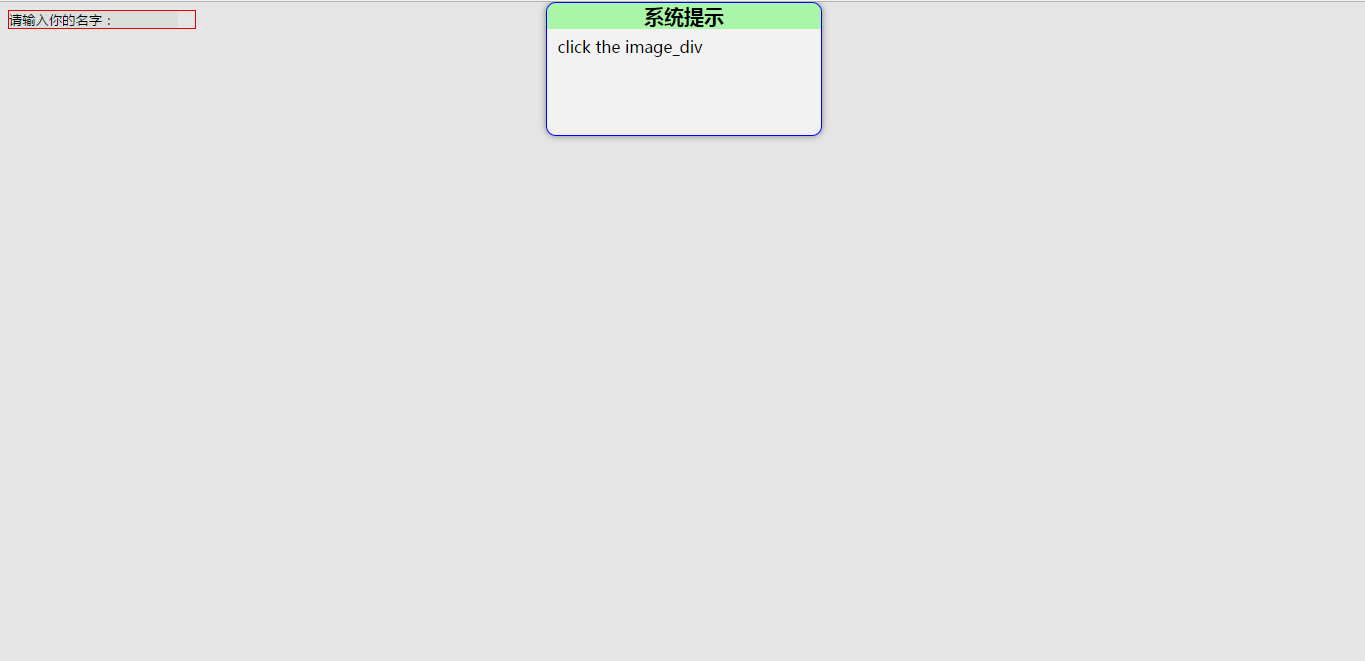
源码:
1.demo.jsp
 <%@ page contentType="text/html;charset=UTF-8" language="java" %>

 <html>

 <head>

     <title>自定义提示窗口</title>

     <script type="text/javascript" src="js/myAlert.js"></script>

     <script type="text/javascript">

         function bodyOnload() {

             var myInput = document.getElementById("myInput");

             myInput.style.border = "none";

             myInput.style.backgroundColor = "rgba(223, 230, 223, 0.3)";

             myInput.value = "请输入你的名字:";

             myInput.onfocus = function () {

                 myInput.style.outline = "none";

                 myInput.value = "";

             };

             var image_div = document.createElement("div");

             image_div.style.width = myInput.offsetHeight ;

             image_div.style.height = myInput.offsetHeight;

             image_div.style.float = "right";

             image_div.style.cursor = "pointer";

             image_div.onclick = function () {

               new MyAlert().alert("系统提示","click the image_div",5000);

             };

             var outer_div = document.createElement("div");

             outer_div.style.border = "1px solid red";

             outer_div.style.width = parseInt(myInput.offsetWidth) + parseInt(image_div.style.width);

             outer_div.style.height = myInput.offsetHeight;

             document.body.appendChild(outer_div);

             outer_div.appendChild(myInput);

             outer_div.appendChild(image_div);

         }

     </script>

 </head>

 <body onload="bodyOnload()">

      <input id="myInput" type="text" name="name" title="名字"/>

 </body>

 </html>
2.myAlert.js
 /**

  * Created by zhuwenqi on 2017/6/20.

  */

 /**

  * @param options 基本配置

  * @constructor

  */

 function MyAlert(options) {

     this.options = options ;

 }

 /**

  * 提示窗口

  * @param title 提示标题,默认为""

  * @param content 提示内容,默认为""

  * @param closeTime 提示窗口自动关闭时间,单位为ms,默认为2000ms

  */

 MyAlert.prototype.alert = function (title,content,closeTime) {

     var div_background = document.createElement("div");

     div_background.style.position = "absolute";

     div_background.style.left = "0";

     div_background.style.top = "0";

     div_background.style.width = "100%";

     div_background.style.height = "100%";

     div_background.style.backgroundColor = "rgba(0,0,0,0.1)";

     div_background.style.zIndex = "1001";

     var div_alert = document.createElement("div");

     div_alert.style.position = "absolute";

     div_alert.style.left = "40%";

     div_alert.style.top = "0";

     div_alert.style.width = "20%";

     div_alert.style.height = "20%";

     div_alert.style.overflow = "auto";

     div_alert.style.backgroundColor = "rgba(255,255,255,0.5)";

     div_alert.style.zIndex = "1002";

     div_alert.style.border = "1px solid blue";

     div_alert.style.borderRadius = "10px";

     div_alert.style.boxShadow = "0 0 10px gray";

     var div_title = document.createElement("div");

     div_title.style.backgroundColor = "rgba(0,255,0,0.3)";

     div_title.style.textAlign = "center";

     var span_title = document.createElement("span");

     span_title.style.fontSize = "20px";

     span_title.style.fontWeight = "bold";

     var text_title = document.createTextNode((title === undefined || title === null) ? "" : title) ;

     span_title.appendChild(text_title);

     div_title.appendChild(span_title);

     div_alert.appendChild(div_title);

     var div_content = document.createElement("div");

     div_content.style.lineHeight = "35px";

     div_content.style.paddingLeft = "10px";

     var span_content = document.createElement("span");

     var text_content = document.createTextNode((content === undefined || content === null) ? "" : content);

     span_content.appendChild(text_content);

     div_content.appendChild(span_content);

     div_alert.appendChild(div_content);

     document.body.appendChild(div_background);

     document.body.appendChild(div_alert);

     setTimeout(function () {

         document.body.removeChild(div_alert);

         document.body.removeChild(div_background);

     },(closeTime === undefined || closeTime === null || closeTime === "") ? 2000 : closeTime);

 };
html5+css3+javascript 自定义提示窗口的更多相关文章
- html5+css3+javascript 自定义弹出窗口
效果图: 源码: 1.demo.jsp <%@ page contentType="text/html;charset=UTF-8" language="java& ...
- HTMl5/CSS3/Javascript 学习推荐资源
HTMl5/CSS3/Javascript 学习推荐资源 前端的定义应该是数据内容的展示,在国内大家都觉得前端只是HTML+CSS+Javascript,但是实际上与展示有关的都是前端,所以Ruby/ ...
- HTML5&CSS3&JavaScript&PHP&MySQL学习笔记
1.在文字间添加一条水平线 使用<hr /> 注意该符号不是成对出现的 2.<q> </q>用来标记于段落中的较短引用,浏览器会在它之间的语句两端加上双引号. ...
- 检测 HTML5\CSS3\JAVASCRIPT 在浏览器的适应情况
CSS3 Selectors Test : 这是CSS3.INFO网站提供的css选择器测试页面,它能够详细显示当前浏览器对所有CSS3选择器的支持情况.启动测试,浏览器会自动测验,并已列表的方式显示 ...
- HTML5 + CSS3 + JavaScript
http://www.programmer.com.cn/14761/#more-14761 文/李晶 随着互联网产业的爆炸式增长,与之伴生的Web前端技术也在历经洗礼和蜕变.尤其是近几年随着移动终端 ...
- 《HTML5+CSS3+JavaScript 从入门到精通(标准版)》学习笔记(二)
这是一个应用的例子,学以致用嘛 <!--这些代码我就直接放在了博客园的"页首Html代码"中,用于自定义博客,效果就是页面左上角的白色文字--> <p> & ...
- 《HTML5+CSS3+JavaScript 从入门到精通(标准版)》学习笔记(一)
以下是以代码形式书写的笔记,本系列会持续更新,主要内容预计是类似下文的笔记,兼或一些思考与小项目,希望对你会有所帮助 1 <!-- --> <!DOCTYPE html>< ...
- 用HTML5/CSS3/JS开发Android/IOS应用框架大全
现在人人都想成为安卓/IOS应用开发工程师.其实,安卓/IOS应用可以用很多种语言来实现.由于我们前端开发工程师,对HTML5/CSS/JavaScript的网络编程已经相当熟悉了.所以,今天大家将会 ...
- 好程序员技术分享html5和JavaScript的区别
好程序员技术分享html5和JavaScript的区别,HTML5广义上讲是前端开发学科的代名词,包含HTML5.CSS3及JavaScript三个重要的部分,是运行在浏览器上应用的统称.如PC端网站 ...
随机推荐
- 使用Jquery Ajax请求 下载压缩文件
使用第三方组件: ICSharpCode.SharpZipLib 给按钮绑定一个点击事件 后台处理: public ActionResult DownZip(string ids) { if (st ...
- jQuery中文学习站点
jQuery是一个快速.简单的Javascript library,它简化了HTML文件的traversing,事件处理.动画.Ajax互动,从而方便了网页制作的快速发展.jQuery是为改变你编写J ...
- mac pro 安装 composer 失败
http://getcomposer.org/doc/00-intro.md#using-composer $ brew install josegonzalez/php/composer 出现错误: ...
- ZBrush中如何实现智能对称
ZBrush软件智能化和人性化的工作流程让用户在创作中提高工作效率,体验创作乐趣,说起智能化不得不提的就是ZBrush 4R8®给我们提供的智能对称功能,所谓的智能对称就是当您在编辑其中一半的物体模型 ...
- List of features and minimum Clang version with support
#1: C++11 Language Feature C++11 Proposal Available in Clang? Rvalue references N2118 Clang 2.9 ...
- pytorch实战(2)-----回归例子
一.回归任务介绍: 拟合一个二元函数 y = x ^ 2. 二.步骤: 导入包 创建数据 构建网络 设置优化器和损失函数 前向和后向传播训练网络 画图 三.代码: 导入包: import torch ...
- event 下鼠标坐标的获取
event.clientX.event.clientY 鼠标相对于浏览器窗口可视区域的X,Y坐标(窗口坐标),可视区域不包括工具栏和滚动条.IE事件和标准事件都定义了这2个属性 event.pageX ...
- Windows Vista 安装和使用指导 - 停止支持后的几条建议
简介 曾经被广大网民吐槽的Windows Vista现在已经淡出了人们的视线,但仍有一些朋友想要体验一下这个操作系统.Windows Vista是Windows发展路线上的里程碑,相比之前的Windo ...
- Shell(五)Shell输入/输出重定向
Shell 输入/输出重定向 大多数 UNIX 系统命令从你的终端接受输入并将所产生的输出发送回到您的终端.一个命令通常从一个叫标准输入的地方读取输入,默认情况下,这恰好是你的终端.同样,一个命令 ...
- 设置PATH 环境变量、pyw格式、命令行运行python程序与多重剪贴板
pyw格式简介: 与py类似,我认为他们俩卫衣的不同就是前者运行时候不显示终端窗口,后者显示 命令行运行python程序: 在我学习python的过程中我通常使用IDLE来运行程序,这一步骤太过繁琐( ...