
使用TensorBoard可视化工具
title: 使用TensorBoard可视化工具
date: 2018-04-01 13:04:00
categories:
- deep learning
tags:
- TensorFlow
- TensorBoard
图表可视化在理解和调试时显得非常有帮助。
安装:
pip3 install --upgrade tensorboard
名称域(Name scoping)和节点(Node)
典型的TensorFlow有数以千计的节点,为了简单起见,我们可以为变量名(节点)划分范围。
这个范围称为名称域,即tf.name_scope('xxx'),其中xxx是这个名称域的名字。
在定义好名称域后,TensorBoard的显示界面里这个名称域内的变量并不会显示,而是只显示一个xxx节点,这个点是可展开的,展开后才会显示这个名称域内的节点。
TensorFlow 图表有两种连接关系:数据依赖和控制依赖。数据依赖显示两个操作之间的tensor流程,用实心箭头表示,控制依赖用虚线表示。
具体的符号表:
| 符号 | 意义 |
|---|---|
 |
High-level节点代表一个名称域,双击则展开一个高层节点。 |
 |
彼此之间不连接的有限个节点序列。 |
 |
彼此之间相连的有限个节点序列。 |
 |
一个单独的操作节点。 |
 |
一个常量结点。 |
 |
一个摘要节点。 |
 |
显示各操作间的数据流边。 |
 |
显示各操作间的控制依赖边。 |
 |
引用边,表示出度操作节点可以使入度tensor发生变化。 |
Scalar
使用summary scalar(标量统计):
xentropy = ... # xentropy的定义

tf.summary.scalar('xentropy_mean', xentropy)	# xentropy_mean为定义的xentropy的标签名

Histogram
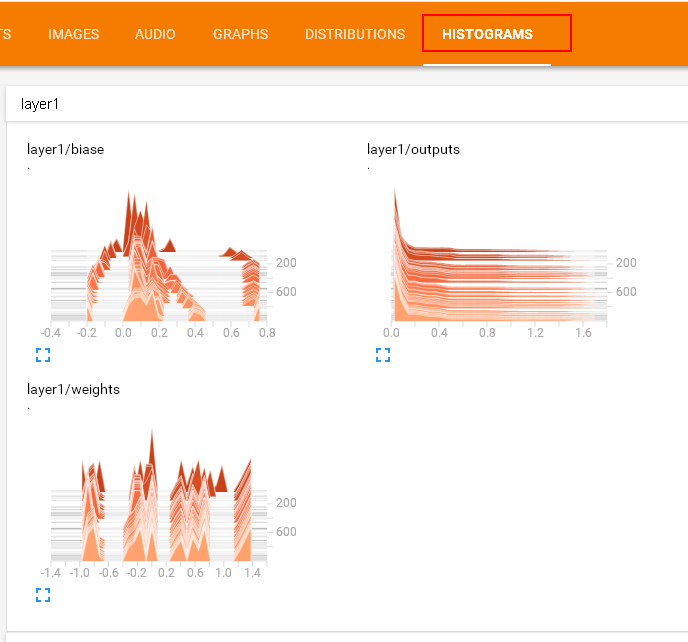
使用summary histogram统计某个Tensor的取值分布:
 with tf.name_scope('layer1'):

          with tf.name_scope('biases'):

              biases = ... # 具体声明这里不再给出

              tf.summary.histogram('layer1' + '/biases', biases)

          with tf.name_scope('weights'):

              weights= ...

              tf.summary.histogram('layer1' + '/weights', weights)

          with tf.name_scope('outputs'):

              outputs= ...

              tf.summary.histogram('layer1' + '/weights', outputs)
合并Summary
# 将各个summary操作合并为一个操作merged_summary_op

merged_summary_op = tf.summary.merge_all()

# 数据写入器,'/logs'为训练日志的存储路径

summary_writer = tf.summary.FileWriter('./logs', sess.graph)

total_step = 0

while training:

  total_step += 1

  session.run(training_op)

  if total_step % 100 == 0:

    ...

    summary_str = sess.run(merged_summary_op, feed_dict{...}) # 注意这里必须加feed_dict否则会报错

    summary_writer.add_summary(summary_str, total_step) # 使用summary_writer将数据写入磁盘
生成TensorBoard界面
运行添加了各种summary的操作的代码后,打开cmd,进入代码所在文件夹,输入:
tensorboard --logdir=logs
按照运行后的提示:
TensorBoard 1.7.0 at http://MengjieZhang:6006 (Press CTRL+C to quit)
打开浏览器,输入地址 http://MengjieZhang:6006 即可以看到TensorBoard界面。
具体代码:
import input_data

import tensorflow as tf

def weight_variable(shape):

  initial = tf.truncated_normal(shape, stddev=0.1)

  return tf.Variable(initial)

def bias_variable(shape):

  initial = tf.constant(0.1, shape=shape)

  return tf.Variable(initial)

def conv2d(x, W):

  return tf.nn.conv2d(x, W, strides=[1, 1, 1, 1], padding='SAME')

def max_pool_2x2(x):

  return tf.nn.max_pool(x, ksize=[1, 2, 2, 1],

                        strides=[1, 2, 2, 1], padding='SAME')

mnist = input_data.read_data_sets('data', one_hot=True)

mnistGraph = tf.Graph()

with mnistGraph.as_default():

    with tf.name_scope('input'):

        x = tf.placeholder("float", shape=[None, 784])

        y_ = tf.placeholder("float", shape=[None, 10])

        W = tf.Variable(tf.zeros([784,10]))

        b = tf.Variable(tf.zeros([10]))

    with tf.name_scope('hidden1'):

        W_conv1 = weight_variable([5, 5, 1, 32])

        b_conv1 = bias_variable([32])

        x_image = tf.reshape(x, [-1,28,28,1])

        h_conv1 = tf.nn.relu(conv2d(x_image, W_conv1) + b_conv1)

        h_pool1 = max_pool_2x2(h_conv1)

        tf.summary.histogram('W_conv1', W_conv1)

        tf.summary.histogram('b_conv1', b_conv1)

    with tf.name_scope('hidden2'):

        W_conv2 = weight_variable([5, 5, 32, 64])

        b_conv2 = bias_variable([64])

        h_conv2 = tf.nn.relu(conv2d(h_pool1, W_conv2) + b_conv2)

        h_pool2 = max_pool_2x2(h_conv2)

        tf.summary.histogram('W_conv2', W_conv2)

        tf.summary.histogram('b_conv2', b_conv2)

    with tf.name_scope('fc1'):

        W_fc1 = weight_variable([7 * 7 * 64, 1024])

        b_fc1 = bias_variable([1024])

        h_pool2_flat = tf.reshape(h_pool2, [-1, 7*7*64])

        h_fc1 = tf.nn.relu(tf.matmul(h_pool2_flat, W_fc1) + b_fc1)

        keep_prob = tf.placeholder("float")

        h_fc1_drop = tf.nn.dropout(h_fc1, keep_prob)

        tf.summary.histogram('W_fc1', W_fc1)

        tf.summary.histogram('b_fc1', b_fc1)

    with tf.name_scope('fc2'):

        W_fc2 = weight_variable([1024, 10])

        b_fc2 = bias_variable([10])

        y_conv=tf.nn.softmax(tf.matmul(h_fc1_drop, W_fc2) + b_fc2)

        tf.summary.histogram('W_fc2', W_fc2)

        tf.summary.histogram('b_fc2', b_fc2)

    with tf.name_scope('train'):

        cross_entropy = -tf.reduce_sum(y_*tf.log(y_conv))

        train_step = tf.train.AdamOptimizer(1e-4).minimize(cross_entropy)

        correct_prediction = tf.equal(tf.argmax(y_conv,1), tf.argmax(y_,1))

        accuracy = tf.reduce_mean(tf.cast(correct_prediction, "float"))

        tf.summary.scalar('loss', cross_entropy)

        tf.summary.scalar('accuracy', accuracy)

with tf.Session(graph=mnistGraph) as sess:

    sess.run(tf.initialize_all_variables())

    merged_summary_op = tf.summary.merge_all()

    summary_writer = tf.summary.FileWriter('./logs', sess.graph)

    for i in range(3000):

      batch = mnist.train.next_batch(50)

      if i%100 == 0:

        train_accuracy = accuracy.eval(feed_dict={

            x:batch[0], y_: batch[1], keep_prob: 1.0})

        print ("step %d, training accuracy %g" % (i, train_accuracy))

        summary_str = sess.run(merged_summary_op, feed_dict={x: batch[0], y_: batch[1], keep_prob: 0.5})

        summary_writer.add_summary(summary_str, i)

      train_step.run(feed_dict={x: batch[0], y_: batch[1], keep_prob: 0.5})

    accuracy_sum = tf.reduce_sum(tf.cast(correct_prediction, tf.float32))

    good = 0

    total = 0

    for i in range(10):

        testSet = mnist.test.next_batch(50)

        good += accuracy_sum.eval(feed_dict={ x: testSet[0], y_: testSet[1], keep_prob: 1.0})

        total += testSet[0].shape[0]

    print ("test accuracy %g"%(good/total))
运行后的TensorBoard界面:

使用TensorBoard可视化工具的更多相关文章
- AI - TensorFlow - 可视化工具TensorBoard
TensorBoard TensorFlow自带的可视化工具,能够以直观的流程图的方式,清楚展示出整个神经网络的结构和框架,便于理解模型和发现问题. 可视化学习:https://www.tensorf ...
- tensorflow Tensorboard可视化-【老鱼学tensorflow】
tensorflow自带了可视化的工具:Tensorboard.有了这个可视化工具,可以让我们在调整各项参数时有了可视化的依据. 本次我们先用Tensorboard来可视化Tensorflow的结构. ...
- Ubuntu环境下TensorBoard 可视化 不显示数据问题 No scalar data was found...(作者亲测有效)(转)
TensorBoard:Tensorflow自带的可视化工具.利用TensorBoard进行图表可视化时遇到了图表不显示的问题. 环境:Ubuntu系统 运行代码,得到TensorFlow的事件文件l ...
- Tensorflow 之 TensorBoard可视化Graph和Embeddings
windows下使用tensorboard tensorflow 官网上的例子程序都是针对Linux下的:文件路径需要更改 tensorflow1.1和1.3的启动方式不一样 :参考:Running ...
- Tensorflow实战 手写数字识别(Tensorboard可视化)
一.前言 为了更好的理解Neural Network,本文使用Tensorflow实现一个最简单的神经网络,然后使用MNIST数据集进行测试.同时使用Tensorboard对训练过程进行可视化,算是打 ...
- TensorFlow——TensorBoard可视化
TensorFlow提供了一个可视化工具TensorBoard,它能够将训练过程中的各种绘制数据进行展示出来,包括标量,图片,音频,计算图,数据分布,直方图等,通过网页来观察模型的结构和训练过程中各个 ...
- 使用 TensorBoard 可视化模型、数据和训练
使用 TensorBoard 可视化模型.数据和训练 在 60 Minutes Blitz 中,我们展示了如何加载数据,并把数据送到我们继承 nn.Module 类的模型,在训练数据上训练模型,并在测 ...
- MongoDB 安装和可视化工具
MongoDB 是一款非常热门的NoSQL,面向文档的数据库管理系统,官方下载地址是:MongoDB,博主选择的是 Enterprise Server (MongoDB 3.2.9)版本,安装在Win ...
- MySQL学习(一)MySQLWorkbench(MySQL可视化工具)下载,安装,测试连接,以及注意事项
PS:MySQLWorkbench是MYSQL自带的可视化工具,无论使用哪个可视化工具,其实大同小异,如果想以后走的更远的话,可以考虑使用命令行操作数据库MYSQL.可视化工具让我们初学者更能理解数据 ...
随机推荐
- 机器学习 LR中的参数迭代公式推导——极大似然和梯度下降
Logistic本质上是一个基于条件概率的判别模型(DiscriminativeModel). 函数图像为: 通过sigma函数计算出最终结果,以0.5为分界线,最终结果大于0.5则属于正类(类别值为 ...
- UESTC--1271--Search gold(贪心)
Search gold Time Limit: 1000MS Memory Limit: 65535KB 64bit IO Format: %lld & %llu Submit Sta ...
- div position:fixed后,水平居中的问题
.div{position:fixed;margin:auto;left:0; right:0; top:0; bottom:0;width:200px; height:150px;}
- Python 递归和二分查找
# 二分查找l1 = [2,3,5,10,15,16,18,22,26,30,32,35,41,42,43,55,56,66,67,69,72,76,82,83,88] def two_search( ...
- Java NIO(四)文件通道
文件通道 通道是访问I/O服务的导管,I/O可以分为广义的两大类:File I/O和Stream I/O.那么相应的,通道也有两种类型,它们是文件(File)通道和套接字(Socket)通道.文件通道 ...
- JEE Spring-boot 简单的ioc写法。
什么是ioc,就是你可能会有一些生活必需品,这些东西你必须要用才能存活.但是你不是每天都回去买,去哪一家点去买.而这些用品会一直放在哪里,每一个商店就是一个容器,包裹着这些物品. 创建ioc项目,首先 ...
- RedHat/CentOS(Linux)双网卡bond(mode=6)
1. 将/etc/sysconfig/network-scripts/ifcfg-ens1f0和ifcfg-ens1f1文件备份到root目录下2. 修改/etc/sysconfig/network- ...
- GridBagLayout使用案例+获取目录下所有的文件+获取创建时间及最后修改时间
package vvv; import java.awt.Dimension;import java.awt.GridBagConstraints;import java.awt.GridBagLay ...
- [转] hadoop MapReduce实例解析-非常不错,讲解清晰
来源:http://blog.csdn.net/liuxiaochen123/article/details/8786715?utm_source=tuicool 2013-04-11 10:15 4 ...
- [THUWC2017]在美妙的数学王国中畅游 LCT+泰勒展开+求导
p.s. 复合函数求导时千万不能先带值,再求导. 一定要先将符合函数按照求导的规则展开,再带值. 设 $f(x)=g(h(x))$,则对 $f(x)$ 求导: $f'(x)=h'(x)g'(h(x)) ...