
PXE无人值守部署centos7.4操作系统
1、基础环境:
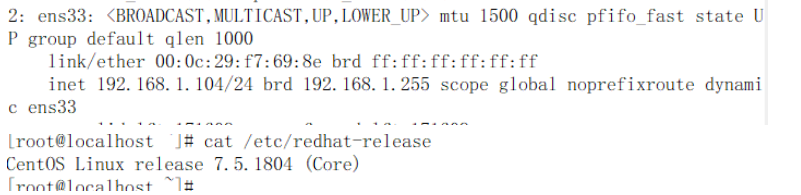
镜像ISO文件名为:CentOS-7-x86_64-DVD-1804.iso
2、安装需要的软件包
yum install dhcp xinetd syslinux httpd tftp-server -y
dhcpd: 动态分配IP
xinetd: 对服务访问进行控制,这里主要是控制tftp
tftp: 从服务器端下载pxelinux.0、default文件
syslinux: 用于网络引导
httpd: 在网络上提供安装源,也就是镜像文件中的内容
3、配置对应的服务
vi /etc/xinetd.d/tftp
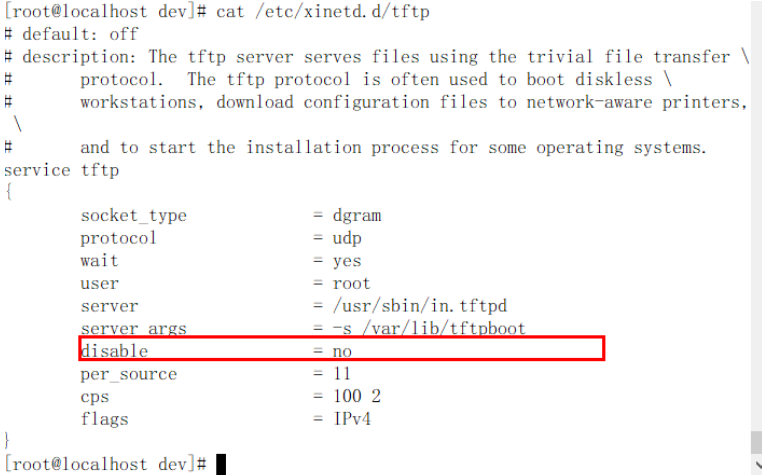
配置 dhcp下发地址
ddns-update-style none;
ignore client-updates;
default-lease-time 259200;
max-lease-time 518400;
option domain-name-servers 114.114.114.114; #dns地址
subnet 192.168.1.0 netmask 255.255.255.0 {
range 192.168.1.110 192.168.1.115;
option routers 192.168.1.254; #下发的网关
option subnet-mask 255.255.255.0;
next-server 192.168.1.104; #下发的本机ip
# the configuration file for pxe boot
filename "pxelinux.0";
}
systemctl enable dhcpd && systemctl start dhcpd
systemctl enable xinetd && systemctl start xinetd
systemctl enable tftp && systemctl start tftp
systemctl enable httpd && systemctl start httpd
依次执行以下命令,开放防火墙TCP-80端口及UDP-69端口,注意不要搞错了UDP和TCP。
firewall-cmd –zone=public –add-port=80/tcp –permanent
firewall-cmd –zone=public –add-port=69/udp –permanent
firewall-cmd –reload
firewall-cmd –zone=public –list-ports
也可以直接关闭防火墙
关闭selinux
## 以下配置生效需要系统重启## 
临时关闭selinux: setenforce 0
mkdir /var/www/html/centos7
创建挂载点
mount -t iso9660 -o loop /dev/cdrom /mnt/
cp -rf /mnt/* /var/www/html/centos7/
建议挂载在/mnt 下(通用挂载点)
mkdir /var/lib/tftpboot/centos7
cp /var/www/html/centos7/images/pxeboot/initrd.img /var/lib/tftpboot/centos7/
cp /var/www/html/centos7/images/pxeboot/vmlinuz /var/lib/tftpboot/centos7/
cp /usr/share/syslinux/menu.c32 /var/lib/tftpboot
cp /usr/share/syslinux/pxelinux.0 /var/lib/tftpboot
mkdir /var/lib/tftpboot/pxelinux.cfg
vi /var/lib/tftpboot/pxelinux.cfg/default
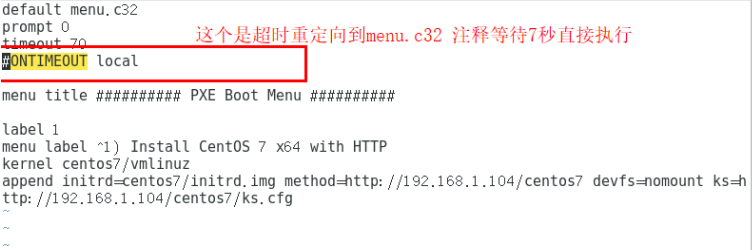
4、创建Kickstart文件ks.cfg
这个需要安装kickstart执行:yum -y install system-config-kickstart
bash#下运行system-config-kickstart,打开kickstart桌面软件,选择安装步骤。
cat/var/www/html/centos7/ks.cfg
#platform=x86, AMD64, 或 Intel EM64T
#version=DEVEL
# Install OS instead of upgrade
install
# Keyboard layouts
keyboard 'us'
# Root password
rootpw --iscrypted $1$grc2urK7$tqnhPtOUV/SFfQT0DTeko0
# Use network installation
url --url="http://192.168.1.104/centos7/"
# System language
lang zh_CN
# System authorization information
auth --useshadow --passalgo=sha512
# Use text mode install
text
# SELinux configuration
selinux --disabled
# Do not configure the X Window System
skipx
# Firewall configuration
firewall --disabled
# Network information
network --bootproto=dhcp --device=ens33
# Reboot after installation
reboot
# System timezone
timezone Asia/Hong_Kong --isUtc
# System bootloader configuration
bootloader --location=mbr
# Clear the Master Boot Record
zerombr
# Partition clearing information
clearpart --all --initlabel
# Disk partitioning information
clearpart --all --initlabel #清空分区
part /boot --fstype xfs --size 1024 #/boot分区
part swap --size 1024 #swap分区
part / --fstype xfs --size 1 --grow #根分区
firstboot --disable
%packages
@compat-libraries
@core
@debugging
@development
@fonts
@gnome-apps
@gnome-desktop
@graphics
@ha
@input-methods
@internet-applications
@load-balancer
@mainframe-access
@mariadb-client
@network-tools
@office-suite
@platform-devel
@remote-system-management
@resilient-storage
@system-admin-tools
@system-management
@web-server
crypto-utils
fence-agents-all
%end
%post
cat >>/etc/yum.repos.d/base.repo<<eof
[base]
name=CentOS-$releasever - Base - 163.com
#mirrorlist=http://mirrorlist.centos.org/?release=$releasever&arch=$basearch&repo=os
baseurl=http://mirrors.163.com/centos/$releasever/os/$basearch/
gpgcheck=1
gpgkey=http://mirrors.163.com/centos/RPM-GPG-KEY-CentOS-7
#released updates
[updates]
name=CentOS-$releasever - Updates - 163.com
#mirrorlist=http://mirrorlist.centos.org/?release=$releasever&arch=$basearch&repo=updates
baseurl=http://mirrors.163.com/centos/$releasever/updates/$basearch/
gpgcheck=1
gpgkey=http://mirrors.163.com/centos/RPM-GPG-KEY-CentOS-7
eof
sed -i "s/ONBOOT.*$/ONBOOT=yes/" /etc/sysconfig/network-scripts/ifcfg-ens33 #设置网卡为启动
sed -i "s/rhgb //" /boot/grub/grub.conf # 设置启动系统时不使用图形进度条方
式
sed -i "s/HOSTNAME=.*$/HOSTNAME=xuexi.longshuai.com/" /etc/sysconfig/network #设置主机名
%end
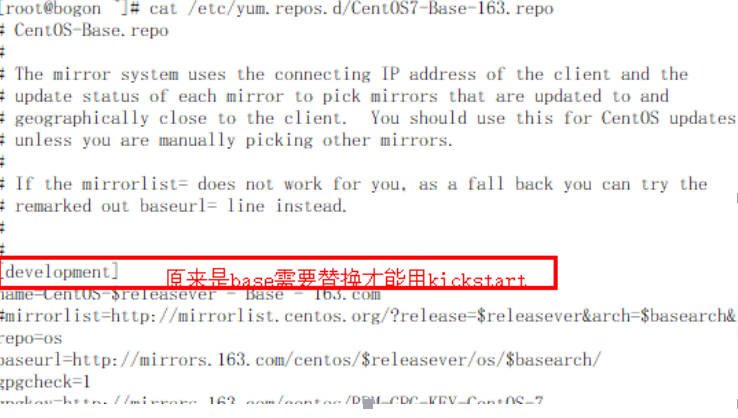
有个小彩蛋,kickstart安装之后默认是起不来软件包选择项的需要修改yum源
PXE无人值守部署centos7.4操作系统的更多相关文章
- pxe+kickstart 无人值守安装CentOS7.1
CentOS6.6下PXE+Kickstart无人值守安装CentOS7.1操作系统 一.简介 1.1 什么是PXE Pxe(Pre-boot Execution Environment,预启动执行 ...
- Vmware部署Linux无人值守安装Centos7系统
Linux - 无人值守安装服务 # 需求分析 - 使用光盘镜像来安装 Linux 系统的方式; 坦白讲, 该方法适用于只安装少量 Linux 系统的情况, 如果生产环境中有数百台服务器都需安装系统, ...
- 第19章 使用PXE+Kickstart部署无人值守安装
章节概述: 本章节将教会您通过PXE+DHCP+TFTP+VSftpd+Kickstart服务程序搭建出无人值守安装系统,从而批量部署客户机系统. 这种系统能够实现自动化运维.避免了重复性劳动,帮助提 ...
- PXE无人值守实现批量化自动安装Linux系统
设想一个场景:假如让你给1000台服务器装系统,你会怎么做?跑去每一台服务器给它安装系统吗?显然不会.. 一.概括 通过网络引导系统的做法可以不必从硬盘.软盘或CD-ROM硬盘,而是完全通过网络来引导 ...
- Linux PXE无人值守网络装机
Linux PXE无人值守网络装机 一.实验环境: 2台Linux系统(RHEL6.5版本),1台作为:PXE远程安装服务器(安装dhcp服务.ftp服务.tftp服务),另1台作为:客户端(未装RH ...
- 在docker中部署centos7镜像
本篇文章参考自: https://www.cnblogs.com/linjj/p/5606911.html https://blog.csdn.net/u012767761/article/detai ...
- .net core 2.2 部署CentOS7(2)给虚拟机安装CentOS7
目录: .net core 2.2 部署CentOS7(1)安装虚拟机 .net core 2.2 部署CentOS7(2)给虚拟机安装CentOS7 .net core 2.2 部署CentOS7( ...
- 利用PXE引导安装centos7
# 利用PXE引导安装centos7 # ###简介### > PXE (Pre-boot Execution Environment,PXE client 在网卡的 ROM 中,当计算机引导时 ...
- PXE自动化部署
PXE 预启动执行环境,基于tftp条件下完成基于网络的自动化部署软件 原理: 网卡利用自身的tftp 请求dhcp 服务器获取ip和一个pxelinux.0的地址 在给定的tftp目录下存有ks的配 ...
随机推荐
- Pleasant sheep and big big wolf
pid=3046">点击打开链接 题目:在一个N * M 的矩阵草原上,分布着羊和狼.每一个格子仅仅能存在0或1仅仅动物.如今要用栅栏将全部的狼和羊分开.问怎么放,栅栏数放的最少,求出 ...
- 使用深度学习检测DGA(域名生成算法)——LSTM的输入数据本质上还是词袋模型
from:http://www.freebuf.com/articles/network/139697.html DGA(域名生成算法)是一种利用随机字符来生成C&C域名,从而逃避域名黑名单检 ...
- sicily 1003. hash
Description 请用HASH链式法来解决冲突,且规定链表在链表头插入新元素. 规定HASH函数为:h(x) = x % 11,即哈希数组下标为0-10. 给定两种操作: I 操作,插入一个新的 ...
- Storm Zookeeper
本文记录了storm 1.1.0 在zookeeper中保存的信息. 下面的图是在[4]的基础上进行修改的. /-storm -- storm在zookeeper上的根目录 | |-/assignme ...
- vue 实现 点击取消监控内容是否发生修改 若修改提示 是否需要保存
<!DOCTYPE html> <html lang="en"> <head> <meta charset="UTF-8&quo ...
- 51Nod 和为k的连续区间
一整数数列a1, a2, ... , an(有正有负),以及另一个整数k,求一个区间[i, j],(1 <= i <= j <= n),使得a[i] + ... + a[j] = k ...
- yii2.0缓存篇之页面缓存
页面缓存: 如果整个页面都不会发生改变,就可以使用页面缓存缓存整个页面. public function behaviors(){ //此方法[也叫行为]会提前控制器内其他方法执 ...
- BZOJ3744 Gty的妹子序列(分块+树状数组)
题意 询问区间内逆序对数 强制在线 1<=n<=50000 1<=m<=50000 题解 两个预处理f[i][j]为块i到j的逆序对数,s[i][j]前i块≤j的有多少个边角 ...
- centeros安装jdk
准备工作: java se下载网址:https://www.oracle.com/technetwork/java/javase/downloads/jdk8-downloads-2133151.ht ...
- java 线程传参 方式
第一类:主动向线程传参 public class ThreadTest extends Thread { public ThreadTest() { } /** * 第一种通过构造方法来传递参数 ...