
5.listview(QStringList QStringListModel)
- UI
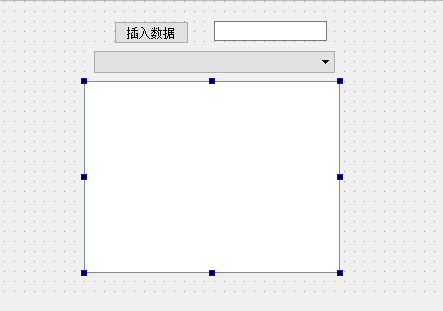
- mainwindow.h
#ifndef MAINWINDOW_H
#define MAINWINDOW_H #include <QMainWindow>
#include <QStringListModel> namespace Ui {
class MainWindow;
} class MainWindow : public QMainWindow
{
Q_OBJECT public:
explicit MainWindow(QWidget *parent = );
~MainWindow(); private slots:
//按下按钮
void on_pushButton_clicked();
22 //combox改变
23 void on_comboBox_currentIndexChanged(int index);
private:
Ui::MainWindow *ui;
27 //设置列表
28 QStringList *sl;
29 //设置模式,显示列表
30 QStringListModel *slm;
}; #endif // MAINWINDOW_H - mainwindow.cpp
 #include "mainwindow.h"

 #include "ui_mainwindow.h"

 #include <QStringListModel>

 MainWindow::MainWindow(QWidget *parent) :

     QMainWindow(parent),

     ui(new Ui::MainWindow)

 {

     ui->setupUi(this);

10     sl = new QStringList();

11     sl->append("hello1");

12     sl->append("hello2");

13     sl->append("hello3");

14     sl->append("hello4");

15     //创建字符串模式

16     slm = new QStringListModel(this);

17     slm->setStringList(*sl);

18     //显示

19     ui->listView->setModel(slm);

20

21     //设置combox选项

22     ui->comboBox->insertItem(0,"hello1","hello1");

23     ui->comboBox->insertItem(1,"hello2","hello2");

24     ui->comboBox->insertItem(2,"hello3","hello3");

25     ui->comboBox->insertItem(3,"hello4","hello4");


 }

 MainWindow::~MainWindow()

 {

     delete ui;

 }

 void MainWindow::on_pushButton_clicked()

 {

     QString qstr;

39     qstr = ui->lineEdit->text();

40     sl->append(qstr);

41     //模式设置字符串

42     slm->setStringList(*sl);

43     //显示

44     ui->listView->setModel(slm);

 }

 void MainWindow::on_comboBox_currentIndexChanged(int index)

 {

     //获取当前数据

50     QString myqstr=ui->comboBox->currentText();

51     ui->lineEdit->setText(myqstr);

} - main.cpp
 #include "mainwindow.h"

 #include <QApplication>

 int main(int argc, char *argv[])

 {

     QApplication a(argc, argv);

     MainWindow w;

     w.show();

     return a.exec();

 }
5.listview(QStringList QStringListModel)的更多相关文章
- Qt 学习之路:QStringListModel
上一章我们已经了解到有关 list.table 和 tree 三个最常用的视图类的便捷类的使用.前面也提到过,由于这些类仅仅是提供方便,功能.实现自然不如真正的 model/view 强大.从本章起, ...
- qt model/view 架构自定义模型之QStringListModel
# -*- coding: utf-8 -*- # python:2.x #QStringListModel #QStringListModel 是最简单的模型类,具备向视图提供字符串数据的能力. # ...
- QLineEdit 自动完成(使用setCompleter,内含一个ListView)
-------------------------------------CompleteLineEdit.h------------------------------------- #ifndef ...
- (二)使用预定义模型 QStringListModel例子
使用预定义模型 QStringListModel例子 源代码如下 Main.cpp #include <QApplication> #include "teamleadersdi ...
- Qt 学习之路 2(43):QStringListModel
Qt 学习之路 2(43):QStringListModel 豆子 2013年2月13日 Qt 学习之路 2 38条评论 上一章我们已经了解到有关 list.table 和 tree 三个最常用的视图 ...
- QT QStringListModel 示例代码
1. QStringListModel , 实现 插入 删除 编辑 list,支持鼠标双击编辑. 2. dialog.h #ifndef DIALOG_H #define DIALOG_H #inc ...
- PyQt(Python+Qt)学习随笔:model/view架构中的QStringListModel
老猿Python博文目录 专栏:使用PyQt开发图形界面Python应用 老猿Python博客地址 一.QStringListModel介绍 QStringListModel是Qt提供的一个已经实现Q ...
- PyQt学习随笔:ListView控件的视图和数据模型分离案例
Qt 中view类控件的目的是实现数据和模型分离,控件展示数据,数据保存在数据存储中,数据存储中的数据改变了,则控件中展示的数据跟随改变.当设计时只指定了一个控件和一个数据存储关联时,这种分离虽然也能 ...
- PyQt学习随笔:QtDesigner ListView控件列表项的初始化
在QtDesigner中设计的界面中添加ListView控件后,是没办法添加需要在ListView控件中显示的列表项.由于ListView控件只是一个展示列表项的视图控件,实现了界面与数据的分离,其要 ...
随机推荐
- javascript实现选项卡切换的4种方法
方法一:for循环+if判断当前点击与自定义数组是否匹配 <html lang="en"> <head> <meta charset="UT ...
- 13.javaweb xml标签库详解
一.XML标签简介 1, 作用 2, 标签分类 XPath 路径标记 查找节点元素示例 2.1<x:out> 2.2<x:parse> 操作示例:导入XML文件,解析,然后 ...
- ML一些简单的资源
参考文献及推荐阅读 维基百科,http://en.wikipedia.org/wiki/K-nearest_neighbor_algorithm: 机器学习中的相似性度量,http://www.cnb ...
- SQL的类型转换
说到SQL类型转换,我们知道SQL是一个弱类型语言,所以可以做隐式的强制类型转换,下面记录一下这几天遇到的类型转换问题. 1.在SQL中,字符串类型与数字之间转换是不需要强制类型转换符的,如果字符串是 ...
- getopt_long 函数
getopt_long, getopt_long_only -- 命令行解析函数,支持长选项解析 [说明]getopt_long/getopt_long_only是getopt的泛集,getopt ...
- MySQL_视图/触发器/事务/存储过程/函数
视图.触发器.事务.存储过程.函数 视图 视图是一个虚拟表(非真实存在),其本质是根据SQL语句获取动态的数据集,并为其命名,用户使用时只需使用名称即可获取结果集,可以将该结果集当作表来使用 #创建视 ...
- 2018秋招blibli算法工程师
我给出代码如下:和之前做数塔(dp的入门题目)的思路一致 dp[i][j]为走到坐标(i,j)的最小减速(只有向右走和向上走两种情况) #include<stdio.h> #include ...
- 机器学习之TensorFlow编程环境_TensorFlow_Estimator
title: Machine-learning subtitle: 1. 机器学习之TensorFlow编程环境_TensorFlow_Estimator date: 2018-12-13 10:17 ...
- Go 语言一本通
什么是GO语言? Go 是一个开源的编程语言,它能让构造简单.可靠且高效的软件变得容易. Go是从2007年末由Robert Griesemer, Rob Pike, Ken Thompson主持开发 ...
- priority_deque作为Timer时间队列底层容器的一些思考
https://www.bbsmax.com/A/D854VkZxzE/ 设置底层容器可以分离出两个逻辑上独立的问题: >如何存储构成优先级队列(容器)的实际元素,以及>如何组织这些元素以 ...