
从Client应用场景介绍IdentityServer4(一)
原文:从Client应用场景介绍IdentityServer4(一)
一、背景
IdentityServer4的介绍将不再叙述,百度下可以找到,且官网的快速入门例子也有翻译的版本。这里主要从Client应用场景方面介绍对IdentityServer4的应用。
首先简要介绍ID Token和Access Token:
Access Token是授权第三方客户端访问受保护资源的令牌。 ID Token是第三方客户端标识用户身份认证的问令牌,是JSON Web Token格式。
二、Client应用场景介绍
Client类是为OpenID Connect或OAuth 2.0 协议建模的。
我们先看官网快速入门中给的Client例子
 public static IEnumerable<Client> GetClients()

        {

            // client credentials client

            return new List<Client>

            {

                new Client

                {

                    ClientId = "Client",

                    AllowedGrantTypes = GrantTypes.ClientCredentials,

                    ClientSecrets =

                    {

                        new Secret("secret".Sha256())

                    },

                    AllowedScopes = { "api1" }

                },

                // resource owner password grant client

                new Client

                {

                    ClientId = "ro.client",

                    AllowedGrantTypes = GrantTypes.ResourceOwnerPassword,

                    ClientSecrets =

                    {

                        new Secret("secret".Sha256())

                    },

                    AllowedScopes = { "api1" }                },

                // OpenID Connect hybrid flow and client credentials client (MVC)

                new Client

                {

                    ClientId = "mvc",

                    ClientName = "MVC Client",

                    AllowedGrantTypes = GrantTypes.HybridAndClientCredentials,

                    ClientSecrets =

                    {

                        new Secret("secret".Sha256())

                    },

                    RedirectUris = { "http://localhost:5002/signin-oidc" },

                    PostLogoutRedirectUris = { "http://localhost:5002/signout-callback-oidc" },

                    AllowedScopes =

                    {

                        IdentityServerConstants.StandardScopes.OpenId,

                        IdentityServerConstants.StandardScopes.Profile,

                        "api1"

                    },

                    AllowOfflineAccess = true

                },

                // JavaScript Client

                new Client

                {

                    ClientId = "js",

                    ClientName = "JavaScript Client",

                    AllowedGrantTypes = GrantTypes.Implicit,

                    AllowAccessTokensViaBrowser = true,

                    RedirectUris = { "http://localhost:5003/callback.html" },

                    PostLogoutRedirectUris = { "http://localhost:5003/index.html" },

                    AllowedCorsOrigins = { "http://localhost:5003" },

                    AllowedScopes =

                    {

                        IdentityServerConstants.StandardScopes.OpenId,

                        IdentityServerConstants.StandardScopes.Profile,

                        "api1"

                    },

                }

            };

        }
里面主要介绍四种Client应用场景。
(1)客户端模式(AllowedGrantTypes = GrantTypes.ClientCredentials)
这是一种最简单的授权方式,应用于服务于服务之间的通信,token通常代表的是客户端的请求,而不是用户。
使用这种授权类型,会向token endpoint发送token请求,并获得代表客户机的access token。客户端通常必须使用token endpoint的Client ID和secret进行身份验证。
适用场景:用于和用户无关,服务与服务之间直接交互访问资源
(2)密码模式(ClientAllowedGrantTypes = GrantTypes.ResourceOwnerPassword)
该方式发送用户名和密码到token endpoint,向资源服务器请求令牌。这是一种“非交互式”授权方法。
官网上称,为了解决一些历史遗留的应用场景,所以保留了这种授权方式,但不建议使用。
适用场景:用于当前的APP是专门为服务端设计的情况。
(3)混合模式和客户端模式(ClientAllowedGrantTypes =GrantTypes.HybridAndClientCredentials)
ClientCredentials授权方式在第一种应用场景已经介绍了,这里主要介绍Hybrid授权方式。Hybrid是由Implicit和Authorization code结合起来的一种授权方式。其中Implicit用于身份认证,ID token被传输到浏览器并在浏览器进行验证;而Authorization code使用反向通道检索token和刷新token。
推荐适用Hybrid模式。
适用场景:用于MVC框架,服务器端 Web 应用程序和原生桌面/移动应用程序。
(4)简化模式(ClientAllowedGrantTypes =GrantTypes.Implicit)
Implicit要么仅用于服务端和JavaScript应用程序端进行身份认证,要么用于身份身份验证和access token的传输。
在Implicit中,所有token都通过浏览器传输的。
适用场景:JavaScript应用程序。
三、Server端搭建
为了介绍IdentityServer4的Client应用场景,我们需要先搭建IdentityServer服务端。
这里搭建的是使用EF Core来做数据操作,保存到SQL Server中。
(1)新建API项目
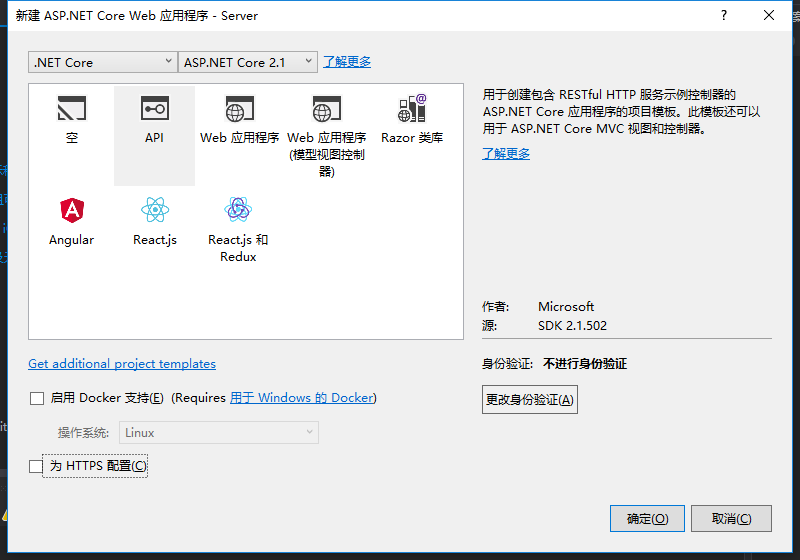
(2)安装IdentityServer4.EntityFramework包

(3)安装IdentityServer4包
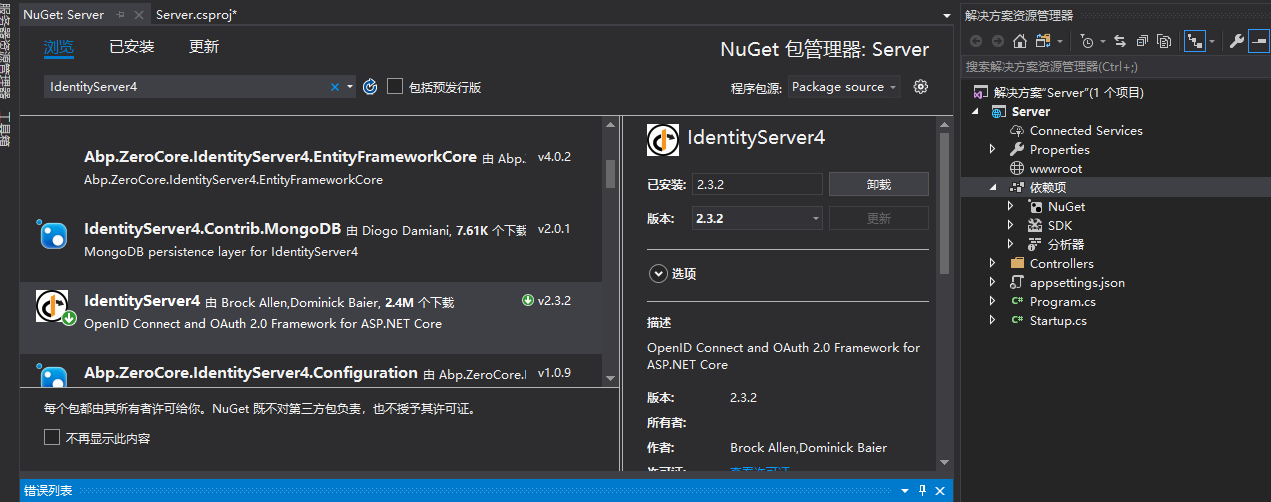
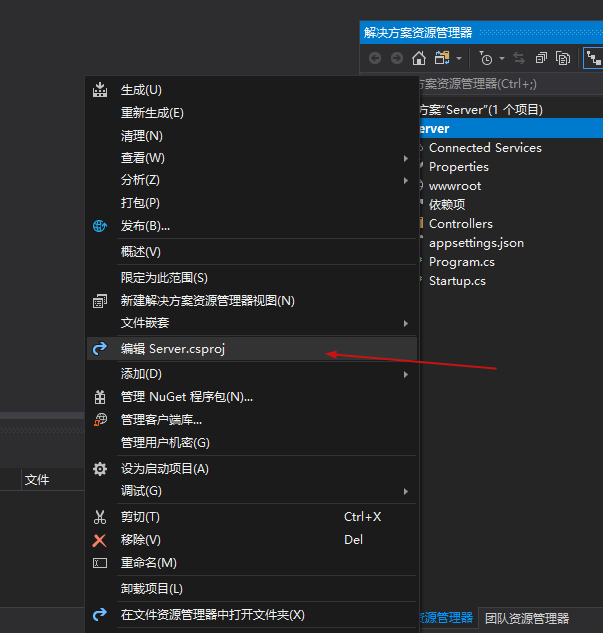
(4)右键项目的属性,编辑项目的.csproj文件
添加如下元素
<ItemGroup>

    <DotNetCliToolReference Include="Microsoft.EntityFrameworkCore.Tools.DotNet" Version="2.0.0" />

</ItemGroup>
如图:

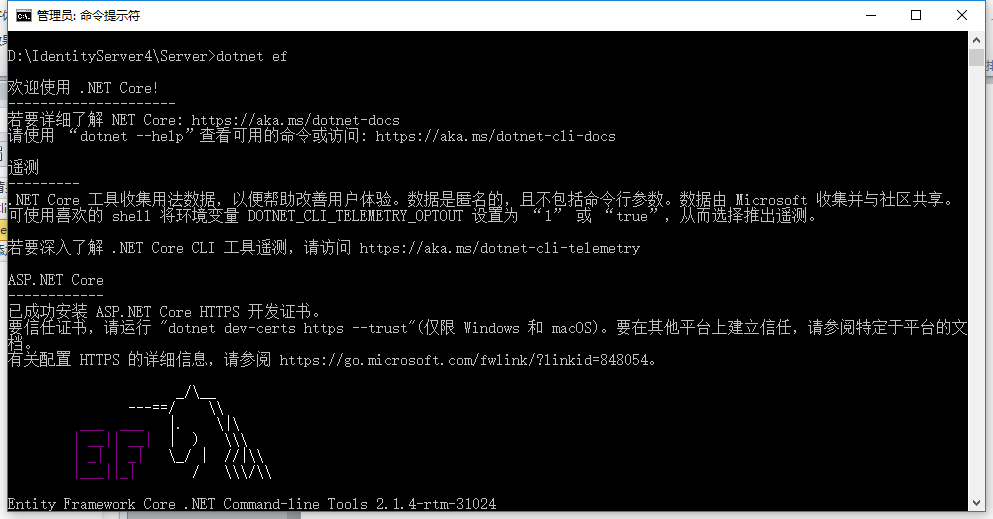
(5)cmd管理员身份进入项目目录路径(D:\IdentityServer4\Server),运行:dotnet ef
(6)项目内添加Config.cs类,代码如下
 public class Config

    {

        public static List<TestUser> GetUsers()

        {

            return new List<TestUser>

            {

                new TestUser

                {

                    SubjectId = "1",

                    Username = "alice",

                    Password = "password",

                  Claims = new List<Claim>(){new Claim(JwtClaimTypes.Role,"superadmin") }

                },

                new TestUser

                {

                    SubjectId = "2",

                    Username = "bob",

                    Password = "password",

                    Claims = new List<Claim>

                    {

                        new Claim("name", "Bob"),

                        new Claim("website", "https://bob.com")

                    },

                }

            };

        }

        public static IEnumerable<Client> GetClients()

        {

            // client credentials client

            return new List<Client>

            {

                new Client

                {

                    ClientId = "Client",

                    AllowedGrantTypes = GrantTypes.ClientCredentials,

                    ClientSecrets =

                    {

                        new Secret("secret".Sha256())

                    },

                    AllowedScopes = { "api1" }

                },

                // resource owner password grant client

                new Client

                {

                    ClientId = "ro.client",

                    AllowedGrantTypes = GrantTypes.ResourceOwnerPassword,

                    ClientSecrets =

                    {

                        new Secret("secret".Sha256())

                    },

                    AllowedScopes = { "api1" }

                },

                // OpenID Connect hybrid flow and client credentials client (MVC)

                new Client

                {

                    ClientId = "mvc",

                    ClientName = "MVC Client",

                    AllowedGrantTypes = GrantTypes.HybridAndClientCredentials,

                    ClientSecrets =

                    {

                        new Secret("secret".Sha256())

                    },

                    RedirectUris = { "http://localhost:5002/signin-oidc" },

                    PostLogoutRedirectUris = { "http://localhost:5002/signout-callback-oidc" },

                    AllowedScopes =

                    {

                        IdentityServerConstants.StandardScopes.OpenId,

                        IdentityServerConstants.StandardScopes.Profile,

                        "api1"

                    },

                    AllowOfflineAccess = true

                },

                // JavaScript Client

                new Client

                {

                    ClientId = "js",

                    ClientName = "JavaScript Client",

                    AllowedGrantTypes = GrantTypes.Implicit,

                    AllowAccessTokensViaBrowser = true,

                    RedirectUris = { "http://localhost:5003/callback.html" },

                    PostLogoutRedirectUris = { "http://localhost:5003/index.html" },

                    AllowedCorsOrigins = { "http://localhost:5003" },

                    AllowedScopes =

                    {

                        IdentityServerConstants.StandardScopes.OpenId,

                        IdentityServerConstants.StandardScopes.Profile,

                        "api1"

                    },

                }

            };

        }

        public static IEnumerable<IdentityResource> GetIdentityResources()

        {

            return new List<IdentityResource>

            {

                new IdentityResources.OpenId(),

                new IdentityResources.Profile(),

            };

        }

        public static IEnumerable<ApiResource> GetApiResources()

        {

            return new List<ApiResource>

            {

                new ApiResource("api1", "My API")

            };

        }
添加引用:
using IdentityModel;
using IdentityServer4;
using IdentityServer4.Models;
using IdentityServer4.Test;
using System.Collections.Generic;
using System.Security.Claims;
(7)编辑Startup.cs文件的ConfigureServices方法,改成如下代码。
public void ConfigureServices(IServiceCollection services)

        {

            const string connectionString = @"Server=localhost;database=IdentityServer4;User ID=sa;Password=Pwd;trusted_connection=yes";

            var migrationsAssembly = typeof(Startup).GetTypeInfo().Assembly.GetName().Name;

            // configure identity server with in-memory stores, keys, clients and scopes

            services.AddIdentityServer()

                .AddDeveloperSigningCredential()

                .AddTestUsers(Config.GetUsers())

                // this adds the config data from DB (clients, resources)

                .AddConfigurationStore(options =>

                {

                    options.ConfigureDbContext = builder =>

                        builder.UseSqlServer(connectionString,

                            sql => sql.MigrationsAssembly(migrationsAssembly));

                })

                // this adds the operational data from DB (codes, tokens, consents)

                .AddOperationalStore(options =>

                {

                    options.ConfigureDbContext = builder =>

                        builder.UseSqlServer(connectionString,

                            sql => sql.MigrationsAssembly(migrationsAssembly));

                    // this enables automatic token cleanup. this is optional.

                    options.EnableTokenCleanup = false;//是否从数据库清楚令牌数据,默认为false

                    options.TokenCleanupInterval = 300;//令牌过期时间,默认为3600秒,一个小时

                });

            //.AddInMemoryClients(Config.GetClients());

            services.AddMvc().SetCompatibilityVersion(CompatibilityVersion.Version_2_1);

        }
添加引用:
using Microsoft.EntityFrameworkCore;
using System.Reflection;
(8)cmd管理员身份进入到项目目录路径(D:\IdentityServer4\Server\Server),注意,多了一层目录,分别运行以下两条指令:
dotnet ef migrations add InitialIdentityServerPersistedGrantDbMigration -c PersistedGrantDbContext -o Data/Migrations/IdentityServer/PersistedGrantDb

dotnet ef migrations add InitialIdentityServerConfigurationDbMigration -c ConfigurationDbContext -o Data/Migrations/IdentityServer/ConfigurationDb

运行完后,项目中会多了一个Data文件夹
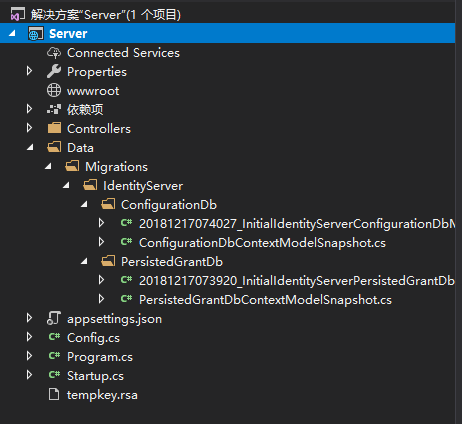
(9)在Startup.cs中添加初始化数据库方法。
private void InitializeDatabase(IApplicationBuilder app)

{

    using (var serviceScope = app.ApplicationServices.GetService<IServiceScopeFactory>().CreateScope())

    {

        serviceScope.ServiceProvider.GetRequiredService<PersistedGrantDbContext>().Database.Migrate();

        var context = serviceScope.ServiceProvider.GetRequiredService<ConfigurationDbContext>();

        context.Database.Migrate();

        if (!context.Clients.Any())

        {

            foreach (var client in Config.GetClients())

            {

                context.Clients.Add(client.ToEntity());

            }

            context.SaveChanges();

        }

        if (!context.IdentityResources.Any())

        {

            foreach (var resource in Config.GetIdentityResources())

            {

                context.IdentityResources.Add(resource.ToEntity());

            }

            context.SaveChanges();

        }

        if (!context.ApiResources.Any())

        {

            foreach (var resource in Config.GetApiResources())

            {

                context.ApiResources.Add(resource.ToEntity());

            }

            context.SaveChanges();

        }

    }

}
添加引用:
using IdentityServer4.EntityFramework.DbContexts;
using IdentityServer4.EntityFramework.Mappers;
(10)在Startup.cs中的Configure方法修改成以下代码。
  public void Configure(IApplicationBuilder app, IHostingEnvironment env)

        {

            //if (env.IsDevelopment())

            //{

            //    app.UseDeveloperExceptionPage();

            //}

            InitializeDatabase(app);

            //app.UseMvc();

        }
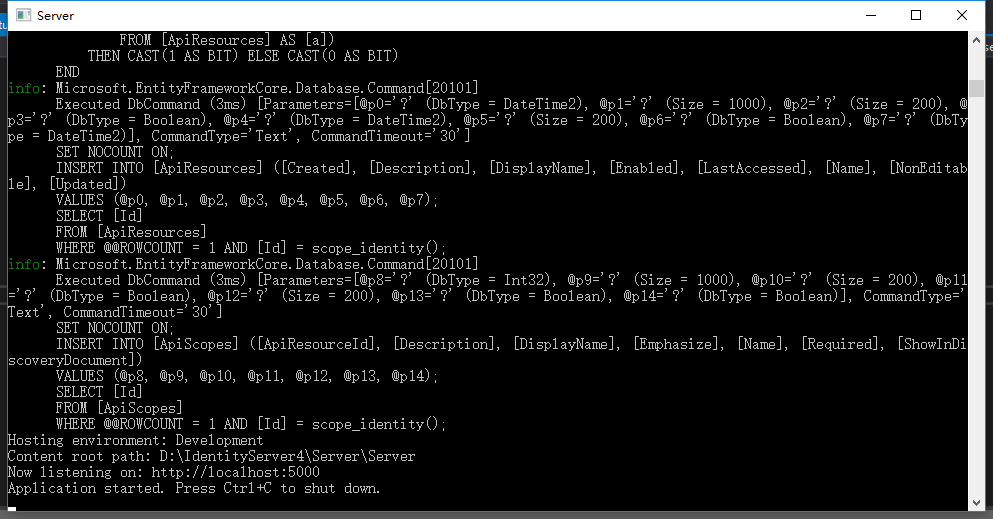
到这里,把项目以控制台形式运行
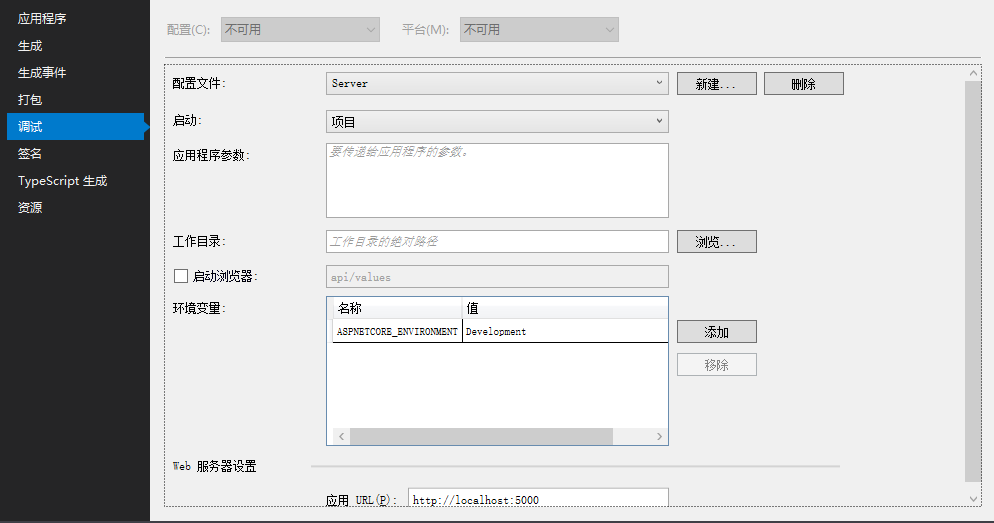

点击运行,可以跑起来,且生成数据库IdentityServer4DB。

关于Client的说明可以查阅官网资料:https://identityserver4.readthedocs.io/en/release/reference/client.html
源码地址:https://github.com/Bingjian-Zhu/Server.git
服务端准备好之后,下篇文章开始介绍Client客户端的应用。
文中如有错漏,欢迎指正,将对此系列文章进行维护。
从Client应用场景介绍IdentityServer4(一)的更多相关文章
- 从Client应用场景介绍IdentityServer4(五)
原文:从Client应用场景介绍IdentityServer4(五) 本节将在第四节基础上介绍如何实现IdentityServer4从数据库获取User进行验证,并对Claim进行权限设置. 一.新建 ...
- 从Client应用场景介绍IdentityServer4(四)
原文:从Client应用场景介绍IdentityServer4(四) 上节以对话形式,大概说了几种客户端授权模式的原理,这节重点介绍Hybrid模式在MVC下的使用.且为实现IdentityServe ...
- 从Client应用场景介绍IdentityServer4(三)
原文:从Client应用场景介绍IdentityServer4(三) 在学习其他应用场景前,需要了解几个客户端的授权模式.首先了解下本节使用的几个名词 Resource Owner:资源拥有者,文中称 ...
- 从Client应用场景介绍IdentityServer4(二)
原文:从Client应用场景介绍IdentityServer4(二) 本节介绍Client的ClientCredentials客户端模式,先看下画的草图: 一.在Server上添加动态新增Client ...
- 消息中间件activemq的使用场景介绍(结合springboot的示例)
一.消息队列概述 消息队列中间件是分布式系统中重要的组件,主要解决应用耦合,异步消息,流量削锋等问题.实现高性能,高可用,可伸缩和最终一致性架构.是大型分布式系统不可缺少的中间件. 目前在生产环境,使 ...
- Redis 中 5 种数据结构的使用场景介绍
这篇文章主要介绍了Redis中5种数据结构的使用场景介绍,本文对Redis中的5种数据类型String.Hash.List.Set.Sorted Set做了讲解,需要的朋友可以参考下 一.redis ...
- Memcache应用场景介绍
面临的问题 对于高并发高訪问的Web应用程序来说,数据库存取瓶颈一直是个令人头疼的问题.特别当你的程序架构还是建立在单数据库模式,而一个数据池连接数峰 值已经达到500的时候,那你的程序执行离崩溃的边 ...
- SharePoint Server 2013开发之旅(一):新的开发平台和典型开发场景介绍
我终于开始写这个系列文章,实际上确实有一段时间没有动笔了.最近重新安装了一套SharePoint Server 2013的环境,计划利用工作之余的时间为大家写一点新的东西. SharePoint Se ...
- ZooKeeper应用场景介绍
ZooKeeper是一个高可用的分布式数据管理与系统协调框架.维护着一个树形层次结构,书中的节点被称为znode.znode可以用来存储数据,并且有一个与之相关联的ACL(权限),znode不能大于1 ...
随机推荐
- php 获取隔日日期
php获取日期时间 <?php date_default_timezone_set('PRC'); //默认时区 echo "今天:",date("Y-m-d&qu ...
- 每日技术总结:filter(),Bscroll
前言: 这是一个vue的电商项目,使用express后端提供数据. 1.filter()函数. 事情是这样的.我从数据库拿到了所有分类数据. 分类有三个等级.父类,子类,孙类这样.但它们都在同一张表里 ...
- 一位90后程序员的自述:如何从年薪3w到30w!
初入职场之时,大多数人都应该考虑过这样的一个问题,如何找到一种实用,简化web流程的方法,在工作之中能有所提升和突破. 学好哪些?基础必须精通! 九层之塔,起于垒土;千里之行,始于足下.入门之前,这些 ...
- Engine工具栏按钮的使用详解
转自原文 Engine自定义控件实现toolbar功能 Engine提供的工具条能够轻易实现各种操作,非常方便,可是不好的地方就是太死板了,toolbar的图标都不能改.因此需要自己做按钮做控件去实现 ...
- 使用C#版本的gdal库打开hdf文件
作者:朱金灿 来源:http://blog.csdn.net/clever101 最近应同事的请求帮忙研究下使用C#版的gdal库读取hdf文件,今天算是有一点成果,特地做一些记录. 首先是编译C#版 ...
- 【50.26%】【hdu 5907】Find Q
Time Limit: 2000/1000 MS (Java/Others) Memory Limit: 262144/131072 K (Java/Others) 问题描述 Byteasar迷恋上了 ...
- php实现求字符串第一个只出现一次的字符
php实现求字符串第一个只出现一次的字符 一.总结 很简单的逻辑 1.两个数组,一个存字母,一个存字母出现的次数 二.php实现求字符串第一个只出现一次的字符 题目描述 在一个字符串(1<=字符 ...
- Volley框架源代码分析
Volley框架分析Github链接 Volley框架分析 Volley源代码解析 为了学习Volley的网络框架,我在AS中将Volley代码又一次撸了一遍,感觉这样的照抄代码也是一种挺好的学习方式 ...
- js进阶 11-12 jquery如何实现节点的删除和复制
js进阶 11-12 jquery如何实现节点的删除和复制 一.总结 一句话总结:remove().detach().empty()方法 1.jquery删除节点中的remove()方法和detac ...
- [GraphQL] Add an Interface to a GraphQL Schema
As we start building out more complex GraphQL schemas, certain fields start to repeat across differe ...