
How to : SAP PI Cache Refresh
Requirement : Identify various tools/resources available to perform SAP PI Cache refresh .
Please note : Do not perform cache refresh when there are messages under processing, especially there are synchronous messages under processing.
The complete cache refresh should only be used in case of emergency, e. g. when the cache is inconsistent for whatever reasons and can not be made consistent using partial cache refresh
Following cache are present in SAP PI .
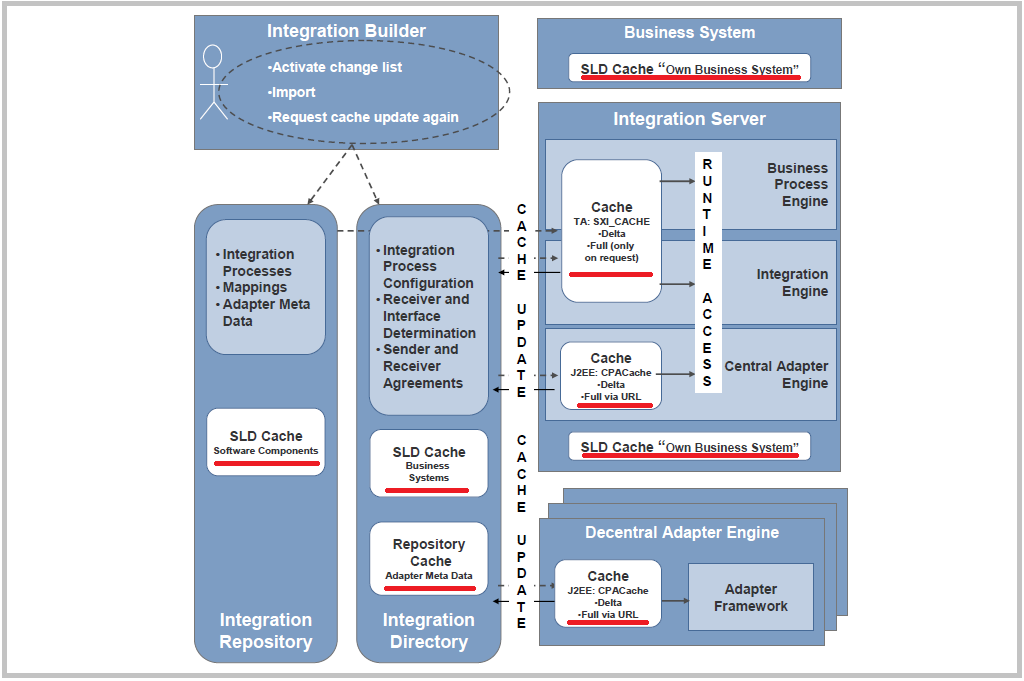
Adapter Engine Runtime Cache (CPA cache).
The cache of the Adapter Engine is called CPA Cache. It contains configuration information as e.g. adapter IDs that run on the J2EE Engine.
Thus, it is important that the refresh of this cache is working correctly.
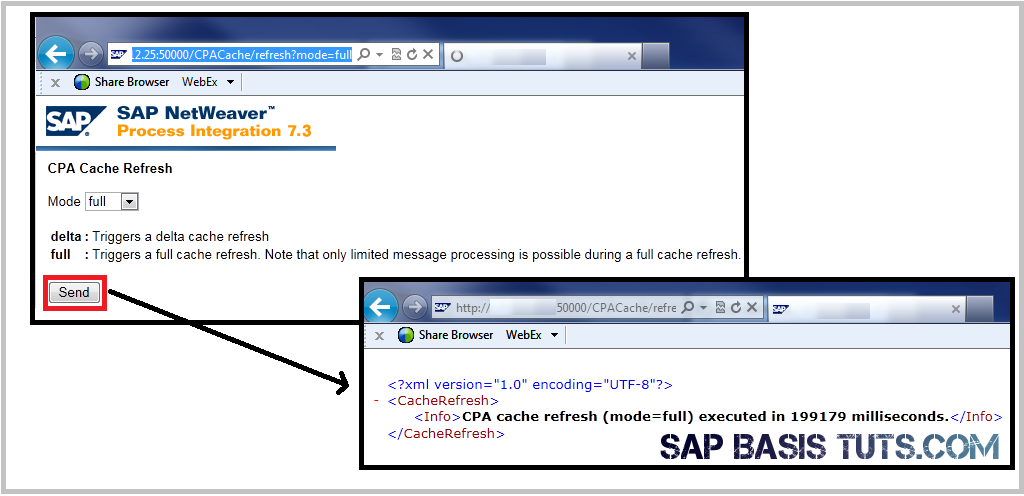
To perform cache refresh open a browser window and call the URL: http://:500/CPACache/refresh?mode=delta.
A full CPA Cache Refresh is triggered by executing the following URL: http://:500/CPACache/refresh?mode=full
Depending on the SAP PI Version , you may get following screen to choose again from "Full or Delta" . Select the required mode and press send.
Use the PIDIRUSER to authenticate yourself, it is the only user that is allowed to carry out a CPA Cache Refresh.
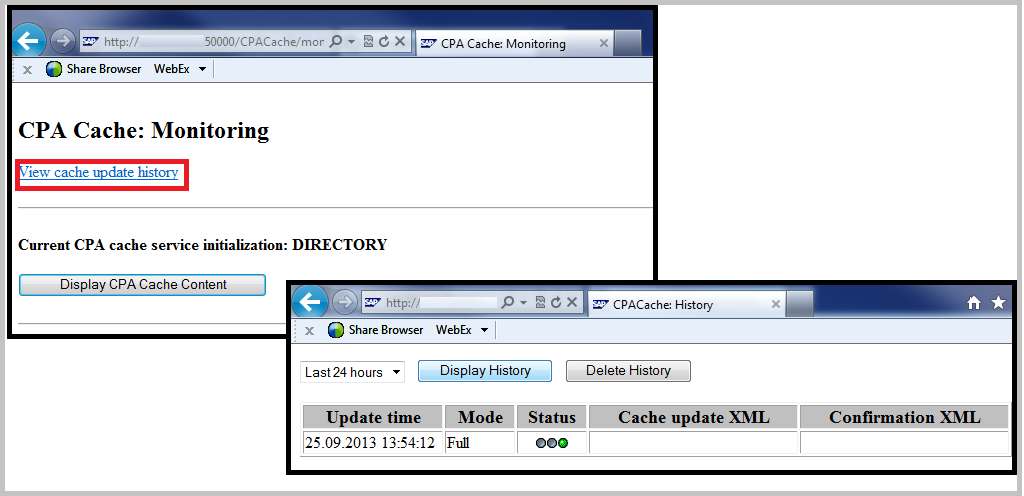
You can also view the content/ history of cache refreshes in a browser window by calling the following URL:
http://:/CPACache
Integration Service Runtime Cache(ABAP).
SXI_Cache : Integration Directory and Integration Repository data .
Integration Repository and Integration Directory data that is transferred to the runtime can be viewed in transaction SXI_CACHE. We can trigger a manual refresh by choosing an option under Runtime Cache menu.
We have following options for cache refresh:
• Start Complete Cache Refresh
• Start Delta Cache Refresh
Go to Transaction SXI_CACHE > Runtime Cache > Start Delta Cache Refresh

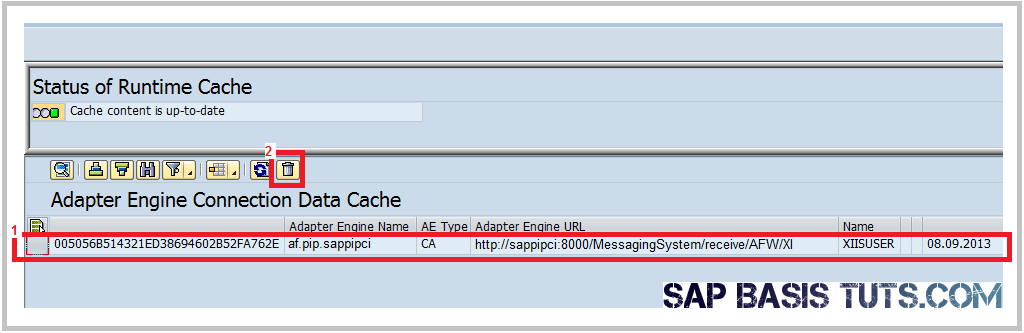
SXI_Cache :Adapter Engine Connection Data Cache :
Adapter Engine cache store the URLs of Adapter Engines including the central and non-central Adapter Engines, which is used by the Integration Engine to pass a message to the central or non-central Adapter Engine messaging system when the receiving system uses a JCA based adapter channels.
Refresh of this cache is required whenever there is a change in URL and Port of Adapter Engine.
Go to Transaction SXI_CACHE >Go to > Adapter Engine Cache , Select the cache entry and press the 'DELETE' button.
SLD Cache : Own Business System (ABAP).
SLD data of the business system is cached in table LCRT_CLNTCACHE .This data can be refreshed using function module LCR_CLEAR_CACHE .
Use transaction SE37 or Se38 to execute this function module.

The Integration Repository, Directory and Runtime Cache
Software component versions maintained in the System Landscape Directory (SLD) are cached in the Integration Repository when the data is first requested.
The cache refresh can be requested either in the Enterprise Services Repository or in the Administration section. The cache refresh is the same for both options.
- Cache refresh from Enterprise Services Repository (ESR) and Integration Directory (DIR) tools.
to launch the tools enter following URL in browser
URL for ESR ( Enterprise Services Repository or Integration repository) : http://:500/rep
Now go to Environment > Clear SLD Data Cache.

We can also perform this activity in other SAP PI tool - Integration Directory (ID)
URL for Integration Directory http://:500/dir for example http://sappipci.company.com:51000/dir
- Cache refresh from the Administration section on the SAP Exchange Infrastructure start page.
To launch the Administration Section of SAP PI , enter following URL in browser http://:500/dir .
Now go to Administration
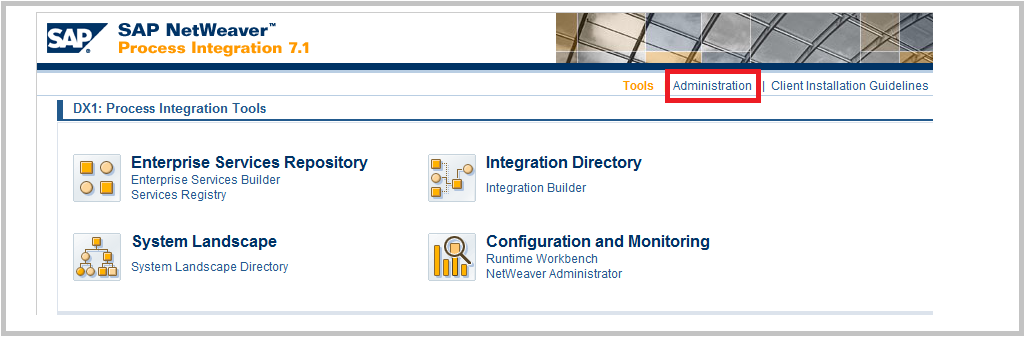
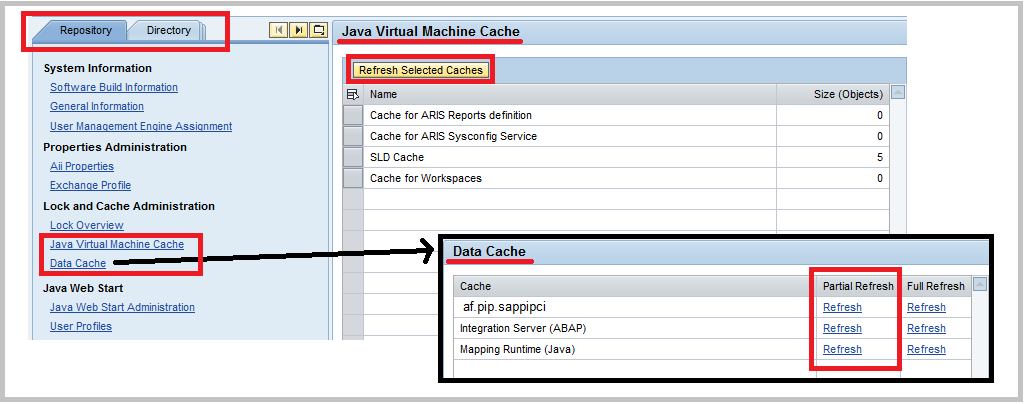
You can also perform refresh for Directory and Runtime components by selecting the required tab from top.
Reference :
SAP Note 1383148 Error in cache connectivity test
SAP Note 1372866 SAP_XI_ADMINISTRATOR added S_XMB_AUTH,value=CACHE, activity=01
SAP Note 1377033 How to perform a Single Repository Object Cache Refresh
SAP Note 1365480 Error in full cache refresh in https mode
SAP Note 1342064 Insufficient monitoring for SXI_CACHE
SAP Note 1337797 XI cache: FAQ about parameter CACHE_DIRTY_READ
SAP Note 1259998 FAQ: Central Web service configuration using PI
SAP Note 1177441 XI cache: Error when reading HTTP destination
SAP Note 1157385 IDoc adapter: IDocs with status 03 and in XI not transferred
SAP Note 1117249 Incomplete Registration of PI components in SLD
SAP Note 1122879 Introduction of a restricted permission for cache refresh
SAP Note 907957 IDoc adapter: Metadata inconsistent after update
SAP Note 897656 NO_MAPPINGPROGRAM_FOUND after you import a SWCV
SAP Note 881276 CPADirectoryCacheException during J2EE Engine startup
SAP Note 865137 Full CPA Cache refresh can cause duplicate channel execution
SAP Note 857890 Cache status after deleting SWC or hierarchy relationship
SAP Note 807000 Http requests are not fully read after timeout
SAP Note 764176 Error in XI due to inconsistent SLD contents
SAP Note 741214 Troublesh. during cache update of the J2EE CPACache service
SAP Note 732681 XI 3.0: Buffering SLD data
SAP Note 730870 FAQ XI 3.0/ PI 7.0/ PI 7.1 RFC Adapter
How to : SAP PI Cache Refresh的更多相关文章
- SAP PI入门
本教程的目的是让读者理解:SAP Process Intergration(以下简称SAP PI)是什么.我们不需要探究课题的本质,但是会讨论SAP PI的架构和不同特点.本文只会覆盖到PI的基本特点 ...
- REST Adapter实现SAP PI中的增强XML/JSON格式转换
SAP标准的REST adapter有着XML/JSON转换的功能,它很有用,因为一方面SAP PI/PO内部以XML格式处理数据,而另一方面,在处理REST架构风格的时候,JSON才是事实上的格式. ...
- SAP PI
PI功能很是强大,且系统很稳定. 1.什么是PI PI = Process IntegrationSAP PI是一项集成的技术和平台 1.为sap和non-sap之间提供集成 2.为A2A ...
- 应用SAP PI实现SAP BW数据仓库对于第三方系统数据完美集成以及DELTA加载的分析
注明:本篇的技术性细节参考了SAP SCN上的一篇SAP PI 和BW集成的文章,本篇文章并不打算过多探讨实现的技术细节,因为在SCN上的这篇英文文章已经完全涵盖了技术细节和配置步骤 大家可以通过搜索 ...
- REST Adapter实现SAP PI中的增强XML/JSON格式转换(转载)
SAP标准的REST adapter有着XML/JSON转换的功能,它很有用,因为一方面SAP PI/PO内部以XML格式处理数据,而另一方面,在处理REST架构风格的时候,JSON才是事实上的格式. ...
- SAP CRM和C4C数据同步的两种方式概述:SAP PI和HCI
SAP Cloud for Customer(C4C)和SAP其他传统产品进行数据同步的方式,如下图所示,可以使用SAP Netweaver Process Integration或者SAP HANA ...
- SAP PI开发手册-ERP发布服务供外围系统调用(RFC类型)
1转自:https://www.cnblogs.com/fanjb/p/10677018.html 8年进入国网项目后陆陆续续做了一些接口,按实现方法去分有RFC和代理类sproxy类型,按服务提供方 ...
- SAP PI开发手册-ERP发布服务供外部系统调用(sproxy代理类)
转自:https://www.cnblogs.com/fanjb/p/10829858.html 一. 接口内容 接口详细信息 1. 字段对应关系 发送字段对应关系 返回字段对应关系 2. ...
- SAP PI接口(RFC类型)在函数字段修改或增加后,出现字段映射错误问题
在解决标题所言问题之前,我们先回头看看RFC和sproxy这两种接口的优缺点. 关于PI接口的实现,目前我了解到的各大国企项目像中海油.中石化.国网等,普遍实现方式是RFC和代理类sproxy这两种. ...
随机推荐
- 一个80后妈妈的邪淫忏悔(转自学佛网:http://www.xuefo.net/nr/article55/551761.html)
我是一个80后独生女,2012年因为孩子小产后,痛苦难当,悲伤中想起可为孩子超度,因此开始了与佛法的缘分.断断续续几年的学习,才真的知道了邪淫的可怕 我从小面容姣好,气质超群,一直被父母,老师宠爱.想 ...
- Spring Cloud API网关服务 5.2
为什么需要API网关 通过前面内容的学习,我们已经可以构建一个简单的微服务架构系统.这个系统可以使用Spring Boot实现微服务的开发,使用Spring Cloud Eureka实现注册中心以及服 ...
- CentOS "libc.so.6: version 'GLIBC_2.14' not found"解决方法,同理'GLIBC_2.15' not found"
出现"libc.so.6: version 'GLIBC_2.14' not found"问题,是由于glibc版本过低,升级glibc即可. 由于CentOS系统RPM源目前gl ...
- windows7 + iis7 + fastcgi + php5 + netbeans + xdebug 调试 php
Xdebug是一个开放源代码的PHP程序调试器(即一个Debug工具),可以用来跟踪,调试和分析PHP程序的运行状况. windows7 + iis7 + fastcgi + php5 + netbe ...
- C#Json数据反序列化为Dictionary并根据关键字获取指定的值
Json数据: { "dataSet": { "header": { ", "errorInfo": "HTTP请求错误 ...
- unsupported media type 415
jquery ajax请求报错解决方案: 两点: data: JSON.stringify(obj), contentType:"application/json", 完整pos ...
- vue react 路由history模式刷新404问题解决方案
vue单页因微信分享和自动登录需要,对于URL中存在’#’的地址,处理起来比较坑.用history模式就不会存在这样的问题.但是换成history模式,就会有个新的问题,就是页面刷新后,页面就无法显示 ...
- Linux18.04换源等等等配置
root用户 sudo passwd root 安装Tools 文件→其他位置→Vmware Tools→打开终端. 管理员权限→copy→tar -zxvf 文件名解压→打开vmware-tools ...
- Vue + ElementUI的电商管理系统实例01 登录表单
效果图: 1.首先来根据Element网站实现布局: <template> <div class="login_container"> <div cl ...
- axios 使用入门
[Vue 牛刀小试]:第十五章 - 传统开发模式下的 axios 使用入门 一.前言# 在没有接触 React.Angular.Vue 这类 MVVM 的前端框架之前,无法抛弃 Jquery 的重 ...