
Django REST framework+Vue 打造生鲜电商项目(笔记三)
(PS:转载自http://www.cnblogs.com/derek1184405959/p/8810591.html 有修改)
一、drf的过滤
(1)添加到app里面
INSTALLED_APPS = [

     'django_filters',

]
(2)新建filter.py
自定义一个过滤器
# goods/filters.py

import django_filters

from .models import Goods

class GoodsFilter(django_filters.rest_framework.FilterSet):

    '''

    商品过滤的类

    '''

    #两个参数,name是要过滤的字段,lookup是执行的行为,‘小与等于本店价格’。

    #注意,这里我用的django-filter是2.0.0,因此跟视频教程中不一样,所以这里的

    #name="shop_price"要改为field_name="shop_price",不然报错

    price_min = django_filters.NumberFilter(name="shop_price", lookup_expr='gte')

    price_max = django_filters.NumberFilter(name="shop_price", lookup_expr='lte')

    class Meta:

        model = Goods

        fields = ['price_min', 'price_max']
(3)views.py
from .filters import GoodsFilter

from django_filters.rest_framework import DjangoFilterBackend

class GoodsListViewSet(mixins.ListModelMixin,viewsets.GenericViewSet):

    '商品列表页'

    #这里必须要定义一个默认的排序,否则会报错

    queryset = Goods.objects.all().order_by('id')

    # 分页

    pagination_class = GoodsPagination

    serializer_class = GoodsSerializer

    filter_backends = (DjangoFilterBackend,)

    # 设置filter的类为我们自定义的类

    filter_class = GoodsFilter
二、drf的搜索和排序
添加搜索功能
搜索的字段可以使用正则表达式,更加的灵活
class GoodsListViewSet(mixins.ListModelMixin,viewsets.GenericViewSet):

    '商品列表页'

    #这里必须要定义一个默认的排序,否则会报错

    queryset = Goods.objects.all().order_by('id')

    # 分页

    pagination_class = GoodsPagination

    serializer_class = GoodsSerializer

    filter_backends = (DjangoFilterBackend,filters.SearchFilter)

    # 设置filter的类为我们自定义的类

    filter_class = GoodsFilter

    #搜索,=name表示精确搜索,也可以使用各种正则表达式

    search_fields = ('=name','goods_brief')
添加排序功能
class GoodsListViewSet(mixins.ListModelMixin,viewsets.GenericViewSet):

    '商品列表页'

    #这里必须要定义一个默认的排序,否则会报错

    queryset = Goods.objects.all()

    # 分页

    pagination_class = GoodsPagination

    #序列化

    serializer_class = GoodsSerializer

    filter_backends = (DjangoFilterBackend,filters.SearchFilter,filters.OrderingFilter)

    # 设置filter的类为我们自定义的类

    #过滤

    filter_class = GoodsFilter

    #搜索,=name表示精确搜索,也可以使用各种正则表达式

    search_fields = ('=name','goods_brief')

    #排序

    ordering_fields = ('sold_num', 'add_time')
三、商品类别数据显示
1、商品类别数据接口
(1)商品分类有两个接口:
一种是全部分类:一级二级三级

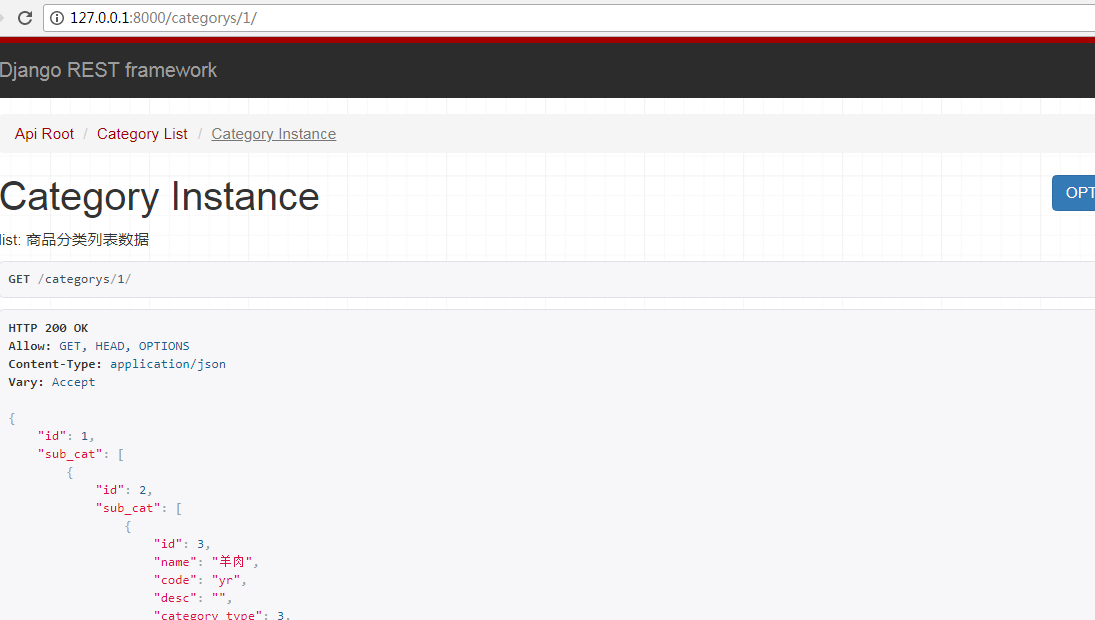
一种是某一类的分类以及商品详细信息("CategoryViewSet"继承"mixins.RetrieveModelMixin"):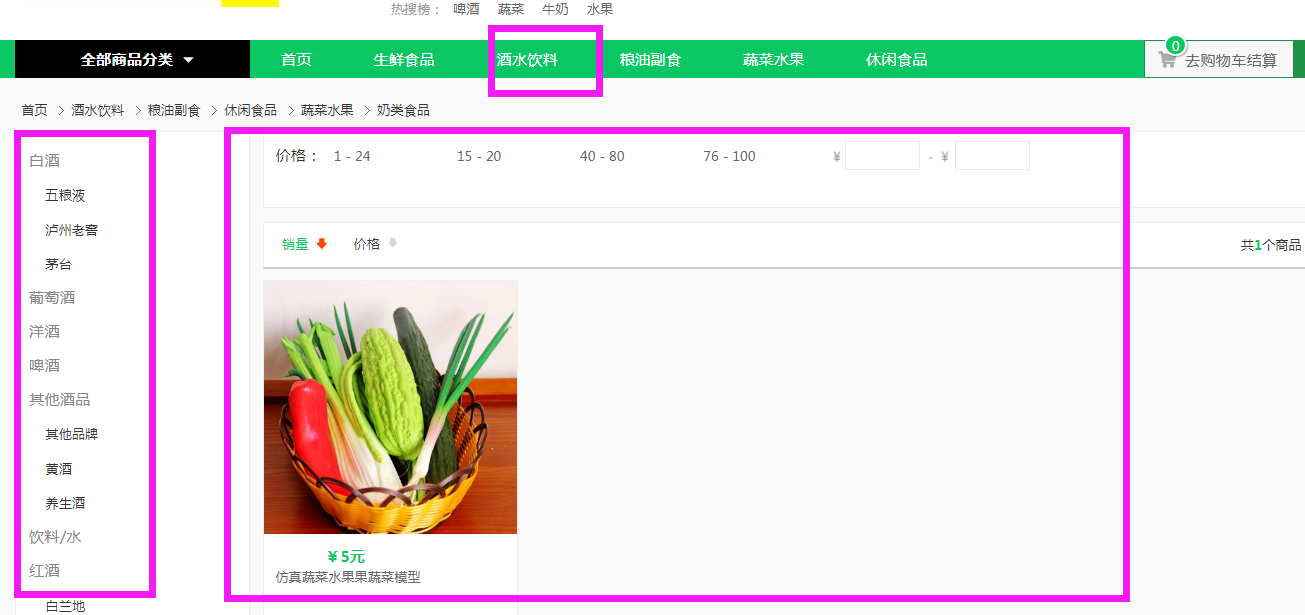
开始写商品分类的接口
(2)序列化
给分类添加三级分类的serializer
goods/serializers.py
from rest_framework import serializers

from .models import Goods,GoodsCategory

class CategorySerializer3(serializers.ModelSerializer):

    '''三级分类'''

    class Meta:

        model = GoodsCategory

        fields = "__all__"

class CategorySerializer2(serializers.ModelSerializer):

    '''

    二级分类

    '''

    #在parent_category字段中定义的related_name="sub_cat"

    sub_cat = CategorySerializer3(many=True)

    class Meta:

        model = GoodsCategory

        fields = "__all__"

class CategorySerializer(serializers.ModelSerializer):

    """

    商品一级类别序列化

    """

    sub_cat = CategorySerializer2(many=True) # “many=True”表示不止一个二级分类

    class Meta:

        model = GoodsCategory

        fields = "__all__"
(3)views.py
class CategoryViewSet(mixins.ListModelMixin, mixins.RetrieveModelMixin, viewsets.GenericViewSet):

    '''

    list:

        商品分类列表数据

    '''

    queryset = GoodsCategory.objects.filter(category_type=1)

    serializer_class = CategorySerializer
说明:
- 注释的内容,在后面生成drf文档的时候会显示出来,所有要写清楚
- 要想获取某一个商品的详情的时候,继承 mixins.RetrieveModelMixin 就可以了(本来按照以前的做法,获取详情页需要我们配置url,以便获取某个商品id,但这些viewsets.GenericViewSet已经
- 替我们完成了,不需要我们自己动手写代码)
(4)url配置
# 配置Category的url

router.register(r'categorys', CategoryViewSet, base_name="categorys")
2、vue展示商品分类数据
接口相关代码都放在src/api/api.js里面,调试接口的时候我们首先需要新建一个自己的host,然后替换要调试的host
(1)新建local_host
let local_host = 'http://127.0.0.1:8000'
(2)替换商品类别默认的host
//获取商品类别信息

export const getCategory = params => {

  if('id' in params){

    return axios.get(`${local_host}/categorys/`+params.id+'/');

  }

  else {

    return axios.get(`${local_host}/categorys/`, params);

  }

};
这个时候访问 http://127.0.0.1:8080/#/app/home/index
发现不显示商品分类了,是因为这涉及到了跨域问题,接下来就解决跨域的问题
(前端端口是8080,后端接口是8000,端口不同导致了跨域问题)

drf跨域问题
后端服务器解决跨域问题的方法
(1)安装模块
pip install django-cors-headers
django-cors-headers 使用说明:https://github.com/ottoyiu/django-cors-headers
(2)添加到INSTALL_APPS中
INSTALLED_APPS = (

    ...

    'coreschema',

 ... )
(3)添加中间件
下面添加中间件的说明:
CorsMiddleware should be placed as high as possible, especially before any middleware that can generate responses such as Django's CommonMiddleware or Whitenoise's WhiteNoiseMiddleware. If it is not before, it will not be able to add the CORS headers to these responses.
Also if you are using CORS_REPLACE_HTTPS_REFERER it should be placed before Django's CsrfViewMiddleware (see more below).
意思就是 要放的尽可能靠前,必须在CsrfViewMiddleware之前。我们直接放在第一个位置就好了
MIDDLEWARE = [

    'corsheaders.middleware.CorsMiddleware',

    'django.middleware.security.SecurityMiddleware',

    'django.contrib.sessions.middleware.SessionMiddleware',

    'django.middleware.common.CommonMiddleware',

    'django.middleware.csrf.CsrfViewMiddleware',

    'django.contrib.auth.middleware.AuthenticationMiddleware',

    'django.contrib.messages.middleware.MessageMiddleware',

    'django.middleware.clickjacking.XFrameOptionsMiddleware',

]
(4)设置为True
CORS_ORIGIN_ALLOW_ALL = True
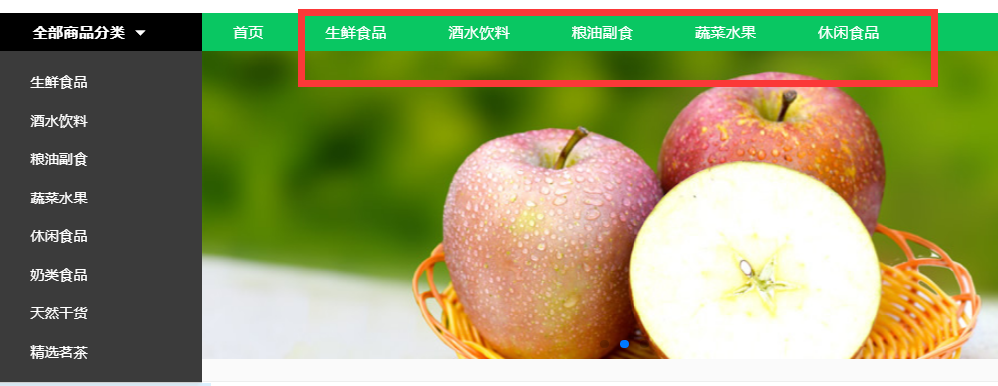
现在再访问 http://127.0.0.1:8080/#/app/home/index 数据就可以填充进来了
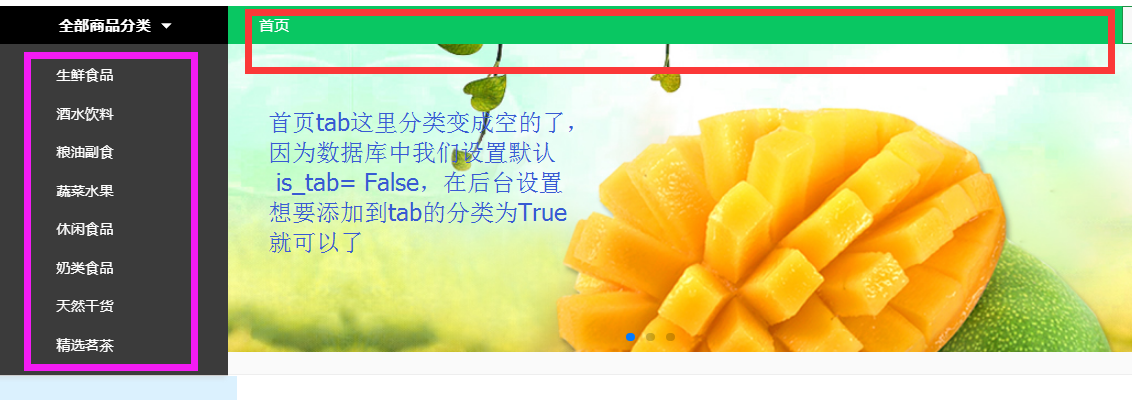
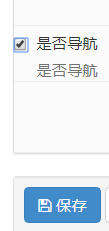
在一级分类中设置为True
3、vue展示商品列表页数据
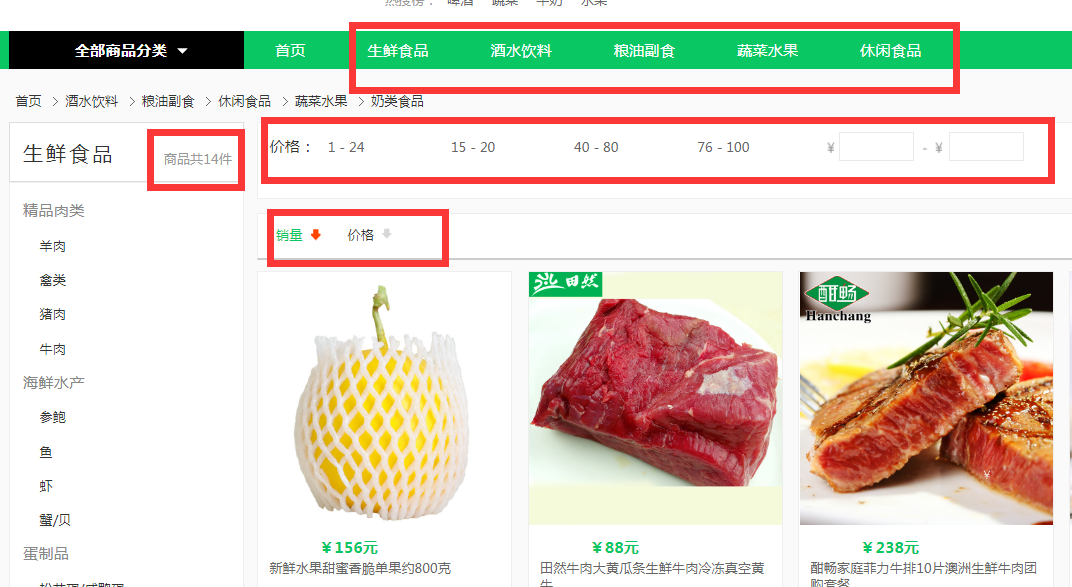
这里我们点击“tab”栏进行搜索和点击“热门关键词”进行搜索,左侧列表栏显示的数据是不一样的。点击“tab”栏,左侧显示的是一级和二级列表,点击“热门关键词”进行搜索,左侧显示的是三级的列表信息。那么是如何做到这点的呢??主要还是在前端,不同的方式搜索,虽然用的是同一个组件,但是所附加的参数不同,这样就区别开来了。
商品列表页会判断我们是serach还是getGoods
getListData() {

                if(this.pageType=='search'){

                  getGoods({

                    search: this.searchWord, //搜索关键词

                  }).then((response)=> {

                    this.listData = response.data.results;

                    this.proNum = response.data.count;

                  }).catch(function (error) {

                    console.log(error);

                  });

                }else {

                  getGoods({

                    page: this.curPage, //当前页码

                    top_category: this.top_category, //商品类型

                    ordering: this.ordering, //排序类型

                    pricemin: this.pricemin, //价格最低 默认为‘’ 即为不选价格区间

                    pricemax: this.pricemax // 价格最高 默认为‘’

                  }).then((response)=> {

                    this.listData = response.data.results;

                    this.proNum = response.data.count;

                  }).catch(function (error) {

                    console.log(error);

                  });

                }

            },
说明:
(1)page分页
page_size数量与前端一致
页码参数与起前端一致"page"
class GoodsPagination(PageNumberPagination):

    '''

    商品列表自定义分页

    '''

    #默认每页显示的个数

    page_size = 12

    #可以动态改变每页显示的个数

    page_size_query_param = 'page_size'

    #页码参数

    page_query_param = 'page'

    #最多能显示多少页

    max_page_size = 100
(2)过滤
top_category是商品的一级分类,需要传入参数:一级分类的id
pricemin和pricemax与前端保持一致
获取一级分类下的所有商品
# goods/filters.py

import django_filters

from .models import Goods

from django.db.models import Q

class GoodsFilter(django_filters.rest_framework.FilterSet):

    '''

    商品过滤的类

    '''

    #两个参数,name是要过滤的字段,lookup是执行的行为,‘小与等于本店价格’

    pricemin = django_filters.NumberFilter(name="shop_price", lookup_expr='gte')

    pricemax = django_filters.NumberFilter(name="shop_price", lookup_expr='lte')

    top_category = django_filters.NumberFilter(name="category", method='top_category_filter')

  # 自定义我们想要的过滤逻辑

    def top_category_filter(self, queryset, name, value):

        # 不管当前点击的是一级分类二级分类还是三级分类,都能找到。

        return queryset.filter(Q(category_id=value) | Q(category__parent_category_id=value) | Q(

            category__parent_category__parent_category_id=value))

    class Meta:

        model = Goods

        fields = ['pricemin', 'pricemax']
(3)排序
GoodsListViewSet中ording与前端要一致

 #排序

 ordering_fields = ('sold_num', 'shop_price')
(4)替换为local_host
//获取商品列表

export const getGoods = params => { return axios.get(`${local_host}/goods/`, { params: params }) }
(5)搜索
#搜索

search_fields = ('name', 'goods_brief', 'goods_desc')
现在就可以从后台获取商品的数据了,主要功能
- 分类过滤
- 价格区间过滤
- 显示商品数量
- 分页
- 搜索
Django REST framework+Vue 打造生鲜电商项目(笔记三)的更多相关文章
- Django REST framework+Vue 打造生鲜电商项目(笔记二)
(转自https://www.cnblogs.com/derek1184405959/p/8768059.html)(有修改) 接下来开始引入django resfulframework,体现它的强大 ...
- Django REST framework+Vue 打造生鲜电商项目(笔记四)
(PS:部分代码和图片来自博客:http://www.cnblogs.com/derek1184405959/p/8813641.html.有增删) 一.用户登录和手机注册 1.drf的token功能 ...
- Django REST framework+Vue 打造生鲜电商项目(笔记十)
(from:https://www.cnblogs.com/derek1184405959/p/8877643.html 有修改) 十三.首页.商品数量.缓存和限速功能开发 首先把pycharm环境 ...
- Django REST framework+Vue 打造生鲜电商项目(笔记九)
(from:http://www.cnblogs.com/derek1184405959/p/8859309.html) 十二.支付宝沙箱环境配置 12.1.创建应用 进入蚂蚁金服开放平台(https ...
- Django REST framework+Vue 打造生鲜电商项目(笔记十一)
(form: http://www.cnblogs.com/derek1184405959/p/8886796.html 有修改) 十四.social_django 集成第三方登录 1.申请应用 进入 ...
- Django REST framework+Vue 打造生鲜电商项目(笔记八)
(form:http://www.cnblogs.com/derek1184405959/p/8862569.html) 十一.pycharm 远程代码调试 第三方登录和支付,都需要有服务器才行(回调 ...
- Django REST framework+Vue 打造生鲜电商项目(笔记七)
十.购物车.订单管理和支付功能 1.添加商品到购物车 (1)trade/serializer.py 这里的serializer不继承ModelSerializer,是因为自己写的Serializer更 ...
- Django REST framework+Vue 打造生鲜电商项目(笔记一)
首先,这系列随笔是我个人在学习Bobby老师的Django实战项目中,记录的觉得对自己来说比较重要的知识点,不是完完整整的项目步骤过程....如果有小伙伴想找完整的教程,可以看看这个(https:// ...
- Django REST framework+Vue 打造生鲜电商项目(笔记六)
(部分代码来自https://www.cnblogs.com/derek1184405959/p/8836205.html) 九.个人中心功能开发 1.drf的api文档自动生成 (1) url #d ...
随机推荐
- Python/C++ in Visual Studio: An Alternative to Matlab/MEX
来自Andrew Delong的博客 http://andrewdelong.wordpress.com/2012/11/03/pythonc-in-visual-studio-an-alternat ...
- (3)Spring Boot日志
文章目录 选择哪一种日志框架 日志的使用 Spring Boot 日志使用 选择哪一种日志框架 市面上日志门面有: JCL(Jakart Commons Logging) .SLF4J(Simple ...
- Sublim text 3 同步 eclipse 快捷键
首选项>按键绑定>用户 配置内容(注意为JSON格式!) [ { "keys": ["shift+enter"], "command&qu ...
- Go part 6 接口,接口排序,接口嵌套组合,接口与类型转换,接口断言
接口 接口是一种协议,比如一个汽车的协议,就应该有 “行驶”,“按喇叭”,“开远光” 等功能(方法),这就是实现汽车的协议规范,完成了汽车的协议规范,就实现了汽车的接口,然后使用接口 接口的定义:本身 ...
- 基于re模块的计算器
最终计算器需求: 实现加减乘除及拓号优先级解析 用户输入 1 - 2 * ( (60-30 +(-40/5) * (9-2*5/3 + 7 /3*99/4*2998 +10 * 568/14 )) - ...
- 前端相关UED团队和个人博客整理
平时收集的UED的团队和个人博客一些有关/*********************************这次真的是搬运工,原文转载自蓝色理想********************/ 前端团队推荐 ...
- js中的BOM和DOM常用事件方法
笔记: window对象 ● window.innerHeight - 浏览器窗口的内部高度 ● window.innerWidth - 浏览器窗口的内部宽度 ● window.open() - 打开 ...
- 记一次有趣的tp5代码执行
0x00 前言 朋友之前给了个站,拿了很久终于拿下,简单记录一下. 0x01 基础信息 漏洞点:tp 5 method 代码执行,payload如下 POST /?s=captcha _method= ...
- 高并发编程系列:ConcurrentHashMap的实现原理(JDK1.7和JDK1.8)
HashMap.CurrentHashMap 的实现原理基本都是BAT面试必考内容,阿里P8架构师谈:深入探讨HashMap的底层结构.原理.扩容机制深入谈过hashmap的实现原理以及在JDK 1. ...
- 利用EasyUI 数据网格(DataGrid)的loader属性实现后端分页
该属性在easyui官方文档中并没有详细阐述,通过简单的资料查询和摸索,实现了easyUI数据网格的后端分页功能. 在官网文档中这样阐述loader属性: 定义如何从远程服务器加载数据.返回false ...