
Bitmap之getPixel和setPixel函数
package com.loaderman.customviewdemo;

import android.app.Activity;

import android.graphics.Bitmap;

import android.graphics.BitmapFactory;

import android.graphics.Color;

import android.os.Bundle;

import android.widget.ImageView;

public class MainActivity extends Activity {

    @Override

    protected void onCreate(Bundle savedInstanceState) {

        super.onCreate(savedInstanceState);

        setContentView(R.layout.activity_main);

        Bitmap srcBmp = BitmapFactory.decodeResource(getResources(), R.drawable.dog);

        ImageView iv1 = (ImageView) findViewById(R.id.img1);

        iv1.setImageBitmap(srcBmp);

        Bitmap desBmp = srcBmp.copy(Bitmap.Config.ARGB_8888, true);

        for (int h = 0; h < srcBmp.getHeight(); h++) {

            for (int w = 0; w < srcBmp.getWidth(); w++) {

                int originColor = srcBmp.getPixel(w, h);

                int red = (Color.red(originColor));

                int alpha = Color.alpha(originColor);

                int green = Color.green(originColor);

                int blue = Color.blue(originColor);

                if (green < 200) {

                    green += 30;

                }

                desBmp.setPixel(w, h, Color.argb(alpha, red, green, blue));

            }

        }

        ImageView iv2 = (ImageView) findViewById(R.id.img2);

        iv2.setImageBitmap(desBmp);

    }

}
效果:
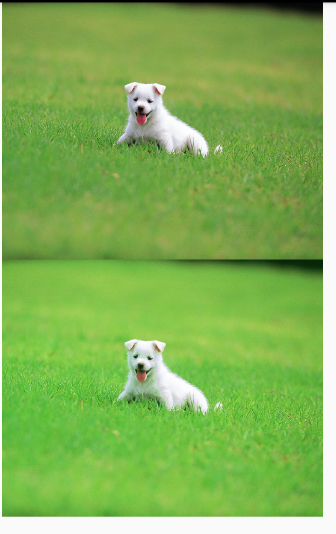
Bitmap之getPixel和setPixel函数的更多相关文章
- 解决 C# GetPixel 和 SetPixel 效率问题(转)
在对Bitmap图片操作的时候,有时需要用到获取或设置像素颜色方法:GetPixel 和 SetPixel, 如果直接对这两个方法进行操作的话速度很慢,这里我们可以通过把数据提取出来操作,然后操作完在 ...
- bitMap算法实现以及ckHash函数类,将字符串映射成数字,同时可以将数字映射成字符串
ckHash函数类,将字符串映射成数字,同时可以将数字映射成字符串 说明 1.所谓的BitMap就是用一个bit位来标记某个元素所对应的value,而key即是该元素,由于BitMap使用了bit位来 ...
- Bitmap之getDensity和setDensity函数
package com.loaderman.customviewdemo; import android.app.Activity; import android.graphics.Bitmap; i ...
- DirectX中文手册
目 录 第一章 DirectX基础(初级篇) 第一节 什么是DirectX 一.什么是DirectX ? 二.DirectX的组成部分 三.关于DirectDraw 四.为什么要使用DirectD ...
- (转)C#进行图像处理的几种方法(Bitmap,BitmapData,IntPtr)
转自 http://blog.sina.com.cn/s/blog_628821950100wh9w.html C#进行图像处理的几种方法 本文讨论了C#图像处理中Bitmap类.BitmapData ...
- .net 反射访问私有变量和私有方法 如何创建C# Closure ? C# 批量生成随机密码,必须包含数字和字母,并用加密算法加密 C#中的foreach和yield 数组为什么可以使用linq查询 C#中的 具名参数 和 可选参数 显示实现接口 异步CTP(Async CTP)为什么那样工作? C#多线程基础,适合新手了解 C#加快Bitmap的访问速度 C#实现对图片文件的压
以下为本次实践代码: using System; using System.Collections.Generic; using System.ComponentModel; using System ...
- 基于位图(Bitmap、BitmapData)的图片处理方法(C#)
目前操作位图的主流方法有三种: 1.基于Bitmap像素的处理方法,以GetPixel()和SetPixel()方法为主.方法调用简单,但是效率偏低. 2.基于内存的像素操作方法,以System.Ru ...
- 加快Bitmap的访问速度
引言 在对Bitmap图片操作的时候,有时需要用到获取或设置像素颜色方法:GetPixel 和 SetPixel, 如果直接对这两个方法进行操作的话速度很慢,这里我们可以通过把数据提取出来操作,然后操 ...
- 对索引像素格式的图片进行Setpixel(具有索引像素格式的图像不支持SetPixel)解决方案
最近编写了一个验证码识别软件.其中对png.jpg图片进行二值化处理时,出现了错误:具有索引像素格式的图像不支持SetPixel解决方案.从字面上来看,这说明我对一个具有索引色的图片进行了直接RGB颜 ...
随机推荐
- Java--8--新特性--Stream API
Stream API 提供了一种高效且易于使用的处理数据的方式,(java.util.stream.*) 他可以对数组,集合等做一些操作,最终产生一个新的流,原数据是不会发生改变的. “集合”讲的是数 ...
- 容器自动化(一):docker基础(上)
一,Docker简介,功能特性与应用场景 1.1 Docker简介 Docker是一个开源的应用容器引擎,让开发者可以打包他们的应用以及依赖包到一个可移植的容器中,然后发布到任何流行的Linux机器上 ...
- Luogu P2935 最好的地方Best Spot
Luogu P2935 最好的地方Best Spot 这道题就是一道近乎裸的Floyd,因为数据很小,所以用领接表存图就可以了. #include<bits/stdc++.h> #defi ...
- python3 wordcloud词云
wordclou:根据文本生成词云 一.词云设置 wc=WordCloud(width=400, height=200, #画布长.宽,默认(400,200)像素 margin=1, #字与字之间的距 ...
- Aure Event Hubs小白完全入门指南
refer to https://www.cnblogs.com/mysunnytime/p/11634815.html?from=groupmessage&isappinstalled=0 ...
- MySQL进阶11--DDL数据库定义语言--库创建/修改/删除--表的创建/修改/删除/复制
/*进阶 11 DDL 数据库定义语言 库和表的管理 一:库的管理:创建/修改/删除 二:表的管理:创建/修改/删除 创建: CREATE DATABASE [IF NOT EXISTS] 库名; 修 ...
- CF436E Cardboard Box(贪心)
题意 有nnn个关卡,第iii关可以花费aia_iai的代价打一颗星,bib_ibi的代价打两颗星.保证1≤ai<bi≤1091\le a_i<b_i\le10^91≤ai<b ...
- 利用Intellij+MAVEN搭建Spring+Mybatis+MySql+SpringMVC项目详解
http://blog.csdn.net/noaman_wgs/article/details/53893948 利用Intellij+MAVEN搭建Spring+Mybatis+MySql+Spri ...
- &和&&,|和||的用法区别
&和&&的区别是,&会执行两边,不管第一个是否成立&&只会执行一边,如果第一个条件为假,则不会走第二个条件举例public class Test2{ p ...
- leetcode解题报告(16):Move Zeroes
描述 Given an array nums, write a function to move all 0's to the end of it while maintaining the rela ...