
服务命令(systemctl的使用)
常用的service与systemctl命令的对比

应用举例:
●start:开启服务

●stop:停止服务

●status:参数来查看服务运行情况

●restart:重新加载服务

应用举例·;

#启动网络服务

systemctl start network

#停止网络服务

systemctl stop network

#查看网络服务状态

systemctl status network

#查看防火墙

systemctl status firewalld
chkconfig命令与systemctl命令对比
设置开机启动/不启动

查看系统上所有的服务
查看系统服务应用举例:
systemctl [command] [-type=TYPE] [-all]          注意——type和——all符号

参数详解:

command -list-units:依据unit列出所有启动的unit。加上-all才会列出没启动的unit;  - list-unit-files:依据/usr/lib//systemd/system/内的启动文件,列出启动文件列表

-type=TYPE   其中TYPE主要有service,socket,target
特殊用法:
systemctl                                # 列出所有的系统服务

systemctl list-units                            #列出所有启动unit

systemctl list-unit-files                       #列出所有启动文件

systemctl list-unit-files | grep enable         #过滤查看启动项


systemctl list-unit-files | grep sshd           #过滤查看某服务的状态
systemctl命令用法

)systemctl is-active [unit type]            #查看服务是否运行

2)systemctl mask [unit type]                  #注销指定服务

3)systemctl unmask [unit type]               #取消注销指定服务
设置系统运行级别
运行级别对应表
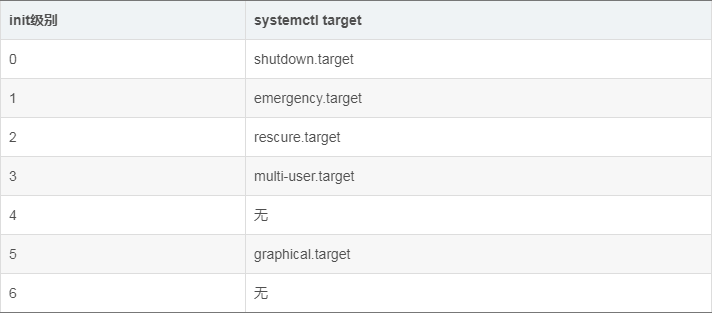
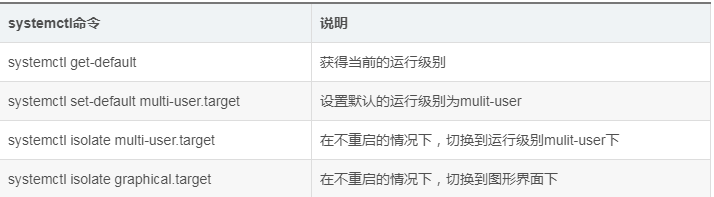
设置运行级别
●get-default:取到当前的target

●set-default:设置指定的target为默认的运行级别

●isolate:切换到指定的运行级别

●unit.target:为上表中列出的运行级别
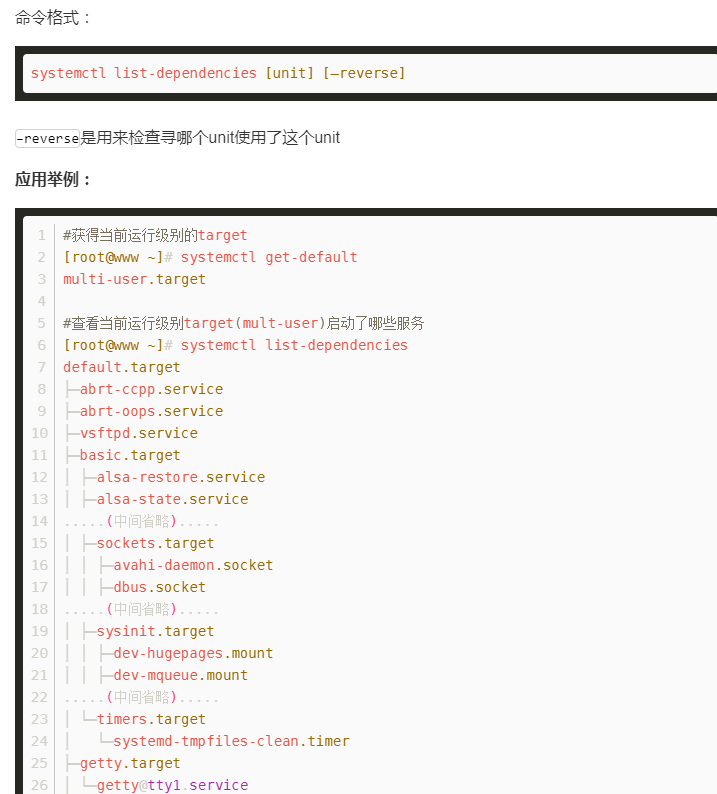
使用systemctl分析各服务之前的依赖关系
关闭网络服务
systemctl stop sshd            #停止sshd(22端口)

systemctl disable sshd           #禁止开机启动
关闭防火墙
Centos7中关闭防火墙:

        systemctl stop firewalld

Centos7中允许开机自动启动:

         systemctl enable firewalld

Centos7中禁止开机自动启动:

         systemctl disable firewalld

Ubuntu中关闭防火墙:

        systemctl stop ufw

Ubuntu中允许开机自动启动:

         systemctl enable ufw

Ubuntu中禁止开机自动启动:

         systemctl disable ufw
查看系统网络与监控(netstat)
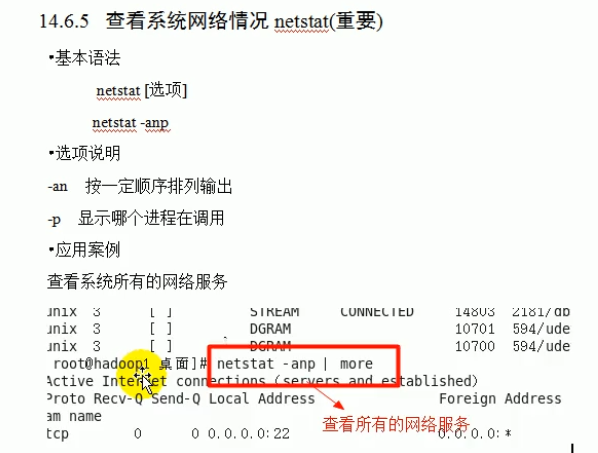
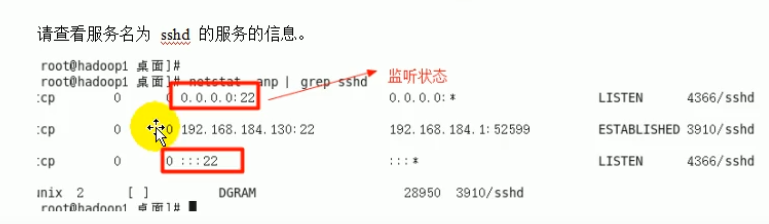
查看已经监听的端口:
netstat -antp
服务命令(systemctl的使用)的更多相关文章
- Linux服务器,服务管理--systemctl命令详解,设置开机自启动
Linux服务器,服务管理--systemctl命令详解,设置开机自启动 syetemclt就是service和chkconfig这两个命令的整合,在CentOS 7就开始被使用了. 摘要: syst ...
- Centos7 服务 service 设置命令 systemctl 用法 (替代service 和 chkconfig)
在Centos 中 systemctl 是设置系统服务的命令,即 service , 它融合之前service和chkconfig的功能于一体. 可以使用它永久性或只在当前会话中启用/禁用服务 ...
- Centos7 环境下开机 自启动服务(service) 设置的改变 (命令systemctl 和 chkconfig用法区别比较)
参考文章: <Linux 设置程序开机自启动 (命令systemctl 和 chkconfig用法区别比较)> http://blog.csdn.net/kenhins/article/ ...
- Linux服务管理 systemctl命令详解
Linux服务器,服务管理--systemctl命令详解,设置开机自启动 syetemclt就是service和chkconfig这两个命令的整合 任务 旧指令 新指令 使某服务自动启动 ch ...
- Linux系统管理命令-systemctl 和 sshd 服务
一系统服务管理命令systemctl 开启一个服务 : systemctl start sshd 关闭一个服务: systemctl stop sshd 查看一个服务的状态: systemctl st ...
- systemd服务管理--systemctl常用命令
转自 :https://m635674608.iteye.com/blog/2359480 1. #systemctl enable crond.service //让某个服务开机启动(.servic ...
- CentOS 7.0关闭服务器的防火墙服务命令
1.直接关闭防火墙systemctl stop firewalld.service #停止firewallsystemctl disable firewalld.service #禁止firewall ...
- Linux 设置程序开机自启动 (命令systemctl 和 chkconfig用法区别比较)
之前在Linux centos 7 上安装了apache 和mysql,当时并没有设置开机自动启动. 最近又重新练习网页,每次开机总是要手动启动httpd和mysqld,不方便,就想设置成开机自动启动 ...
- systemct管理服务命令
systemctl管理服务的启动,重启,停止,重载,查看状态的命令 Systcinit命令(红帽RHEL6系统) Systemctl命令(红帽RHEL7系统) 作用 service foo star ...
随机推荐
- electron关于页面跳转 的问题
刚开始看到页面跳转,大家一般会想到用 window.location.href = './index.html'; 这样的代码.结果是可以跳转,但 DOM事件 基本都会失效.到最后还是使用的 elec ...
- LC 763. Partition Labels
A string S of lowercase letters is given. We want to partition this string into as many parts as pos ...
- 003-Spring4 扩展分析-spring类初始化@PostConstruct > InitializingBean > init-method、ApplicationContext、BeanPostProcessor、BeanFactoryPostProcessor、BeanDefinitionRegistryPostProcessor
一.spring类初始化@PostConstruct > InitializingBean > init-method InitializingBean接口为bean提供了初始化方法的方式 ...
- [nginx]设置代理和静态资源目录
upstream disconf { server ; #tomcat服务器的地址 } server { listen ; #监听端口 server_name localhost; #域名 index ...
- laydate中设置动态改变max与min值的方法
参考网址: 原网址:https://blog.csdn.net/cherry_11qianqian/article/details/82259704 改进的网址:https://blog.csdn.n ...
- YII :将oracle中timestamp 字段正常显示在页面中
'value'=>'DateTime::createFromFormat("d#M#y H#i#s*A", $data["START_TIME"])-&g ...
- 使用robotframework做接口测试三——保持登录状态
调用登录接口登录了,其他的接口怎么保持登录状态呢? 首先来看一看,web端或者说客户端是怎么样用cookie/token等保持登录状态的.一般来说,cookie都会在登录接口由服务端返回,而且会是在 ...
- 1004: [递归]母牛的故事(python):(本地测试正确;但提交不对!!??)求教
时间限制: 1Sec 内存限制: 128MB 提交: 28438 解决: 8320 题目描述 有一头母牛,它每年年初生一头小母牛.每头小母牛从第四个年头开始,每年年初也生一头小母牛.请编程实现在第n年 ...
- Autofac实现AOP拦截
本文主要是详解一下在ASP.NET Core中,采用替换后的Autofac来实现AOP拦截. Aspect Oriented Programming(AOP),面向切面编程,是一个比较热门的话题.AO ...
- Docker在windows环境下的安装部署
一.准备 系统环境:Windows 10 64bit Docker安装包:Docker for Windows Installer.exe 二.安装步骤 1.开启系统的hyper-v 2. 重启电脑后 ...