
JavaWeb-SpringBoot_使用MySQL管理用户登录注册+接入腾讯短信SDK_demo
使用Gradle编译项目 传送门
项目已托管到Github上 传送门
JavaWeb-SpringBoot_一个类实现腾讯云SDK发送短信 传送门
用户注册
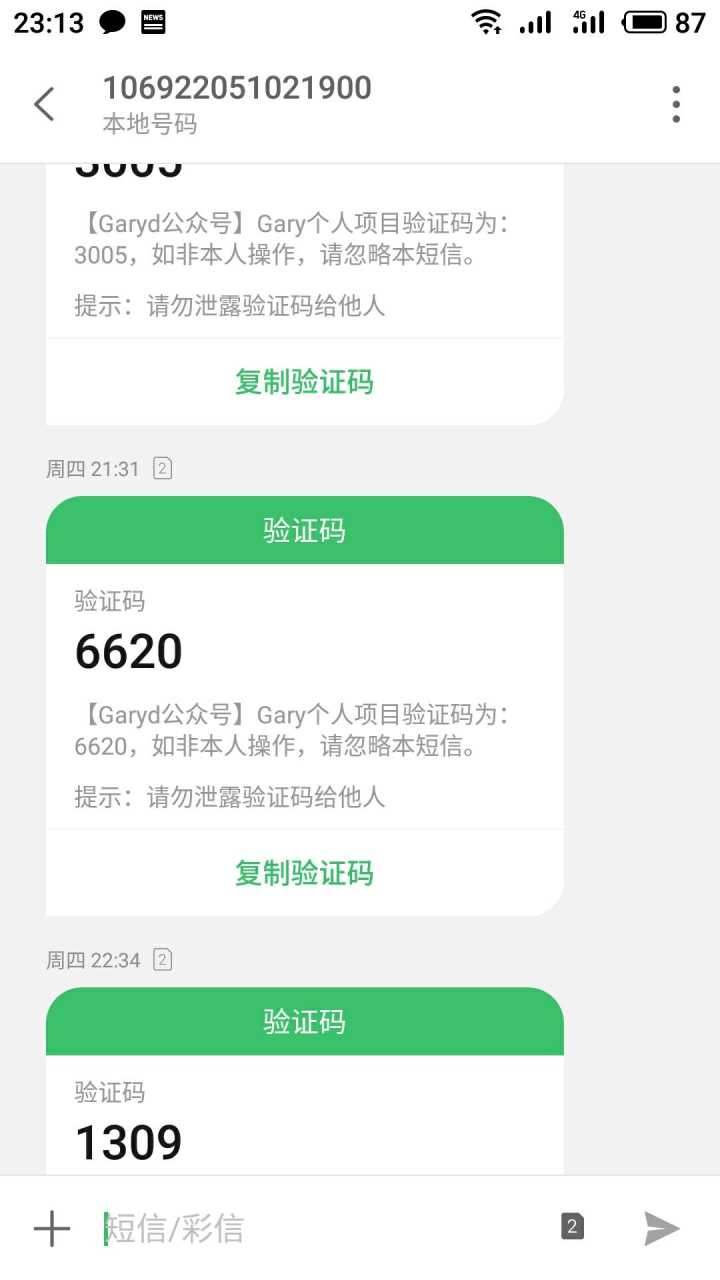
用户并非一定要输入正确的手机验证码去激活当前信息,用户提交注册表单后不会去数据库进行重复校验,只有当用户正确输入手机验证码,则该用户state状态在数据库中设置为1,而用户错误错误手机验证码或未输入手机验证码后,则该用户state状态在数据库中设置为0【手机验证码为随机四位整数】

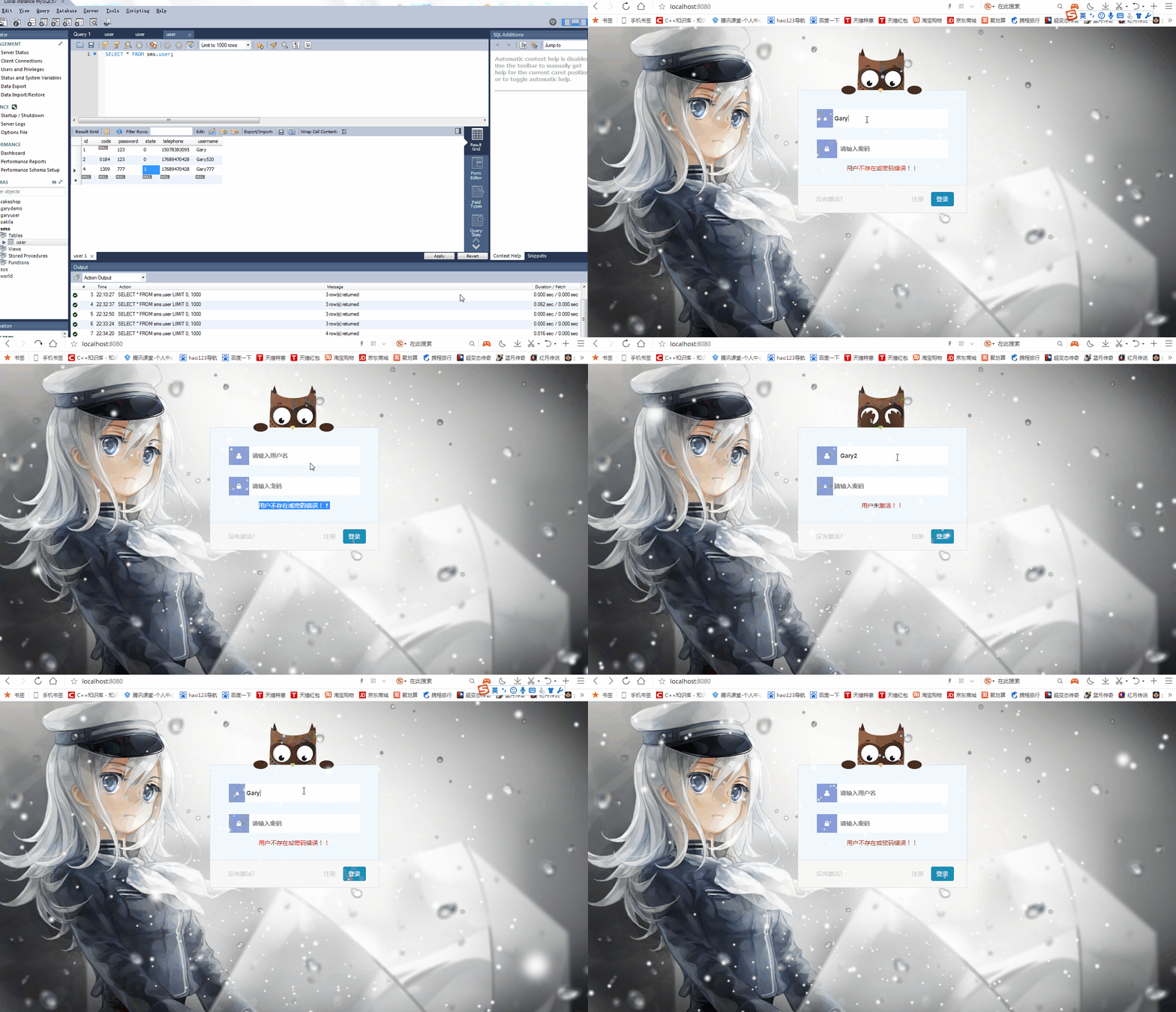
用户登录
用户点击登录按钮时,用户名账号密码输入错误则用户无法登录,提示用户用户不存在或密码错误;用户成功输入账号和密码后,该用户数据库中state状态激活(1)时->显示登录成功->跳转至成功页面;当该用户在数据库中state状态未激活(0),提示用户账号未激活->登录失败->页面重定向至首页
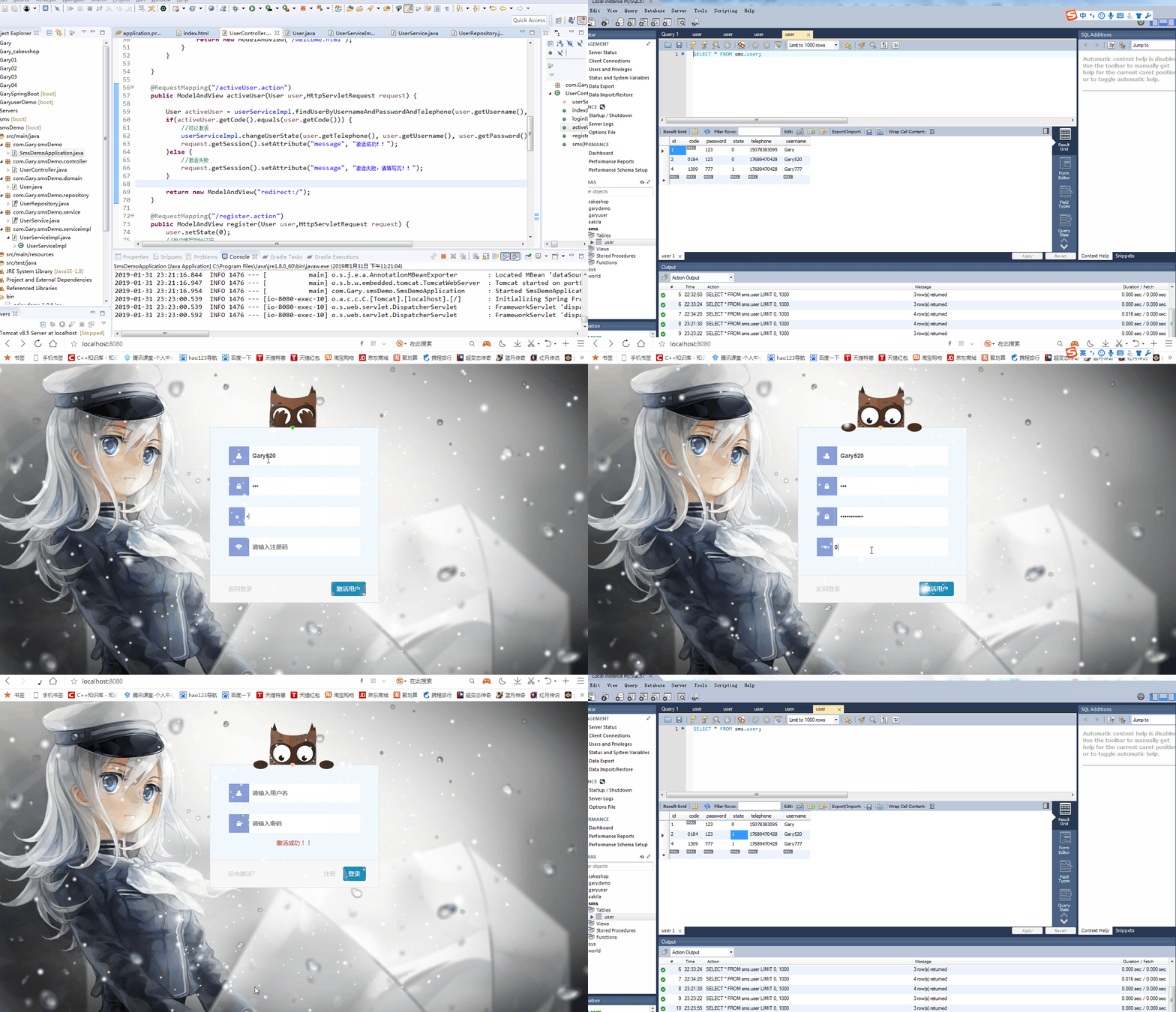
激活用户
用户state为0时,可点击"没有激活"去进行重新发送手机信息并当用户正确输入手机验证码后重新激活用户state,用户state为1时也可以再次激活该用户(没有进行过滤),当用户输入信息与手机吗中信息不匹配时提示用户激活失败
<!DOCTYPE html> <html xmlns:th="http://www.thymeleaf.org" xmlns:layout="http://www.ultraq.net.nz/thymeleaf/layout"> <head>
<meta charset="utf-8">
<meta name="viewport" content="width=device-width, initial-scale=1.0, minimum-scale=1.0, maximum-scale=1.0, user-scalable=no">
<title>登录</title>
<link rel="stylesheet" href="css/normalize.css">
<link rel="stylesheet" href="css/login.css">
<link rel="stylesheet" href="css/sign-up-login.css">
<link rel="stylesheet" type="text/css" href="http://cdn.bootcss.com/font-awesome/4.6.0/css/font-awesome.min.css">
<link rel="stylesheet" href="css/inputEffect.css" />
<link rel="stylesheet" href="css/tooltips.css" />
<link rel="stylesheet" href="css/spop.min.css" /> <script src="js/jquery.min.js"></script>
<script src="js/snow.js"></script>
<script src="js/jquery.pure.tooltips.js"></script>
<script src="js/spop.min.js"></script>
<script type="text/javascript" th:inline="javascript">
(function() {
// trim polyfill : https://developer.mozilla.org/en-US/docs/Web/JavaScript/Reference/Global_Objects/String/Trim
if (!String.prototype.trim) {
(function() {
// Make sure we trim BOM and NBSP
var rtrim = /^[\s\uFEFF\xA0]+|[\s\uFEFF\xA0]+$/g;
String.prototype.trim = function() {
return this.replace(rtrim, '');
};
})();
} [].slice.call(document.querySelectorAll('input.input__field')).forEach(
function(inputEl) {
// in case the input is already filled..
if (inputEl.value.trim() !== '') {
classie.add(inputEl.parentNode, 'input--filled');
} // events:
inputEl.addEventListener('focus', onInputFocus);
inputEl.addEventListener('blur', onInputBlur);
}); function onInputFocus(ev) {
classie.add(ev.target.parentNode, 'input--filled');
} function onInputBlur(ev) {
if (ev.target.value.trim() === '') {
classie.remove(ev.target.parentNode, 'input--filled');
}
}
})(); $(function() {
$('#login #login-password').focus(function() {
$('.login-owl').addClass('password');
}).blur(function() {
$('.login-owl').removeClass('password');
});
$('#login #register-password').focus(function() {
$('.register-owl').addClass('password');
}).blur(function() {
$('.register-owl').removeClass('password');
});
$('#login #register-repassword').focus(function() {
$('.register-owl').addClass('password');
}).blur(function() {
$('.register-owl').removeClass('password');
});
$('#login #forget-password').focus(function() {
$('.forget-owl').addClass('password');
}).blur(function() {
$('.forget-owl').removeClass('password');
});
}); function goto_register() {
$("#register-username").val("");
$("#register-password").val("");
$("#register-repassword").val("");
$("#register-code").val("");
$("#tab-2").prop("checked", true);
} function goto_login() {
$("#login-username").val("");
$("#login-password").val("");
$("#tab-1").prop("checked", true);
} function goto_forget() {
$("#forget-username").val("");
$("#forget-password").val("");
$("#forget-code").val("");
$("#tab-3").prop("checked", true);
} function login() {//登录
var username = $("#login-username").val(), password = $(
"#login-password").val(), validatecode = null, flag = false;
//判断用户名密码是否为空
if (username == "") {
$.pt({
target : $("#login-username"),
position : 'r',
align : 't',
width : 'auto',
height : 'auto',
content : "用户名不能为空"
});
flag = true;
}
if (password == "") {
$.pt({
target : $("#login-password"),
position : 'r',
align : 't',
width : 'auto',
height : 'auto',
content : "密码不能为空"
});
flag = true;
}
//用户名只能是15位以下的字母或数字
var regExp = new RegExp("^[a-zA-Z0-9_]{1,15}$");
if (!regExp.test(username)) {
$.pt({
target : $("#login-username"),
position : 'r',
align : 't',
width : 'auto',
height : 'auto',
content : "用户名必须为15位以下的字母或数字"
});
flag = true;
} if (flag) {
return false;
} else {//登录
//调用后台登录验证的方法
alert('登录成功');
return false;
}
} //注册
function register() {
var username = $("#register-username").val(), password = $(
"#register-password").val(), repassword = $(
"#register-repassword").val(), code = $("#register-code").val(), flag = false, validatecode = null;
//判断用户名密码是否为空
if (username == "") {
$.pt({
target : $("#register-username"),
position : 'r',
align : 't',
width : 'auto',
height : 'auto',
content : "用户名不能为空"
});
flag = true;
}
if (password == "") {
$.pt({
target : $("#register-password"),
position : 'r',
align : 't',
width : 'auto',
height : 'auto',
content : "密码不能为空"
});
flag = true;
} else {
if (password != repassword) {
$.pt({
target : $("#register-repassword"),
position : 'r',
align : 't',
width : 'auto',
height : 'auto',
content : "两次输入的密码不一致"
});
flag = true;
}
}
//用户名只能是15位以下的字母或数字
var regExp = new RegExp("^[a-zA-Z0-9_]{1,15}$");
if (!regExp.test(username)) {
$.pt({
target : $("#register-username"),
position : 'r',
align : 't',
width : 'auto',
height : 'auto',
content : "用户名必须为15位以下的字母或数字"
});
flag = true;
}
//检查用户名是否已经存在
//调后台代码检查用户名是否已经被注册 //检查注册码是否正确
//调后台方法检查注册码,这里写死为11111111
if (code != '11111111') {
$.pt({
target : $("#register-code"),
position : 'r',
align : 't',
width : 'auto',
height : 'auto',
content : "注册码不正确"
});
flag = true;
} if (flag) {
return false;
} else {//注册
spop({
template : '<h4 class="spop-title">注册成功</h4>即将于3秒后返回登录',
position : 'top-center',
style : 'success',
autoclose : 3000,
onOpen : function() {
var second = 2;
var showPop = setInterval(function() {
if (second == 0) {
clearInterval(showPop);
}
$('.spop-body').html(
'<h4 class="spop-title">注册成功</h4>即将于' + second
+ '秒后返回登录');
second--;
}, 1000);
},
onClose : function() {
goto_login();
}
});
return false;
}
} function sms()
{
alert("验证码已发送");
var telephone = $("#telephone").val();
//隐藏自己
$("#smsbutton").attr("disabled","true");
//发短信。post ajax提交
$.post(
//aciton的地址[[表达式(thytmeleaf)]]
[[@{~/sms.action}]],
//提交的数据
{"telephone":telephone},
//回调函数
function(data)
{ },
//数据格式
"json" )
//延时几秒,然后才显示
//alert("隐藏");
setTimeout("fun(10)",1000); } function fun(n)
{
if(n>0)
{
n--;
document.getElementById("smsbutton").innerHTML = "还剩:" + n + "秒";
setTimeout("fun("+n+")",1000);
}
//alert("显示");
else
{
//显示自己
document.getElementById("smsbutton").innerHTML = "获取验证码";
$("#smsbutton").removeAttr("disabled");
} } //重置密码
function forget() {
var username = $("#forget-username").val(), password = $(
"#forget-password").val(), code = $("#forget-code").val(), flag = false, validatecode = null;
//判断用户名密码是否为空
if (username == "") {
$.pt({
target : $("#forget-username"),
position : 'r',
align : 't',
width : 'auto',
height : 'auto',
content : "用户名不能为空"
});
flag = true;
}
if (password == "") {
$.pt({
target : $("#forget-password"),
position : 'r',
align : 't',
width : 'auto',
height : 'auto',
content : "密码不能为空"
});
flag = true;
}
//用户名只能是15位以下的字母或数字
var regExp = new RegExp("^[a-zA-Z0-9_]{1,15}$");
if (!regExp.test(username)) {
$.pt({
target : $("#forget-username"),
position : 'r',
align : 't',
width : 'auto',
height : 'auto',
content : "用户名必须为15位以下的字母或数字"
});
flag = true;
}
//检查用户名是否存在
//调后台方法 //检查注册码是否正确
if (code != '11111111') {
$.pt({
target : $("#forget-code"),
position : 'r',
align : 't',
width : 'auto',
height : 'auto',
content : "注册码不正确"
});
flag = true;
} if (flag) {
return false;
} else {//重置密码
spop({
template : '<h4 class="spop-title">重置密码成功</h4>即将于3秒后返回登录',
position : 'top-center',
style : 'success',
autoclose : 3000,
onOpen : function() {
var second = 2;
var showPop = setInterval(function() {
if (second == 0) {
clearInterval(showPop);
}
$('.spop-body').html(
'<h4 class="spop-title">重置密码成功</h4>即将于'
+ second + '秒后返回登录');
second--;
}, 1000);
},
onClose : function() {
goto_login();
}
});
return false;
}
}
</script>
<style type="text/css">
html {
width: 100%;
height: 100%;
} body {
background-repeat: no-repeat;
background-position: center center #2D0F0F;
background-color: #00BDDC;
background-image: url(images/snow.jpg);
background-size: 100% 100%;
} .snow-container {
position: fixed;
top: 0;
left: 0;
width: 100%;
height: 100%;
pointer-events: none;
z-index: 100001;
}
</style>
</head>
<body>
<!-- 雪花背景 -->
<div class="snow-container"></div>
<!-- 登录控件 -->
<div id="login">
<input id="tab-1" type="radio" name="tab" class="sign-in hidden" checked />
<input id="tab-2" type="radio" name="tab" class="sign-up hidden" />
<input id="tab-3" type="radio" name="tab" class="sign-out hidden" />
<div class="wrapper">
<!-- 登录页面 -->
<div class="login sign-in-htm">
<form class="container offset1 loginform" th:action="@{~/login.action}">
<!-- 猫头鹰控件 -->
<div id="owl-login" class="login-owl">
<div class="hand"></div>
<div class="hand hand-r"></div>
<div class="arms">
<div class="arm"></div>
<div class="arm arm-r"></div>
</div>
</div>
<div class="pad input-container">
<section class="content">
<span class="input input--hideo">
<input class="input__field input__field--hideo" type="text" id="login-username" autocomplete="off" placeholder="请输入用户名" tabindex="1" maxlength="15" name="username" />
<label class="input__label input__label--hideo" for="login-username">
<i class="fa fa-fw fa-user icon icon--hideo"></i>
<span class="input__label-content input__label-content--hideo"></span>
</label>
</span>
<span class="input input--hideo">
<input class="input__field input__field--hideo" type="password" id="login-password" placeholder="请输入密码" tabindex="2" maxlength="15" name="password" />
<label class="input__label input__label--hideo" for="login-password">
<i class="fa fa-fw fa-lock icon icon--hideo"></i>
<span class="input__label-content input__label-content--hideo"></span>
</label>
</span>
<div th:text="${message}" style="color: red"></div>
</section>
</div>
<div class="form-actions">
<a tabindex="4" class="btn pull-left btn-link text-muted" onClick="goto_forget()">没有激活?</a>
<a tabindex="5" class="btn btn-link text-muted" onClick="goto_register()">注册</a>
<input class="btn btn-primary" type="submit" tabindex="3" value="登录" style="color: white;" />
</div>
</form>
</div>
<!-- 忘记密码页面 -->
<div class="login sign-out-htm">
<form action="#" method="post" th:action="@{~/activeUser.action}" class="container offset1 loginform">
<!-- 猫头鹰控件 -->
<div id="owl-login" class="forget-owl">
<div class="hand"></div>
<div class="hand hand-r"></div>
<div class="arms">
<div class="arm"></div>
<div class="arm arm-r"></div>
</div>
</div>
<div class="pad input-container">
<section class="content">
<span class="input input--hideo">
<input class="input__field input__field--hideo" type="text" id="forget-username" autocomplete="off" placeholder="请输入用户名" name="username" />
<label class="input__label input__label--hideo" for="forget-username">
<i class="fa fa-fw fa-user icon icon--hideo"></i>
<span class="input__label-content input__label-content--hideo"></span>
</label>
</span> <span class="input input--hideo">
<input class="input__field input__field--hideo" type="password" id="forget-password" placeholder="请输入密码" name="password"/>
<label class="input__label input__label--hideo" for="forget-password">
<i class="fa fa-fw fa-lock icon icon--hideo"></i>
<span class="input__label-content input__label-content--hideo"></span>
</label>
</span>
<span class="input input--hideo">
<input class="input__field input__field--hideo" type="password" id="forget-password" placeholder="请输入电话" name="telephone"/>
<label class="input__label input__label--hideo" for="forget-password">
<i class="fa fa-fw fa-lock icon icon--hideo"></i>
<span class="input__label-content input__label-content--hideo"></span> </label>
</span>
<span class="input input--hideo">
<input class="input__field input__field--hideo" type="text" id="forget-code" autocomplete="off" placeholder="请输入注册码" name="code"/>
<label class="input__label input__label--hideo" for="forget-code">
<i class="fa fa-fw fa-wifi icon icon--hideo"></i>
<span class="input__label-content input__label-content--hideo"></span>
</label>
</span>
</section>
</div>
<div class="form-actions">
<a class="btn pull-left btn-link text-muted" onClick="goto_login()">返回登录</a>
<input class="btn btn-primary" type="submit" value="激活用户" style="color: white;" />
</div>
</form>
</div>
<!-- 注册页面 -->
<div class="login sign-up-htm">
<form action="#" th:action="@{~/register.action}" method="post" class="container offset1 loginform">
<!-- 猫头鹰控件 -->
<div id="owl-login" class="register-owl">
<div class="hand"></div>
<div class="hand hand-r"></div>
<div class="arms">
<div class="arm"></div>
<div class="arm arm-r"></div>
</div>
</div>
<div class="pad input-container">
<section class="content">
<span class="input input--hideo">
<input class="input__field input__field--hideo" type="text" id="register-username" autocomplete="off" placeholder="请输入用户名" maxlength="15" name="username" />
<label class="input__label input__label--hideo" for="register-username">
<i class="fa fa-fw fa-user icon icon--hideo"></i>
<span class="input__label-content input__label-content--hideo"></span>
</label>
</span>
<span class="input input--hideo">
<input class="input__field input__field--hideo" type="password" id="register-password" placeholder="请输入密码" maxlength="15" name="password" />
<label class="input__label input__label--hideo" for="register-password">
<i class="fa fa-fw fa-lock icon icon--hideo"></i>
<span class="input__label-content input__label-content--hideo"></span>
</label>
</span>
<span class="input input--hideo">
<input class="input__field input__field--hideo" type="password" id="register-repassword" placeholder="请确认密码" maxlength="15" />
<label class="input__label input__label--hideo" for="register-repassword">
<i class="fa fa-fw fa-lock icon icon--hideo"></i>
<span class="input__label-content input__label-content--hideo"></span>
</label>
</span>
<span class="input input--hideo">
<input class="input__field input__field--hideo" type="text" id="telephone" autocomplete="off" placeholder="请输入手机号" name="telephone" /> <label class="input__label input__label--hideo" for="register-code">
<button id="smsbutton" class="btn btn-primary" type="button" onClick="sms()" style="color: white; margin-left: 210px; margin-top: -7px">获取验证码</button>
</label> </span> <span class="input input--hideo">
<input class="input__field input__field--hideo" type="text" id="register-code" autocomplete="off" placeholder="请输入注册码" name="code" />
<label class="input__label input__label--hideo" for="register-code">
<i class="fa fa-fw fa-wifi icon icon--hideo"></i>
<span class="input__label-content input__label-content--hideo"></span>
</label>
</span>
</section>
</div>
<div class="form-actions">
<a class="btn pull-left btn-link text-muted" onClick="goto_login()">返回登录</a>
<input class="btn btn-primary" type="submit" value="注册" style="color: white;" />
</div>
</form>
</div>
</div>
</div>
</body>
</html>
index.html
<!DOCTYPE html>

<html>

<head>

<meta charset="UTF-8">

<title>Insert title here</title>

</head>

<body>

<h1>欢迎登录~~</h1>

</body>

</html>
welcome.html
#热部署静态文件

#thymeleaf

spring.thymeleaf.cache=false

spring.thymeleaf.encoding=UTF-8

spring.thymeleaf.mode=HTML5

spring.h2.console.enabled=true

#datasource

spring.datasource.url=jdbc:mysql:///sms

spring.datasource.username=root

spring.datasource.password=123456

spring.datasource.driver-class-name=com.mysql.jdbc.Driver

#jpa

spring.jpa.show-sql=true

spring.jpa.hibernate.ddl-auto=update
application.properties
package com.Gary.smsDemo;

import org.springframework.boot.SpringApplication;

import org.springframework.boot.autoconfigure.SpringBootApplication;

@SpringBootApplication

public class SmsDemoApplication {

    public static void main(String[] args) {

        SpringApplication.run(SmsDemoApplication.class, args);

    }

}
SmsDemoApplication.java
 package com.Gary.smsDemo.controller;

import java.io.IOException;

import java.util.Random;

import javax.servlet.http.HttpServletRequest;

import javax.servlet.http.HttpServletResponse;

import org.json.JSONException;

import org.springframework.beans.factory.annotation.Autowired;

import org.springframework.ui.Model;

import org.springframework.web.bind.annotation.RequestMapping;

import org.springframework.web.bind.annotation.RestController;

import org.springframework.web.servlet.ModelAndView;

import com.Gary.smsDemo.domain.User;

import com.Gary.smsDemo.serviceimpl.UserServiceImpl;

import com.github.qcloudsms.SmsSingleSender;

import com.github.qcloudsms.SmsSingleSenderResult;

import com.github.qcloudsms.httpclient.HTTPException;

@RestController

public class UserController {

    @Autowired

    private UserServiceImpl userServiceImpl;

    @RequestMapping("/")

    public ModelAndView index(HttpServletRequest request,Model model) {

        String message =(String) request.getSession().getAttribute("message");

        model.addAttribute("message",message);

        return new ModelAndView("/index.html","userModel",model);

    }

    @RequestMapping("login.action")

    public ModelAndView login(User user,HttpServletRequest request) {

        User loginUser = userServiceImpl.findUserByUsernameAndPassword(user.getUsername(),user.getPassword());

        if(loginUser == null) {

            //用户不存在

            request.getSession().setAttribute("message","用户不存在或密码错误!!");

            return new ModelAndView("redirect:/");

        }else {

            if(loginUser.getState() == 0) {

                //用户未激活

                request.getSession().setAttribute("message","用户未激活!!");

                return new ModelAndView("redirect:/");

            }else {

                return new ModelAndView("/welcome.html");

            }

        }

    }

    @RequestMapping("/activeUser.action")

    public ModelAndView activeUser(User user,HttpServletRequest request) {

        User activeUser = userServiceImpl.findUserByUsernameAndPasswordAndTelephone(user.getUsername(),user.getPassword(),user.getTelephone());

        if(activeUser.getCode().equals(user.getCode())) {

            //可以激活

            userServiceImpl.changeUserState(user.getTelephone(), user.getUsername(), user.getPassword());

            request.getSession().setAttribute("message", "激活成功!!");

        }else {

            //激活失败

            request.getSession().setAttribute("message", "激活失败,请填写完!!");

        }

        return new ModelAndView("redirect:/");

    }

    @RequestMapping("/register.action")

    public ModelAndView register(User user,HttpServletRequest request) {

        user.setState(0);

        //用户填写的验证码

        String usersms = user.getCode();

        String sms = (String) request.getSession().getAttribute("sms");

        //系统的验证码

        user.setCode(sms);

        userServiceImpl.save(user);

        if(usersms.equals(sms)) {

            //改变用户的状态

            userServiceImpl.changeUserState(user.getTelephone(), user.getUsername(), user.getPassword());

            request.getSession().setAttribute("message", "注册成功!!");

        }else {

            //验证码错误

            request.getSession().setAttribute("message", "验证码错误,请重新激活!!");

        }

        return new ModelAndView("redirect:/");

    }

    @RequestMapping("/sms.action")

    public ModelAndView sms(HttpServletRequest request,HttpServletResponse response,String telephone) throws IOException {

        //填应用配置 SDK appID

        int appid = 1111184301;

        //填应用配置 APK appkey

        String appkey ="000000000000faba756087b9504bff46";

        //填短信正文ID

        int templateId = 111243;

        String smsSign = "Garyd公众号";

        String phoneNumber = telephone;

        //验证码

        Random r = new Random();

        //字符串的拼接

        String sms = ""+r.nextInt(10)+r.nextInt(10)+r.nextInt(10)+r.nextInt(10);

        //把验证码放置到session域中

        request.getSession().setAttribute("sms", sms);

        String[] params = new String[1];

        params[0]=sms;

        SmsSingleSender ssender = new SmsSingleSender(appid,appkey);

        try {

            SmsSingleSenderResult result = ssender.sendWithParam("86", phoneNumber, templateId, params, smsSign, "", "");

            System.out.println(result);

        } catch (HTTPException e) {

            // TODO Auto-generated catch block

            e.printStackTrace();

        } catch (JSONException e) {

            // TODO Auto-generated catch block

            e.printStackTrace();

        }

        response.getWriter().write("{\"success\":"+true+"}");

        return null;

    }

}
UserController.java
package com.Gary.smsDemo.domain;

import javax.persistence.Entity;

import javax.persistence.GeneratedValue;

import javax.persistence.GenerationType;

import javax.persistence.Id;

@Entity

public class User {

    @Id

    @GeneratedValue(strategy = GenerationType.IDENTITY)

    private Long id;

    private String username;

    private String password;

    private String telephone;

    private String code;

    private Integer state;

    protected User() {

    }

    public User(Long id,String username,String password,String telephone,String code,Integer state) {

        this.id = id;

        this.username = username;

        this.password = password;

        this.code = code;

        this.state = state;

        this.telephone = telephone;

    }

    public Long getId() {

        return id;

    }

    public void setId(Long id) {

        this.id = id;

    }

    public String getUsername() {

        return username;

    }

    public void setUsername(String username) {

        this.username = username;

    }

    public String getPassword() {

        return password;

    }

    public void setPassword(String password) {

        this.password = password;

    }

    public String getTelephone() {

        return telephone;

    }

    public void setTelephone(String telephone) {

        this.telephone = telephone;

    }

    public String getCode() {

        return code;

    }

    public void setCode(String code) {

        this.code = code;

    }

    public Integer getState() {

        return state;

    }

    public void setState(Integer state) {

        this.state = state;

    }

}
User.java
package com.Gary.smsDemo.repository;

import org.springframework.data.jpa.repository.Modifying;

import org.springframework.data.jpa.repository.Query;

import org.springframework.data.repository.CrudRepository;

import com.Gary.smsDemo.domain.User;

public interface UserRepository extends CrudRepository<User,Long>{

    @Query(value="update user u set u.state = 1 where u.telephone = ?1 and u.username=?2 and password = ?3",nativeQuery=true)

    @Modifying

    void changeUserState(String telephone ,String username,String passwprd);

    User findUserByUsernameAndPassword(String username,String password);

    User findUserByUsernameAndPasswordAndTelephone(String username,String password,String telephone);

}
UserRepository.java
package com.Gary.smsDemo.service;

import com.Gary.smsDemo.domain.User;

public interface UserService {

    void save(User user);

    void changeUserState(String telephone ,String username,String passwprd);

    User findUserByUsernameAndPassword(String username,String password);

    User findUserByUsernameAndPasswordAndTelephone(String username,String password,String telephone);

}
UserService.java
package com.Gary.smsDemo.serviceimpl;

import javax.transaction.Transactional;

import org.springframework.beans.factory.annotation.Autowired;

import org.springframework.stereotype.Service;

import com.Gary.smsDemo.domain.User;

import com.Gary.smsDemo.repository.UserRepository;

import com.Gary.smsDemo.service.UserService;

@Service

public class UserServiceImpl implements UserService{

    @Autowired

    private UserRepository userRepository;

    @Override

    public void save(User user) {

        // TODO Auto-generated method stub

        userRepository.save(user);

    }

    @Transactional

    @Override

    public void changeUserState(String telephone, String username, String passwprd) {

        // TODO Auto-generated method stub

        userRepository.changeUserState(telephone, username, passwprd);

    }

    @Override

    public User findUserByUsernameAndPassword(String username, String password) {

        return userRepository.findUserByUsernameAndPassword(username, password);

    }

    @Override

    public User findUserByUsernameAndPasswordAndTelephone(String username, String password, String telephone) {

        return userRepository.findUserByUsernameAndPasswordAndTelephone(username, password,telephone);

    }

}
UserServiceImpl.java
目录结构

controller控制层
service业务逻辑层
repository持久层
各个功能模块的默认配置文件application.properties
#热部署静态文件

#thymeleaf

spring.thymeleaf.cache=false

spring.thymeleaf.encoding=UTF-8

spring.thymeleaf.mode=HTML5

spring.h2.console.enabled=true

#datasource

spring.datasource.url=jdbc:mysql:///sms

spring.datasource.username=root

spring.datasource.password=123456

spring.datasource.driver-class-name=com.mysql.jdbc.Driver

#jpa

spring.jpa.show-sql=true

spring.jpa.hibernate.ddl-auto=update
数据库与手机验证码 手机验证码随机生成

User实体 设置主键ID自增
    @Id

    @GeneratedValue(strategy = GenerationType.IDENTITY)

    private Long id;

    private String username;

    private String password;

    private String telephone;

    private String code;

    private Integer state;
package com.Gary.smsDemo.domain;

import javax.persistence.Entity;

import javax.persistence.GeneratedValue;

import javax.persistence.GenerationType;

import javax.persistence.Id;

@Entity

public class User {

    @Id

    @GeneratedValue(strategy = GenerationType.IDENTITY)

    private Long id;

    private String username;

    private String password;

    private String telephone;

    private String code;

    private Integer state;

    protected User() {

    }

    public User(Long id,String username,String password,String telephone,String code,Integer state) {

        this.id = id;

        this.username = username;

        this.password = password;

        this.code = code;

        this.state = state;

        this.telephone = telephone;

    }

    public Long getId() {

        return id;

    }

    public void setId(Long id) {

        this.id = id;

    }

    public String getUsername() {

        return username;

    }

    public void setUsername(String username) {

        this.username = username;

    }

    public String getPassword() {

        return password;

    }

    public void setPassword(String password) {

        this.password = password;

    }

    public String getTelephone() {

        return telephone;

    }

    public void setTelephone(String telephone) {

        this.telephone = telephone;

    }

    public String getCode() {

        return code;

    }

    public void setCode(String code) {

        this.code = code;

    }

    public Integer getState() {

        return state;

    }

    public void setState(Integer state) {

        this.state = state;

    }

}
User.java
发送短信正文模板 参考
public ModelAndView sms(HttpServletRequest request,HttpServletResponse response,String telephone) throws IOException {

        //填应用配置 SDK appID

        int appid = 1111184301;

        //填应用配置 APK appkey

        String appkey ="000000000000faba756087b9504bff46";

        //填短信正文ID

        int templateId = 111243;

        String smsSign = "Garyd公众号";

        String phoneNumber = telephone;

        //验证码

        Random r = new Random();

        //字符串的拼接

        String sms = ""+r.nextInt(10)+r.nextInt(10)+r.nextInt(10)+r.nextInt(10);

        //把验证码放置到session域中

        request.getSession().setAttribute("sms", sms);

        String[] params = new String[1];

        params[0]=sms;

        SmsSingleSender ssender = new SmsSingleSender(appid,appkey);

        try {

            SmsSingleSenderResult result = ssender.sendWithParam("86", phoneNumber, templateId, params, smsSign, "", "");

            System.out.println(result);

        } catch (HTTPException e) {

            // TODO Auto-generated catch block

            e.printStackTrace();

        } catch (JSONException e) {

            // TODO Auto-generated catch block

            e.printStackTrace();

        }

        response.getWriter().write("{\"success\":"+true+"}");

        return null;

    }
点击发送短信Ajax校验
function sms()

    {

        alert("验证码已发送");

        var telephone = $("#telephone").val();

        //隐藏自己

        $("#smsbutton").attr("disabled","true");

        //发短信。post ajax提交

        $.post(

            //aciton的地址[[表达式(thytmeleaf)]]

            [[@{~/sms.action}]],

            //提交的数据

            {"telephone":telephone},

            //回调函数

            function(data)

            {

            },

            //数据格式

            "json"

        )

        //延时几秒,然后才显示

        //alert("隐藏");

        setTimeout("fun(10)",1000);

    }

    function fun(n)

    {

        if(n>0)

        {

            n--;

            document.getElementById("smsbutton").innerHTML = "还剩:" + n + "秒";

            setTimeout("fun("+n+")",1000);

        }

        //alert("显示");

        else

        {

            //显示自己

            document.getElementById("smsbutton").innerHTML = "获取验证码";

            $("#smsbutton").removeAttr("disabled");

        }

    }
接收验证码
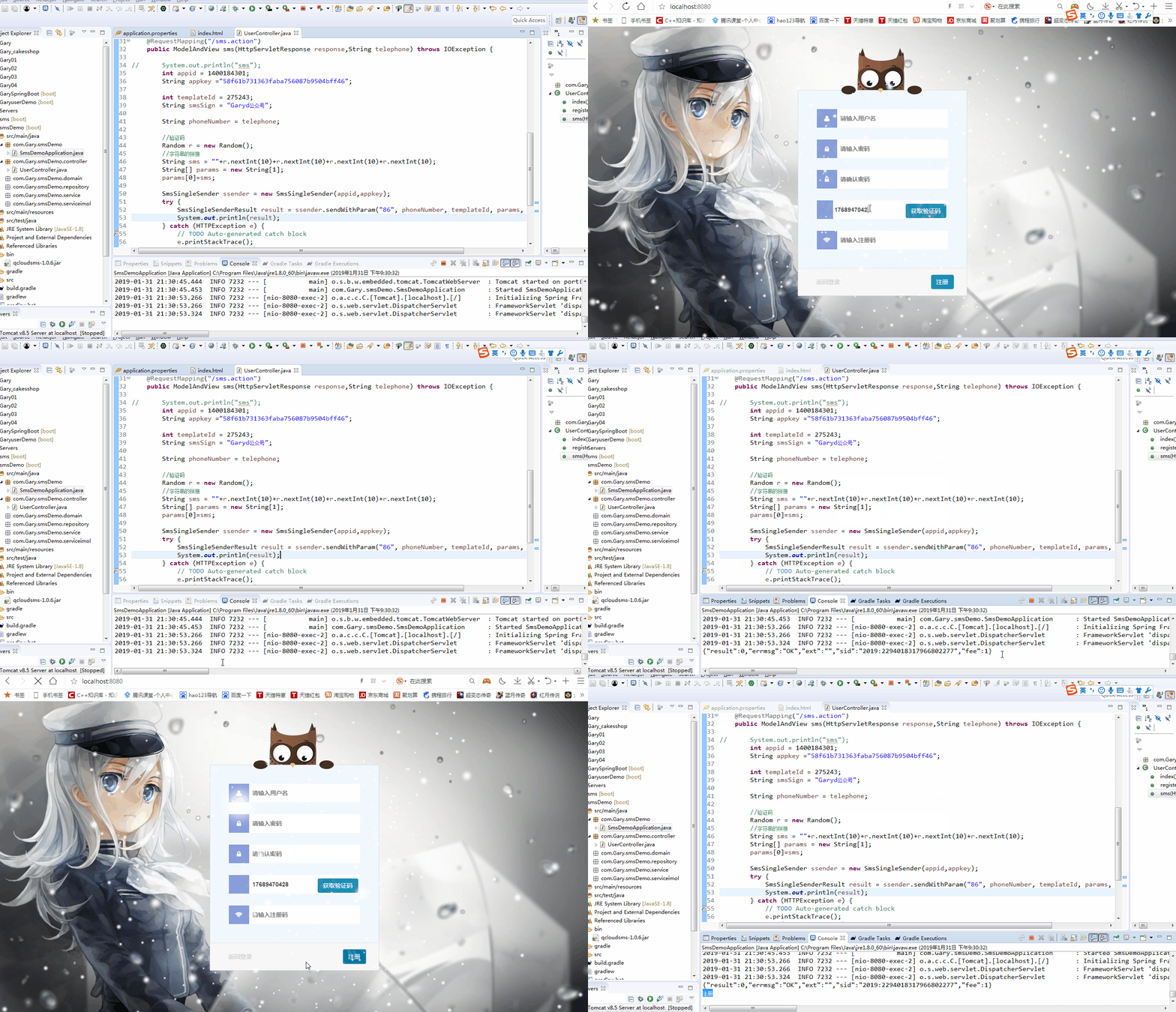
controller层获接收用户和管理员请求并做相应的回应
//登录首页,接收所有请求

    @RequestMapping("/")

    public ModelAndView index(HttpServletRequest request,Model model)

//用户登录

    @RequestMapping("login.action")

    public ModelAndView login(User user,HttpServletRequest request)

//激活用户

    @RequestMapping("/activeUser.action")

    public ModelAndView activeUser(User user,HttpServletRequest request)

//用户注册

    @RequestMapping("/register.action")

    public ModelAndView register(User user,HttpServletRequest request)

//发送短信

    @RequestMapping("/sms.action")

    public ModelAndView sms(HttpServletRequest request,HttpServletResponse response,String telephone) throws IOException
Service层处理用户注册与登录的业务逻辑
  //保存用户

    void save(User user);

    //改变用户激活状态

    void changeUserState(String telephone ,String username,String passwprd);

    //校验用户登录

    User findUserByUsernameAndPassword(String username,String password);

    //校验用户激活

    User findUserByUsernameAndPasswordAndTelephone(String username,String password,String telephone);
public interface UserRepository extends CrudRepository<User,Long>{

    @Query(value="update user u set u.state = 1 where u.telephone = ?1 and u.username=?2 and password = ?3",nativeQuery=true)

    @Modifying

    void changeUserState(String telephone ,String username,String passwprd);

    User findUserByUsernameAndPassword(String username,String password);

    User findUserByUsernameAndPasswordAndTelephone(String username,String password,String telephone);

}
登录表单 发送请求th:action="@{~/login.action}"
<form class="container offset1 loginform" th:action="@{~/login.action}">

                    <!-- 猫头鹰控件 -->

                    <div id="owl-login" class="login-owl">

                        <div class="hand"></div>

                        <div class="hand hand-r"></div>

                        <div class="arms">

                            <div class="arm"></div>

                            <div class="arm arm-r"></div>

                        </div>

                    </div>

                    <div class="pad input-container">

                        <section class="content">

                            <span class="input input--hideo">

                                <input class="input__field input__field--hideo" type="text" id="login-username" autocomplete="off" placeholder="请输入用户名" tabindex="1" maxlength="15" name="username" />

                                <label class="input__label input__label--hideo" for="login-username">

                                    <i class="fa fa-fw fa-user icon icon--hideo"></i>

                                    <span class="input__label-content input__label-content--hideo"></span>

                                </label>

                            </span>

                            <span class="input input--hideo">

                                <input class="input__field input__field--hideo" type="password" id="login-password" placeholder="请输入密码" tabindex="2" maxlength="15" name="password" />

                                <label class="input__label input__label--hideo" for="login-password">

                                    <i class="fa fa-fw fa-lock icon icon--hideo"></i>

                                    <span class="input__label-content input__label-content--hideo"></span>

                                </label>

                            </span>

                            <div th:text="${message}" style="color: red"></div>

                        </section>

                    </div>

                    <div class="form-actions">

                        <a tabindex="4" class="btn pull-left btn-link text-muted" onClick="goto_forget()">没有激活?</a>

                        <a tabindex="5" class="btn btn-link text-muted" onClick="goto_register()">注册</a>

                        <input class="btn btn-primary" type="submit" tabindex="3" value="登录" style="color: white;" />

                    </div>

                </form>
注册表单 发送请求th:action="@{~/register.action}"
<form action="#" th:action="@{~/register.action}" method="post" class="container offset1 loginform">

                    <!-- 猫头鹰控件 -->

                    <div id="owl-login" class="register-owl">

                        <div class="hand"></div>

                        <div class="hand hand-r"></div>

                        <div class="arms">

                            <div class="arm"></div>

                            <div class="arm arm-r"></div>

                        </div>

                    </div>

                    <div class="pad input-container">

                        <section class="content">

                            <span class="input input--hideo">

                                <input class="input__field input__field--hideo" type="text" id="register-username" autocomplete="off" placeholder="请输入用户名" maxlength="15" name="username" />

                                <label class="input__label input__label--hideo" for="register-username">

                                    <i class="fa fa-fw fa-user icon icon--hideo"></i>

                                    <span class="input__label-content input__label-content--hideo"></span>

                                </label>

                            </span>

                            <span class="input input--hideo">

                                <input class="input__field input__field--hideo" type="password" id="register-password" placeholder="请输入密码" maxlength="15" name="password" />

                                <label class="input__label input__label--hideo" for="register-password">

                                    <i class="fa fa-fw fa-lock icon icon--hideo"></i>

                                    <span class="input__label-content input__label-content--hideo"></span>

                                </label>

                            </span>

                            <span class="input input--hideo">

                                <input class="input__field input__field--hideo" type="password" id="register-repassword" placeholder="请确认密码" maxlength="15" />

                                <label class="input__label input__label--hideo" for="register-repassword">

                                    <i class="fa fa-fw fa-lock icon icon--hideo"></i>

                                    <span class="input__label-content input__label-content--hideo"></span>

                                </label>

                            </span>

                            <span class="input input--hideo">

                                <input class="input__field input__field--hideo" type="text" id="telephone" autocomplete="off" placeholder="请输入手机号" name="telephone" />

                                <label class="input__label input__label--hideo" for="register-code">

                                    <button id="smsbutton" class="btn btn-primary" type="button" onClick="sms()" style="color: white; margin-left: 210px; margin-top: -7px">获取验证码</button>

                                </label>

                            </span>

                            <span class="input input--hideo">

                                <input class="input__field input__field--hideo" type="text" id="register-code" autocomplete="off" placeholder="请输入注册码" name="code" />

                                <label class="input__label input__label--hideo" for="register-code">

                                    <i class="fa fa-fw fa-wifi icon icon--hideo"></i>

                                    <span class="input__label-content input__label-content--hideo"></span>

                                </label>

                            </span>

                        </section>

                    </div>

                    <div class="form-actions">

                        <a class="btn pull-left btn-link text-muted" onClick="goto_login()">返回登录</a>

                        <input class="btn btn-primary" type="submit" value="注册" style="color: white;" />

                    </div>

                </form>
JavaWeb-SpringBoot_使用MySQL管理用户登录注册+接入腾讯短信SDK_demo的更多相关文章
- Django+pycharm+mysql 实现用户登录/注册(Django五)
首先是让Django项目与mysql数据库初步建立连接 具体做法见:pycharm连接mysql(注意其中第二步MySQL驱动最好安装最新版的) 这里讲一下我在做这一步遇到的问题.一般Driver 那 ...
- Java Spring+Mysql+Mybatis 实现用户登录注册功能
前言: 最近在学习Java的编程,前辈让我写一个包含数据库和前端的用户登录功能,通过看博客等我先是写了一个最基础的servlet+jsp,再到后来开始用maven进行编程,最终的完成版是一个 Spri ...
- javaweb学习总结(二十二)——基于Servlet+JSP+JavaBean开发模式的用户登录注册
一.Servlet+JSP+JavaBean开发模式(MVC)介绍 Servlet+JSP+JavaBean模式(MVC)适合开发复杂的web应用,在这种模式下,servlet负责处理用户请求,jsp ...
- JavaWeb学习 (二十一)————基于Servlet+JSP+JavaBean开发模式的用户登录注册
一.Servlet+JSP+JavaBean开发模式(MVC)介绍 Servlet+JSP+JavaBean模式(MVC)适合开发复杂的web应用,在这种模式下,servlet负责处理用户请求,jsp ...
- javaweb(二十二)——基于Servlet+JSP+JavaBean开发模式的用户登录注册
一.Servlet+JSP+JavaBean开发模式(MVC)介绍 Servlet+JSP+JavaBean模式(MVC)适合开发复杂的web应用,在这种模式下,servlet负责处理用户请求,jsp ...
- JavaWeb实现用户登录注册功能实例代码(基于Servlet+JSP+JavaBean模式)
一.Servlet+JSP+JavaBean开发模式(MVC)介绍 Servlet+JSP+JavaBean模式(MVC)适合开发复杂的web应用,在这种模式下,servlet负责处理用户请求,jsp ...
- 基于Servlet+JSP+JavaBean开发模式的用户登录注册
http://www.cnblogs.com/xdp-gacl/p/3902537.html 一.Servlet+JSP+JavaBean开发模式(MVC)介绍 Servlet+JSP+JavaBea ...
- Django实现用户登录注册
本文将会介绍小白如何完成一个用户登录注册系统 新建一个Django项目,名字为login_register,并且使用命令manage.py startapp.User(名字自己随便起) 最终djang ...
- vue新手入门之使用vue框架搭建用户登录注册案例,手动搭建webpack+Vue项目(附源码,图文详解,亲测有效)
前言 本篇随笔主要写了手动搭建一个webpack+Vue项目,掌握相关loader的安装与使用,包括css-loader.style-loader.vue-loader.url-loader.sass ...
随机推荐
- 【原创】大叔案例分享(5)id打通
经常有一些需要做id打通的场景,比如用户id打通等, 问题抽象是每条数据都可以解析出一个或多个kv pair:(id_type,id),然后需要将某一个kv pair匹配的多条数据进行merge: 比 ...
- python中获取当前位置所在的行号和函数名(转)
http://www.vimer.cn/2010/12/%E5%9C%A8python%E4%B8%AD%E8%8E%B7%E5%8F%96%E5%BD%93%E5%89%8D%E4%BD%8D%E7 ...
- MongoDB 基础增删改查
增删改查 基础操作 use show dbs show collections db[当前所在数据库] 插入文档 db.collection.insert() db.collection.insert ...
- ubuntu - 14.04,安装docker(源代码管理工具)
一,安装docker: 1,安装curl:在shell中执行:sudo apt-get install curl 2,shell中执行:curl -sSL https://get.daocloud.i ...
- Android-分享多图到微信好友
/** * 微信分享(多图片) */ private static void shareWeChatByImgList(String kDescription, List<File> im ...
- 对MySQL索引、锁及事务的简单分析
一.索引的数据结构 1.二叉搜索树实现的索引 二叉搜索树如下图,它查找元素的时间复杂度为O(logn) 但如果经常出现增删操作,最后导致二叉搜索树变成线性的二叉树,这样它查找元素的时间复杂度就会变成O ...
- Shell脚本——for,while,until循环
1.for循环: 语句格式: for i in 循环判断 do 循环体 done 举例:九九乘法表(for循环版本) #!/bin/bash # Author: Sean Martin # Blog: ...
- Delphi MSComm控件属性
- Oracle笔记(二) SQLPlus命令
对于Oracle数据库操作主要使用的是命令行方式,而所有的命令都使用sqlplus完成,对于sqlplus有两种形式. 一种是dos风格的sqlplus:sqlplus.exe; 另一种是window ...
- qunee 流动的关系
<!DOCTYPE html> <html> <head> <title>Hello Qunee for HTML5</title> < ...