
wpf menuitem 简约显示的 template样式
<ControlTemplate x:Key="MenuItemControlTemplate1" TargetType="{x:Type MenuItem}">
<Grid SnapsToDevicePixels="True">
<Border x:Name="OuterBorder" BorderThickness="0,0,0,0.7" BorderBrush="White"/>
<DockPanel>
<TextBlock x:Name="TextContent" HorizontalAlignment="Center">
<ContentPresenter ContentTemplate="{TemplateBinding HeaderTemplate}" Content="{TemplateBinding Header}" ContentStringFormat="{TemplateBinding HeaderStringFormat}" ContentSource="Header" Margin="{TemplateBinding Padding}" RecognizesAccessKey="True" SnapsToDevicePixels="{TemplateBinding SnapsToDevicePixels}"/>
</TextBlock>
</DockPanel>
<Popup x:Name="PART_Popup" AllowsTransparency="True" Margin="0" Focusable="False" HorizontalOffset="1" IsOpen="{Binding IsSubmenuOpen, RelativeSource={RelativeSource TemplatedParent}}" PopupAnimation="{DynamicResource {x:Static SystemParameters.MenuPopupAnimationKey}}" Placement="Bottom" VerticalOffset="-1">
<Themes:SystemDropShadowChrome x:Name="Shdw" Color="#535865">
<Border x:Name="SubMenuBorder" BorderBrush="#FF959595" BorderThickness="0">
<ScrollViewer x:Name="SubMenuScrollViewer" Margin="0" Padding="0" BorderThickness="0" Style="{DynamicResource {ComponentResourceKey ResourceId=MenuScrollViewer, TypeInTargetAssembly={x:Type FrameworkElement}}}">
<Grid RenderOptions.ClearTypeHint="Enabled" ShowGridLines="True" Background="#535865">
<StackPanel IsItemsHost="True"
KeyboardNavigation.DirectionalNavigation="Cycle" Width="100"/>
</Grid>
</ScrollViewer>
</Border>
</Themes:SystemDropShadowChrome>
</Popup>
</Grid>
<ControlTemplate.Triggers>
<Trigger Property="IsSuspendingPopupAnimation" Value="True">
<Setter Property="PopupAnimation" TargetName="PART_Popup" Value="None"/>
</Trigger>
<Trigger Property="IsHighlighted" Value="True">
<Setter Property="Foreground" TargetName="TextContent" Value="#54FFFF"/>
<Setter Property="BorderBrush" TargetName="OuterBorder" Value="Red"/>
<Setter Property="BorderThickness" TargetName="OuterBorder" Value="1"/>
</Trigger>
<Trigger Property="HasDropShadow" SourceName="PART_Popup" Value="True">
<Setter Property="Margin" TargetName="Shdw" Value="0,0,5,5"/>
<Setter Property="Color" TargetName="Shdw" Value="#71000000"/>
</Trigger>
</ControlTemplate.Triggers>
</ControlTemplate>
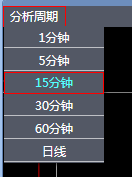
效果图如下
wpf menuitem 简约显示的 template样式的更多相关文章
- WPF 文字换行TextWrapping 显示不全用省略号TextTrimming 显示不全弹提示内容ToolTip
原文:WPF 文字换行TextWrapping 显示不全用省略号TextTrimming 显示不全弹提示内容ToolTip [TextBlock] 换行 TextWrapping="W ...
- WPF实现斜纹圆角进度条样式
原文:WPF实现斜纹圆角进度条样式 运行效果: 进度条样式: <!--进度条样式--> <LinearGradientBrush x:Key="ProgressBar.Pr ...
- WPF : ListBox的几种Template属性
原文:WPF : ListBox的几种Template属性 属性名 属性的类名 功能 示例 Template ControlTemplate 定义控件自身的外观.其子元素的布局可以自定义,也可以由It ...
- weex 数据绑定,动态控制组件的显示内容及样式
无论的原生开发还是weex开发,经常会需要我们对一些组件/控件动态赋值,在原生中,我们大家都知道,对控件setText就可以了,那么在weex中呢,我们需要怎么做呢,其实很简单,几行代码就可以搞定!首 ...
- WPF DatePicker默认显示当前日期,格式化为年月日
原文:WPF DatePicker默认显示当前日期 WPF的日历选择控件默认为当前日期,共有两种方法,一种静态,一种动态. 静态的当然写在DatePicker控件的属性里了,动态的写在对应的cs文件里 ...
- WPF 动态添加控件以及样式字典的引用(Style introduction)
原文:WPF 动态添加控件以及样式字典的引用(Style introduction) 我们想要达到的结果是,绑定多个Checkbox然后我们还可以获取它是否被选中,其实很简单,我们只要找到那几个关键的 ...
- AvalonEdit-基于WPF的代码显示控件
AvalonEdit是基于WPF的代码显示控件,项目地址:https://github.com/icsharpcode/AvalonEdit,支持C#,javascript,C++,XML,HTML, ...
- WPF 实现测量显示文本长度
原文:WPF 实现测量显示文本长度 以工具类的方式实现: using System; using System.Windows; using System.Windows.Media; using S ...
- WPF使用MediaElement显示gif图片
原文:WPF使用MediaElement显示gif图片 版权声明:本文为博主原创文章,未经博主允许不得转载. https://blog.csdn.net/SANYUNI/article/details ...
随机推荐
- react-hook的简单的动画插件react-simple-animate(其实是react插件,但是这里只介绍react-hook的简单用法)
1.useAnimate(普通anima动画的形式) (1)js const animate = useAnimate({ complete: { display: 'none' }, //动画完成的 ...
- CentOS 上 Jenkins 的安装
Jenkins 的前身是 Hudson. Jenkins 是一款开源 CI&CD 软件,用于自动化各种任务,包括构建.测试和部署软件. Jenkins 支持各种运行方式,可通过系统包.Dock ...
- leetcode-hard-array-179 Largest Number-NO
mycode 写的很复杂,还报错... 参考: class Solution: # @param {integer[]} nums # @return {string} def largestNum ...
- springboot 获取控制器参数的几种方式
这里介绍springboot 获取控制器参数有四种方式 1.无注解下获取参数 2.使用@RequestParam获取参数 3.传递数组 4.通过URL传递参数 无注解下获取参数无注解下获取参数,需要控 ...
- Android蓝牙开发技术学习总结
Android开发,提供对蓝牙的通讯栈的支持,允许设别和其他的设备进行无线传输数据.应用程序层通过安卓API来调用蓝牙的相关功能,这些API使程序无线连接到蓝牙设备,并拥有P2P或者多端无线连接的特性 ...
- VUE中v-for和v-if不能同时使用的问题
摘抄自:https://www.cnblogs.com/showjs/p/11376446.html 在开发时候碰到了一个问题:v-if和v-for不能同时使用: <h-tab-pane v-f ...
- Java日志体系(三)commons-logging
1.1 简介 Apache Commons Logging,又名JakartaCommons Logging (JCL),它是Apache提供的一个通用的日志接口,它的出现避免了和具体的日志方案直接耦 ...
- Java并发——volatile
CPU的内存模型如下:
- Python 面向对象(下)
本篇博客承接自Python 面向对象(上) 四. 继承,实现,依赖,关联,聚合,组合 Python面向对象--继承,实现,依赖,关联,聚合,组合 五. 特殊成员 Python面向对象--类的特殊成员 ...
- react 添加 react-redux 基本用法
安装 yarn add react-redux 创建文件.文件夹 |- redux |- actions.js |- reducer.js |- store.js actions.js export ...