
html homework27
1. 使用框架完成如下功能
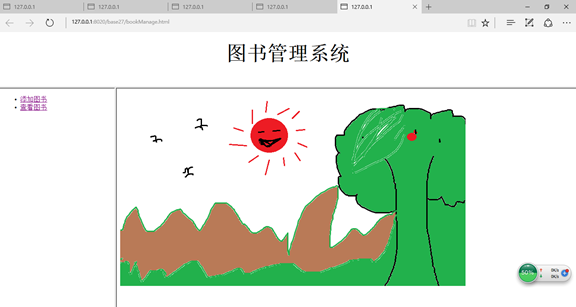
将框架先上下分割成两部分(上半部分的为TopFrame)、再将下半部分垂直分割为两部分(左侧为BottomLeftFrame,右侧为BottomRightFrame),为TopFrame添加一个logo、为BottomLeftFrame添加一个菜单(使用a标签),当点击超链接标签时,在BottomRightFrame中显示目标页面
如图示例(可自行设计)
 <!DOCTYPE html PUBLIC "-//W3C//DTD HTML 4.01//EN"

 "http://www.w3.org/TR/html4/strict.dtd">

 <html xmlns="http://www.w3.org/1999/xhtml" lang="en">

     <head>

         <meta http-equiv="Content-Type" content="text/html; charset=UTF-8" />

         <title></title>

     </head>

     <frameset rows="20%,*">

         <frame name="TopFrame" src="topbook.html"/>

         <frameset cols="20%,*">

             <frame name="BottomLeftFrame" src="bookmenu.html"/>

             <frame name="BottomRightFrame" src="right.html"/>

         </frameset>

     </frameset>

 </html>
 <!DOCTYPE html PUBLIC "-//W3C//DTD HTML 4.01//EN"

 "http://www.w3.org/TR/html4/strict.dtd">

 <html xmlns="http://www.w3.org/1999/xhtml" lang="en">

     <head>

         <meta http-equiv="Content-Type" content="text/html; charset=UTF-8" />

         <title></title>

     </head>

     <body>

     <ul>

         <li><a href="addBook.html" target="BottomRightFrame">添加图书</a></li>

         <li><a href="checkBook.html" target="BottomRightFrame">查看图书</a></li>

     </ul>

     </body>

 </html>
 <!DOCTYPE html PUBLIC "-//W3C//DTD HTML 4.01//EN"

 "http://www.w3.org/TR/html4/strict.dtd">

 <html xmlns="http://www.w3.org/1999/xhtml" lang="en">

     <head>

         <meta http-equiv="Content-Type" content="text/html; charset=UTF-8" />

         <title></title>

     </head>

     <body>

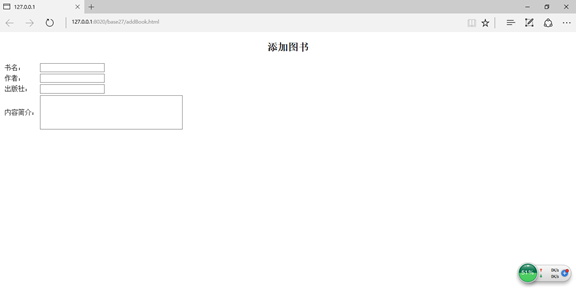
         <h4 align="center"><font size="5"><b>添加图书</b></font></h4>

         <table>

             <tr>

                 <td>书名:</td>

                 <td><input type="text"/></td>

             </tr>

             <tr>

                 <td>作者:</td>

                 <td><input type="text"/></td>

             </tr>

             <tr>

                 <td>出版社:</td>

                 <td><input type="text"/></td>

             </tr>

             <tr>

                 <td>内容简介:</td>

                 <td><textarea rows="5" cols="40"></textarea></td>

             </tr>

         </table>

     </body>

 </html>
 <!DOCTYPE html PUBLIC "-//W3C//DTD HTML 4.01//EN"

 "http://www.w3.org/TR/html4/strict.dtd">

 <html xmlns="http://www.w3.org/1999/xhtml" lang="en">

     <head>

         <meta http-equiv="Content-Type" content="text/html; charset=UTF-8" />

         <title></title>

     </head>

     <body>

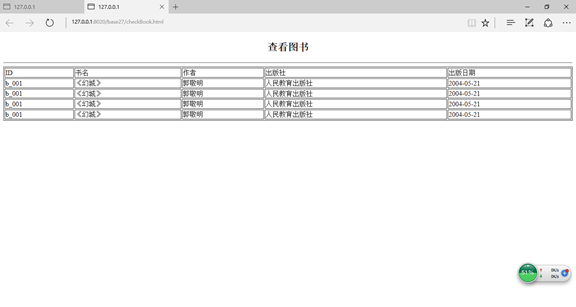
         <h5 align="center"><font size="5"><b>查看图书</b></font></h5>

         <hr />

         <table border="1" width="100%">

             <tr>

             <td>ID</td><td>书名</td><td>作者</td><td>出版社</td><td>出版日期</td>

             </tr>

             <tr>

                 <td>b_001</td><td>《幻城》</td><td>郭敬明</td><td>人民教育出版社</td><td>2004-05-21</td>

             </tr>

             <tr>

                 <td>b_001</td><td>《幻城》</td><td>郭敬明</td><td>人民教育出版社</td><td>2004-05-21</td>

             </tr>

             <tr>

                 <td>b_001</td><td>《幻城》</td><td>郭敬明</td><td>人民教育出版社</td><td>2004-05-21</td>

             </tr>

             <tr>

                 <td>b_001</td><td>《幻城》</td><td>郭敬明</td><td>人民教育出版社</td><td>2004-05-21</td>

             </tr>

         </table>

     </body>

 </html>
 <!DOCTYPE html PUBLIC "-//W3C//DTD HTML 4.01//EN"

 "http://www.w3.org/TR/html4/strict.dtd">

 <html xmlns="http://www.w3.org/1999/xhtml" lang="en">

     <head>

         <meta http-equiv="Content-Type" content="text/html; charset=UTF-8" />

         <title></title>

     </head>

     <body>

     <h5 align="center" ><font size="7">图书管理系统</font></h5>

     </body>

 </html>
 <!DOCTYPE html PUBLIC "-//W3C//DTD HTML 4.01//EN"

 "http://www.w3.org/TR/html4/strict.dtd">

 <html xmlns="http://www.w3.org/1999/xhtml" lang="en">

     <head>

         <meta http-equiv="Content-Type" content="text/html; charset=UTF-8" />

         <title></title>

     </head>

     <body>

     <img src="img/秋天美景.png" />

     </body>

 </html>
 <!DOCTYPE html PUBLIC "-//W3C//DTD HTML 4.01//EN"

 "http://www.w3.org/TR/html4/strict.dtd">

 <html xmlns="http://www.w3.org/1999/xhtml" lang="en">

     <head>

         <meta http-equiv="Content-Type" content="text/html; charset=UTF-8" />

         <title></title>

     </head>

     <body>

     <h5 align="center" ><font size="7">图书管理系统</font></h5>

     </body>

 </html>

 <!DOCTYPE html PUBLIC "-//W3C//DTD HTML 4.01//EN"

 "http://www.w3.org/TR/html4/strict.dtd">

 <html xmlns="http://www.w3.org/1999/xhtml" lang="en">

     <head>

         <meta http-equiv="Content-Type" content="text/html; charset=UTF-8" />

         <title></title>

     </head>

     <body>

     <img src="img/秋天美景.png" />

     </body>

 </html>

 <!DOCTYPE html PUBLIC "-//W3C//DTD HTML 4.01//EN"

 "http://www.w3.org/TR/html4/strict.dtd">

 <html xmlns="http://www.w3.org/1999/xhtml" lang="en">

     <head>

         <meta http-equiv="Content-Type" content="text/html; charset=UTF-8" />

         <title></title>

     </head>

     <body>

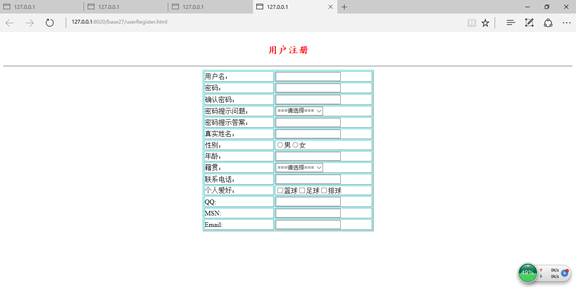
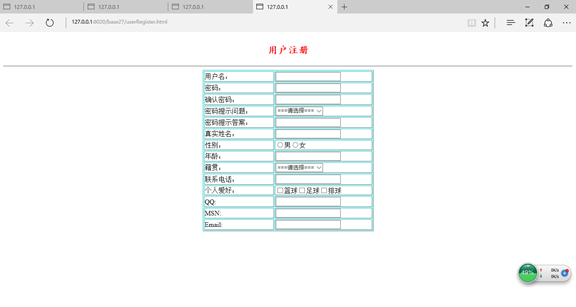
         <h1 align="center"><font size="5" color="red" face="楷体">用户注册</font></h1>

         <hr />

         <table border="1" align="center" width="30%" bordercolor="#00ffff">

             <tr>

                 <td>用户名:</td>

                 <td><input type="text"/></td>

             </tr>

             <tr>

                 <td>密码:</td>

                 <td><input type="password"/></td>

             </tr>

             <tr>

                 <td>确认密码:</td>

                 <td><input type="password"/></td>

             </tr>

             <tr>

                 <td>密码提示问题:</td>

                 <td><select>

                     <option>===请选择===</option>

                     <option>所在学校:</option>

                     <option>专业:</option>

                     <option>班级:</option>

                     <option>职位:</option>

                     <option>家庭住址:</option>

                 </select></td>

             </tr>

             <tr>

                 <td>密码提示答案:</td>

                 <td><input type="text"/></td>

             </tr>

             <tr>

                 <td>真实姓名:</td>

                 <td><input type="text"/></td>

             </tr>

             <tr>

                 <td>性别:</td>

                 <td><input type="radio"name="gender"/>男<input type="radio"name="gender"/>女</td>

             </tr>

             <tr>

                 <td>年龄:</td>

                 <td><input type="number"/></td>

             </tr>

             <tr>

                 <td>籍贯:</td>

                 <td>

                     <select>

                         <option>===请选择===</option>

                         <option>北京</option>

                         <option>上海</option>

                         <option>广州</option>

                         <option>深圳</option>

                         <option>河南</option>

                         <option>四川</option>

                         <option>济南</option>

                         <option>山东</option>

                         <option>河北</option>

                         <option>东北</option>

                         <option>内蒙古</option>

                         <option>石家庄</option>

                         <option>乌鲁木齐</option>

                         <option>天津</option>

                     </select>

                 </td>

             </tr>

             <tr>

                 <td>联系电话:</td>

                 <td><input type="tel"/></td>

             </tr>

             <tr>

                 <td>个人爱好:</td>

                 <td><input type="checkbox"/>篮球<input type="checkbox"/>足球<input type="checkbox"/>排球</td>

             </tr>

             <tr>

                 <td>QQ:</td>

                 <td><input type="text"/></td>

             </tr>

             <tr>

                 <td>MSN:</td>

                 <td><input type="text"/></td>

             </tr>

             <tr>

                 <td>Email:</td>

                 <td><input type="email"/></td>

             </tr>

         </table>

     </body>

 </html>
html homework27的更多相关文章
随机推荐
- Nginx之HTTP过滤模块
1. HTTP 过滤模块 ngx_http_not_modified_module 仅对 HTTP 头部做处理.在返回 200 成功时,根据请求中 If-Modified-Since 或者 If-Un ...
- sentinel控制台监控数据持久化【InfluxDB】
根据官方wiki文档,sentinel控制台的实时监控数据,默认仅存储 5 分钟以内的数据.如需持久化,需要定制实现相关接口. https://github.com/alibaba/Sentinel/ ...
- Exponentiation(求高精度幂)
Exponentiation Time Limit: 500MS Memory Limit: 10000K Total Submissions: 175340 Accepted: 42341 ...
- 微信小程序之状态管理A
其实这个标题 不是很对 主要是最近小程序项目中 有这么一个状态 所有商品都共用一个商品详情页面 大概就是这样子 为了公司 保险起见,一些展示的内容已经处理 但是无伤大雅 就是这么两个按钮 左侧粉色 ...
- UDDI:百科
ylbtech-UDDI:百科 UDDI是一种用于描述.发现.集成Web Service的技术,它是Web Service协议栈的一个重要部分.通过UDDI,企业可以根据自己的需要动态查找并使用Web ...
- 小D课堂-SpringBoot 2.x微信支付在线教育网站项目实战_2-4.后端项目分层分包及资源文件处理
笔记 4.后端项目分层分包及资源文件处理 简介:项目基本目录结构,包名称建立,配置文件建立 1.基本目录结构 controller se ...
- 小D课堂 - 新版本微服务springcloud+Docker教程_4-01 常用的服务间调用方式讲解
笔记 第四章 服务消费者ribbon和feign实战和注册中心高可用 1.常用的服务间调用方式讲解 简介:讲解常用的服务间的调用方式 RPC: 远程过程调用,像调用本地 ...
- react 添加 react-redux 基本用法
安装 yarn add react-redux 创建文件.文件夹 |- redux |- actions.js |- reducer.js |- store.js actions.js export ...
- 在VM虚拟机Windows Server r2上部署安装Microsoft Dynamics CRM 2016 步骤详解(一)
应公司需求,最近在学微软的Dynamics CRM.在搭建环境的过程中也遇到了一些雷坑,在这里分享一下安装部署过程当中所遇到的一些问题, 安装Microsoft Dynamics CRM 2016的几 ...
- SpringBoot简历模板
项目二:智慧学习-乐勤在线学习网(SpringBoot)◎ 开发模式:团队(8人) ◎ 开发周期:4个月◎ 开发环境:JDK1.8.Zookeeper ◎ ...